


 Video Converter Ultimate
 Gravadora de pantalla
 Reparació de vídeo
 Baixada segura
Converteix MP4 a WebP en línia amb les millors eines gratuïtes
Un vídeo amb només una segona durada està format per diverses imatges separades. Aquestes imatges o fotogrames solen mostrar-se quan treballeu en l'edició del vídeo. I si sou un blogger especialitzat en menjar, una bona manera de fer que el vostre contingut de vídeo sigui interessant és creant-hi una miniatura. No només això, sinó que voldreu triar el marc perfecte per utilitzar-lo com a miniatura del vostre vídeo. Per solucionar-ho, podeu triar la millor imatge del vostre contingut de vídeo perquè sigui la vostra imatge de previsualització perfecta mitjançant la conversió de vídeo a foto. I si ens ho preguntes, WebP seria un bon format d'imatge per provar.
Fortunately, this article will show you three different ways to convert MP4 to WebP online. Take a look at the content below and find out which method works best for you to get photos from your videos.

Part 1. Més informació sobre WebP
Què és WebP?
WebP és una mena de format d'imatge dissenyat per Google. Està fet per fer que les imatges web siguin més petites i es carreguin més ràpidament. A més, aquest tipus de format utilitza mètodes de compressió avançats que ajuden a reduir la mida del fitxer de les imatges sense canviar massa la qualitat.
Això és avantatjós perquè els llocs web es carreguin més ràpidament, i això també és important per als usuaris amb connexions a Internet lentes o dispositius mòbils. Com que els fitxers WebP admeten compressió amb pèrdues i sense pèrdues, també us ofereix la flexibilitat per seleccionar l'equilibri adequat entre la mida i la qualitat del fitxer. Sabíeu que podeu convertir el vostre MP4 a WebP en línia? Això només és recomanable si voleu millorar la vostra experiència de navegació web fent que les imatges siguin més eficients i capaços de carregar-se mantenint una qualitat decent dels fitxers de vídeo que teniu actualment. Dit això, passem als convertidors de vídeo a imatge decents, el procés de conversió dels quals es presenta a continuació.
Part 2. 3 millors maneres de convertir MP4 a WebP en línia
1. MP4.to
Si voleu desbloquejar el potencial del vostre vídeo MP4 per ser una imatge web, el primer convertidor que heu de provar és aquest MP4.to. És una eina de conversió de fitxers en línia dissenyada específicament per convertir diversos tipus de fitxers multimèdia en format MP4. Amb aquesta notable eina, podeu convertir MP4 a WebP en línia i a altres formats diferents com GIF, MOV, WAV, AVI, MP3, MPEG i molt més. D'altra banda, podeu carregar diversos tipus de fitxers, com ara vídeos, clips d'àudio i fins i tot imatges, i convertir-los en format MP4. Això pot ser útil per preparar vídeos per a la transmissió en línia i garantir la compatibilitat entre diferents dispositius i plataformes compatibles amb el format MP4. Mentrestant, a continuació es mostren els passos senzills que podeu seguir per utilitzar MP4.to per convertir els vostres vídeos a WebP.
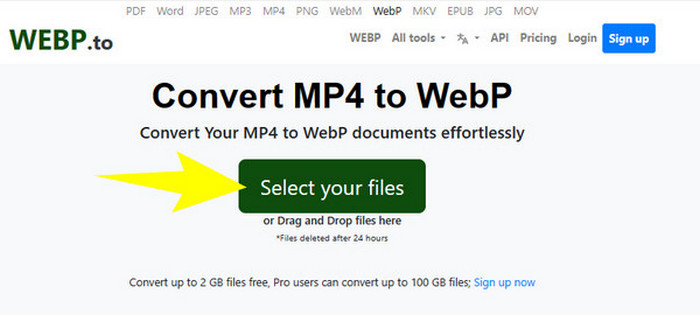
Step 1. On the tool's website, click the Select your files button to upload your MP4 files.
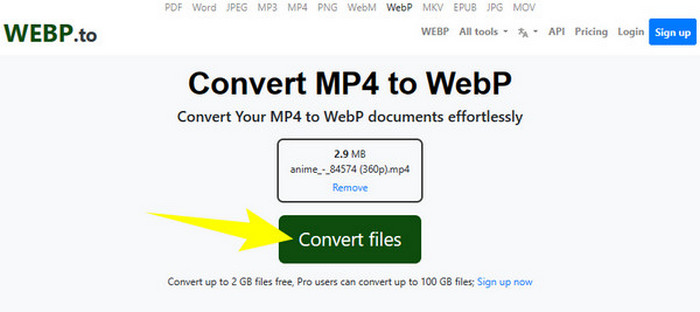
Step 2. Once the MP4 file is uploaded, the tool will give you the Convert Files button, which you need to click to process the conversion.
Step 3. Wait while the process continues. Afterward, download the converted file and export it to your computer.
2. MConverter
The next MP4 file to WebP or WebP to MP4 free converter online that you must try is MConvert. This online converter provides a convenient solution for you who need to transform files into different formats, as it also supports various types of formats for video, audio, and image. Furthermore, this online converter offers a user-friendly interface and often requires no software installation, making it accessible to anyone with an internet connection. However, just like the problem of many online tools, MConverter also comes with ads on its interface. Hence, if this is not a problem for you at all, then proceed to the simple steps we made below.
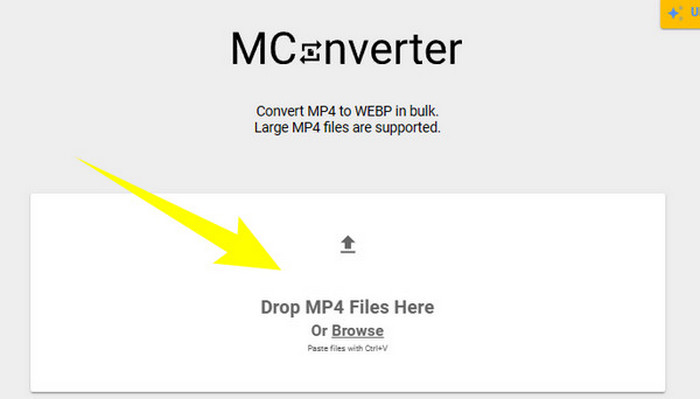
Step 1. Once you reach the converter website, you may drop the MP4 files you need to convert there.
Step 2. After dropping the file, click the WebP from the options in the yellow section as your output format.
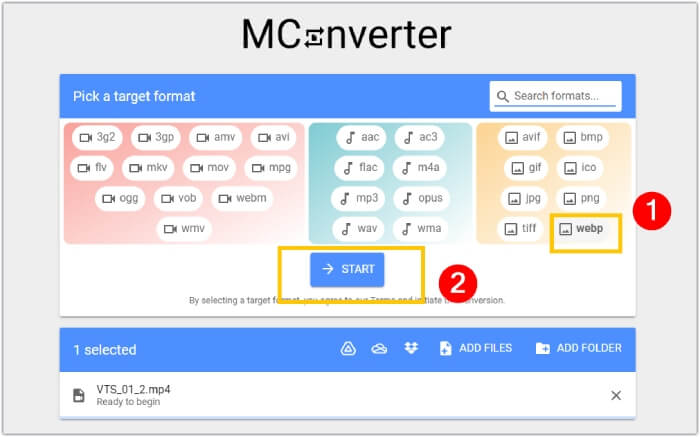
Step 3. Then, click the START button to begin the conversion process.
3. Ezgif.com
With the Video to WebP tool of Ezgif, you can easily convert your MP4 files freely into WebP format. Aside from that, with this online tool, you can perform tasks such as resizing, optimizing, cropping, and adding effects to your multimedia files. Furthermore, this MP4 to WebP converter software is popular for its simplicity and ease of use. It is a convenient option for individuals looking to edit or convert multimedia files without the need for complex software or technical expertise. Thus, it can also be your media converter, editor, and GIF maker all in one! Meanwhile, focusing on our purpose, here are the steps in transforming a video file into an image with Ezgif.
Step 1. On the main website of the tool, choose the Video to WebP tab among the tools that it offers. Upload the MP4 file using the Upload File button.
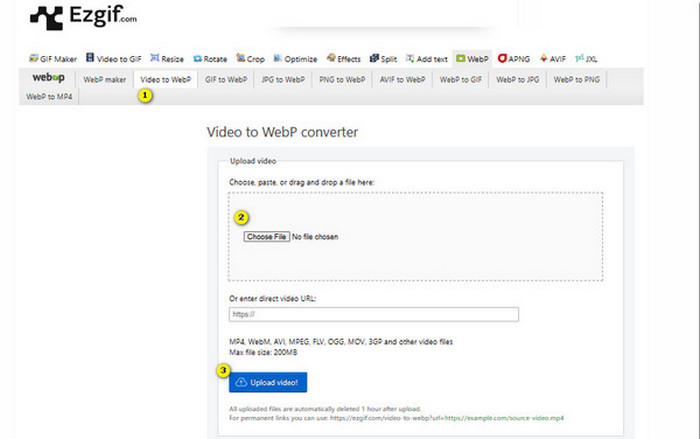
Step 2. After that, click the Upload Video button to proceed.
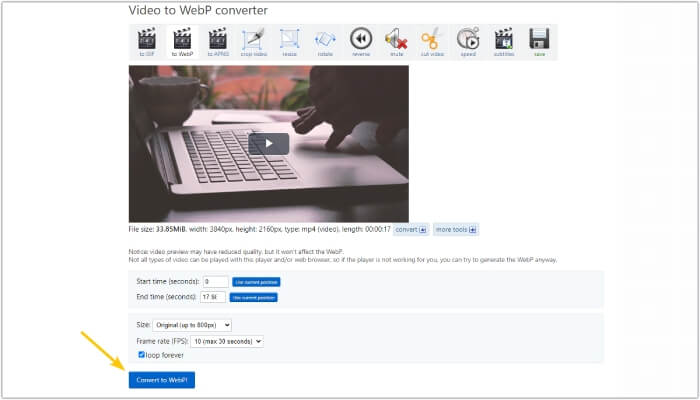
Step 3. When the file is loaded, click the Convert to WebP button and wait till the process finishes.
Part 3. Consell de bonificació: la millor manera de convertir MP4 a diversos formats de vídeo i àudio
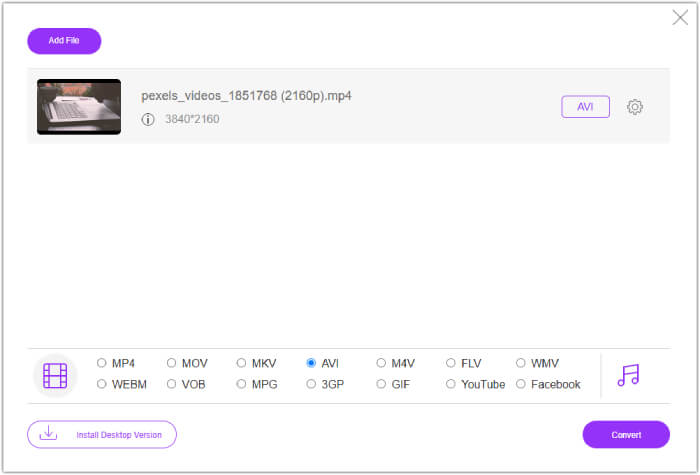
Now that you have met the three MP4 to WebP converters above, we are pleased to give you a bonus part where you will find the best way to convert your MP4 to video or audio formats. FVC Free Video Converter Online is also a tool via the web, which provides a great way to convert bulk files in a flash. Yes, unlike the online converters above, this video converter comes with an ultrafast conversion, which leads you to a swift conversion process. Moreover, you won’t need to download your converted files, as it works to export the files automatically right after the conversion. What’s more attractive about it is its ads, which are watermark-free, making it breezy and more convenient.
Part 4. Preguntes freqüents sobre la conversió de MP4 i WebP
Realment puc convertir MP4 en una imatge com ara WebP?
La conversió de vídeo a imatge no es pot fer directament. En canvi, es fa mitjançant l'extracció de fotogrames.
Quins beneficis trec de convertir un vídeo a WebP?
Compared to traditional formats like JPEG and PNG, converting videos to WebP format offers several advantages. It includes smaller file sizes, which can help improve website loading times.
Puc utilitzar tot WebP en tots els navegadors web?
El format WebP no és totalment compatible amb alguns navegadors antics. Tanmateix, la majoria dels navegadors web moderns admeten imatges WebP, com ara Google Chrome, Opera, Firefox i Edge.
Conclusió
This post is an introduction to three effective MP4 to WebP converters that you can use online. In addition, we also included a video-to-video/audio online converter that will surely enhance your media conversion process. Thus, share this with your friends and have the same professional-grade conversion together!
-
 Apreneu els enfocaments més fàcils per convertir WebP a JPG ràpidament
 Apreneu els enfocaments més fàcils per convertir WebP a JPG ràpidament
-
 Mètodes perfectes per convertir WebP a PNG sense esforç
 Coneixeu els mètodes notables per convertir WebP a PNG. Aquesta guia us proporcionarà els convertidors d'imatges més útils que podeu provar.
-
 Revisió dels millors convertidors de MP4 en línia i fora de línia
 Maximitzeu l'abast i l'impacte del vostre contingut de vídeo amb el millor MP4
