


 Video Converter Ultimate
 Gravadora de pantalla
 Reparació de vídeo
 Baixada segura
Comprimir fitxers de vídeo TS - Com comprimir fitxers TS en mides més petites
Quan teniu fitxers video_ts de DVD, els fitxers són de mida gran i mengen espai al disc dur. Si heu de desar els fitxers TS al NAS o a la biblioteca multimèdia, és necessari comprimir els vídeos TS. Per descomptat, el compressor de vídeo TS en línia hauria de ser l’elecció inicial. Però la majoria dels serveis en línia tenen limitacions per a la mida del vídeo. Podeu consultar el compressor TS en línia gratuït i l'eina professional de l'article.

Part 1: Com comprimir fitxers TS en línia de forma gratuïta
És possible comprimir fitxers de vídeo TS en línia? Com que els fitxers TS són de gran mida, és difícil trobar un compressor TS en línia sense limitacions de mida. Free Video Compressor és un versàtil compressor TS en línia que admet fitxers TS grans sense cap límit. Només redueix la mida del vídeo dels vídeos TS, però en preserva la qualitat original.
- 1. Comprimiu els vídeos TS en resolució 4K amb una qualitat impressionant.
- 2. No afegiu cap filigrana als fitxers de vídeo TS comprimits.
- 3. Comprimiu per lots els fitxers TS a una velocitat 30 vegades més alta que la d'altres eines.
- 4. Proporcioneu funcions de seguretat de privadesa per protegir la vostra informació.
Pas 1: Aneu al compressor de vídeo en línia amb qualsevol navegador web; podeu fer clic al botó Add Files to Compress per descarregar l’instal·lador. Torneu a fer clic al botó per importar el fitxer TS al compressor de vídeo en línia sense cap limitació de mida.

Pas 2: Un cop hàgiu pujat els fitxers TS en línia, podeu ajustar diferents paràmetres, com ara la mida, el format, la resolució i la taxa de bits, fins a obtenir la mida de vídeo desitjada. Després, podeu fer clic al botó Compress per comprimir gratis el vostre vídeo TS.

Part 2: Com comprimir fitxers TS sense perdre qualitat
Quan necessiteu combinar diferents clips de pel·lícula de diversos fitxers TS, comprimir els fitxers TS per a telèfons Android o fins i tot convertir TS a MP4 o fitxers MKV, Video Converter Ultimate és un compressor TS amb múltiples funcions que redueix la mida d’un vídeo amb algorismes avançats. També us permet eliminar les parts no desitjades i unir els clips de vídeo en una sola pel·lícula.
Descàrrega gratuïtaPer a Windows 7 o posteriorDescàrrega segura
Descàrrega gratuïtaPer a macOS 10.7 o posteriorDescàrrega segura
Pas 1: Descarregueu i instal·leu Video Converter Ultimate a l’ordinador i inicieu el programa. Feu clic al menú Converter i trieu el botó Add Files per importar els fitxers TS.
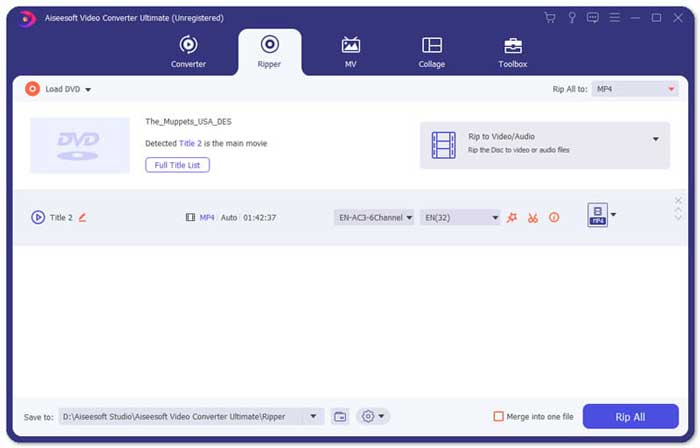
Pas 2: Un cop hàgiu importat els fitxers TS, podeu anar al menú Tool i fer clic a l’opció Video Compressor. Només cal que canvieu la mida, el nom, el format, la resolució i la taxa de bits del fitxer de destinació. Quan tingueu la mida de vídeo desitjada, podeu fer clic al botó Compress per comprimir els fitxers TS.

Pas 3: També podeu triar MKV o MP4 com a format de sortida. Es comprimirà TS a MKV o MP4 amb una mida relativament petita. Feu clic a la icona de les tisores per retallar les parts TS que vulgueu. També podeu combinar diferents clips TS en un de sol amb l’opció Merge into one.
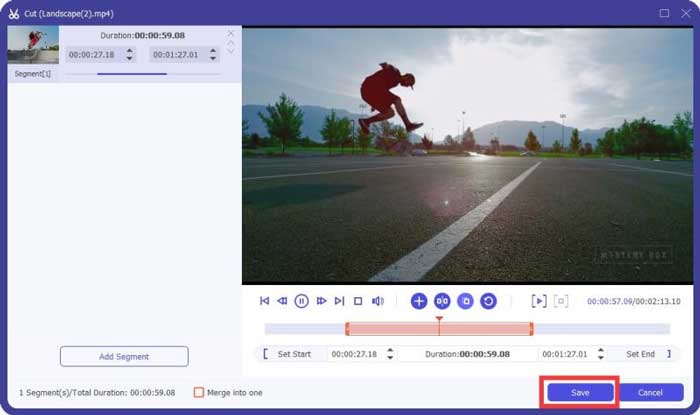
Pas 4: Quan estigueu satisfets amb el vídeo comprimit, podeu triar una carpeta de destinació per als vídeos TS comprimts. A continuació, feu clic al botó Convert All per començar a comprimir els fitxers TS del vostre DVD sense perdre la qualitat original.

Part 3: Preguntes més freqüents sobre com comprimir fitxers de vídeo TS
1. Què és el format de fitxer TS?
TS, curt de Transport Stream que és un format de paquet. El nom complet de TS és MPEG2-TS, que és un format estàndard de contenidor de dades per transmetre i emmagatzemar àudio, vídeo, programa, etc. S'utilitza principalment en sistemes de transmissió digital, com ara DVB, ATSC i IPTV.
2. He de comprimir TS a MP4 o MKV?
Sí. Quan calgui conservar la qualitat de vídeo original, simplement es pot comprimir TS a MKV amb el còdec de vídeo original. Però si voleu comprimir TS per a un telèfon Android o un iPhone, MP4 hauria de ser una de les millors opcions.
3. Quant triga a comprimir fitxers .TS amb H.264?
Depèn de la mida del fitxer .TS. Pel que fa a H.264 amb velocitat de bits de compressió de 15 MBPS, que triga poc menys de 2 minuts a comprimir-se. Es crearà un fitxer comprimit de 484 MB. Si necessiteu comprimir TS des d'un DVD de 9 GB, pot trigar aproximadament una hora.
Conclusió
L’article comparteix 2 maneres viables de comprimir els fitxers de vídeo TS. Podeu utilitzar el compressor de vídeo gratuït per comprimir fitxers TS grans sense limitacions. Quan necessiteu comprimir els fitxers TS sense pèrdues de qualitat, Video Converter Ultimate sempre ha de ser la millor opció.
-
 Com convertir TS a AVI / MKV / MOV / WMV en línia i gratuïtament a Win / Mac
 Voleu convertir fitxers TS a AVI / MKV / MOV / WMV ràpidament? En aquest article es mostren els convertidors de vídeo en línia i fora de línia amb una guia completa. Potser podeu obtenir el millor convertidor gratuït de TS aquí.
-
 MTS VS M2TS: diferència entre MTS i M2TS
 Què és el fitxer MTS o M2TS? Quina diferència hi ha entre M2TS i MTS? Com puc veure la càmera de vídeo gravada en fitxers MTS o M2TS? Trobeu totes les respostes en aquest post.
-
 10 maneres gratuïtes de convertir fitxers TS a MP3, AIFF, ALAC, FLAC i molt més
 Com convertir el fitxer TS a MP3 de forma gratuïta? En aquesta guia, trobareu 11 maneres senzilles d’extreure àudio del fitxer TS amb TS a freeware d’àudio i eines de conversió en línia.
