


 Video Converter Ultimate
 Gravadora de pantalla
 Reparació de vídeo
 Baixada segura
Com comprimir fitxers PDF per correu electrònic 3 maneres efectives de triar
De fet, enviar fitxers grans per correu electrònic pot ser un maldecap. De fet, et pot causar problemes o fins i tot pot no arribar-se a lliurar. A més, molts proveïdors de correu limiten la mida dels fitxers adjunts, un límit que és fàcil de superar amb un PDF complex. Això passa especialment amb els PDFs que tenen moltes imatges o que són documents molt extensos. Per resoldre-ho, la majoria de persones en aquesta situació recorren a serveis per compartir fitxers com Dropbox o Google Drive. Tanmateix, gairebé s’obliden d’un truc molt pràctic: la compressió de fitxers. Hi ha moltes eines gratuïtes en línia que ho poden fer, i algunes són força populars. Però com comprimir un PDF per enviar-lo per correu electrònic de manera efectiva? Això és el que estàs a punt d’aprendre si continues llegint tot el contingut que hi ha a continuació.

Part 1. Quina és la millor mida de PDF per al correu electrònic
Aquí hi ha un fet: no hi ha un número màgic per a la mida ideal de PDF per als correus electrònics. El que cal tenir en compte és el límit de fitxers adjunts de la vostra plataforma de correu electrònic. Els serveis populars limiten els fitxers adjunts al voltant de 20 MB, cosa que pot ser sorprenentment fàcil d'arribar, especialment amb PDF que contenen moltes imatges o documents molt llargs. Per tant, si el vostre PDF és més gran que el límit de 20 MB esmentat, probablement no s'enviarà el vostre correu electrònic i rebreu un missatge d'error. Dit això, en comptes de buscar una mida específica o la millor mida de PDF per al correu electrònic, el millor és jugar amb seguretat i mantenir-lo per sota de 20 MB. D'aquesta manera, podeu estar segur que s'adjuntarà i s'enviarà correctament.
Part 2. Un clic per comprimir fitxers PDF per correu electrònic
Aquí tens una manera ràpida i eficaç de comprimir fitxers per correu electrònic. Prepara’t per provar aquesta eina gratuïta anomenada FVC Free PDF Compressor, que pot reduir considerablement la mida dels teus fitxers PDF voluminosos sense espatllar-los. Com que la majoria de serveis de correu només permeten adjunts d’uns 20 MB, els PDFs amb imatges o molt de text poden arribar fàcilment a aquest límit. Aquest compressor pot fer que el teu PDF sigui molt més petit, fins i tot per sota dels 100 kilobytes! No has de patir per com redueix de manera tan dràstica la mida dels PDFs per enviar-los per correu, perquè igualment en manté la qualitat. De fet, probablement ni tan sols notaràs la diferència entre l’original i la versió comprimida.
A més, aquesta increïble eina és molt fàcil d'utilitzar i qualsevol persona amb qualsevol nivell d'experiència la pot utilitzar. Tot el que heu de fer és arrossegar i deixar anar el fitxer PDF al programa, i automàticament el redueix. Aleshores, amb només un clic, podeu desar el PDF més petit al vostre ordinador. D'aquesta manera, podeu comprimir ràpidament PDF a mida de correu electrònic en línia a una mida perfecta per enviar-lo per correu electrònic o penjar-ho tot sense cap filigrana al document final. Per entendre millor el seu procés, consulteu les directrius detallades a continuació.
Pas 1. A la interfície principal, fes clic a la pestanya Add PDF File i tria el fitxer PDF que necessites comprimir.
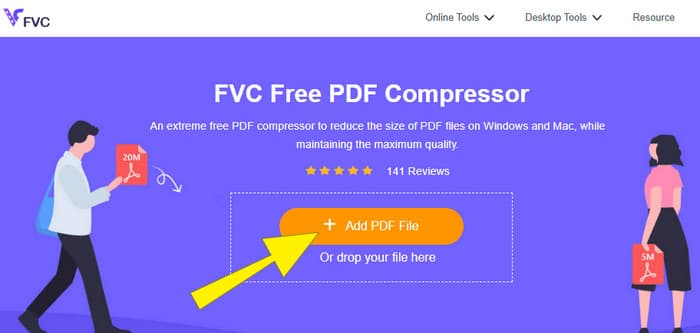
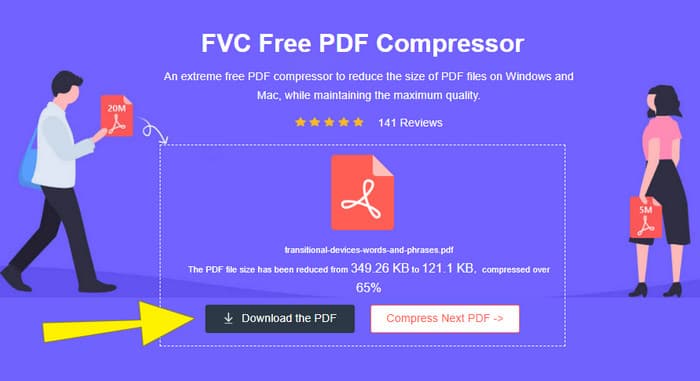
Pas 2. Mentre el fitxer PDF es carrega, l’eina també en realitza la compressió.
Pas 3. Un cop acabat, fes clic al botó Download the PDF.
Part 3. Comprimir fitxers PDF per correu electrònic amb funcions d'edició
Si prefereixes una eina que també inclogui funcions d’edició, llavors Adobe Acrobat és el que necessites per a aquesta tasca. Adobe Acrobat és un programa conegut per crear, editar i gestionar fitxers PDF. És com un conjunt d’eines potent dissenyat específicament per treballar amb PDFs. Una de les seves funcions més útils és la compressió de PDF, que pots fer servir quan tens un PDF molt pesat que no pots adjuntar al correu a causa dels límits de mida. Adobe Acrobat, que disposa de versió en línia i d’escriptori, et pot ajudar a comprimir fitxers PDF grans per enviar per correu electrònic sense afectar gaire la qualitat. Ho fa, per exemple, reduint la mida de les imatges dins del PDF o eliminant tipografies innecessàries. Ara bé, coneixent Adobe i les seves suites, no t’hauria de sorprendre que tingui una corba d’aprenentatge pronunciada. Per això, aquí tens els passos que t’ajudaran a fer més fàcil el procés.
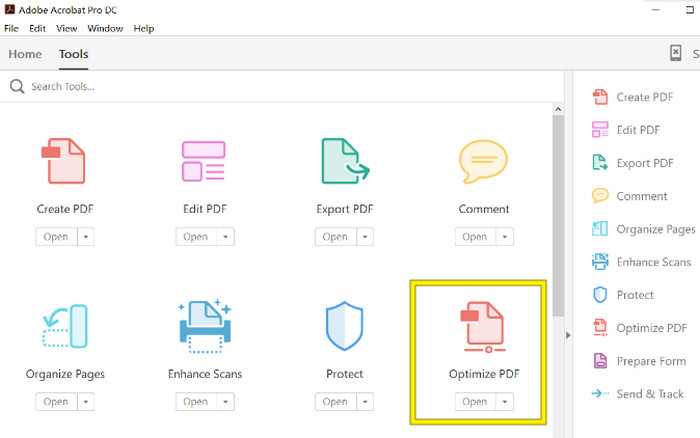
Pas 1. Obre Acrobat i carrega el fitxer PDF amb què has de treballar. Per fer-ho, ves a Eines–Optimitza PDF–Obre.
Pas 2. Un cop hagis obert el fitxer PDF, fes clic a l’opció Reduce File Size del nou menú que es mostra. Després, estableix o utilitza les opcions d’edició disponibles per aconseguir la compressió i optimització desitjades.
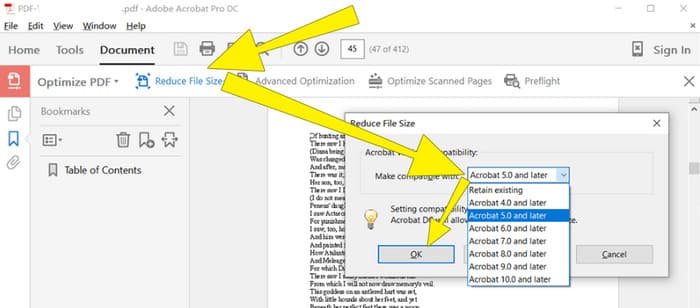
Pas 3. Després, desa el fitxer PDF comprimit.
Part 4. Comprimiu fitxers PDF per a correu electrònic mitjançant la conversió
Vols aprendre un truc nou sobre com comprimir un PDF per enviar-lo per correu electrònic? Anem a convertir el fitxer a JPG. Aquest truc de conversió es pot fer perfectament amb PowerPoint. PowerPoint és un programa que probablement utilitzes per crear presentacions. Imagina un passi de diapositives amb text, imatges i potser fins i tot vídeos. PowerPoint et permet construir aquestes presentacions amb diapositives individuals que vas passant per mostrar-les al teu públic. És una eina molt popular entre professors, estudiants, professionals dels negocis i qualsevol persona que vulgui compartir informació de manera visual.
Ara, inserir un PDF a la vostra presentació de PowerPoint pot ser útil, però pot ser que no sigui el procés més intuïtiu. Però un cop ho feu, produir un fitxer JPG serà molt fàcil. No et preocupis, però! Us podem guiar pas a pas, que heu de seguir per tenir el PDF incrustat en molt poc temps.
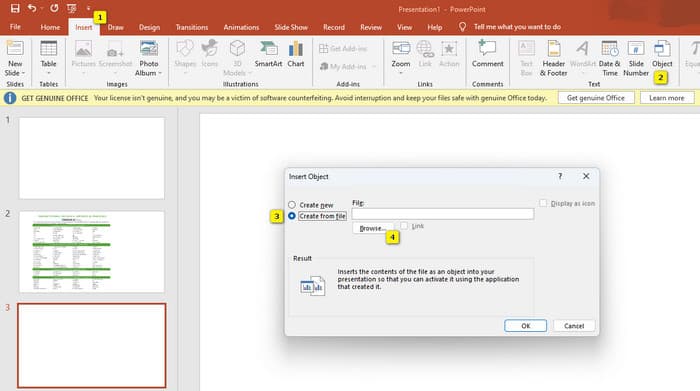
Pas 1. Obre PowerPoint a l’ordinador i selecciona la diapositiva adequada on puguis obrir el fitxer PDF.
Pas 2. Ara, navega fins al menú de la pestanya Insert i busca l’opció Objecte dins de la secció Text. Fes clic en aquesta opció i s’obrirà una finestra nova. En aquesta finestra, activa l’opció Crea a partir d’un fitxer, situada al costat esquerre de la interfície. A continuació, fes clic al botó Browse, que et permetrà importar el fitxer PDF a la diapositiva.
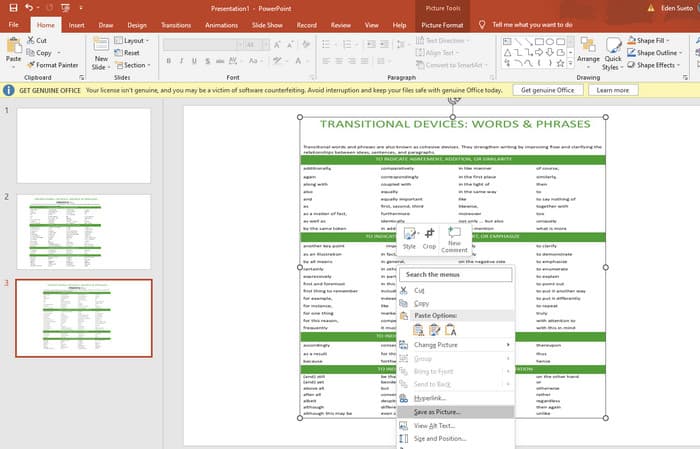
Pas 3. Un cop el fitxer PDF estigui carregat, el podràs convertir a JPG. Per fer-ho, fes clic amb el botó dret sobre el PDF a la diapositiva, selecciona Save As Picture i desa’l com a JPEG.
Part 5. Preguntes freqüents sobre PDF i compressió
De quina mida podeu enviar un fitxer adjunt PDF per correu electrònic?
Això depèn del vostre proveïdor de correu electrònic, però la majoria limita els fitxers adjunts a uns 20 MB.
Quin és el millor compressor de PDF gratuït?
Hi ha compressors PDF gratuïts disponibles, però el millor sempre depèn de les preferències dels usuaris. Fins ara, el compressor de PDF gratuït FVC és l'eina en línia gratuïta més recomanada.
Com comprimir fitxers PDF per correu electrònic?
En realitat, comprimir funciona per als PDF perquè ja són fitxers comprimits.
Conclusió
Aquest article explica com comprimir fitxers PDF per enviar per correu electrònic de les millors maneres possibles. Ara ja pots garantir una forma més fluida i eficaç d’enviar els teus PDFs per correu, sempre que els redueixis correctament per ajustar-te al límit de mida dels fitxers.
-
 3 millors solucions sobre com eliminar la filigrana dels vídeos fàcilment
 Vols eliminar la molesta marca d'aigua del vídeo? Amb aquest bloc, podeu aprendre les diferents idees per eliminar la marca d'aigua d'un vídeo.
-
 4 millors maneres d'afegir una marca d'aigua a qualsevol vídeo ràpidament
 Aprenem a afegir una marca d'aigua a qualsevol vídeo a Windows, Mac, en línia, iOS i Android amb passos detallats si llegiu aquest article.
-
 3 maneres més fàcils d'afegir una marca d'aigua a un GIF en línia i fora de línia
 Afegir una marca d'aigua a un GIF pot ser tan fàcil com 1-2-3 si feu servir correctament l'eina adequada. Les eines del mercat són massa àmplies, però us presentarem les tres eines de les quals podeu confiar.
