


 Video Converter Ultimate
 Gravadora de pantalla
 Reparació de vídeo
 Baixada segura
4 mètodes efectius: com reduir la mida del fitxer fotogràfic a l'iPhone
Normalment, amb els nostres iPhones, hem de pujar fotos directament a determinats llocs web o enviar-les per correu electrònic o altres plataformes. Tanmateix, les fotos fetes amb iPhone solen tenir una mida de fitxer gran a causa de l’alta qualitat de les imatges capturades per les seves càmeres avançades. Per reduir la mida dels fitxers de les fotos al teu iPhone sense comprometre gaire la qualitat, aquí tens quatre mètodes eficaços que has de conèixer. Continua llegint per descobrir-los tots!

Part 1. Redueix la mida del fitxer de fotos a l'iPhone a la configuració de la càmera
La manera més senzilla i ràpida de reduir la mida dels fitxers de fotos a l’iPhone és des de l’app Configuració. Amb aquest mètode, pots triar el format de totes les fotos que facis amb la càmera del teu iPhone. El que passa amb els iPhones és que normalment estan configurats en el format més compatible i, en conseqüència, les fotos es desen amb una mida gran. Tanmateix, si vols estalviar espai d’emmagatzematge, has d’ajustar els paràmetres de format de la càmera a alta eficiència i desactivar el format HEIC. Aquest tipus de configuració de la càmera no redueix la qualitat de les imatges, però t’estalviarà molt d’espai al teu iPhone.
A continuació s'explica com podeu reduir la mida del fitxer a la configuració de la càmera:
Pas 1. Al teu iPhone, ves a Configuració, busca Càmera i tria Formats.
Pas 2. A la part superior de la pantalla, tria Alta eficiència. Aquest format et permet obtenir la mida de foto més petita sense reduir la qualitat.
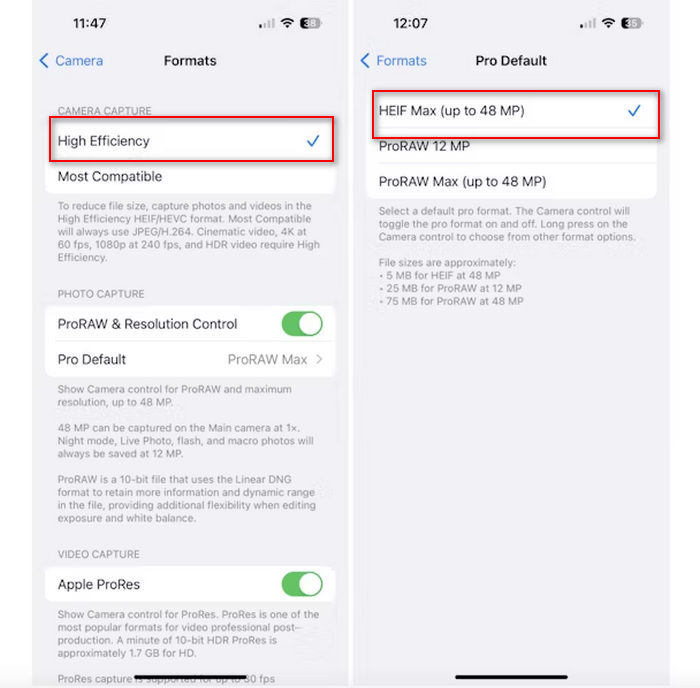
Pas 3. Per reduir encara més la mida dels fitxers d’imatge, toca Pro per defecte i tria HEIF màx. fins a 48 MP. Això limitarà la mida de la teva foto a aproximadament 5 MB.
Reduir la mida del fitxer en un iPhone canviant la configuració de la càmera pot ser una bona manera de comprimir imatges. Tanmateix, trigaria un temps quan vulgueu canviar la configuració de la càmera quan també voleu fer fotos d'alta qualitat que poden tenir una mida de fitxer gran.
Part 2. Comprimiu fotos a l'iPhone retallant-les
El retall és un mètode eficaç per reduir la mida d'una imatge en un iPhone perquè elimina parts innecessàries de la foto, disminuint així la mida general del fitxer. Quan retalleu una foto, bàsicament esteu retallant parts de la imatge que no necessiteu, cosa que no només se centra en els elements importants de la imatge, sinó que també redueix la quantitat de dades que conté el fitxer. Això pot ser especialment útil per estalviar espai d'emmagatzematge al vostre iPhone i facilitar la compartició de fotos en diverses plataformes.
A continuació s'explica com podeu comprimir fotos al vostre iPhone retallant-les:
Pas 1. Obre a l’app Fotos la imatge de la qual vols reduir la mida del fitxer i toca Edita.
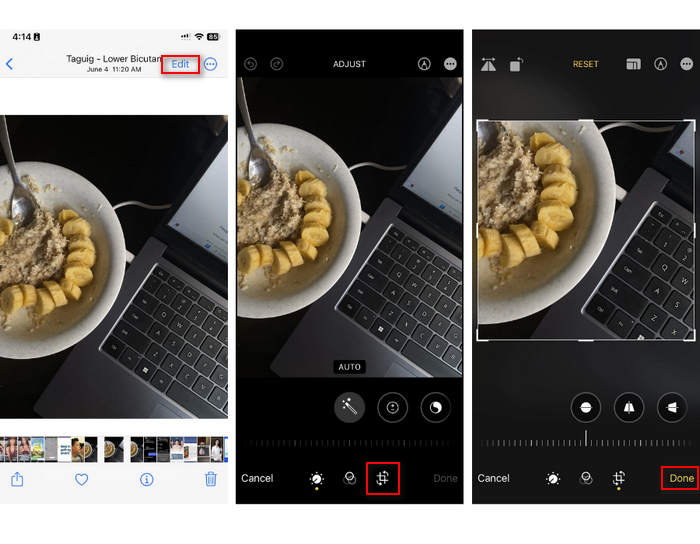
Pas 2. Ara, toca el botó Retalla a la part inferior i retalla les parts no desitjades de la foto.
Pas 3. Ajusta el retall com vulguis i toca Fet.
Tot i que això pot reduir la mida del fitxer de fotos en un iPhone, aquest mètode no sempre serà aplicable en tot moment, per la qual cosa es recomana utilitzar altres eines per comprimir fotos en un iPhone a part d'això.
Part 3. Redueix la mida del fitxer de fotos a l'iPhone mitjançant l'aplicació de xarxes socials
WhatsApp permet als usuaris reduir la mida dels fitxers de fotos als seus iPhones. Ofereix una opció per comprimir la imatge a una mida més petita abans d’enviar-la, cosa que ajuda a estalviar espai d’emmagatzematge i facilita compartir fotos.
A continuació s'explica com podeu comprimir fotos al vostre iPhone mitjançant WhatsApp:
Pas 1. A WhatsApp, obre un missatge de text.
Pas 2. A continuació, toca la icona de foto i tria la foto que vols enviar.
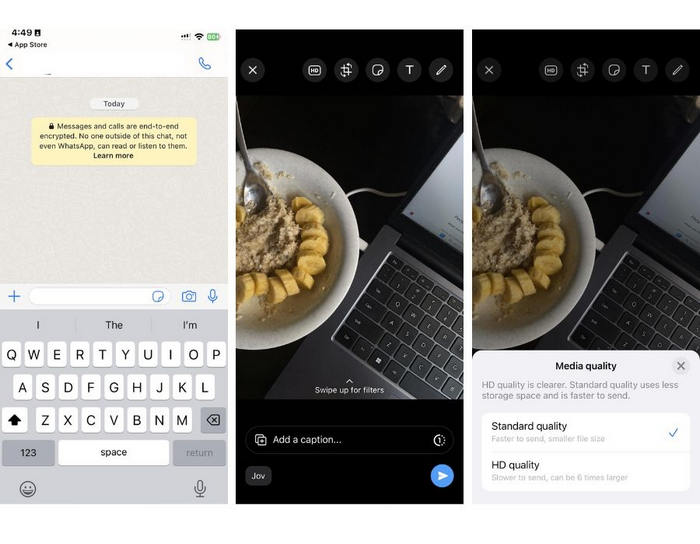
Pas 3. Després, toca HD per ajustar la mida del fitxer triant enviar la teva foto en qualitat estàndard.
Pas 4. Toca la fletxa per enviar el missatge i descarregar-lo.
Aquest mètode és molt recomanable per a aquells que tinguin WhatsApp instal·lat al seu iPhone. Tot i que és una manera fantàstica de reduir la mida del fitxer fotogràfic en un iPhone, afectarà significativament la qualitat de la foto.
Part 4. Comprimir fotos a l'iPhone amb l'eina en línia
Mentrestant, si busques una manera directa i molt senzilla de reduir la mida dels fitxers de fotos a l’iPhone, la millor eina que pots fer servir és el FVC Free Image Compressor. Només cal que hi accedeixis en línia, hi pugin la foto que vols comprimir i ja està. A més, amb aquesta eina pots comprimir diverses fotos directament des del teu iPhone i reduir-les significativament sense perdre gaire qualitat en comparació amb els altres mètodes esmentats més amunt.
A continuació s'explica com podeu comprimir fotos al vostre iPhone mitjançant el compressor d'imatges gratuïts FVC:
Pas 1. Al Safari, cerca FVC Free Image Compressor.
Pas 2. Toca el botó Upload Images per importar les fotos de les quals vols reduir la mida del fitxer.
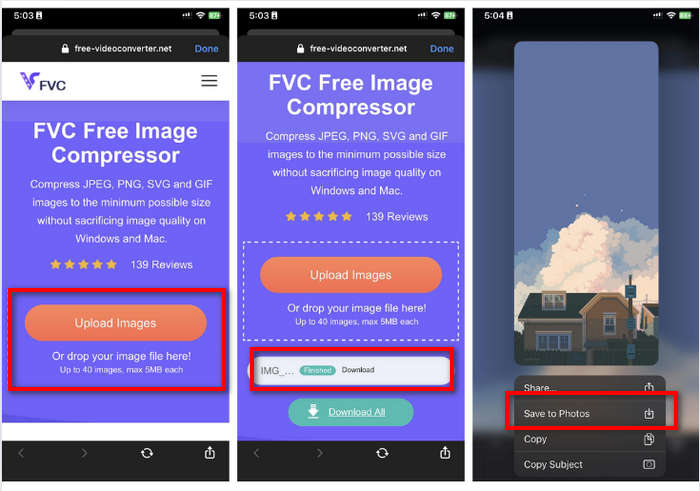
Pas 3. Després, comprimirà les teves fotos automàticament. Toca el botó Download, prem llargament la foto comprimida i tria l’opció Desa a Fotos.
Amb el compressor d'imatges gratuït FVC, es pot reduir la mida dels fitxers fotogràfics a l'iPhone amb tanta rapidesa sense perdre gran part de la seva qualitat. A més, la seva accessibilitat i la seva interfície fàcil d'utilitzar la converteixen en una eina de referència per als usuaris d'iPhone per comprimir les seves fotos.
Part 5. Preguntes freqüents sobre la reducció de la mida dels fitxers fotogràfics a l'iPhone
Com puc reduir la mida del fitxer d'un JPEG sense perdre la resolució?
Per reduir la mida d'un JPEG sense perdre la resolució, podeu utilitzar el compressor d'imatges gratuïts FVC. Aquesta eina en línia us permet comprimir les vostres fotos tot conservant-ne la qualitat. Només cal que carregueu o importeu el fitxer d'imatge a l'eina i el comprimirà automàticament. A continuació, podeu tornar a descarregar la foto comprimida al vostre iPhone.
Com veig la mida del fitxer de les fotos en un iPhone?
Pots veure la mida del fitxer de les teves fotos a l'aplicació Fitxers del teu iPhone. Si la teva foto no es troba a l'aplicació Fitxers, primer l'has de penjar a l'iCloud. Un cop la foto estigui a iCloud, podeu veure la mida del fitxer accedint-hi a través de l'aplicació Fitxers.
Quin tipus de foto fa l'iPhone?
Els iPhones solen guardar fotos en HEIC o el format de codificació d'imatges d'alta eficiència de manera predeterminada. HEIC ofereix una millor compressió que JPEG mantenint una alta qualitat. Podeu canviar aquesta configuració a la secció Càmera de l'aplicació Configuració a Formats.
Conclusió
Com que els iPhones generen fitxers de mida gran en fer fotos, compartir-les i pujar-les pot ser complicat. Per tant, aprendre a reduir la mida dels fitxers de fotos a l’iPhone és una gran decisió quan vols optimitzar les teves imatges per utilitzar-les sense problemes. Ara depèn de tu quin mètode fas servir per comprimir les teves fotos. Què estàs esperant? Comprimeix les teves fotos al teu iPhone ara mateix!
-
 Com canviar la mida de la imatge: Adobe Canvia la mida de la imatge [en línia i fora de línia]
 Si esteu buscant una imatge de redimensionament d'Adobe, tenim la solució per a vosaltres. Consulteu aquesta publicació a fons per aprendre a canviar la mida de les imatges amb Adobe al vostre ordinador.
-
 Eines del programa de canvi de mida de GIF creatiu disponibles amb comoditat
 Canviar la mida dels GIF pot ser una tasca dolorosa. Utilitzeu els programes adequats per canviar la mida dels vostres GIF i fer el vostre treball perfectament. Consulteu aquest article per obtenir més informació.
-
 3 maneres de canviar la mida de la imatge per a Twitter sense perdre qualitat
 Per canviar la mida de la imatge per a Twitter, haureu de tenir un redimensionador de fotos a la mà. No en té cap? A continuació, trieu a la llista.
