


 Video Converter Ultimate
 Gravadora de pantalla
 Reparació de vídeo
 Baixada segura
4 consells útils per solucionar el VLC Player no reproduirà MKV
MKV (Matroska Video file) is a free and open multimedia file format. But it can’t be supported by many frequently-used players, including Windows Media Player and QuickTime Player. So, you may turn to the popular VLC Media Player for the MKV playing. However, many users have encountered the VLC player won’t play MKV problem.

The MKV playback issues can vary, such as the audio track of your MKV file playing is delay, playback stuttering, fuzzy image, and buggy interface quirks and so on. Here in this post, we like to share 4 useful tips for you to fix the MKV files won’t play on VLC issue.
Part 1. Definiu les preferències per solucionar que el reproductor VLC no reproduirà MKV
VLC és una eina de reproducció de fitxers multimèdia molt popular que pot admetre la majoria de formats d’àudio i vídeo digitals, inclosos MKV, MP4, AVI, FLV, MP3, AAC, M4A, FLAC, etc., i VCD, CD d’àudio i DVD.
VLC Media Player atrau milions d'usuaris perquè pot reproduir qualsevol fitxer multimèdia que tingueu. Però el reproductor VLC no reproduirà els fitxers MKV de tant en tant. Si el reproductor VLC només omet el fitxer MKV o HD MKV, podeu configurar les preferències personalitzades.
Step 1. Open VLC Media Player and choose the Tools menu. From the drop-down list, select the Preferences option.
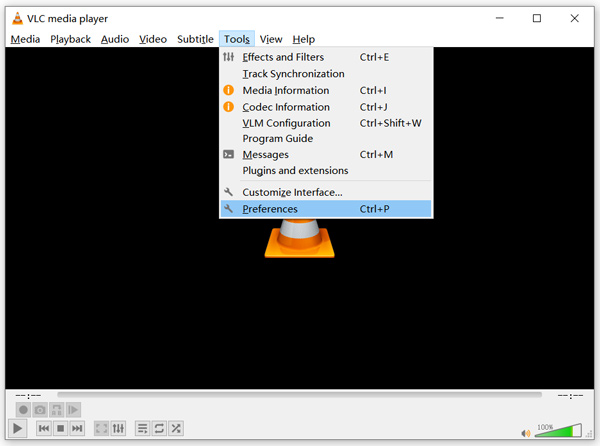
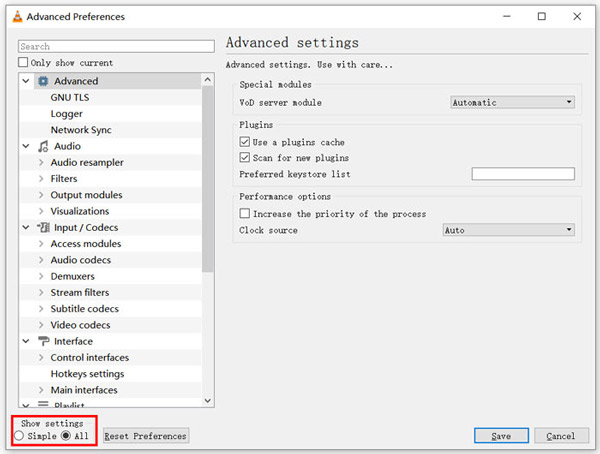
Step 2. Tick All under the Show settings on the bottom left of the dialog window. By doing so, you can display the Advanced Preferences window.
Step 3. Choose the Input/Codecs section on the left, and then locate the File Caching(ms) option on the right. You may need to scroll down to find it.
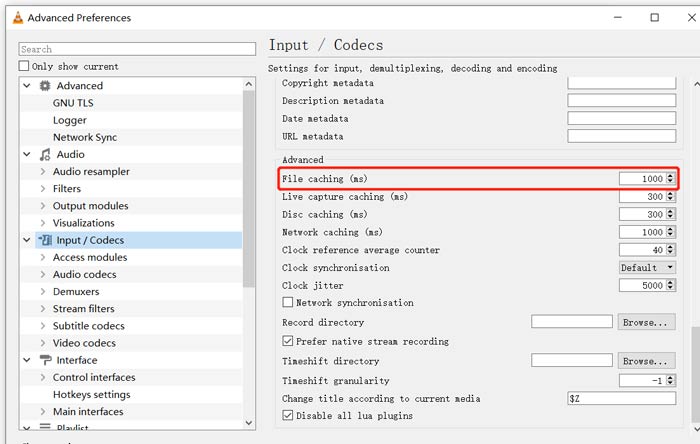
Step 4. Set File Caching to 1000 and then click Save button to confirm your operation. After that, you can restart VLC and replay your MKV file.
Part 2. Actualitzeu o torneu a instal·lar VLC per solucionar que el reproductor no reproduirà MKV
Si el reproductor VLC no reprodueix el problema MKV encara existeix, podeu optar per actualitzar-lo a la versió més recent. Heu de saber que una nova versió sempre solucionarà molts errors de versions antigues. Podeu seguir els passos següents per actualitzar el VLC Media Player.
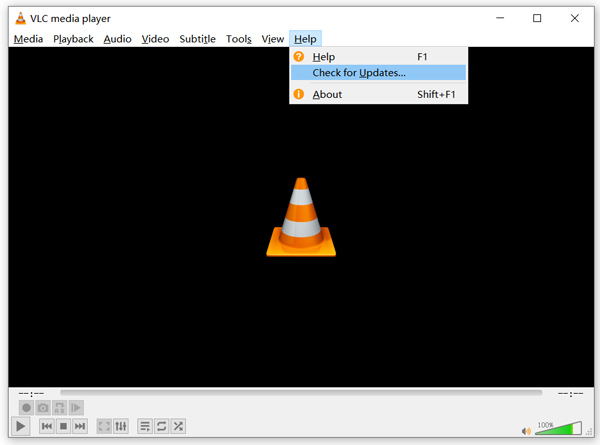
Open VLC and click the Help menu. Select the Check for Updates option from the drop-down list. VLC will start to check if there is an available updating version. Then you can follow the instructions to upgrade VLC to its latest version.
You can also directly remove VLC from your computer, and then go to its official site, VideoLAN to install a right version. When you get a new VLC Media Player installed, you can play your MKV file and check if it can be played normally.
Part 3. Activa l'àudio per solucionar el reproductor VLC sense so mentre es reprodueix MKV
Si el vostre reproductor multimèdia VLC pot reproduir fitxers MKV però sense so, haureu de comprovar si la configuració d’àudio és correcta.
Step 1. Choose Tools option on VLC menu bar. From the drop-down menus, select Preferences. Then you will be guided to the Simple Preferences window.
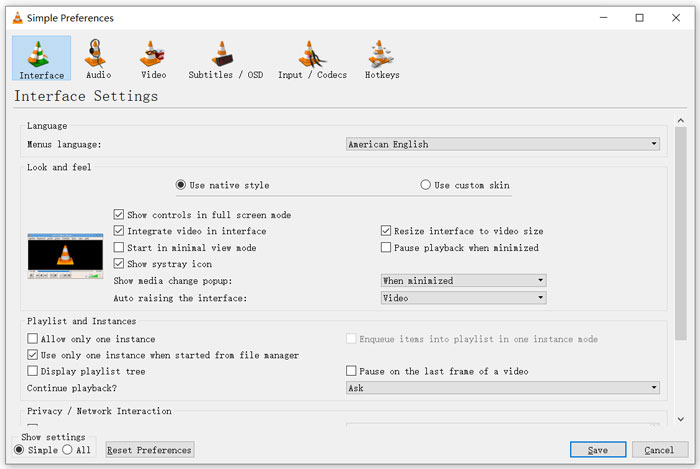
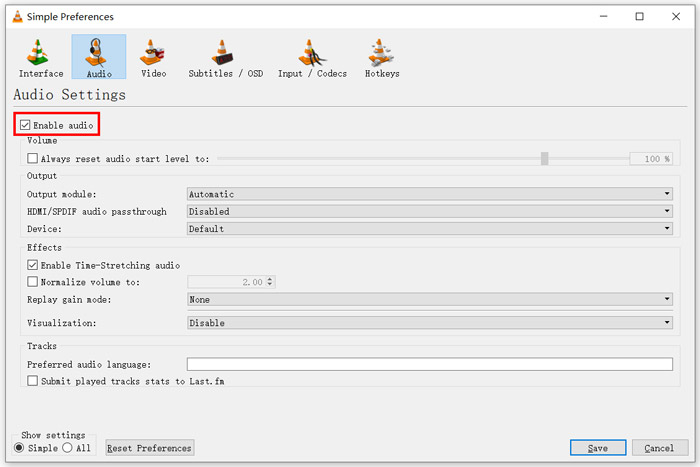
Step 2. Click on the Audio tab, and then check the Enable Audio option. During this step, you are also allowed to custom Output Module, HDMI/SPDIF audio passthrough and Device based on your need. Click Save button to save your changes.
Now you will be back to the main interface of VLC, you can click Media and then Open File to play your MKV file.
Part 4. Seleccioneu una alternativa de reproductor VLC per reproduir fitxers MKV
When you want to watch MKV movies, you can also choose another player to replace VLC. You can give the popular Free Online Video Player a try. Whether you are using a Windows 10/8/7 PC or a Mac, you can rely on it to play any MKV files with high quality.
Aquest reproductor gratuït en línia té la capacitat de reproduir sense problemes 4K, 1080p / 720p HD, vídeos SD, vídeos 3D i fitxers d’àudio. A més de MKV, també admet molts altres formats, inclosos MP4, MOV, FLV, AVI, MPEG, WMV, WMA, AAC, MP3 i molt més.
Step 1. When you want to view MKV files, you can go to this Free Online Video Player site. It is compatible with any web browser like Chrome, IE, Firefox and Safari. Click on the Play Now button to quickly install a small launcher for the MKV playing.
Step 2. Once the installation is complete, this free online MKV file player will be initiated automatically. Click Open File button to import your MKV file. Here you can also click Open Disc to watch a DVD movie.
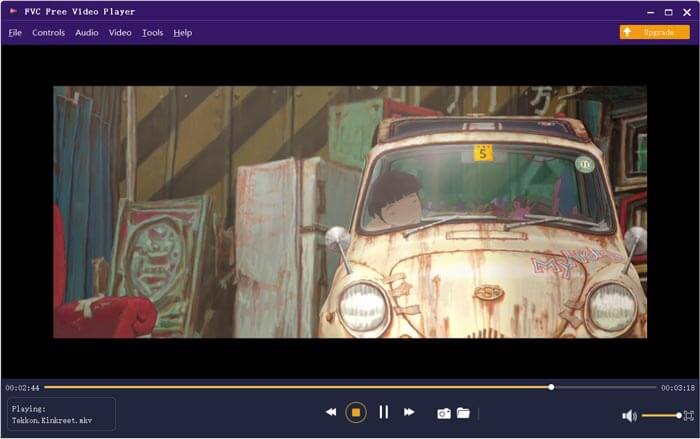
Your MKV video will be played automatically after that. You are given full control of the MKV playing. Compared with VLC Media Player, it gives an easier way to enjoy MKV files. This free online MKV player supports both DTS-HD and Dolby TrueHD to ensure you have a great sound experience.
Part 5. Preguntes més freqüents del reproductor VLC no reproduirà MKV
La televisió intel·ligent reprodueix fitxers MKV?
Sí. Molts televisors intel·ligents com Sony i Samsung que admeten fitxers MKV. Podeu reproduir el vostre MKV mitjançant un disc dur extern o un dispositiu UBS
Com es reprodueix DVD amb VLC Media Player?
Quan vulgueu reproduir una pel·lícula en DVD amb VLC, primer heu d’inserir el disc de DVD a la unitat de disc de l’ordinador. Obriu VLC, feu clic a Multimèdia a la barra de menú i, a continuació, trieu Obre disc. Cerqueu i carregueu aquesta pel·lícula de DVD a VLC i reproduïu-la.
Com desactivar la descodificació de l’acceleració de maquinari a VLC?
Per desactivar la descodificació de l’acceleració de maquinari al VLC Media Player, heu d’anar a les Preferències del menú Eines. Trieu la categoria Entrada / Còdecs i, a continuació, Còdecs. Cerqueu l’opció de descodificació accelerada per maquinari i desactiveu-la.
Conclusió
When you face the VLC player won’t play MKV problem, you can directly use another player like the recommended Free Online Video Player to view your MKV files. Also, you can choose to upgrade VLC Media Player or custom various settings to fix it.
-
 Formes gratuïtes i professionals de convertir MKV a MOV
 Com puc convertir MKV a MOV a Mac? Pot iMovie llegir MKV? Què significa el format MOV? Aquesta publicació explica dues maneres senzilles d'ajudar-vos a convertir MKV a MOV amb convertidors de vídeo gratuïts en línia i professionals.
-
 Com convertir M2TS a MKV sense perdre qualitat
 Voleu convertir M2TS a MKV mantenint la qualitat original? Aquesta publicació us mostra mètodes gratuïts i en línia per canviar M2TS a MKV sense pèrdues.
-
 VLC Media Player: una breu revisió del reproductor de vídeo i les millors alternatives a Windows i Mac
 Per què l'àudio no funciona al VLC Media Player? Si voleu obtenir més informació sobre el popular reproductor multimèdia, podeu obtenir més informació sobre la ressenya i les millors alternatives de l'article.
