


 Video Converter Ultimate
 Gravadora de pantalla
 Reparació de vídeo
 Baixada segura
La millor gravadora d'àudio MP2 amb passos i consells fiables per a PC i Mac
MP2 és un altre fitxer d’àudio comprimit amb pèrdua. Encara que el format MP3 és molt popular en comparació amb altres formats d’àudio, l’estàndard continua essent l’MP2. Com que és el format d’àudio estàndard, és propens a la pèrdua de dades. Així doncs, transferir dades per internet no et suposarà cap problema. En alguns casos, als usuaris els costa decidir quin és el millor gravador d’MP2 que s’ajusta a les seves necessitats. En aquest cas, la llista següent proporciona passos detallats i informació que et pot agradar utilitzar. Continua llegint aquest article per descobrir quins són aquests gravadors d’àudio que poden produir el format de fitxer MP2.

Part 1. Millor gravadora MP2 per a Windows i Mac
Gravador d'àudio gratuït FVC
Un dels millors gravadors d’àudio en línia et pot ajudar. FVC Free Audio Recorder, tal com indica el seu nom, és una eina gratuïta utilitzada per molts usuaris a internet. Si la connexió a internet no és un problema per a tu, aleshores pots confiar en aquest gravador MP2 per a VHS en línia per produir un bon format de sortida. A més a més, aquesta eina ha estat desenvolupada per FVC, de manera que és 100% lliure de programari maliciós, així que no tens de què preocupar-te si fas servir l’eina. A continuació tens la llista de passos; assegura’t de seguir-los amb atenció.
Pas 1. Fes clic en aquest enllaç per anar al lloc web.
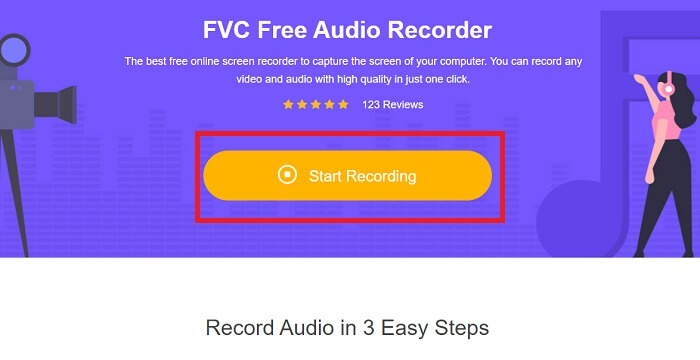
Pas 2. Fes clic a Start Recording per iniciar el gravador.
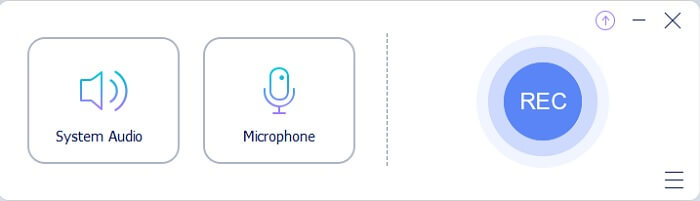
Pas 3. Apareixerà una barra d’eines flotant com aquesta a la pantalla.
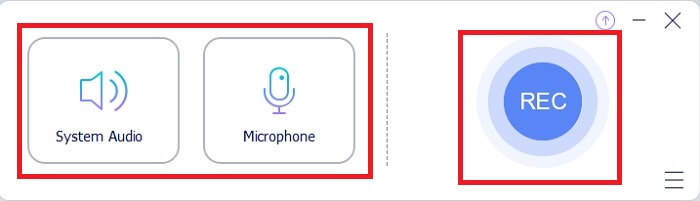
Pas 4. Fes clic a System Sound i Microphone per afegir el so del sistema i la teva veu. Quan ho tinguis a punt, fes clic al botó rodó REC per començar a gravar.
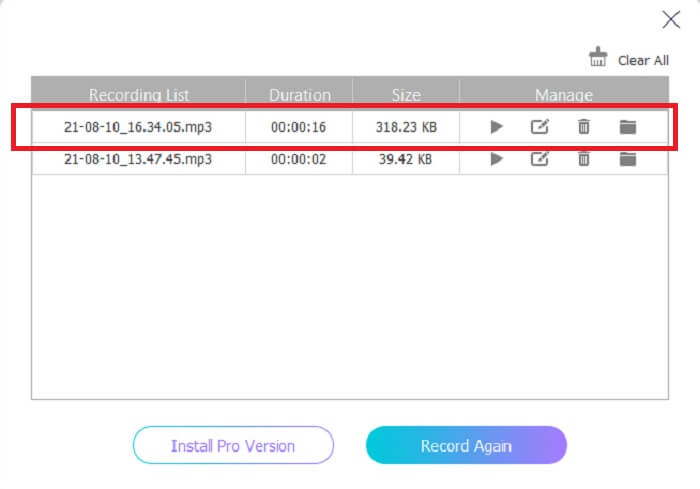
Pas 5. Quan hagis acabat la gravació, fes clic al botó en forma de cub per aturar-la. Es desarà automàticament a l’ordinador i ja la podràs gaudir.
Part 2. Gravadora MP2 ampliada i fàcil d'utilitzar per gravar àudio MP2
1. Gravador de pantalla FVC
Si l’eina en línia et fa dir uau, aquesta eina et farà dir excel·lent. A diferència del gravador en línia, el FVC Screen Recorder és una eina multifuncional que no limita mai la teva creativitat, i millora les teves gravacions d’àudio portant-les a un altre nivell que altres eines no poden oferir. Potser encara et preguntes si aquesta eina pot ser el teu gravador d’MP2; deixem-ho en què ho hauràs de descobrir tu mateix. Sense més dilacions, passem a demostrar-te que aquesta eina és el que estaves buscant. Llegeix amb atenció els passos indicats a continuació.
Pas 1. Descarrega l’eina al teu PC o Mac. Instal·la-la a l’escriptori i modifica les Preferences i, si ja ho tens tot configurat, fes clic a Finish per iniciar l’eina.
Descàrrega gratuïtaPer a Windows 7 o posteriorDescàrrega segura
Descàrrega gratuïtaPer a MacOS 10.7 o posteriorDescàrrega segura
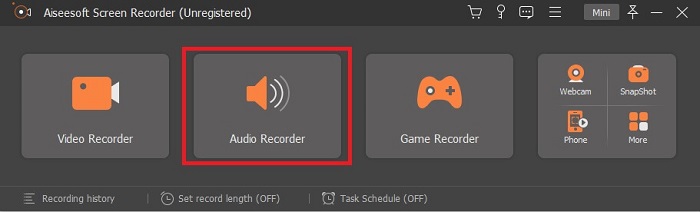
Pas 2. L’eina s’obrirà automàticament. Es mostrarà una barra d’eines com aquesta a la pantalla. Fes clic a Audio Recorder per continuar.
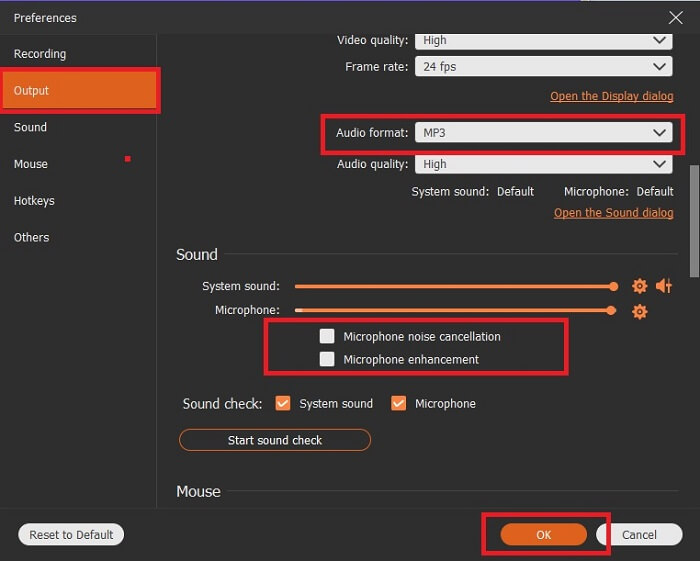
Pas 3. Busca la icona de l'engranatge i fes-hi clic. Canvia els paràmetres de Output segons les teves preferències. Fes clic a OK per desar els canvis.
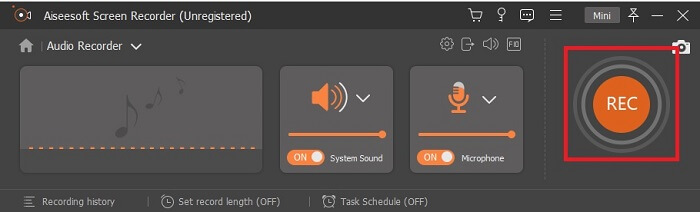
Pas 4. Abans de gravar, comprova que System Sound i Microphone estiguin activats. Quan estigui tot llest, fes clic al botó en forma de disc per començar a gravar.
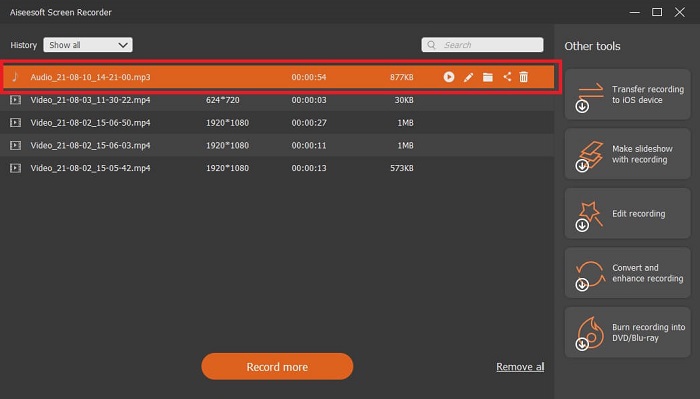
Pas 5. Quan vulguis acabar la gravació, fes clic al botó en forma de caixa per aturar-la. Després desarà el fitxer i fes clic a Next per generar la gravació. Si vols tornar a escoltar la gravació, fes clic al botó amb línies paral·leles per revisar el que acabes de gravar. El primer fitxer serà la teva gravació més recent i l’últim serà la més antiga.
2. Audio Boo
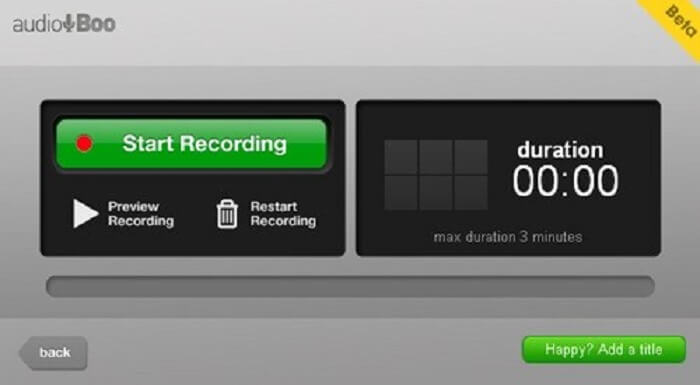
Una altra eina que pots utilitzar per a gravacions curtes és Audio Boo. Permet a l’usuari fer gravacions breus. Per exemple, cantar per a la teva persona estimada i enviar-li l’enregistrament, fer un diari d’àudio, breus recordatoris de veu i molt més. Però, a causa de les seves limitacions, no hi podràs gravar una conversa sencera, llargues sessions musicals, etc. Si et preguntes quina és la durada màxima de gravació disponible, és de 3 minuts.
3. Adobe Audition
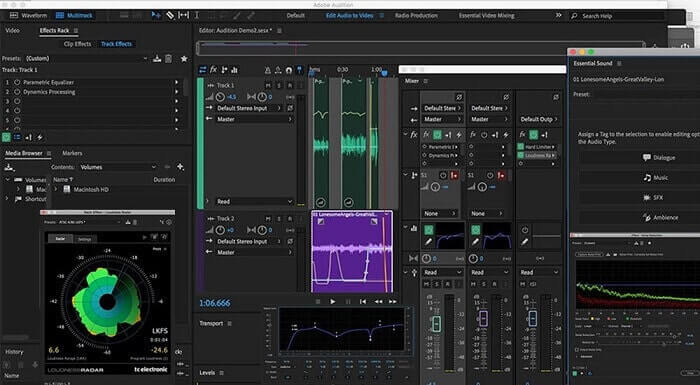
Una eina que permet a l'usuari gravar un enregistrament de qualitat. A més, és compatible amb Adobe, així que espereu una sortida de bona qualitat que produirà. Això és el més utilitzat pel productor musical, cantants, arranjador musical i com a tal. Aquesta és una gravadora més industrialitzada. És una mica aclaparador per al nou usuari utilitzar aquest tipus de gravadora Mp2. Però produeix una bona qualitat com les altres gravadores MP2.
Lectures relacionades
Part 3. Gràfic comparatiu
| Característiques de l'eina | Gravador d'àudio gratuït FVC | Gravadora d'àudio FVC (Premium) | Àudio Boo | Adobe Audition |
| Gravadora d'àudio | SÍ | SÍ | SÍ | SÍ |
| Cancel·lació de soroll | NO | SÍ | NO | SÍ |
| Millora del micròfon | NO | SÍ | NO | SÍ |
| Eines d'edició | NO | SÍ | NO | SÍ |
| Programa/s disponibles | Tots els programes són compatibles | Tots els programes són compatibles | iPhone, iPod touch i iPad. | Windows 7, Windows 8.1 o Windows 10 OS X Yosemite, OS X El Capitan o macOS Sierra |
| Formats disponibles | MP3 i MP2 | MP3, MP2, WMA, AAC, M4A, FLAC, OGG, AMR, Opus i molts més. | MP3 | AC3, M4A, MAT, VOX, W64, WAV i molts més |
| Preu de l'eina (si es paga) | Eina gratuïta en línia | Durant 1 mes: $25.00 Durant un any: $31.20 Per a llicència de per vida: $55.20 | Eina descarregable gratuïta | $27.62/moment, per a anual $315.61/anys, per a anual $41.43/pla mensual |
Part 4. Preguntes freqüents sobre MP2 Recorder
Puc convertir el meu MP2 a un altre format?
Sí, pots fer-ho utilitzant aquest Convertidor MP2 disponible en línia; potser també voldràs provar aquest convertidor definitiu per obtenir un resultat encara millor.
Quin és el millor diputat? 1, 2, 3 o 4?
Aquests formats de fitxer MP són tots contenidors d'àudio, vídeo i text. Però la principal diferència entre ells és el que contenen. MP1 és el primer a ser el primer a fer un format de casset. MP2 admet d'1 a 2 canals i l'estàndard per a la reproducció d'estacions de ràdio i televisió digital. MP3 és el format més utilitzat que desa l'enregistrament d'àudio o el format d'àudio. MP4 conté formats d'àudio, vídeo i text.
Vull reproduir el meu vídeo però el meu reproductor multimèdia no admet el format, què he de fer?
Pots utilitzar aquest reproductor multimèdia, ja que admet gairebé tots els formats diferents que puguis conèixer.
Conclusió
Finalment, ara ja coneixem les diferents eines que hi ha a la xarxa gràcies a aquest article. Si encara et costa triar quina és la millor eina per a tu, aquests consells et poden ajudar a decidir què és el més adequat. L’eina de gravació que facis servir hauria de ser fàcil d’utilitzar, fiable, disponible per a totes les plataformes per si canvies de dispositiu, de manera que això no afecti les teves gravacions d’àudio, duradora, amb actualitzacions constants, econòmica i, sobretot, lliure de programari maliciós. Si has pensat en el FVC Screen Recorder, has encertat. Perquè aquesta eina no et posa límits, no és gens difícil d’utilitzar i no és massa cara. Per tant, no cal buscar una altra eina si aquesta ja pot fer-ho millor que les altres.
-
 Els 5 millors gravadors de pantalla WebM per a Windows/Mac
 Obteniu més informació sobre els fitxers d'extensió WebM llegint l'article i descobriu les aplicacions de gravació de pantalla WebM que podeu utilitzar per gravar vídeos WebM.
-
 Les 4 millors gravadores de vídeo SWF accessibles en línia per a un feed de comentaris gratuït
 Heu sentit a parlar del fitxer SWF? Obteniu més informació sobre aquest format de fitxer i descobriu maneres d'enregistrar fitxers SWF mitjançant eines en línia gratuïtes.
-
 Gravadores de vídeo MTV incomparables compatibles amb ordinadors Mac/Windows Feed de comentaris
 Aquest article us ajudarà a conèixer el format de fitxer MTV i una llista de gravadors de vídeo MTV que podeu utilitzar per gravar pantalles d'ordinador amb facilitat.
