


 Video Converter Ultimate
 Gravadora de pantalla
 Reparació de vídeo
Produeix una obra mestra amb l'ajuda de GIF Speed Changer
Està a punt de tocar la mitjanit i vols felicitar el teu amic pel seu aniversari. Com a bon amic, vols que et recordi en el seu dia especial encara que no hi siguis, així que estàs buscant el GIF perfecte que concordi amb el teu missatge llarg. Tot i així, el GIF que tens al mòbil o a l’ordinador no és gaire emocionant de veure, per això tens dubtes sobre què fer i estàs pensant en com canviar la velocitat d’un GIF. Llegeix l’article següent per aclarir-te —sobretot en situacions molt crítiques— sobre què fer i quines maneres hi ha de resoldre el problema anterior.

Part 1. Com accelerar un GIF professionalment [de pagament]
Video Converter Ultimate és un programari complet de descàrrega gratuïta que té la capacitat d'ajustar la velocitat dels GIF amb l'ús de l'eina Video Speed Controller. A més, també ofereix moltes eines per ajudar-vos a convertir i editar GIF. A més, totes les eines són fàcils d'utilitzar i tenen plantilles disponibles per millorar la visió general cinematogràfica del vostre GIF. Video Converter Ultimate està disponible a Windows i Mac.
Pros
- Oferiu eines fàcils d'utilitzar i altres funcions.
- Produeix una producció d'alta qualitat.
Contres
- Cal comprar altres funcions per tenir accés complet.
Pas 1: Pots descarregar el programa fent clic al botó Descarrega gratis. Després el pots personalitzar i instal·lar.
Descàrrega gratuïtaPer a Windows 7 o posteriorDescàrrega segura
Descàrrega gratuïtaPer a macOS 10.7 o posteriorDescàrrega segura
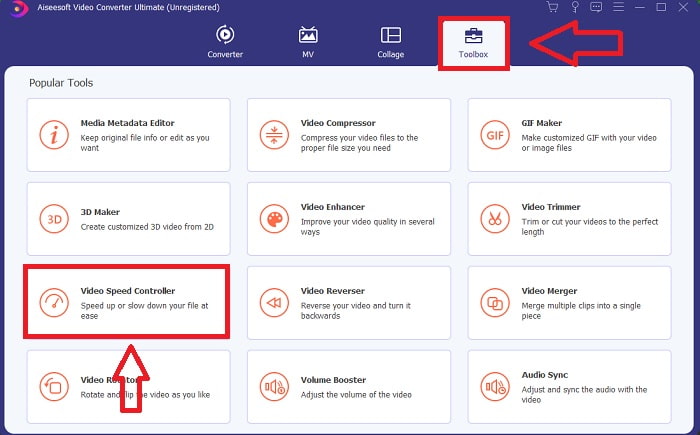
Pas 2: Un cop instal·lat el programa, ves a la funció Caixa d’eines i selecciona Controlador de velocitat de vídeo.
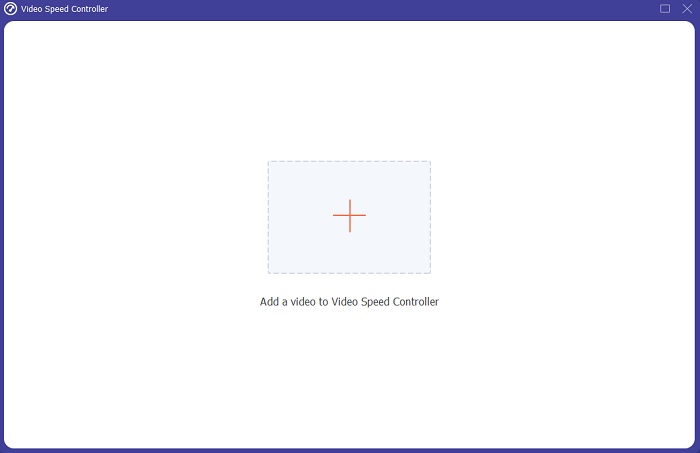
Pas 3: Prement el botó + segons la teva preferència, pots afegir qualsevol fitxer GIF i continuar modificant el clip de vídeo.
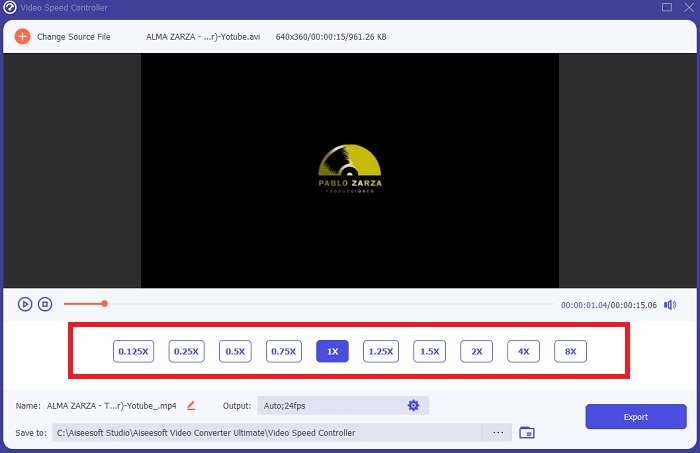
Pas 4: A continuació, pots ajustar la velocitat del vídeo augmentant o disminuint la velocitat de reproducció.
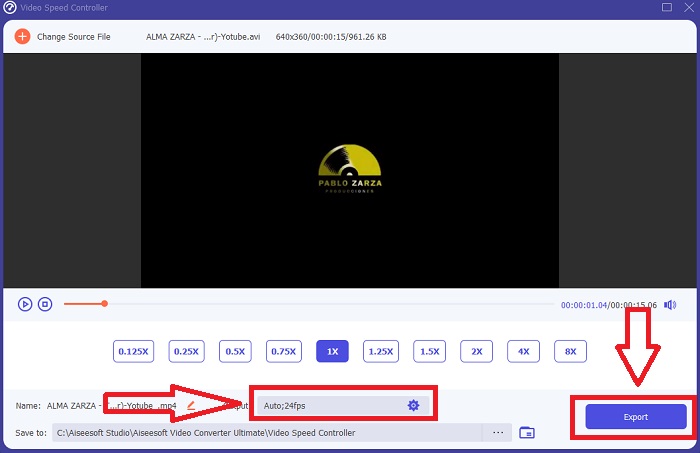
Pas 5: Quan hagis acabat de modificar la velocitat de reproducció del teu clip de vídeo, podràs triar la sortida desitjada canviant el format, la resolució i la qualitat, entre d’altres. Quan estiguis a punt, fes clic a Exporta i selecciona una ubicació per desar-hi la teva feina.
Part 2. Altres maneres d'accelerar GIF [Gratis]
Com accelerar un GIF amb ImageOnline.co
Les imatges gif es poden crear amb aquesta eina d'ús gratuït amb facilitat, sempre que tingueu accés a un ordinador i un navegador web. A més, aquesta eina no només és fàcil d'utilitzar com a editor de velocitat GIF; No hi ha límit en el nombre d'imatges gif que podeu crear amb aquesta eina web. Qualsevol imatge gif es pot fer sense restriccions i la nostra precisió es manté constant.
Pros
- És accessible per a una àmplia gamma d'usuaris.
- Ofereix moltes funcions per utilitzar.
- Proporciona una nota a seguir per utilitzar cada funció.
Contres
- La interfície té molts anuncis i anuncis.
- La interfície és massa senzilla.
Pas 1: Localitza Eines d’imatges GIF al racó esquerre de la interfície i fes clic a Crea animacions GIF.
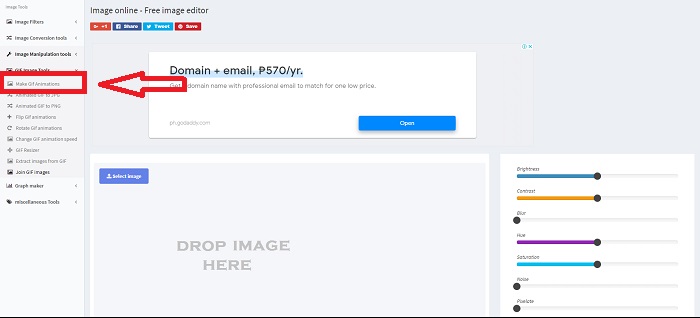
Pas 2: Selecciona una imatge del teu ordinador fent clic a Selecciona imatge, o bé arrossega-hi els fitxers i deixa’ls anar a la interfície web.
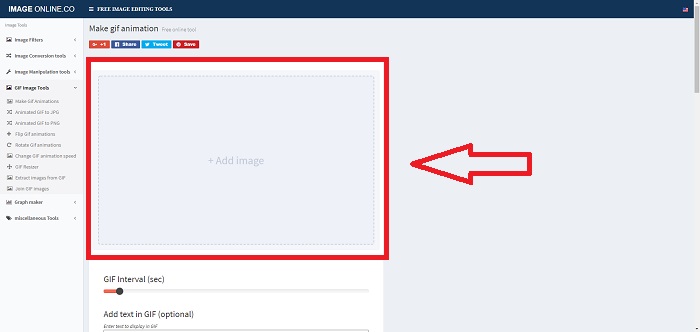
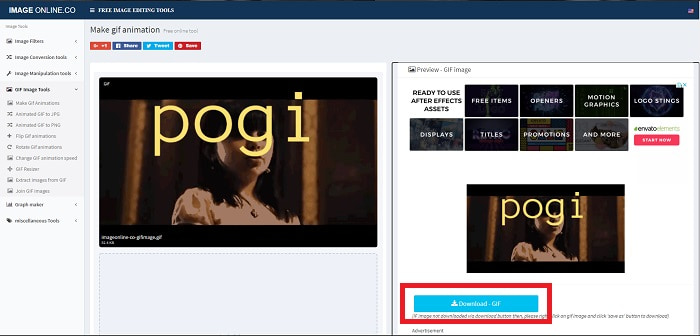
Pas 3: Ajusta l’interval de temps del teu GIF arrossegant el lliscador. Pots afegir text al teu GIF o canviar-ne la mida personalitzant-ne les dimensions. Si ja està tot llest, fes clic a Aplica els canvis. Finalment, fes clic a Descarrega per guardar el fitxer a l’ordinador.
Com accelerar un GIF amb LunaPic
Aquesta eina web és un editor de baix pressupost que cobreix diverses eines disponibles per a una eina web d'ús gratuït que us pot oferir una edició amb perspectiva professional. L'edició es converteix en una llesca de pa i proporciona una experiència excel·lent per a alguns editors professionals perquè aquesta eina web cobreix la majoria dels formats i xarxes socials disponibles. Veureu diferents eines que altres eines web no ofereixen. La interfície és senzilla i es pot personalitzar segons les preferències de cada usuari.
Pros
- Conté eines massives per utilitzar en l'edició.
- Editor de tipus professional.
Contres
- Algunes eines necessiten aclariments o descripció per conèixer-les per part del públic general o dels usuaris.
- És complicat d'utilitzar per a usuaris principiants.
Pas 1: Fes clic a la pestanya Penja a la cantonada superior esquerra de la interfície web i afegeix fitxers fent clic a Tria fitxer.
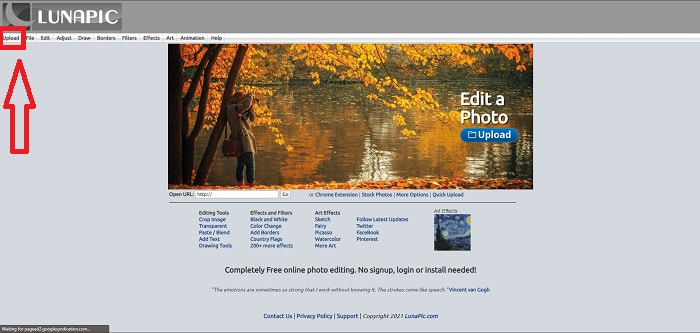
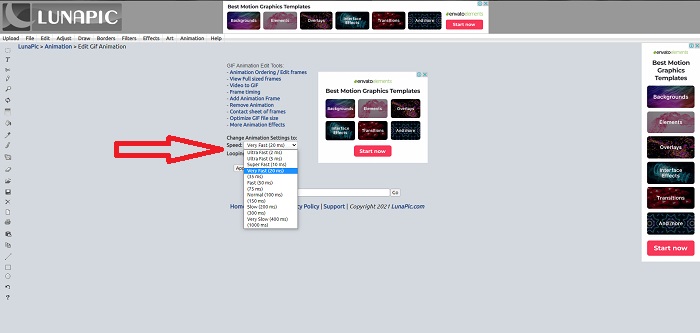
Pas 2: Ja pots editar el teu GIF a la primera interfície que apareixerà després de pujar el fitxer. Però si vols augmentar la velocitat del GIF, continua fent clic a la pestanya Animacions i després a Edita animació GIF.
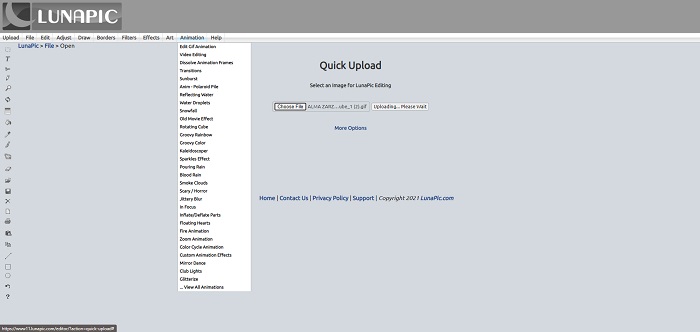
Pas 3: Ajusta la velocitat seleccionant la velocitat de reproducció del teu GIF. Fes clic a Aplica quan acabis de seleccionar la velocitat del teu GIF. A sota de la previsualització del teu GIF, fes clic a Més opcions i tria quin format vols utilitzar per al teu GIF.
Com accelerar un GIF amb Gifntext
També és una eina web d'ús gratuït que proporciona diferents eines d'edició i implica augmentar la velocitat i alentir la velocitat d'un GIF. Aquesta eina web és senzilla d'utilitzar i, a diferència de l'altra eina web, Gifntext admet URL GIF i ofereix tutorials sobre com utilitzar les eines destacades disponibles a l'eina web. A més, no deixa marques d'aigua al fitxer de vídeo de sortida que poden conduir a tècniques publicitàries.
Pros
- La interfície no té anuncis ni anuncis.
- Ofereix tutorials sobre com utilitzar les eines.
Contres
- Conté eines menors per utilitzar en l'edició.
- Es converteix més lentament que les altres eines.
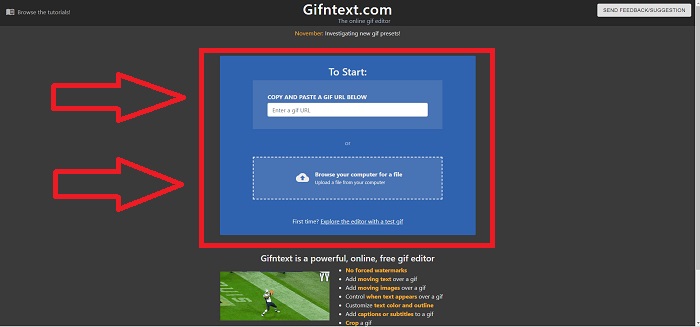
Pas 1: A la interfície principal, pots triar si penjaràs un URL de GIF o seleccionaràs un fitxer GIF del teu ordinador.
Pas 2: Edita la velocitat arrossegant el lliscador.
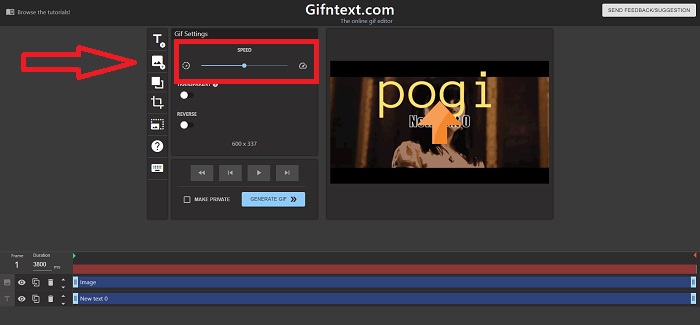
Pas 3: Fes clic a Genera GIF per processar el teu GIF. Espera amb paciència que acabi el processament i, quan estigui llest, fes clic a Descarrega GIF.
Part 3. Preguntes freqüents sobre GIF Speed Changer
Què és un GIF?
Gràcies al seu suport ampli i portabilitat, el format d’intercanvi gràfic (abreujat com a GIF) és àmpliament utilitzat a internet. Al format GIF es pot fer servir una paleta separada de fins a 256 colors per a cada fotograma. Les limitacions de la paleta del GIF fan que sigui menys adequat que altres formats, com ara JPEG, per a imatges més complexes, pel que fa a reproduir fotografies en color i altres il·lustracions amb degradats.
Com convertiré MP4 a GIF?
Altres formats de vídeo no estan disponibles per convertir-los a GIF. Però com que MP4 és un fitxer de vídeo estàndard, hi ha un article sobre convertir MP4 a GIF.
Perdo la qualitat si converto altres formats a GIF?
Sí, convertir qualsevol format a GIF pot espatllar la qualitat del vídeo perquè crear un GIF implica comprimir el fitxer. Però alguns convertidors poden crear un GIF que minimitzi la degradació de la qualitat del vídeo. Video Converter Ultimate ofereix una sortida d’alta qualitat a l’hora de crear un GIF, fins i tot animant la velocitat del GIF de manera més ràpida.
Conclusió
Al llarg de l'article, sabem que GIF és un format que ha d'alentir i augmentar la seva velocitat per retratar la imatge o el missatge en si, ja que GIF no té sons. Hi ha moltes maneres de fer-ho, ja sigui gratuïta o de pagament; aquestes eines web i programari emfatitzen l'edició al següent nivell. Però si voleu accedir al programari d'edició perquè la connexió a Internet no pugui causar cap problema en utilitzar-lo. Baixeu Video Converter Ultimate i utilitzeu-lo com a editor i fiable en altres formats de videoclips, com ara GIF.
-
 5 millors opcions per gravar format GIF amb gravadores GIF per a PC i Mac
 Quina és la millor gravadora de GIF que hauríeu d'utilitzar per gravar GIF? La llista següent proporciona proves sobre quin és el millor gravador de pantalla.
-
 Com convertir MPG a format GIF [en línia i fora de línia]
 Vols expressar una emoció molt millor? Aleshores, heu d'utilitzar GIF. Aquest escrit us ensenyarà com convertir un fitxer MPG a GIF per expressar el vostre sentiment molt millor.
-
 [Actualitzat el 2025] 9 millors editors de GIF per a PC, Mac, iOS i Android
 Necessites afegir un toc personal al teu GIF perquè es torni més expressiu? Continueu llegint aquest article per saber com editar i la millor eina per a la feina.
