


 Video Converter Ultimate
 Gravadora de pantalla
 Reparació de vídeo
 Baixada segura
Com comprimir fitxers d'àudio WAV sense perdre cap qualitat
Quan la gent vol desar els seus fitxers de música en una forma d’alta qualitat, sovint trien WAV com a format d’àudio. Tanmateix, com a norma general, com més alta és la qualitat, més espai d’emmagatzematge ocupa el fitxer. En comparació amb l’MP3, el WAV pot oferir un so d’alta qualitat, però la mida del fitxer serà més gran. Per tant, si vols compartir un fitxer WAV amb els teus amics o vols penjar-lo a una xarxa social, és millor reduir-ne la mida primer. Et presentarem tres eines diferents per a la compressió de fitxers WAV. També et mostrarem els seus avantatges, inconvenients i l’ús detallat. Continua llegint per saber-ne més.

Part 1. Millor manera de comprimir fitxers WAV
Comencem recomanant una eina d’edició de vídeo i àudio força completa, FVC-triada Video Converter Ultimate. Incorpora eines d’anàlisi d’última generació que poden començar a processar els teus fitxers tan bon punt els carreguis. Si busques una eina que et permeti ajustar lliurement el percentatge de compressió de l’àudio WAV, serà el teu millor assistent. Fins i tot pots editar la durada de l’àudio, ajustar el canal d’àudio i canviar el volum de l’àudio abans d’exportar el fitxer. Després d’obrir el compressor d’àudio integrat, apareix una finestra nova. Allà hi pots veure moltes configuracions per triar. Ofereix un alt nivell de personalització i et permet tenir un control precís sobre els paràmetres d’àudio. Si consideres que la mida d’un fitxer WAV encara és massa gran, pots utilitzar el convertidor que proporciona FVC per convertir l’àudio a un format més fàcil de distribuir, com ara MP3.
Descàrrega gratuïtaPer a Windows 7 o posteriorDescàrrega segura
Descàrrega gratuïtaPer a macOS 10.7 o posteriorDescàrrega segura
Aquí, us ensenyarem com comprimir fitxers WAV amb FVC Video Converter Ultimate.
Pas 1. Descarrega i instal·la FVC Video Converter Ultimate a l’ordinador.
Pas 2. Entra a la interfície principal d’aquest programari i tria Toolbox > Audio Compressor.
Pas 3. Després d’entrar a la finestra d’Audio Compressor, fes clic al botó gran amb el signe més per carregar el teu fitxer WAV de destinació.
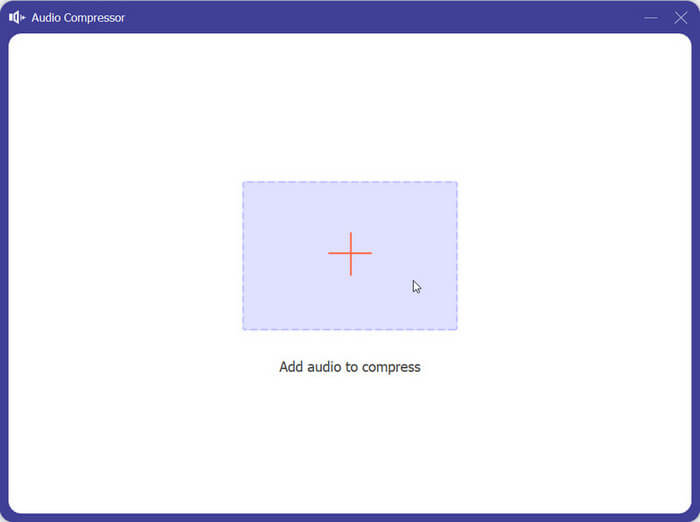
Pas 4. Pots establir la mida del fitxer després de la compressió canviant el valor de Size. Després de l’ajust, pots veure el percentatge de fitxer que s’ha comprimit.
També podeu establir aquí el nom del fitxer, el format, el canal de so, la freqüència de mostreig i la taxa de bits del vostre àudio.
Pas 5. Per comprovar l’àudio de sortida, fes clic a Preview. Si estàs satisfet amb l’efecte, fes clic a Compress.
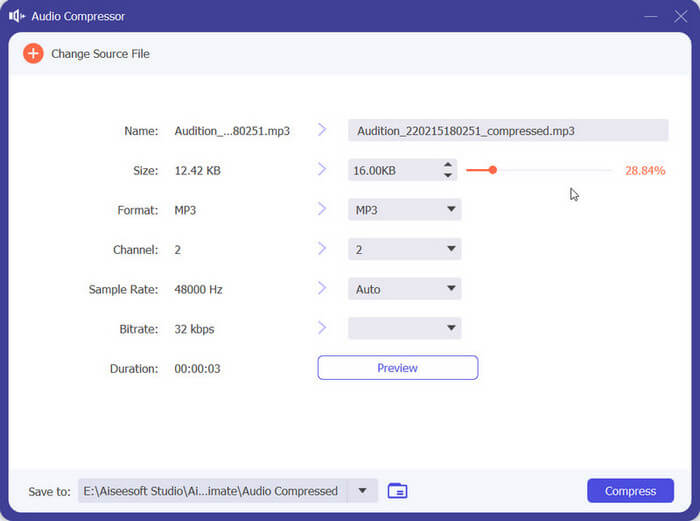
Actualment, pot comprimir àudio WAV fins a 50% de la mida del fitxer font. La seva velocitat de compressió és tan ràpida que gairebé no hem d'esperar per exportar el fitxer comprimit. Gairebé no hi ha pèrdua de qualitat. Tanmateix, només tenim 5 oportunitats gratuïtes, i si en volem més, haurem de pagar.
Part 2. Comprimir fitxers WAV en línia
El programari d'escriptori ofereix més funcions d'edició, però requereix que les baixeu i instal·leu al vostre ordinador. Això també ocupa part de la memòria de l'ordinador i triga un temps a iniciar el programari. Si voleu experimentar una compressió de fitxers d'àudio WAV més ràpida, proveu les eines en línia. Entre els molts productes disponibles, us recomanem que proveu FreeConvert WAV Compressor, un compressor de mida lliure amb una interfície molt fàcil d'utilitzar. Tot el que heu de fer és anar al seu lloc web oficial i immediatament trobareu el botó de destinació. Fins i tot si no l'heu utilitzat mai abans, podreu començar en molt poc temps.
Aquí, us ensenyarem com reduir la mida del fitxer WAV amb FreeConvert WAV Compressor.
Pas 1. Obre FreeConvert WAV Compressor amb el teu navegador.
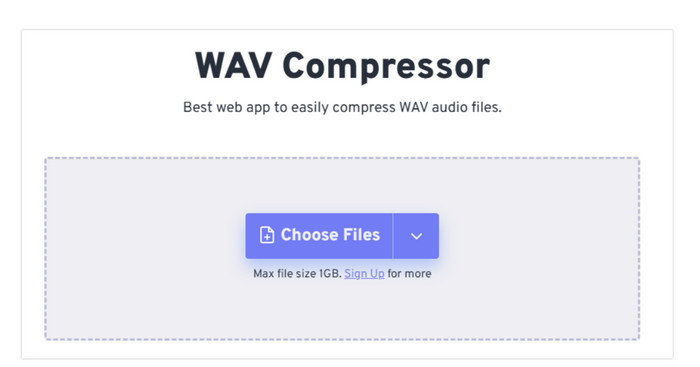
Pas 2. Fes clic a Choose Files per carregar l’àudio que vols comprimir.
.
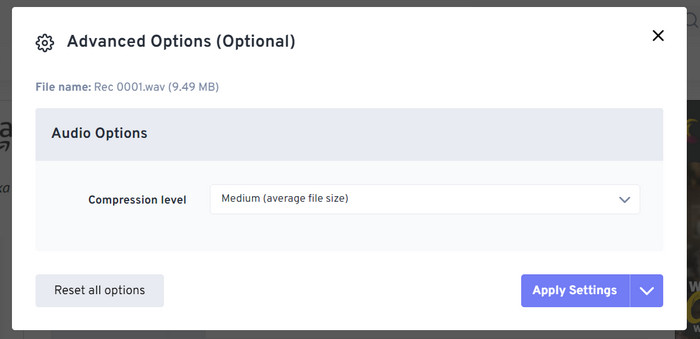
Pas 3. Per ajustar el nivell de compressió, fes clic a Advanced settings (optional). Pots triar entre Low, Medium i Strong. A continuació, tria Apply Settings.
Pas 4. Finalment, fes clic a Compress Now. El programa s’executarà per comprimir el teu fitxer WAV en línia.
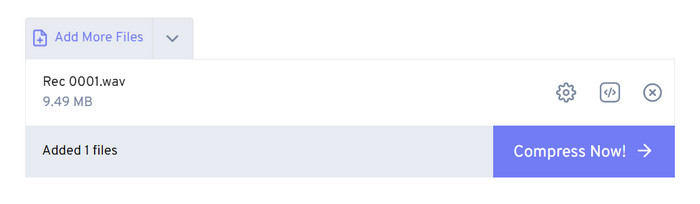
Després dels nostres intents, vam trobar que funciona de manera bastant eficient i que la qualitat del so del fitxer de sortida no és gaire diferent del fitxer font. Tanmateix, només hi ha tres taxes de compressió que podeu triar i no podeu visualitzar el percentatge de compressió i la mida del fitxer comprimit. Actualment, els usuaris només poden utilitzar-lo per comprimir fitxers de fins a 1 GB.
Part 3. Comprimir fitxer WAV a Audacity
A més del programari tot en un per al processament multimèdia, hi ha moltes eines dissenyades específicament per a l’àudio. Mostren més professionalitat i sofisticació en aquest aspecte de l’edició musical. Si utilitzes una eina professional per reduir la mida d’un fitxer WAV, la qualitat del so es pot protegir al màxim. Com una de les millors, Audacity es manté imbatible tot l’any. Els usuaris poden utilitzar-la per completar un procés integral d'enregistrament d’àudio i modificació. Les operacions d’edició que pot dur a terme inclouen ajustar la durada de la música, comprimir la mida del fitxer, convertir el format d’àudio i afegir efectes de so especials. Tot això és bufar i fer ampolles per a aquest programa.
A continuació, us guiarem per comprimir fitxers WAV amb Audacity.
Pas 1. Descarrega i instal·la Audacity al teu dispositiu.
Pas 2. Obre’l i prem File > Open.
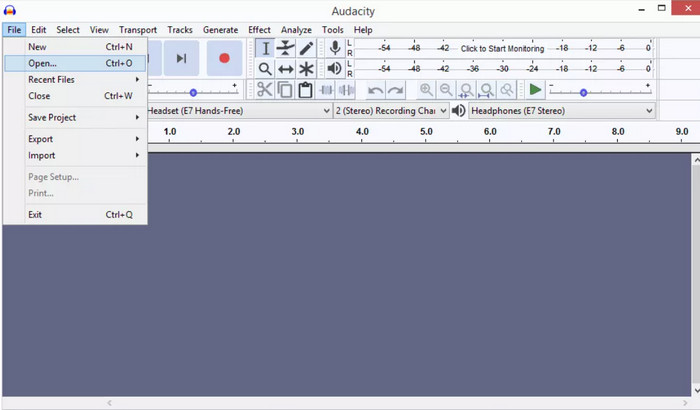
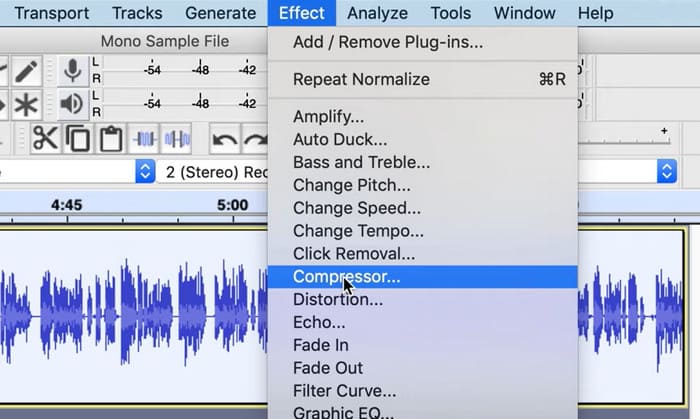
Pas 3. Carrega el fitxer que vols comprimir i prem Ctrl + A al teclat per seleccionar la pista d’àudio. Després, fes clic a Effect > Compressor.
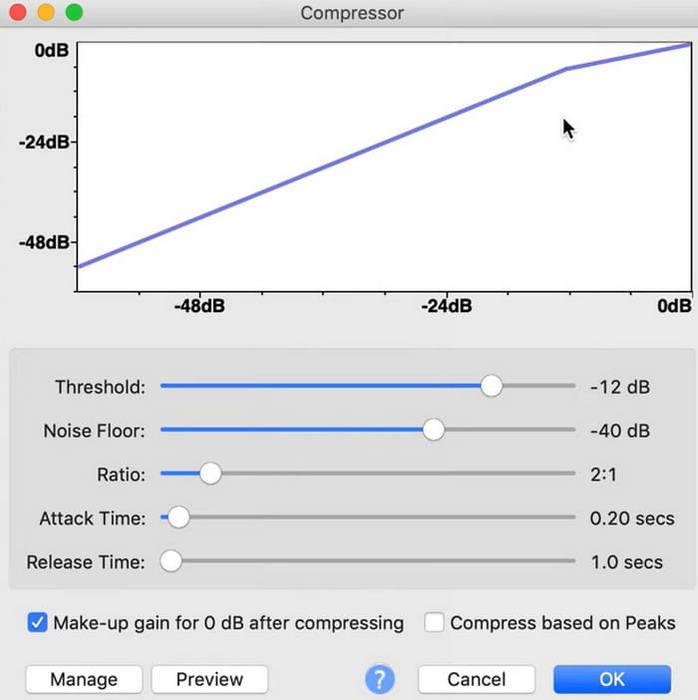
Pas 4. Ara pots canviar els paràmetres del teu fitxer WAV, incloent-hi el llindar (threshold), el nivell de soroll (noise floor), la relació (ratio), el temps d’atac (attack) i el temps d’alliberament (release time).
Pas 5. Finalment, torna a fer clic a File i tria Export.
Us permet comprimir fitxers WAV de forma gratuïta i sense limitacions de mida del fitxer. Podeu controlar amb precisió la velocitat de compressió i exportar el producte acabat tan aviat com apliqueu la configuració. La seva interfície és força complexa i els usuaris sense experiència tindran dificultats per trobar les funcions que necessiten. Es necessitarà un temps per aprendre a utilitzar-lo amb habilitat.
Part 4. Preguntes freqüents sobre comprimir fitxers WAV
Per què el meu fitxer WAV és tan gran?
Els fitxers WAV són normalment fitxers d’àudio no comprimits que emmagatzemen dades d’àudio en un format cru sense cap pèrdua de qualitat. A més, els fitxers WAV sovint tenen una profunditat de bits i una freqüència de mostreig més altes que els formats d’àudio comprimids. Si necessites reduir la mida del teu fitxer WAV, pots considerar comprimir-lo o convertir el WAV a MP3.
Comprimir un fitxer WAV redueix la qualitat?
Quan comprimiu un fitxer WAV a un format d'àudio amb pèrdua com MP3, AAC o OGG, normalment es produeix una reducció de la qualitat de l'àudio. Tanmateix, escollir una bona eina de compressió pot compensar aquest problema fins a cert punt. És important tenir en compte l'equilibri entre la mida del fitxer i la qualitat de l'àudio.
Es pot retallar un fitxer WAV al Windows Media Player?
Windows Media Player no té capacitats integrades per a l'edició directa o retallar fitxers d'àudio com els fitxers WAV. Per retallar un fitxer WAV a Windows, podeu utilitzar altres aplicacions de programari que ofereixen funcions d'edició d'àudio, com ara FVC Video Converter Ultimate i Audacity.
Conclusió
Aquest article està pensat per ajudar-te a resoldre el problema de la compressió de fitxers WAV. T’hem proporcionat tres eines perquè en puguis triar. Si vols gaudir d’un servei d’edició d’àudio més complet, utilitza el Video Converter Ultimate triat per FVC. Si no vols descarregar programari addicional a l’ordinador, pots considerar FreeConvert WAV Compressor. Si vols el programari de processament d’àudio més professional per comprimir els teus fitxers, Audacity cobrirà les teves necessitats.
-
 WAV Player: les 5 millors aplicacions de WAV Player per a Android, iPhone, PC i Mac
 Com es reprodueixen fitxers WAV al telèfon Android? Quin jugador pot jugar a WAV? Aquesta publicació comparteix els cinc millors reproductors WAV gratuïts per a Android, iPhone, Mac i PC.
-
 Tutorial de compressió d'àudio en profunditat el 2024 (pas a pas)
 Necessites comprimir l'àudio però necessites ajuda per saber per on començar? En aquesta publicació, presentarem les millors opcions per reduir la mida del fitxer de les vostres pistes.
-
 Compressors d'àudio efectius per a usuaris fora de línia i en línia
 Teniu problemes amb fitxers d'àudio grans? Hi ha molts compressors de fitxers d'àudio disponibles per als usuaris fora de línia i en línia. Consulteu-los aquí.
