


 Video Converter Ultimate
 Gravadora de pantalla
 Reparació de vídeo
 Baixada segura
Com convertir M2TS a MP4 sense reduir la qualitat
“Quan poso els vídeos de la meva càmera Sony a l'ordinador, són fitxers M2TS, que no es poden compartir a Facebook ni a YouTube. On puc trobar un convertidor de vídeo per convertir els fitxers a MP4 i veure'ls al meu ordinador? "
De vegades vols reproduir fitxers M2TS en alguns dispositius portàtils o penjar-los a YouTube o Facebook. És una bona idea convertir-los a un format de vídeo habitual com MP4. En aquesta publicació, compartirem 5 maneres gratuïtes de convertir M2TS a MP4 a Windows i Mac.

Part 1. La millor manera de convertir M2TS a MP4 de forma gratuïta
No tots els reproductors multimèdia admeten fitxers M2TS. Per gaudir millor del vídeo M2TS de les videocàmeres HD, és preferible canviar M2TS a l’MP4 d’ús més comú per a la reproducció. FVC Free M2TS Converter és un convertidor i editor M2TS tot en un. No només pots convertir fitxers M2TS a MP4, MKV, AVI, MOV, etc., sinó també editar els fitxers M2TS, com comprimir, combinar, aplicar temes i molt més.
Descàrrega gratuïtaPer a Windows 7 o posteriorDescàrrega segura
Descàrrega gratuïtaPer a macOS 10.7 o posteriorDescàrrega segura
Pas 1.En fer clic al botó de Descàrrega gratuïta, pots descarregar ràpidament Free M2TS Converter. A continuació, instal·la’l i obre’l a l’ordinador amb Windows. Fes clic al botó Add File(s) per importar el fitxer M2TS al programa.
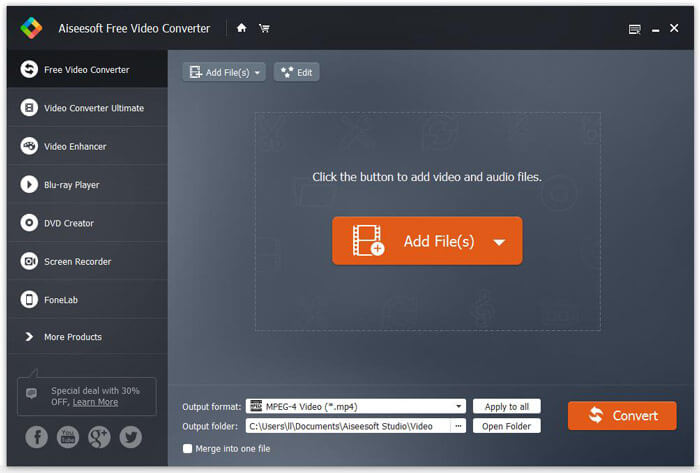
Pas 2.Fes clic al botó desplegable de Output format i tria MPEG-4 Video (*.mp4) com a format de sortida. També pots establir la carpeta de sortida per desar el fitxer convertit.

Pas 3.Si vols afegir un tema específic al vídeo, pots fer clic al botó Edit al menú superior per triar un tema adequat. Després de definir tots els paràmetres, pots fer clic al botó Convert per començar a canviar el fitxer M2TS a MP4.

Part 2. Com canviar M2TS a MP4 en línia
Si vols convertir M2TS a MP4 en línia de manera gratuïta, FVC Free Online Video Converter serà una gran elecció. Com a convertidor multimèdia en línia gratuït, admet la conversió de gairebé tots els vídeos i àudios principals a MP4, FLV, MKV, MOV, M4V, MTS, TS, M2TS, WMV, ASF, VOB, MP3, AAC, etc. A més, és força fàcil d’utilitzar.
Pas 1. Ves al lloc web de FVC Free Online Video Converter. Fes clic a Add Files to Convert a la part superior. Després descarrega i instal·la el FVC launcher.

Pas 2. Selecciona el vídeo que vols convertir. Si vols un vídeo MP4, simplement fes clic a MP4. Després a Convert.

Pas 3. Pots desar el vídeo MP4 directament a l’escriptori. Després d’això, la conversió començarà automàticament.
Part 3. Com convertir M2TS a MP4 amb ConvertFiles
ConvertFiles és el convertidor basat en web de M2TS a MP4 que admet més de 200 formats de vídeos, àudio, imatges, documents, presentacions i arxius. Seguiu els senzills passos següents per començar a convertir el fitxer M2TS a MP4 en línia.
Pas 1.Ves a la pàgina oficial de ConvertFiles. Fes clic al botó Browse per pujar el fitxer M2TS local.
Pas 2.Fes clic al quadre Input format i selecciona HDV Video File(.m2ts), i fes clic al quadre Output format per seleccionar MPEG-4 Video File(.mp4) com a format de sortida.
Pas 3.Fes clic al botó Convert per començar a transformar M2TS a MP4 gratuïtament. La conversió pot trigar uns minuts. Després d’això, pots fer clic a l’enllaç de descàrrega per descarregar el fitxer MP4 convertit.
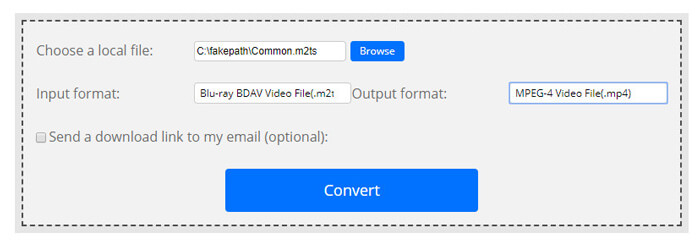
De vegades, la conversió pot fallar a causa del format d'entrada no vàlid. Per aconseguir una alta taxa d’èxit, podeu provar Free M2TS Converter.
Part 4. Com transformar M2TS a MP4 amb VLC
VLC Media Player és un reproductor multimèdia de codi obert per a Windows, Mac, Linux, iOS i Android. També funciona com un gran convertidor de M2TS a MP4 per convertir fitxers M2TS a MP4, MOV, AVI i molt més. A més, podeu editar fitxers M2TS com retallar, retallar, girar, afegir efectes d’imatge i molt més.
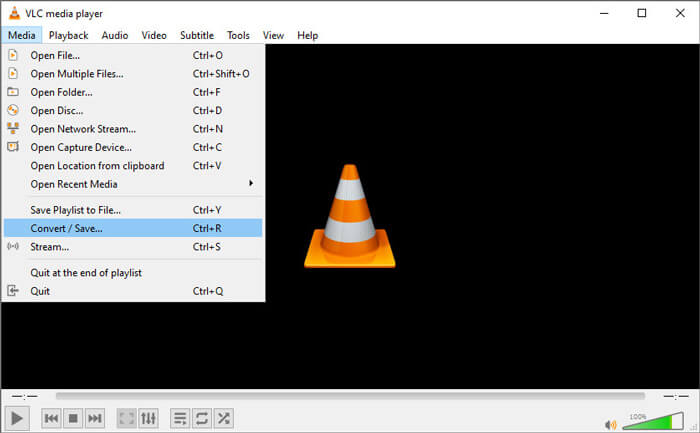
Pas 1.Descarrega i executa VLC Media Player a l’ordinador. Fes clic a Media > Convert / Save... per continuar. Després fes clic al botó Add... per afegir el fitxer M2TS.
Pas 2.Fes clic al botó Convert / Save per entrar a la finestra de conversió. Fes clic al botó desplegable Profile per seleccionar Video - H.264 + MP3 (MP4) com a format de sortida.
Pas 3.Fes clic al botó Browse per triar una carpeta de destinació. Després fes clic al botó Start per començar a convertir M2TS a MP4.
Part 5. Com exportar MP4 des de M2TS amb fre de mà
HandBrake és un altre transcodificador de vídeo lliure i de codi obert que pot convertir el vídeo des de gairebé qualsevol format. Podeu provar Handbrake per convertir el fitxer M2TS a MP4 seguint els passos següents.
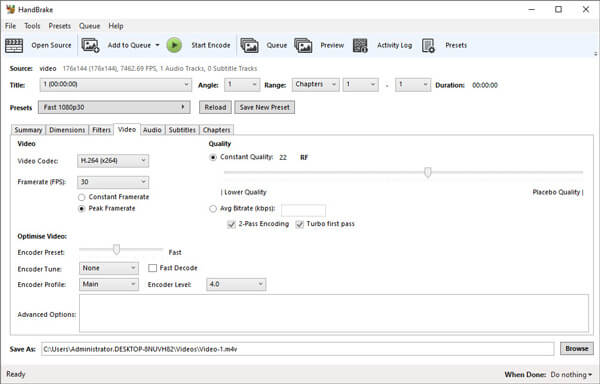
Pas 1.Descarrega gratuïtament, instal·la i obre HandBrake al teu Windows/Mac. Fes clic a Open Source a la cantonada esquerra per importar el fitxer M2TS de la carpeta local.
Pas 2.Pots ajustar la configuració del fitxer M2TS. Selecciona MP4 des del botó desplegable Format a la pestanya Summary. A la pestanya Video, pots ajustar el còdec de vídeo, la qualitat de vídeo, els fotogrames per segon i optimitzar el vídeo.
Pas 3.Fes clic al botó Browse per establir la carpeta de destinació. A continuació, fes clic al botó Start Encode per començar a convertir M2TS a MP4 de manera gratuïta.
Part 6. Preguntes més freqüents sobre la conversió de M2TS a MP4
Quina diferència hi ha entre M2TS i MP4?
M2TS significa MPEG-2 Transport System. És un format de fitxer contenidor de vídeo àudio i disc Blu-ray, que s’utilitza per multiplexar fluxos de vídeo, àudio i altres. En general, els fitxers M2TS són més grans que els fitxers MP4 amb la mateixa qualitat. Els fitxers MP4 són compatibles amb gairebé tots els reproductors multimèdia, però els fitxers M2TS només es poden reproduir en alguns reproductors.
Com puc reproduir fitxers M2TS al meu PC?
Podeu obrir directament fitxers M2TS en algunes aplicacions de reproductors multimèdia populars, com ara Windows Media Player, VLC Media Player, 5K Player, SMPlayer, Splash, etc. També podeu reproduir fitxers M2TS amb el programari Sony Picture Motion Browser.
El VLC pot reproduir fitxers M2TS?
Sí. Podeu reproduir fitxers M2TS amb VLC Media Player a Windows i Mac. Només cal que executeu el reproductor multimèdia VLC i feu clic a Multimèdia per obrir el fitxer per reproduir el fitxer M2TS a VLC. Si això no funciona per al problema del còdec, primer hauríeu de convertir M2TS a format de vídeo compatible amb VLC.
Conclusió
Amb els 5 mètodes gratuïts anteriors, podeu convertir fitxers M2TS a MP4 fàcilment. Després de la comparació, el convertidor FVC Free M2TS hauria de ser el millor convertidor de M2TS a MP4. Amb la tecnologia d’acceleració de maquinari, exporta fitxers MP4 en alta qualitat amb pocs minuts. Podeu provar aquest convertidor gratuït alhora.
-
 Guia completa sobre com convertir TS a MP4
 Què són els fitxers TS i voleu convertir TS a MP4? En aquesta publicació, us compartirem mètodes gratuïts i en línia per convertir TS a MP4.
-
 Com convertir fitxers MTS a MP4
 No saps com convertir el fitxer MTS a MP4? En aquesta guia, trobareu 6 maneres fàcils i gratuïtes de canviar el format MTS a MP4 a Windows o Mac sense pèrdues de qualitat.
-
 2 maneres senzilles de convertir gratuïtament MTS a MP3
 Teniu la necessitat d'extreure àudio MP3 del fitxer MTS però no sabeu com fer-ho? Aquesta publicació comparteix 2 maneres senzilles d'ajudar-vos a convertir MTS / M2TS a MP3 amb alta qualitat d'àudio.
