


 Video Converter Ultimate
 Gravadora de pantalla
 Reparació de vídeo
 Baixada segura
Mètodes extraordinaris per convertir MTS a M4V a l'instant
Vols un convertidor eficaç per al teu dispositiu? Aleshores, llegint la informació d’aquest article et faràs una idea. Et mostrarem diverses maneres de convertir MTS a M4V tant a Mac com a Windows. A més, descobriràs una eina en línia que pots provar per convertir més fitxers.

Part 1: Diferències entre MTS i M4V
Per veure les diferències entre aquests dos formats de fitxer, consulteu els detalls a la taula següent.
| MTS | M4V | |
| Extensió de fitxer | L'extensió de nom de fitxer d'un fitxer de vídeo de codificació de vídeo avançada d'alta definició (AVCHD) és MTS. Té una extensió de nom de fitxer .mts i inclou un vídeo HD MPEG gravat amb marques i models de càmera de vídeo específics, com ara JVC, Sony, Canon i Sanyo. Es pot obrir amb molts programaris i admet vídeos HD de fins a 1080i x 720p. | Apple Inc. va crear el format de contenidor de vídeo digital M4V. Pel que fa a l'estructura, és raonablement comparable al conegut MP4, però els fitxers M4V poden venir amb DRM. El format de vídeo principal per als vídeos a l'iTunes Store actualment és M4V, que pot multiplexar múltiples dades d'àudio i vídeo. |
| Desenvolupat per | Sony/Panasonic | Apple Inc. |
| Programes associats | Reproductor multimèdia VLC Apple Final Cut Pro X Roxio Creator NXT Pro 7 | Media Player Classic KMPlayer Reproductor multimèdia VLC Zoom Player |
| Tipus MIME | vídeo/mp2t | vídeo/x-m4v |
Part 2: excel·lents mètodes per convertir diversos MTS a M4V amb Mac
Si voleu convertir MTS a M4V amb Mac, podeu provar FVC Video Converter Ultimate. Aquesta eina fora de línia pot convertir fitxers a l'instant perquè té una velocitat de conversió 30 vegades més ràpida. A més, aquesta eina ofereix conversió per lots, que permet convertir diversos formats de fitxer alhora. A més, gairebé tots els formats de vídeo es poden penjar en aquesta aplicació perquè admet nombrosos formats de fitxer, com ara MKV, MOV, MP4, FLV, AVI, SWF i més. També podeu editar el vostre fitxer de vídeo MTS. Podeu confiar en aquesta eina si teniu diversos fitxers MTS i voleu que es combinen perquè ofereix una eina de fusió de vídeos. D'aquesta manera, podeu combinar diversos vídeos MTS en una sola peça. A més, si voleu ajustar el volum del vostre vídeo MTS, podeu utilitzar l'eina per augmentar el volum. Amb l'ajuda d'aquesta aplicació fora de línia, podeu canviar fàcilment el volum del vostre vídeo. Hi ha més funcions que podeu gaudir amb Video Converter Ultimate.
Funcions
◆ Pot convertir més de 100 formats de fitxer de vídeo.
◆ Ofereix un creador de vídeos musicals amb molts temes gratuïts.
◆ Es pot crear un collage amb plantilles i filtres gratuïts.
◆ Proporciona eines d'edició com ara un controlador de velocitat de vídeo, compressor i retallador.
◆ Pot eliminar les marques d'aigua d'un vídeo.
Seguiu els passos bàsics següents per convertir el vostre fitxer de vídeo MTS al format M4V mitjançant FVC Video Converter Ultimate al vostre Mac.
Pas 1: Des del teu Mac, descarrega FVC Video Converter Ultimate fent clic al botó Download de sota. Després, obre l’aplicació.
Descàrrega gratuïtaPer a Windows 7 o posteriorDescàrrega segura
Descàrrega gratuïtaPer a macOS 10.7 o posteriorDescàrrega segura
Pas 2: Al centre de la interfície, fes clic a la icona Plus per adjuntar el teu fitxer de vídeo MTS. També pots arrossegar el fitxer directament dins del requadre.
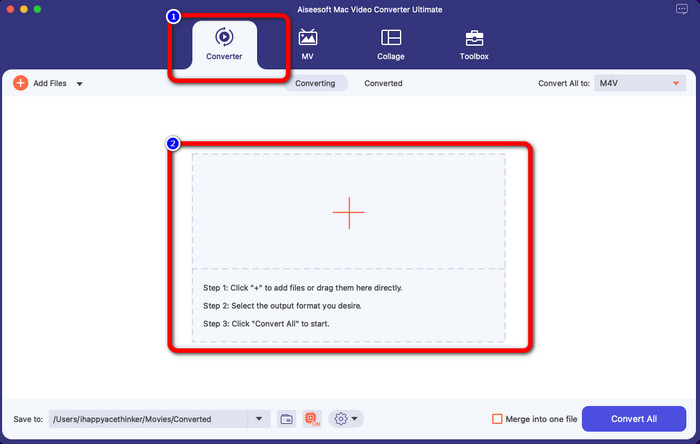
Pas 3: A continuació, veuràs el botó Convert All to a la part superior dreta de la interfície. Fes-hi clic per veure les opcions de format i, després, selecciona el format de fitxer M4V. Per afegir diversos fitxers MTS, prem el botó Add Files a la part superior esquerra de la interfície.
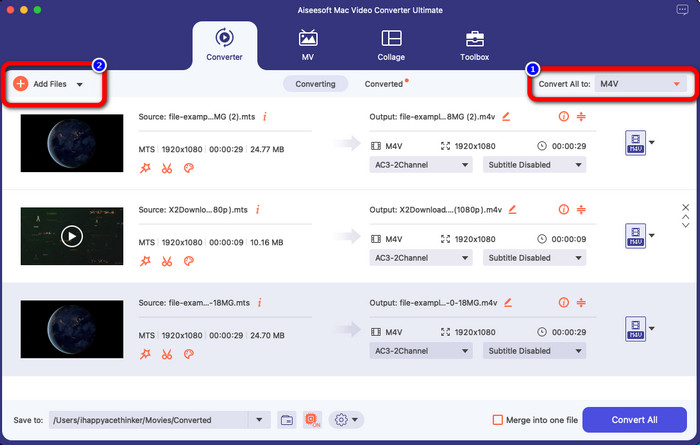
Pas 4: Després de convertir tots els fitxers MTS al format M4V, fes clic al botó Convert All i desa el resultat final a la ubicació que vulguis.
Part 3: Com convertir diversos fitxers MTS a M4V a Windows de forma gratuïta
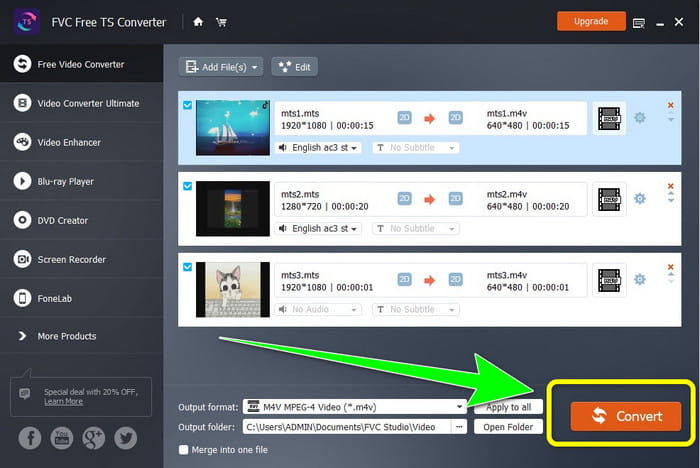
En aquesta part, descobriràs com convertir múltiples fitxers MTS en un sol M4V amb Windows. Per convertir fitxers MTS, pots utilitzar el FVC Free TS Converter. Pot convertir els teus vídeos 10 vegades més ràpid que la velocitat de conversió mitjana. Ofereix conversió per lots, de manera que pots convertir múltiples fitxers d’una vegada. Així no t’avorriràs convertint fitxers un per un. A més, té una interfície intuïtiva amb mètodes bàsics, cosa que el fa més adequat per als usuaris. Si vols convertir múltiples fitxers MTS al format M4V amb FVC Free TS Converter a Windows, segueix els senzills passos següents.
Funcions
◆ Converteix formats de fitxer de vídeo, com ara AVI, MOV, MPEG, MP4, DIVX, XVID, etc.
◆ Proporciona un millorador de vídeo.
◆ Capaç de gravar la pantalla.
◆ Pot reproduir qualsevol disc Blu-ray.
◆ Ofereix conversió per lots.
Pas 1: Descarrega FVC Free TS Converter al teu Windows fent clic al botó Download de sota. Obre l’aplicació després del procés d’instal·lació.
Free DownloadPer a Windows 7 o posteriorSecure Download
Free DownloadPer a MacOS 10.7 o posteriorSecure Download
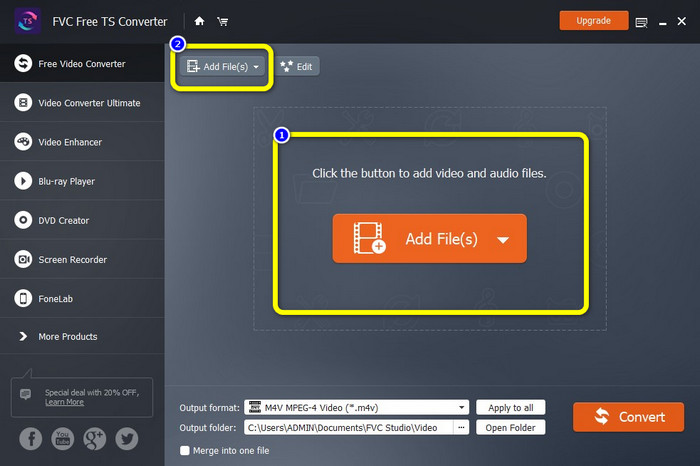
Pas 2: Després d’obrir l’aplicació, prem el botó Add Files al centre per pujar fitxers MTS. També pots fer clic a l’altre botó Add Files a la part superior de la interfície per afegir més fitxers MTS que vulguis convertir.
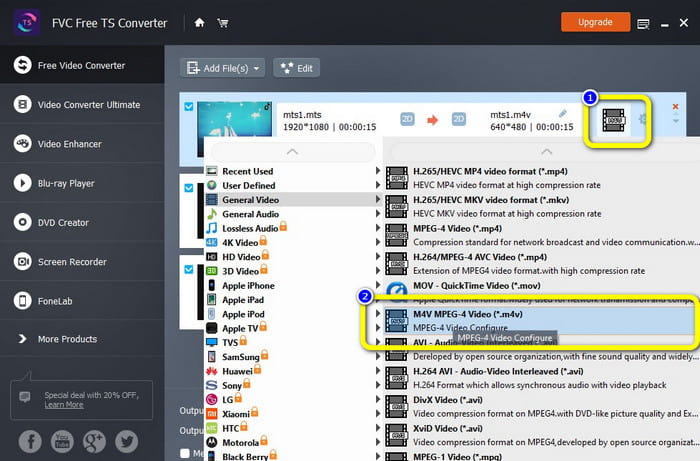
Pas 3: Fes clic a les opcions de format a la part dreta de la interfície. Després, selecciona el format de fitxer M4V com a format de sortida. Fes el mateix procediment per a la resta de fitxers MTS.
Pas 4: Prem el botó Convert per convertir múltiples fitxers MTS al format M4V.
Part 4: Millors maneres de convertir MTS a M4V mitjançant l'aplicació en línia
Quan converteixis MTS a M4V amb una eina en línia, el millor convertidor que pots utilitzar és el FVC Free Video Converter Online. Amb l’ajuda d’aquesta eina, pots convertir fàcilment el teu fitxer MTS a M4V. Només calen tres passos per convertir fitxers. A més, aquesta eina en línia és completament gratuïta. Així doncs, sense més preàmbuls, convertim el teu MTS a format de fitxer M4V. Segueix els passos que t’hem proporcionat!
Funcions
◆ Converteix diversos fitxers, com ara MP4, FLV, WMA, MOV, MTS, M4V, etc.
◆ Permet la conversió per lots.
◆ Accessible tant a Mac com a Windows.
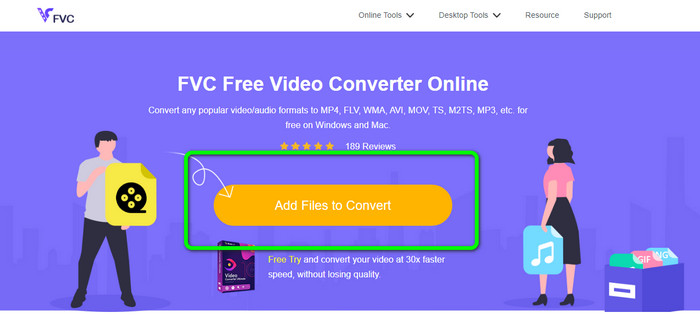
Pas 1: Visita el lloc web de FVC Free Video Converter Online. Després, fes clic al botó Add Files to Convert per pujar el teu vídeo MTS.
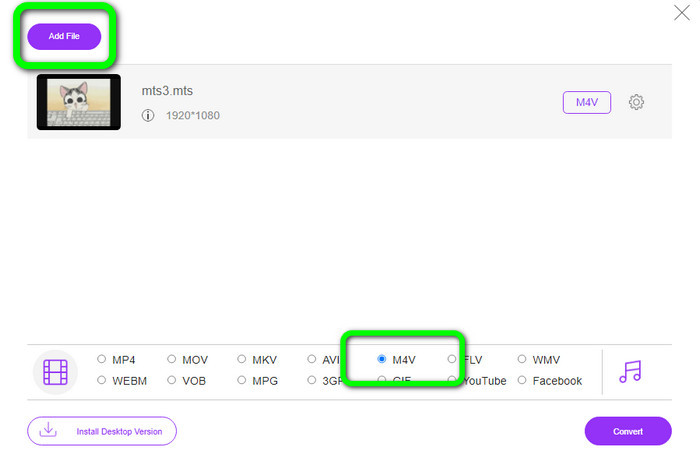
Pas 2: A continuació, selecciona el format M4V a les opcions de format situades a la part inferior de la interfície. També pots fer clic al botó Add File per convertir múltiples fitxers.
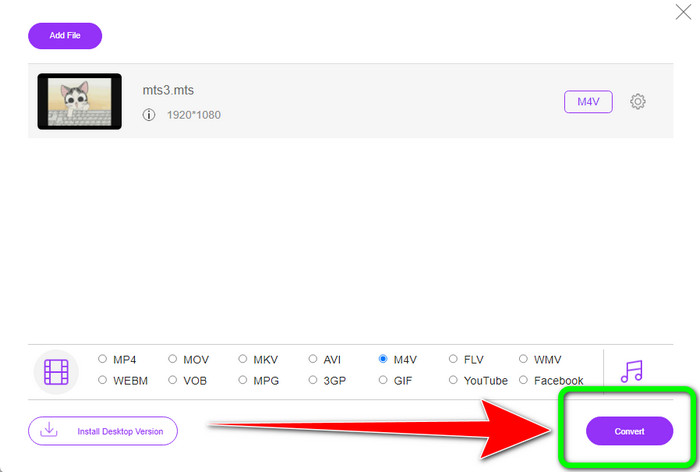
Pas 3: Després de seleccionar el format desitjat, pots fer clic al botó Convert per desar el teu vídeo en format de fitxer M4V.
Part 5: Preguntes freqüents sobre la conversió de MTS a M4V
1. MTS és un bon format?
Sí. Els còdecs de vídeo HD 720p i 1080i són compatibles amb MTS, un MPEG d'alta definició i el format de vídeo de flux de transport H.264. La gent sovint es refereix als fitxers MTS com a AVCHD, creat conjuntament per Sony i Panasonic i llançat en un format d'alta qualitat el 2006.
2. Com puc convertir MTS a MP4?
Pots utilitzar les aplicacions esmentades anteriorment. Aquests convertidors són efectius i útils per convertir MTS a MP4 i a altres formats de fitxer.
3. Per què faries servir M4V?
Els fitxers M4V poden tenir subtítols suaus i protecció DRM per aturar la pirateria i dificultar la distribució de fitxers entre els dispositius als consumidors.
Conclusió
Les tres aplicacions anteriors són els millors convertidors que pots utilitzar als teus dispositius. Si ets usuari de Windows, pots utilitzar FVC Video Converter Ultimate. Si utilitzes Mac, pots provar FVC Free TS Converter. Finalment, pots utilitzar FVC Free Video Converter Online si prefereixes una aplicació en línia. Aquests convertidors poden convertir MTS a M4V sense problemes.
-
 MTS VS M2TS: diferència entre MTS i M2TS
 Què és el fitxer MTS o M2TS? Quina diferència hi ha entre M2TS i MTS? Com puc veure el fitxer MTS o M2TS gravat amb la càmera de vídeo? Troba totes les respostes en aquesta publicació
-
 Els 5 millors reproductors M4V per a Windows / Mac / Android / iOS que hauríeu de conèixer
 Quan no pugueu reproduir els vostres vídeos M4V al QuickTime Player, hauríeu d'aprendre més dels 5 excel·lents reproductors M4V per a Windows, Mac, Android i iOS d'aquest article
-
 [Resolt] Com convertir MTS a MKV en qualitat original
 Et preguntes com pots convertir MTS a MKV de forma gratuïta? En aquest article, hem enumerat els millors convertidors gratuïts de MTS a MKV
