


 Video Converter Ultimate
 Gravadora de pantalla
 Reparació de vídeo
Com convertir ràpidament MTS a MKV de forma gratuïta
En resum, per al sistema de transport MPEG, el fitxer MTS és un format de fitxer estàndard que admet vídeos 720p i 1080i. Tanmateix, la mida del fitxer de sortida d’aquest format pot ser enorme. Per tant, l’has de convertir a un format de fitxer àmpliament compatible i amb una mida més petita, com el format MKV. I en aquest article et presentem les millors maneres de convertir MTS a MKV de franc.

Part 1. 2 Millors eines en línia gratuïtes que converteixen MTS a MKV
FVC Free Video Converter en línia
Avui dia la gent prefereix utilitzar un convertidor en línia en lloc d’instal·lar un convertidor d’escriptori. FVC Free Online Video Converter és un convertidor en línia que et permet convertir fitxers com MTS a MKV, MP4, WMV, AVI, FLV i més. Tot i ser un convertidor en línia gratuït, no compromet la qualitat del teu fitxer durant la conversió. A més, disposa de funcions per editar la resolució i el bitrate de vídeo o d’àudio.
Aquests són els passos sobre com convertireu el vostre fitxer MTS a MKV mitjançant aquesta eina en línia gratuïta:
Pas 1. Per utilitzar aquest convertidor, fes clic en aquest enllaç per anar directament a la seva pàgina web.
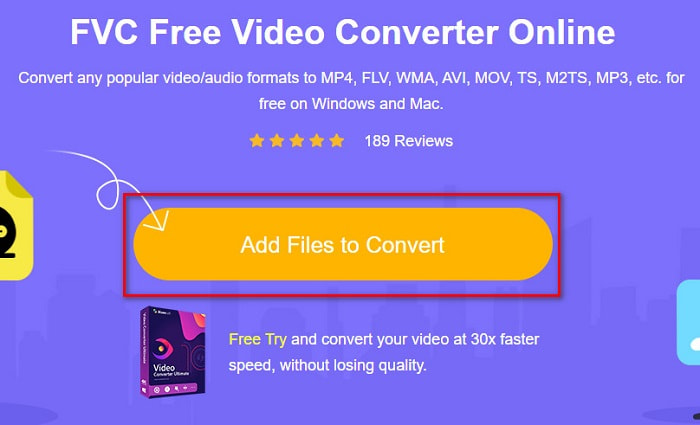
Pas 2. El pas següent és fer clic al botó Add Files to Convert per descarregar el llançador. Un cop descarregat el llançador, apareixeran els fitxers del teu ordinador; després tria el teu fitxer MTS per pujar-lo.
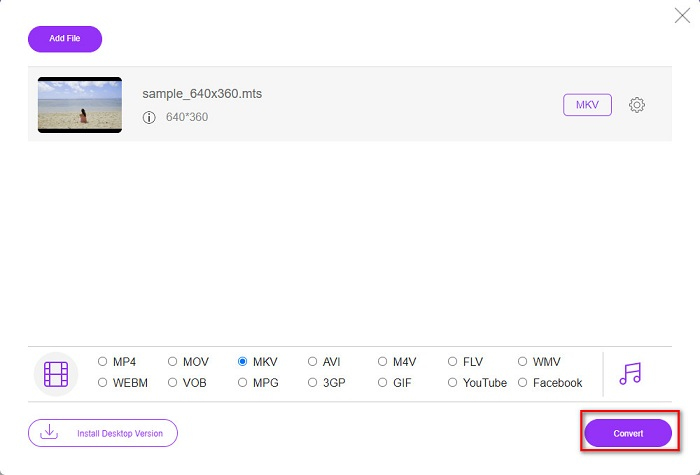
Pas 3. Després de triar el fitxer MTS, fes clic al fitxer MKV que hi ha a la part inferior de la interfície del programari.
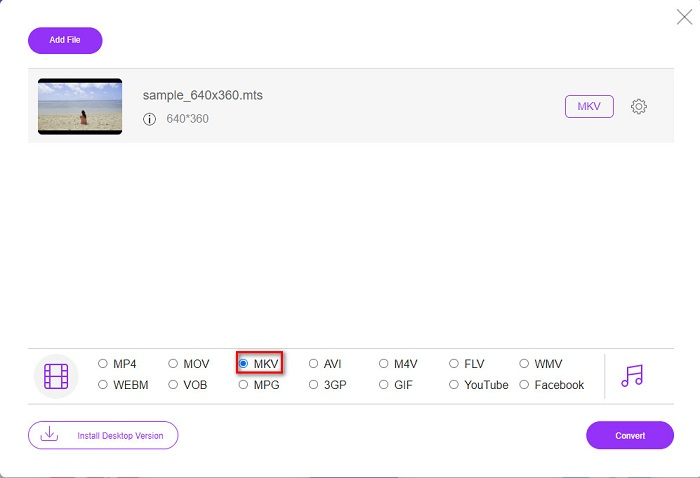
Pas 4. Finalment, fes clic al botó Convert per convertir el teu fitxer MTS a un fitxer MKV. Després, espera que el fitxer es converteixi.
Seguint aquests senzills passos, podeu convertir MTS a MKV de forma gratuïta i en línia.
AnyConv
Un altre convertidor en línia que pots utilitzar per convertir fitxers sense perdre qualitat és AnyConv File Converter. Aquest convertidor també transforma nombrosos formats de fitxer, incloent-hi MTS a MKV, AVI, MP4, MOV, MPEG, etc. Tanmateix, només disposa de funcions limitades. No pots editar ni canviar la resolució del teu fitxer. També és basat al web; per tant, és possible que experimentis una conversió lenta. Tot i així, és molt utilitzat per la seva comoditat.
Passos sobre com utilitzar AnyConv File Converter:
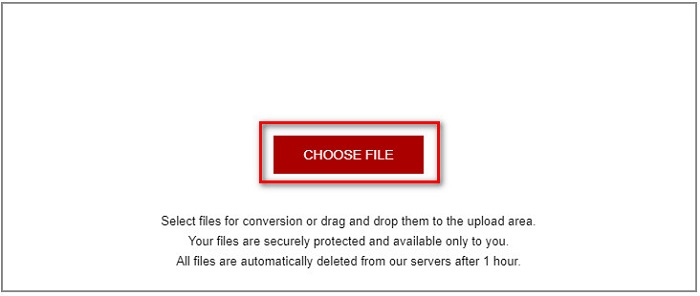
Pas 1. Cerca AnyConv File Converter al teu navegador. Després d’accedir al seu lloc web, fes clic al botó Choose Files per seleccionar el teu fitxer MTS als fitxers de l’ordinador.
Pas 2. Després de seleccionar el teu fitxer MTS, fes clic al botó drop-down i tria el format de fitxer MKV.
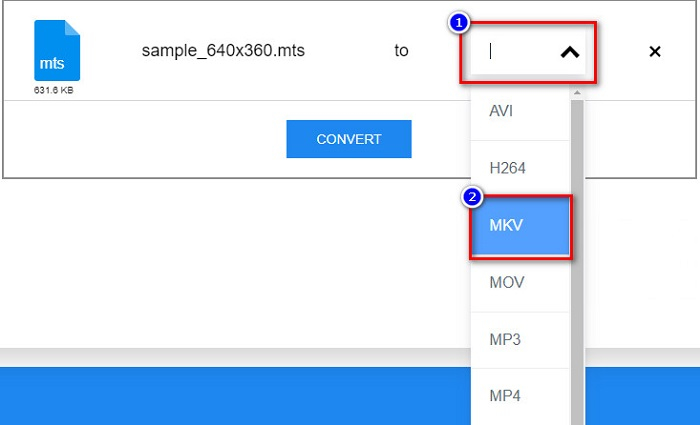
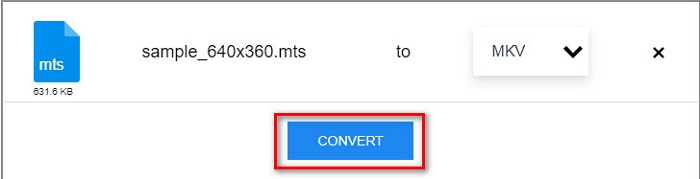
Pas 3. Finalment, fes clic al botó Convert per començar la conversió del teu fitxer MTS a MKV.
Part 2. Converteix MTS a MKV a Windows 10/11 sense pèrdues
Si esteu buscant un convertidor per al vostre Windows 10/11, FVC Video Converter Ultimate és la millor eina per a vosaltres. Admet diversos formats de fitxer i pot convertir MTS a MKV, MP4, WebM, VOB, MPG, AVI i molts més. A més, aquest convertidor té una funció on podeu crear GIF i fins i tot crear un vídeo en 3D. També podeu convertir MTS a MKV de manera ràpida i senzilla sense perdre la qualitat del vostre fitxer.

FVC Video Converter Ultimate
Més de 5.689.200 descàrregues- Podeu convertir els vostres fitxers per lots amb aquest convertidor.
- Us permet convertir diversos formats de fitxer com MTS, MKV, MP4, WMV, etc.
- Té una característica que us permet tenir una conversió ultra ràpida.
Descàrrega gratuïtaPer a Windows 7 o posteriorDescàrrega segura
Descàrrega gratuïtaPer a macOS 10.7 o posteriorDescàrrega segura
A continuació, es mostra com podeu utilitzar FVC Video Converter Ultimate amb aquests senzills passos:
Pas 1. Primer, descarrega l’aplicació fent clic al botó Download que hi ha a continuació per a Windows. Després executa el programari per continuar amb el pas següent.
Descàrrega gratuïtaPer a Windows 7 o posteriorDescàrrega segura
Descàrrega gratuïtaPer a macOS 10.7 o posteriorDescàrrega segura
Pas 2. Després d’obrir el convertidor, fes clic al botó Add Files, o bé arrossega i deixa anar el teu fitxer sobre el botó amb el signe + per pujar el teu fitxer MTS. A continuació, el fitxer es carregarà a la llista.
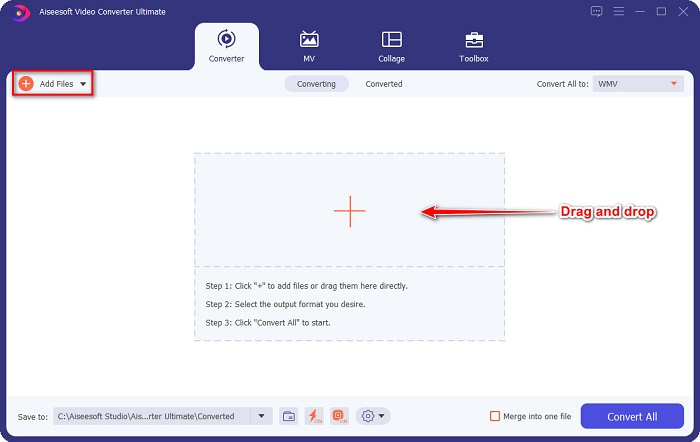
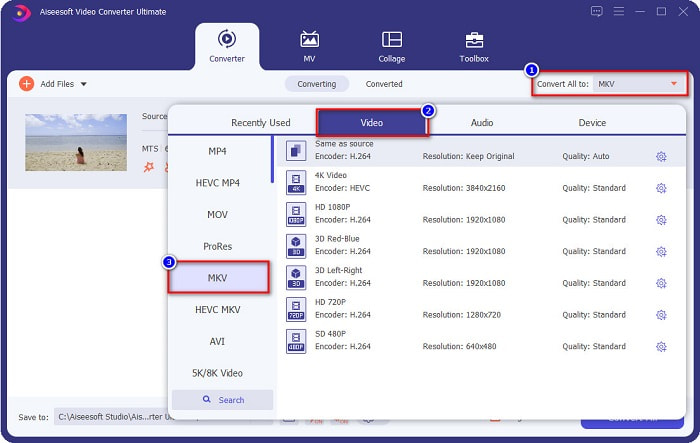
Pas 3. Per triar el format de fitxer al qual vols convertir el teu fitxer MTS, fes clic al botó Convert All to i selecciona el fitxer MKV.
Pas 4. Per acabar, fes clic al botó Convert All per començar a convertir el teu fitxer MTS a un fitxer MKV. I voilà! En només uns segons, el teu fitxer convertit estarà llest.
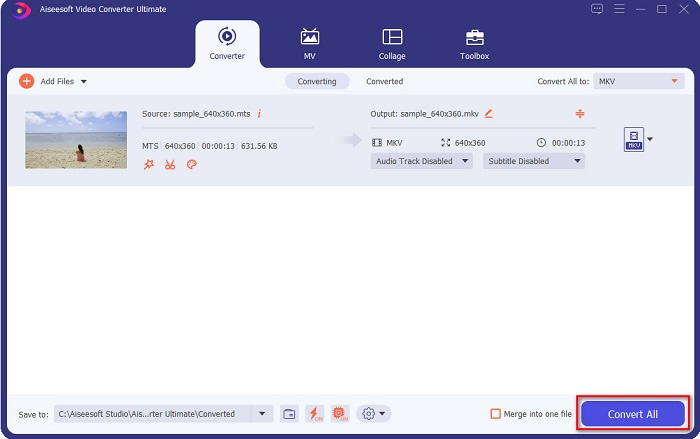
Seguint aquests senzills passos, podeu convertir MTS a MKV tan ràpidament com 1-2-3!
Part 3. Per què convertir el fitxer MTS al format de fitxer MKV
El fitxer MTS, en resum per MPEG Transport System, és un format de fitxer estàndard utilitzat principalment per les càmeres de vídeo HD de SONY i Panasonic. És un fitxer que utilitza compressió de vídeo MPEG4/H.264. A més, admet vídeos de 720p i 1080i, que altres formats de fitxer no admeten. Com que Panasonic i Sony van desenvolupar aquest fitxer, utilitza un fitxer de codificació d'àudio avançat relacionat amb el format de fitxer AVCHD. D'altra banda, el fitxer MKV o Matroska és un format de fitxer estàndard que admet molts còdecs d'àudio i vídeo. Normalment s'utilitza per emmagatzemar vídeos i pel·lícules curtes.
A més, també admet pistes de subtítols. És per això que nombroses persones que fan servir aquest format de fitxer. Aleshores, per què convertir MTS a MKV? Simplement perquè la mida del fitxer MKV és més petita del que conté el format de fitxer MTS.
Part 4. Quadre de comparació sobre els convertidors en línia i fora de línia
| CARACTERÍSTIQUES | Convertidor en línia gratuït de FVC | Convertidor de fitxers AnyConv | FVC Video Converter Ultimate |
| Velocitat de conversió | Normal | Normal | Molt ràpid |
| Formats de fitxer a convertir | MKV, MP4, MTS, MPG, MOV, AVI, WMV, FLV i altres formats de fitxer | MTS, MKV, AVI, MOV, MP4, MPEG i altres formats | Admet més de 1000 formats de fitxer |
| Funcions d'edició | – | – |  |
| Conversió per lots | – | – | |
| Connexió a Internet | Necessari | Necessari | No necessari |
Part 5. Preguntes freqüents sobre la conversió de MTS a MKV
Es pot reduir la mida d'un fitxer MTS?
Sí. Pots comprimir la mida d’un fitxer MTS utilitzant una eina de compressió disponible en línia i fora de línia, com ara Free Video Compressor.
On podeu reproduir formats de fitxer MKV?
Pots reproduir fitxers MKV al Windows Media Player, VLC Media Player, DivX Player, MX Player i més. També pots utilitzar còdecs multimèdia per codificar i descodificar fitxers multimèdia. O bé pots convertir el teu fitxer MKV al format MP4, que és un format àmpliament utilitzat.
Podeu convertir MTS a MKV a Handbrake?
Sí. Aquest convertidor també us permet convertir el vostre fitxer MTS a format de fitxer MKV. Tanmateix, no admet diversos fitxers i no els pot combinar en un de sol.
Conclusió
Hi ha molts convertidors en línia i fora de línia disponibles actualment al mercat. I els convertidors que hem esmentat més amunt són alguns dels que més gent fa servir i que han demostrat ser fantàstics per utilitzar. A més, aquests convertidors tenen funcions i capacitats diferents per convertir MTS a MKV de franc en línia. Però, si busques un convertidor còmode i eficient, et recomanem que facis servir FVC Video Converter Ultimate. Aquest convertidor ultraràpid no decebrà les teves expectatives. Així que, si estàs preparat per convertir fitxers, descarrega’l ara mateix!
-
 [Gratis i en línia] 6 maneres de convertir MTS a MP4 en alta qualitat
 No saps com convertir el fitxer MTS a MP4? En aquesta guia, trobareu 6 maneres fàcils i gratuïtes de canviar el format MTS a MP4 a Windows o Mac sense pèrdues de qualitat.
-
 Com convertir MTS a WMV sense perdre la qualitat
 Estàs lluitant per veure el teu programa preferit perquè el teu reproductor multimèdia no és compatible amb el format de vídeo MTS? Intenta convertir-lo a WMV amb aquests nous i millors convertidors presents en aquest article.
-
 Com convertir MTS a MP3 sense pèrdua de qualitat (AVCHD a MP3)
 Teniu la necessitat d'extreure àudio MP3 del fitxer MTS però no sabeu com fer-ho? Quin és el millor convertidor de MTS a MP3? Aquesta publicació comparteix 2 maneres senzilles d'ajudar-vos a convertir MTS / M2TS a MP3 amb alta qualitat d'àudio.
