


 Video Converter Ultimate
 Gravadora de pantalla
 Reparació de vídeo
 Baixada segura
Com convertir els vostres fitxers TS a format FLV sense pèrdua de qualitat
Aquesta guia se centra en com convertir TS a FLV. En termes generals, hi ha dos tipus de formats de vídeo: els habituals i els altres. FLV és un dels formats de vídeo habituals desenvolupats per a internet, mentre que TS pertany al segon grup. TS, abreviatura de Video Transport Stream, s’utilitza per emmagatzemar dades de vídeo MPEG-2. Sovint es troben en DVDs. Bé, comencem el recorregut ara.

Primera part: 3 maneres fàcils de convertir TS a FLV a l'escriptori
Manera 1: Converteix TS a FLV amb el convertidor FLV gratuït
Com el seu nom indica, FVC Free FLV Converter és just el convertidor FLV que necessites per transformar TS a FLV, de manera que puguis veure els teus fitxers o compartir-los a les xarxes socials. És totalment gratuït, sense marca d’aigua ni cap altre límit. Fins i tot ofereix algunes funcions que només sol trobar-se en programari de pagament.
Característiques principals del millor convertidor FLV
- 1. Converteix fàcilment entre FLV i altres formats de vídeo.
- 2. Protegiu la qualitat de vídeo i àudio mentre feu la conversió.
- 3. Gestioneu per lots diversos fitxers de vídeo TS al mateix temps.
Descàrrega gratuïtaPer a Windows 7 o posteriorDescàrrega segura
Descàrrega gratuïtaPer a MacOS 10.7 o posteriorDescàrrega segura
Com convertir fitxers TS a FLV de forma gratuïta
Pas 1: Importa fitxers TS
Inicieu el millor convertidor FLV després d’instal·lar-lo a l’ordinador. A continuació, feu clic al botó Afegeix fitxers per importar tots els fitxers TS del vostre DVD o ordinador. A continuació, els vídeos apareixeran a l'àrea de la biblioteca.

Pas 2: Defineix el format de sortida
Si has d’editar els vídeos, fes clic al botó Edita per obrir la finestra de l’editor de vídeo. Si no, ves a la part inferior, fes clic i desplega l’opció Format de sortida. A continuació, cerca FLV a la pestanya Vídeo general i selecciona’l.

Pas 3: Converteix TS a FLV
A continuació, defineix una carpeta específica per desar els fitxers FLV de sortida fent clic al botó Browse. Finalment, fes clic al botó Converteix a l’angle inferior dret per començar a convertir TS a FLV.

Manera 2: Com convertir TS a FLV per VLC
VLC és una altra manera de convertir TS a FLV de forma gratuïta, ja que és un projecte de codi obert. Està disponible per a PC, Mac i Linux. Els costos són òbviament. La qualitat de sortida no és molt bona i el procediment és complex. Si no us importa, seguiu els passos següents.
Pas 1: Obre VLC, fes clic al menú Mitjans i tria Converteix/Desa. Es mostrarà el diàleg d’obrir mitjans.
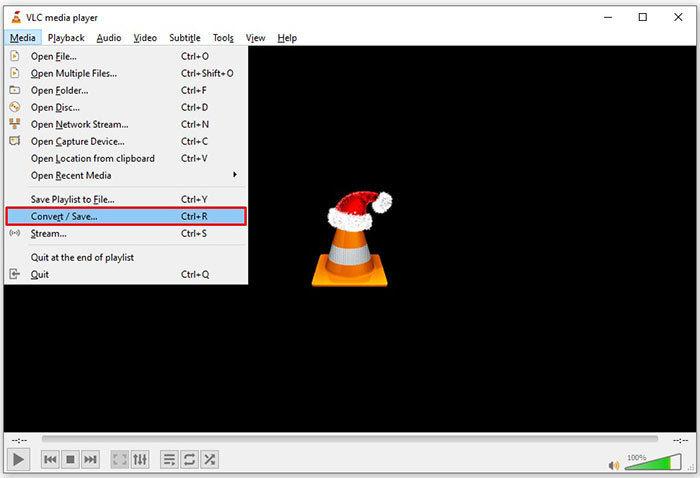
Pas 2: Fes clic al botó Afegeix i afegeix un fitxer TS a VLC. Prem el botó Converteix/Desa per continuar.
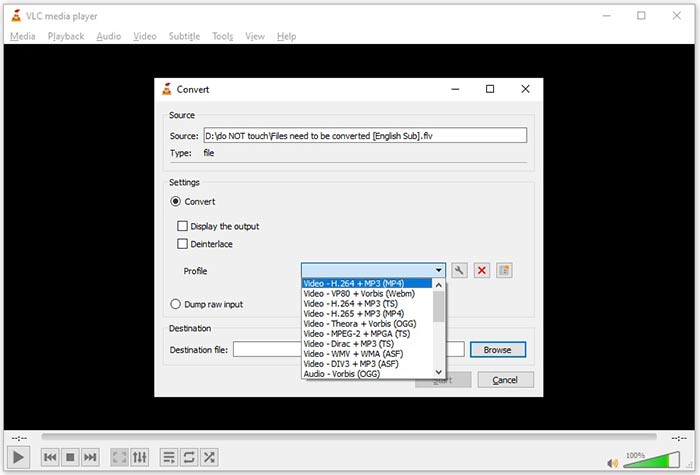
Pas 3: Obre l’opció Perfil i tria el format de sortida. Si no pots trobar FLV a Perfil, fes clic al botó Edita perfil, escriu FLV al quadre Nom del perfil, selecciona FLV i fes clic a Crea. Després selecciona FLV a Perfil.
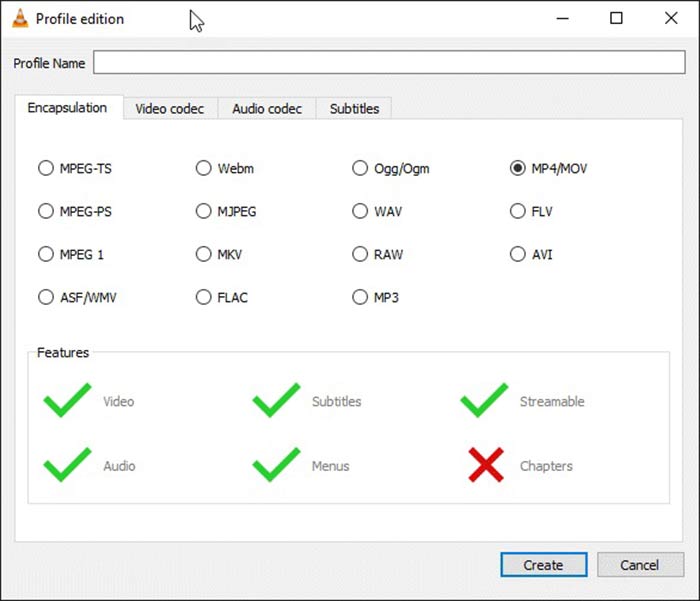
Pas 4: Prem el botó Browse per definir la carpeta de destinació i fes clic al botó Inicia.
Manera 3: Com convertir TS a FLV mitjançant FormatFactory
FormatFactory és un programa gratuït de conversió de fitxers per a PC. Us permet convertir fitxers TS a FLV sense pagar ni un cèntim. Tot i això, només admet la conversió amb pèrdues. Vol dir que la qualitat del vídeo es reduirà. A més, no està disponible per a Mac ni Linux.
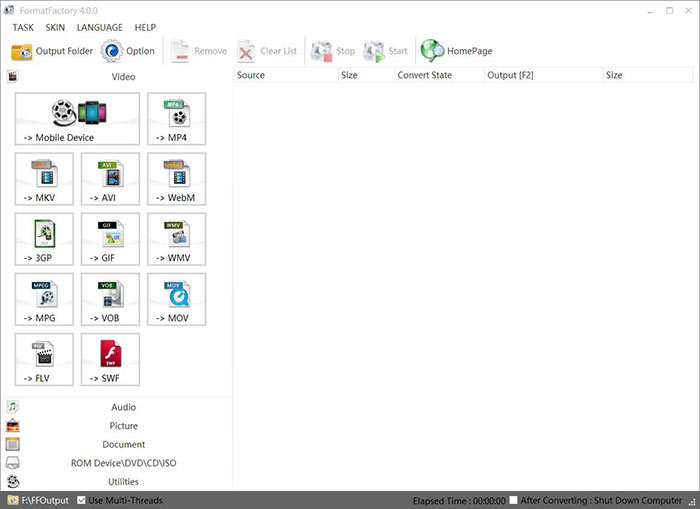
Pas 1: Executa el convertidor gratuït de TS a FLV, ves a la secció Vídeo i selecciona FLV.
Pas 2: Fes clic al botó Afegeix fitxer i importa els fitxers de vídeo TS des de l’ordinador. Prem D’acord per confirmar.
Pas 3: A continuació, fes clic al botó Inicia per començar a convertir TS a FLV a l’ordinador. Trigarà una estona, ja que el programari gratuït és força lent. Quan acabi, podràs anar al directori indicat a la secció Sortida per trobar els fitxers FLV.
Part 2: Com convertir TS a FLV en línia
VLC i altres programes de conversió de vídeo requereixen instal·lació al disc dur. Això ocupa espai de la memòria interna. Et pots preguntar si és possible convertir TS a FLV sense instal·lar cap programa. La resposta és FVC Free Online Video Converter. Funciona en línia i és gratuït. Tot i que no ofereix funcions extres, és suficient per satisfer les necessitats bàsiques de conversió de vídeo.
Pas 1: Obre https://www.free-videoconverter.net/free-online-video-converter/ en un navegador web i fes clic al botó Add Files to Convert per descarregar el llançador.

Pas 2: Quan finalitzi la descàrrega, apareixerà el llançador. Fes clic al botó Add File per pujar els fitxers TS. Aquesta aplicació web admet la conversió per lots. Ves a la part inferior i selecciona FLV a la part inferior.

Pas 3: Quan estiguis a punt, fes clic al botó Converteix per iniciar la conversió de TS a FLV. L’aplicació funciona ràpid, però el temps real depèn de la teva connexió a internet. Espera que la conversió acabi i descarrega el fitxer FLV de sortida.
No t’ho perdis:
- • Guia completa sobre com convertir TS a MP4
- • Com convertir fitxers TS a formats MP3, AIFF, ALAC, FLAC i més àudio a Windows / Mac
Part 3: Preguntes més freqüents sobre la conversió de TS a FLV
Per què no puc convertir TS a altres formats?
TS és el format de fitxer de vídeo per a DVD. La majoria dels DVD comercials estan encriptats i protegits per drets d'autor. Això també us impedeix convertir fitxers TS si no teniu el programari de conversió de vídeo adequat.
Puc obrir TS al Windows Media Player?
El Windows Media Player no pot obrir fitxers DVD o TS, de manera que no podeu reproduir TS en WMP. Com a alternativa, podeu utilitzar un reproductor de vídeo de tercers, com ara VLC. O heu d’instal·lar un paquet de còdecs addicional per a WMP.
Com veure fitxers TS?
Només alguns reproductors multimèdia admeten fitxers TS, com ara VLC. Els reproductors multimèdia integrats a PC i Mac, Windows Media Player i QuickTime Player, no són compatibles amb TS. Una altra manera de veure fitxers TS és gravar-los en DVD.
Conclusió
Ara hauríeu d'aprendre almenys quatre maneres de convertir fitxers TS a vídeos FLV per compartir-los en línia o reproduir-los en dispositius digitals. Com a format de vídeo per a pel·lícules en DVD, TS no s’utilitza àmpliament en ordinadors o dispositius mòbils. Té sentit que la majoria dels reproductors multimèdia no puguin obrir-lo. Convertidor FLV gratuït de FVC; no obstant això, us ajuda a canviar TS a FLV fàcilment. Més preguntes? Escriviu-los a sota d’aquest missatge i us respondrem.
-
 3 senzills passos per gravar fitxers _TS / carpeta de vídeo en DVD al Mac / Windows
 Com puc convertir i gravar fitxers TS a disc DVD? Aquesta guia pas a pas us mostrarà com copiar fitxers i carpetes TS a DVD al Windows / Mac perquè pugueu veure fitxers TS al reproductor de DVD o al televisor.
-
 6 maneres fàcils de convertir TS a AVI / MKV / MOV / WMV a Windows / Mac
 Voleu convertir fitxers TS a AVI / MKV / MOV / WMV ràpidament? En aquest article es mostren els convertidors de vídeo en línia i fora de línia amb una guia completa. Potser podeu obtenir el millor convertidor gratuït de TS aquí.
-
 Comprimir fitxers de vídeo TS - Com comprimir fitxers TS en mides més petites
 Quan vulgueu desar els fitxers de vídeo TS d’alta definició als vostres dispositius, heu d’obtenir més informació sobre com comprimir fitxers de vídeo TS en mides més petites d’aquest article.
