


 Video Converter Ultimate
 Gravadora de pantalla
 Reparació de vídeo
Maneres destacades i útils de convertir 3GP a FLV [provat]
Els fitxers d’àudio i vídeo es poden desar en format 3GP, utilitzat habitualment als telèfons 3G. Fins i tot als telèfons 2G i 4G, també funciona. A través d’internet, aquest contenidor basat en MP4 envia i rep fitxers multimèdia. Tot i això, molts serveis de vídeo en línia i de reproducció en temps real d’àudio utilitzen FLV, un contenidor de vídeo compatible amb Flash. A més d’Adobe Flash Player, molts altres reproductors de vídeo poden reproduir fitxers FLV. Per fer que els fitxers 3GP siguin més accessibles i de mida més reduïda, hi ha diverses maneres senzilles de convertir-los a FLV. A continuació tens els convertidors que hauries de considerar per convertir 3GP a FLV.

Part 1. Excel·lents mètodes per convertir 3GP a FLV [fora de línia]
Video Converter Ultimate és una eina perfecta per convertir fitxers 3GP a FLV sense sacrificar la qualitat. Utilitzant la tecnologia SuperSpeed del programa, els usuaris poden convertir fins i tot fitxers grans en qüestió de minuts. A més, l'aplicació us permet editar els vostres fitxers com us convingui: retallar, girar i retallar els vostres vídeos; ajustar els paràmetres de color; canviar la resolució de vídeo i la taxa de bits; o afegir subtítols. Tots els dispositius més populars, inclosos iPhone, iPad, dispositius basats en Android, Xbox i PlayStation, poden ser compatibles amb aquest programari. Ara ja coneixeu una breu introducció a aquest programari, és hora que entengueu com convertir 3GP a FLV mitjançant aquest programari.
Pas 1: Primer descarrega el programari fent clic a Baixada gratuïta situat a sota. Tens l’oportunitat de descarregar-lo per a Windows o Mac. Després de descarregar-lo, instal·la el programari a l’ordinador i executa’l fent clic a Inicia ara a la finestra que apareixerà a la pantalla un cop hagis instal·lat el programari.
Descàrrega gratuïtaPer a Windows 7 o posteriorDescàrrega segura
Descàrrega gratuïtaPer a macOS 10.7 o posteriorDescàrrega segura
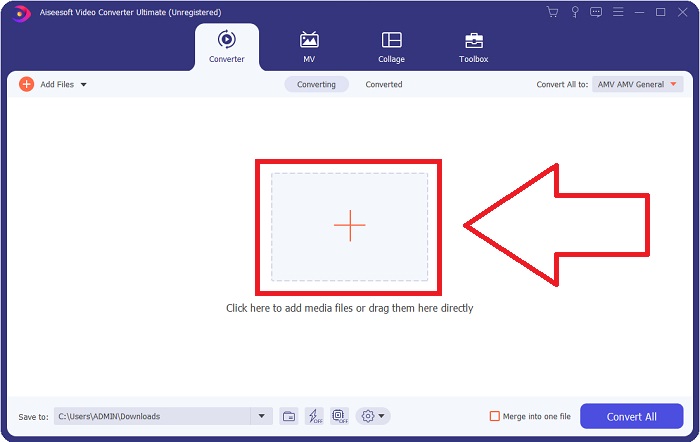
Pas 2: Per començar la conversió, primer has de pujar un fitxer i, per fer-ho, fes clic al botó + al mig de la interfície del programari, o bé arrossega directament els teus fitxers de vídeo des de l’ordinador.
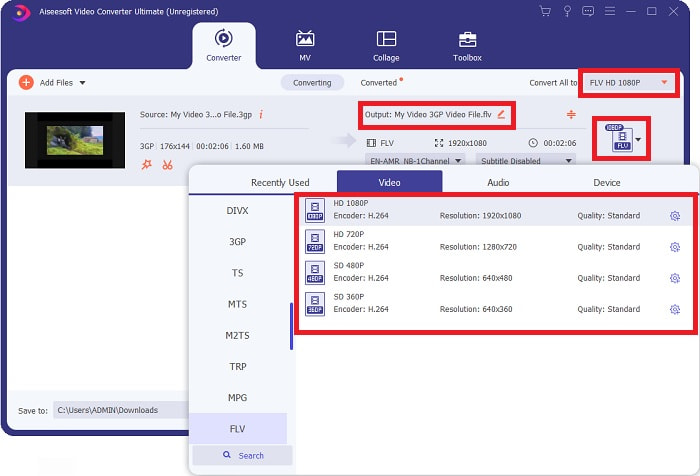
Pas 3: Un cop hagis acabat de pujar un fitxer, ja pots triar el format FLV al selector de formats situat al cantó dret de la pantalla. Pots triar el tipus de qualitat que vulguis, ja que es mostraran tots els atributs possibles que podries necessitar.
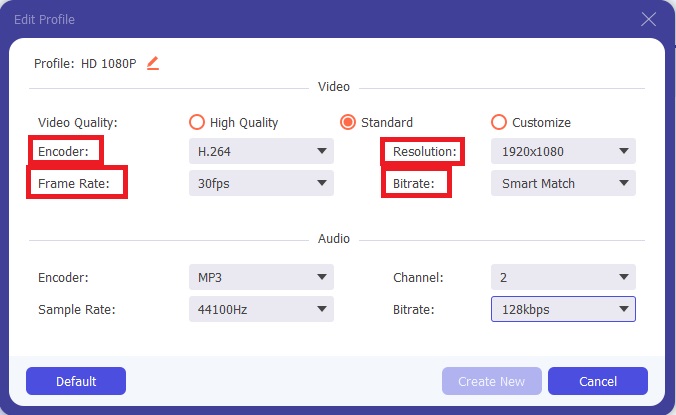
Pas 4: Tot i les opcions de qualitat que es presenten, pots crear la qualitat que vulguis si la que prefereixes no existeix entre les opcions. Fes clic a la icona d’engranatge i ajusta tot el contingut que vegis després que aparegui una finestra emergent. La resolució fa referència a la qualitat de visualització de la pantalla i la taxa de fotogrames a la freqüència de reproducció del vídeo; la taxa de bits correspon a la quantitat de dades codificades en un moment donat. Finalment, el codificador és l’encarregat del lliurament del format de vídeo.
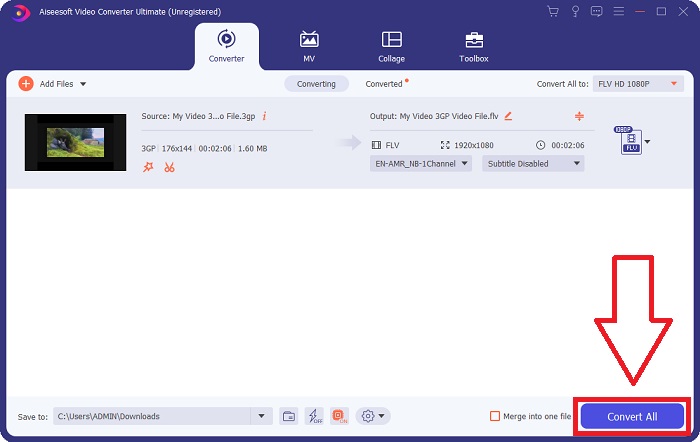
Pas 5: Finalment, després d’ajustar tot el que necessites a la sortida del teu vídeo, ja el pots convertir fent clic a Converteix-ho tot.
Part 2. Un altre mètode interessant per convertir 3GP a FLV [en línia]
Deixant de banda el programari en si, parlem ara d’aquesta eina en línia que segur que t’ajudarà a convertir 3GP a FLV. Et presentem el Convertidor de vídeo gratuït en línia, amb molts formats admesos per aquest convertidor en línia, inclosos 3GP i FLV. Pots convertir un fitxer directament des del teu ordinador pujant-lo. Per pujar un fitxer de més de 500 MB, pots utilitzar aquesta eina en línia per convertir 3GP a FLV. Els usuaris poden canviar molts paràmetres abans que comenci la conversió. Per exemple, pots canviar el còdec d’àudio i el volum de l’àudio. També pots canviar la resolució del vídeo. Després de tota la informació proporcionada, aprenguem tots els passos que cal conèixer.
Pas 1: Aquí tens l'enllaç de l’eina en línia. Fes-hi clic perquè la pàgina principal s’obri al navegador. Fes clic a Afegeix fitxers per convertir per descarregar el llançador que faràs servir per operar l’eina en línia. Instal·la el llançador i comença a pujar un fitxer.
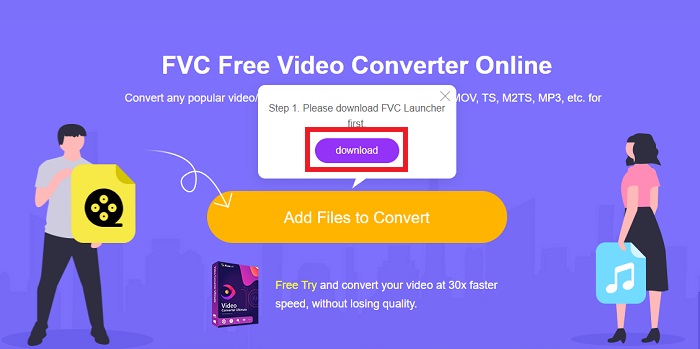
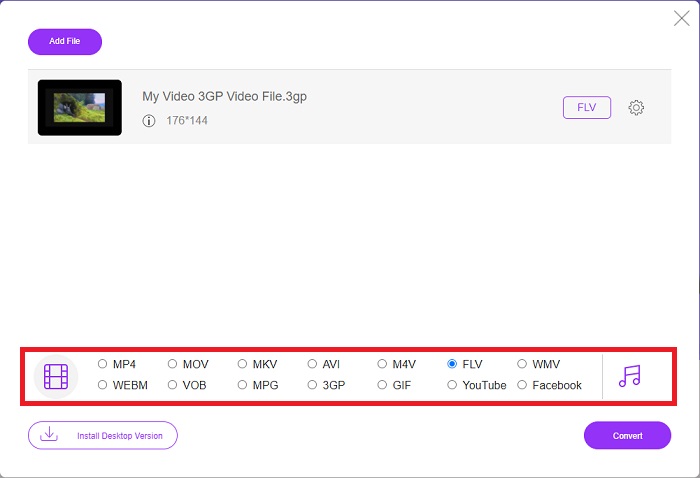
Pas 2: Per pujar un fitxer, torna a fer clic a Afegeix fitxers per convertir. Després de pujar el fitxer, ja pots triar el format de vídeo FLV a la selecció de formats de vídeo situada al cantó inferior de la finestra.
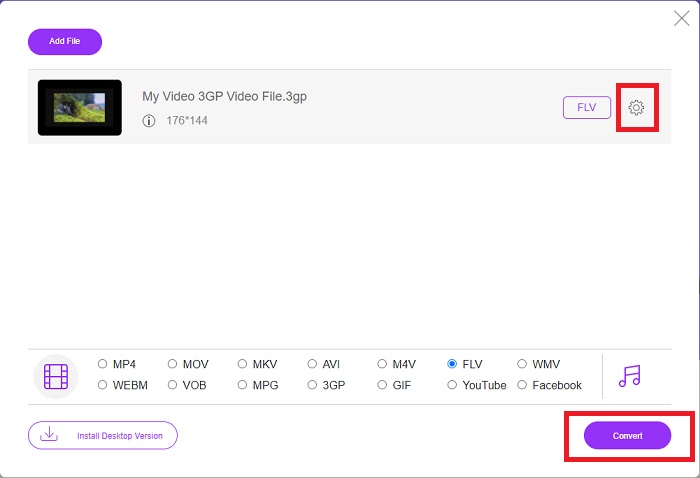
Pas 3: També pots editar la qualitat del teu vídeo o altres especificacions, com la resolució, la taxa de fotogrames o la taxa de bits, fent clic a la icona d’engranatge just al costat del format de vídeo que hagis seleccionat, situada al cantó dret de la finestra. Després d’haver ajustat tots els paràmetres preferits de la teva sortida, ja pots convertir el fitxer fent clic a Converteix.
Part 3. Una visió general: 3GP vs. FLV
Si alguna vegada has volgut desar un clip d'àudio i vídeo en format 3GP, has vingut al lloc correcte! (3GPP). El format de fitxer multimèdia ISO serveix com a base per a 3GPP, un format de contenidor multimèdia. S'admeten els fluxos de vídeo H.263 o H.264 i els fluxos d'àudio AMR-WB, AMR-WB+, AMR-NB, HE-AAC v1, AAC-LC o Enhanced aacPlus. Normalment, els fitxers 3GP utilitzen telèfons mòbils 3G per capturar vídeos, però els usuaris també els poden reproduir en alguns telèfons 2G i 4G. Tot i que els fitxers 3GP encara estan en ús, la seva popularitat ha disminuït a mesura que els formats de vídeo més eficients han suplantat el format 3GPP.
Tanmateix, els fitxers de vídeo desats en format de contenidor Adobe Flash Video (FLV) són documents FLV. Els fluxos d'àudio i vídeo es poden codificar de la mateixa manera que el Flash estàndard. El format SWF i els paquets de metadades inclouen una capçalera curta. El connector Flash Video Exporter (disponible amb Adobe Animate) o una aplicació que admeti fitxers FLV poden produir contingut Flash Video i exportar-lo com a fitxers FLV. Adobe Media Encoder també pot codificar vídeo en formats QuickTime o Windows Media. Ara que teniu una idea sobre 3GP i FLV, us oferim un gràfic de comparació per conèixer els detalls en qüestions específiques.
| Extensió de fitxer | 3GP | FLV |
| Tipus d'arxiu | Fitxer multimèdia ISO | Arxiu de vídeo Flash |
| Desenvolupat per | Projecte d'associació de tercera generació | Adobe System |
| Pros | És més fàcil per als usuaris mòbils compartir i emmagatzemar fitxers de vídeo perquè el format de fitxer 3GP redueix la mida del vídeo i els components d'àudio. Tot i que el format de fitxer dissenyat per 3GP utilitza dispositius compatibles amb 3G, molts dispositius 2G i 4G poden reproduir aquest format. | Per als llocs web que volen incloure animació i elements interactius, Adobe Flash és una opció excel·lent. A llarg termini, pot tenir un impacte substancial. Durant el seu apogeu, Flash va utilitzar jocs senzills. |
| Contres | Tot i que els fluxos de vídeo i àudio es poden comprimir en un únic fitxer, la qualitat i la resolució reduïda, els usuaris poden millorar enormement l'experiència de l'usuari en comparació amb altres formats, com ara la qualitat d'àudio, la resolució de pantalla, la velocitat de reproducció, etc. | És un desavantatge, per descomptat, que la popularitat de FLV s'hagi reduït durant els últims anys. Es necessita molt de temps i diners per crear contingut FLV. Un altre inconvenient de Flash és que no es pot visualitzar en dispositius iOS, la qual cosa limita molt la seva capacitat per atraure nous fans. |
| Els programes obren el format de vídeo | ◆QuickTime Player ◆Reproductor de Windows Media | ◆VLC Media Player ◆Adobe Flash Player |
Part 4. Preguntes freqüents sobre la conversió de 3GP a FLV
El 3GP és de bona qualitat?
La velocitat de bits i la velocitat de fotogrames variables admeten 3GP, igual que en MP4. 3GP era un format popular per als telèfons amb funcions quan encara eren la forma de comunicació més comuna. Necessitem un vídeo petit perquè antigament l'espai era un luxe. La qualitat és igual a la de les càmeres de qualitat de patata que teníem als telèfons en aquell moment, així que no és impactant.
Per què no es reprodueix 3GP?
Prova de reproduir el fitxer 3GP amb VLC Media Player en lloc del teu reproductor multimèdia per defecte si aquest no admet còdecs 3GP. VLC és un excel·lent reproductor de vídeo de codi obert perquè pot reproduir pràcticament qualsevol fitxer de vídeo. A més de Windows i iOS, VLC també està disponible per a Linux i Android.
FLV és un format de gravació adequat?
Adobe Flash Player utilitza un fitxer en format FLV. Com a format de vídeo universalment admès, és un dels formats més utilitzats. Les plataformes de transmissió de vídeo en línia, com ara YouTube, es beneficien de l’ús del format FLV. És molt pràctic perquè té una mida de fitxer petita. Aquí tens els millors gravadors FLV que pots provar.
Conclusió
En termes generals, tots els convertidors que se us proporcionen són el millor i més recomanat programari i convertidors en línia que hauríeu de considerar utilitzar. Com que tenen aquestes funcions professionals i amigables per a l'usuari, no les podeu comparar amb altres programaris i eines en línia. Gaudeix utilitzant-lo i no t'oblidis de fer una ressenya després d'utilitzar-lo.
-
 Les 4 millors maneres més efectives de com convertir 3GP a format AVI [2025]
 Puc convertir els meus fitxers 3GP a AVI? Bé, podeu convertir-lo fàcilment si proveu aquestes eines disponibles, ja que hem reunit totes les solucions possibles al vostre problema de conversió de 3GP a AVI.
-
 Les millors maneres de convertir VOB a FLV [Gratis i en línia inclòs]
 Voleu convertir un fitxer VOB a un fitxer FLV? Podeu completar la tasca fàcilment amb convertidors d'escriptori o en línia. Llegiu aquesta guia i apreneu a transformar VOB a FLV fàcilment i ràpidament.
-
 3 maneres principals de convertir DAT a FLV a l’escriptori i en línia
 Voleu convertir DAT a FLV però no sabeu com fer-ho? Consulteu els convertidors de vídeo DAT a FLV recomanats i seguiu la nostra guia concreta per completar la feina fàcilment.
