


 Video Converter Ultimate
 Gravadora de pantalla
 Reparació de vídeo
Com convertir AMV a FLV de maneres fiables i fiables
Per a qui no ho sàpiga, AMV significa Anime Music Video. L’extensió de fitxer .amv utilitza fitxers de vídeo comprimint-los. Els reproductors multimèdia portàtils fabricats a la Xina són els que més probablement utilitzen fitxers AMV. Els fitxers de vídeo de baixa resolució s’ajusten a la pantalla del reproductor multimèdia, on es pot veure el vídeo quan es reprodueix. En canvi, Adobe Systems crea el format de fitxer FLV (Flash Video File), que inclou una capçalera curta, paquets entrellaçats d’àudio, vídeo i metadades, i dades d’àudio i vídeo emmagatzemades en fitxers SWF. Es poden incrustar fluxos de vídeo mitjançant Flash Video en aplicacions d’Adobe i en els connectors de Flash. Ara que ja coneixes una mica la introducció sobre aquests dos formats, prepara’t per endinsar-te en els convertidors. Et convé considerar convertir AMV a FLV.

Part 1. El convertidor més excel·lent per utilitzar per convertir AMV a FLV
Video Converter Ultimate és un programa professional capaç de gestionar la conversió dels teus vídeos. Admet una conversió FLV a MOV fàcil i sense pèrdues tant en ordinadors Windows com Mac, i està disponible de manera gratuïta. A més, l’eina pot convertir entre més de 100 formats diferents, inclosos fitxers d’alta definició. També ofereix un editor de vídeo complet que et permet retallar la imatge, tallar, dividir, afegir marques d’aigua i aplicar efectes especials. A més de la conversió de vídeo, Video Converter Ultimate admet la descàrrega de vídeo, la transferència de vídeo i altres funcions. Per aprendre a utilitzar aquest programari, t’hauràs de familiaritzar amb les instruccions que es donen en aquesta secció.
Pas 1: Per poder accedir al programari, primer l’has de descarregar a l’ordinador. I per fer-ho, simplement fes clic al botó Free Download situat a la part inferior d’aquest pas. Com pots veure, tens dues opcions a l’hora de descarregar el programari: Windows o Mac. Després de descarregar-lo, instal·la el programari a l’ordinador i, a continuació, obre’l.
Descàrrega gratuïtaPer a Windows 7 o posteriorDescàrrega segura
Descàrrega gratuïtaPer a macOS 10.7 o posteriorDescàrrega segura
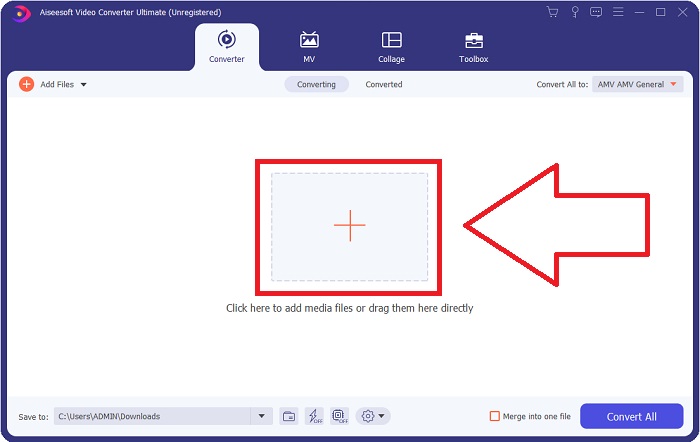
Pas 2: Veureu que apareix una finestra emergent després d’iniciar el programari. La interfície Converter es mostra a la pantalla juntament amb l’àrea de càrrega. Fes clic al botó +, o arrossega qualsevol fitxer de vídeo des de l’escriptori per continuar.
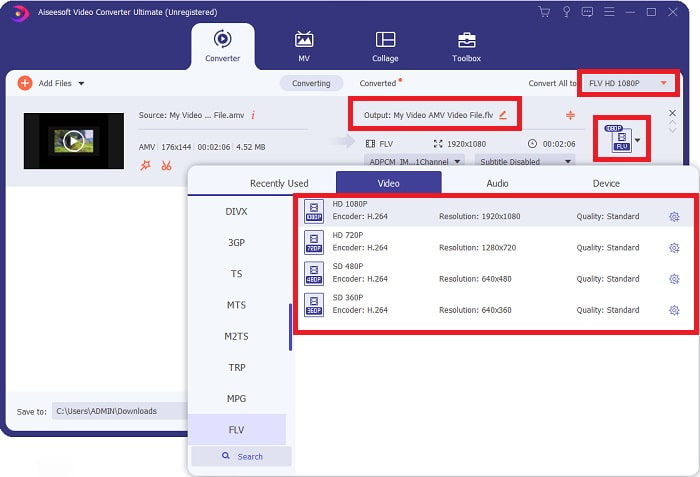
Pas 3: Per convertir el format de vídeo AMV a FLV, has de cercar el format seleccionat després de pujar un fitxer al programari i triar el format FLV. També tens la possibilitat d’escollir després qualsevol qualitat de vídeo.
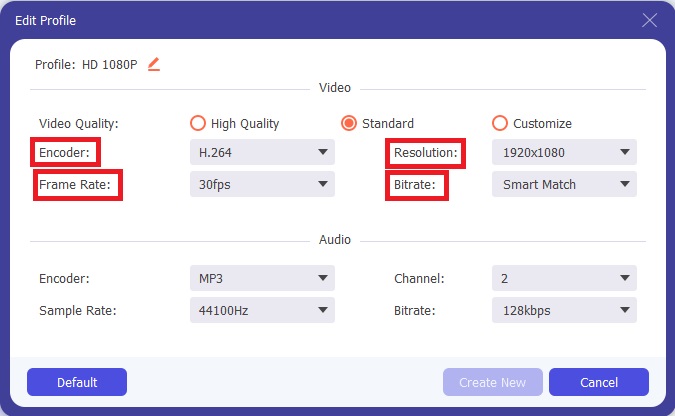
Pas 4: Si necessites personalitzar o crear una nova qualitat de vídeo segons les teves preferències, pots fer clic a la icona d’engranatge que hi ha al costat de la selecció de qualitats de vídeo.
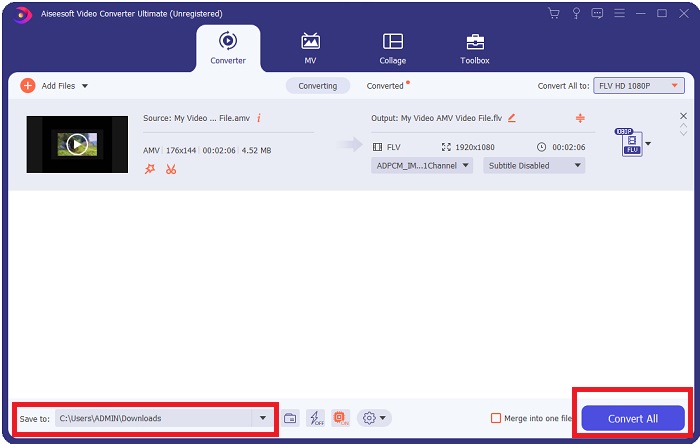
Pas 5: Ja gairebé ho tens! Ara que ja has definit totes les especificacions i ajustos que prefereixes, pots triar la ubicació del fitxer convertit fent clic a la icona de carpeta al costat del camp Save to a l’angle inferior de la finestra. Ara ja pots convertir el teu fitxer de vídeo fent clic al botó Convert All.
Part 2. Eina en línia a considerar per convertir AMV a FLV
És fàcil utilitzar convertidors en línia perquè no cal descarregar ni instal·lar cap programari. Free Video Converter Online és un exemple excel·lent d’un programa que pot convertir AMV a FLV de manera ràpida i senzilla. Pots convertir una àmplia gamma de formats d’àudio i vídeo amb aquest programa, i és completament gratuït. Pots pujar dos fitxers al programa per convertir-los i, un cop finalitzi el procés, el fitxer convertit es desarà automàticament al disc dur. Deixa’m presentar-te tots els procediments que necessites conèixer per utilitzar aquesta magnífica eina en línia.
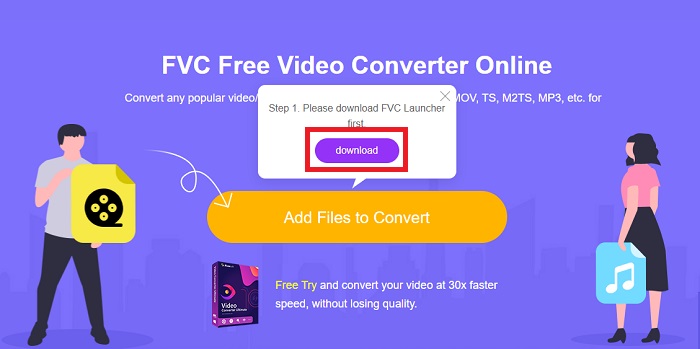
Pas 1: Fes clic en aquest enllaç per accedir a la pàgina principal de l’eina en línia. Després de continuar, comença a convertir un fitxer fent clic a Add Files to Convert. A continuació, el botó de descàrrega apareixerà a la cantonada superior de la pantalla. Quan l’instal·lador acabi la instal·lació, podràs començar a pujar un fitxer des de l’ordinador a aquesta eina.
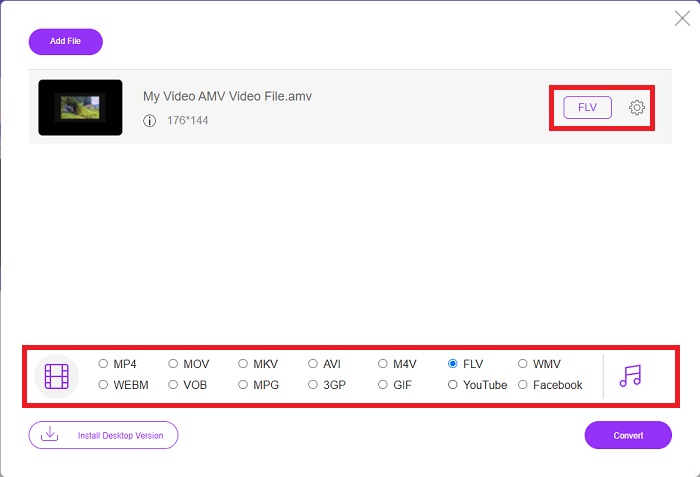
Pas 2: Ara que el fitxer importat ja és a punt, fes clic en el format de vídeo FLV situat a la part inferior. Igual que en el programari d’escriptori, també pots ajustar totes les especificacions del teu vídeo de sortida fent clic a la icona d’engranatge.
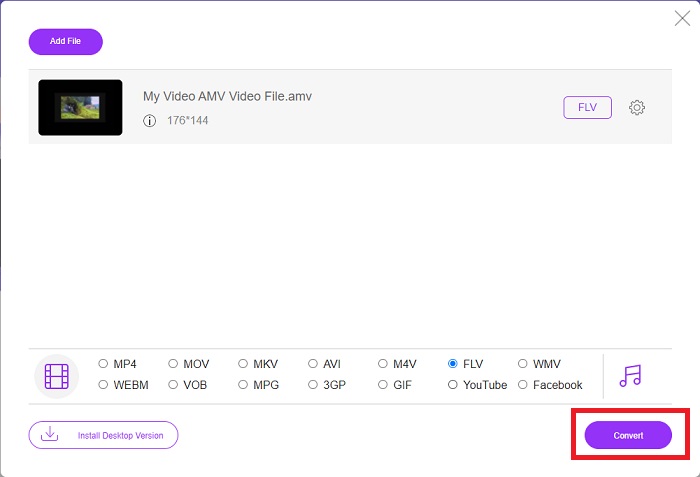
Pas 3: Finalment, fes clic al botó Convert per canviar els teus fitxers AMV al format FLV.
Relacionat:
Part 3. Coneixements ampliats sobre AMV i FLV
AMV optimitza reproductors multimèdia poc versàtils amb CPU lentes i pantalles petites, com el reproductor MP3 S1. El còdec de vídeo és Motion JPEG amb taules de quantificació fixes. El còdec d'àudio és IMA ADPCM, en el qual els primers 8 bytes de cada fotograma són la font (16 bits), l'índex (16 bits) i la quantitat de mostres xifrades de 16 bits (32 bits). La sobrecàrrega de descodificació d'aquests còdecs simplificats és insignificant. La compressió de vídeo és baixa (4 píxels/byte enfront de més de 10 píxels/byte per a MPEG-2), però les mides dels fitxers són petites a causa de la resolució reduïda (96x96 superior o igual a 208x176) i fps (10, 12, o 16 fotogrames/s). Un vídeo de 30 minuts comprimit a 128 x 96 píxels i 12 fotogrames/s serà de 80 MB.
Tanmateix, un fitxer de vídeo amb l'extensió.flv que podeu utilitzar l'extensió de fitxer FLV si voleu transmetre vídeo o àudio des d'Adobe Flash Player o Adobe Air a través d'Internet. Durant molt de temps, Flash Video va ser el format de vídeo predeterminat per a gairebé tots els vídeos en línia, inclosos els de llocs com YouTube, Hulu i molts altres. Per aquest motiu, els serveis de streaming i els desenvolupadors de programari ja no utilitzen el format Flash propietari d'Adobe. Amb tota aquesta comparació indicada, aquí teniu una petita ajuda, aquest article us va proporcionar un gràfic de comparació:
| Extensió de fitxer | AMV | FLV |
| Nom de l'arxiu | Vídeo musical d'anime | Arxiu de vídeo Flash |
| Desenvolupat per | Jim Kaposztas | Adobe System Incorporated |
| Pros | ◆ AMV és un dels vídeos musicals d'anime fets per fans més populars fins ara. ◆ La mida del fitxer és petita. | Adobe Flash per a pàgines web dinàmiques i interactives pot ser un gran avantatge. Tot i que aquest és un procés senzill, els resultats poden ser substancials. Flash també va ser una opció popular per als videojocs senzills. |
| Contres | ◆ Incompatible amb la majoria de reproductors i dispositius multimèdia; baixa qualitat. | La caiguda de popularitat de FLV ha estat un inconvenient. Crear contingut FLV pot ser molt llarg i costós. La manca de suport per a Flash als dispositius iOS limita molt la seva capacitat per atraure nous usuaris. |
| Programes que admeten el fitxer | ◆ VLC Media Player ◆ iOrgsoft AMV Converter | ◆ RealPlayer ◆ Apple QuickTime Player ◆ VLC Media Player ◆ MPlayer |
Part 4. Preguntes freqüents sobre la conversió d'AMV a FLV
Quin és l'objectiu d'un AMV?
La sincronització i la unitat en un AMV poden aconseguir diversos estils d'edició de vídeo. És possible aconseguir una edició en brut amb simples "efectes" d'ampliar i allunyar i transicions de transició senzilles. Entre els molts exemples es troben els següents.
Com es fabriquen els AMV?
Perquè un AMV tingui èxit, ha d'utilitzar una cançó que estigui estretament relacionada amb el tema i que la descrigui gairebé perfectament. Qualsevol persona que llegeixi això pot respondre dient: "Uau, això és increïble! Aquesta cançó és seva, el seu tema principal. Per això, has escollit una bona peça.
El FLV és de millor qualitat?
El format FLV i MP4 són capaços d'emmagatzemar codificació digital de vídeo i àudio d'alta qualitat. La qualitat dels fitxers FLV és una qüestió de debat, però els avantatges i els inconvenients de FLV poden discutir el format del fitxer. Les relacions de compressió més altes en MP4 produeixen menys pèrdua de qualitat.
Conclusió
Per concloure, coneixeràs la importància de triar el millor convertidor per convertir AMV a FLV. Altres produiran vídeos de baixa qualitat i no sincronitzats després del vídeo que hagi passat per la conversió. Però els dos convertidors que recomana aquest article són el convertidor de primer nivell que no us haureu de preocupar per la qualitat que donarà.
-
 Millor mètode per utilitzar per convertir AMV a AVI [Aprovat]
 Us costa convertir el vostre fitxer de vídeo en format AMV a AVI? Aquí teniu alguns consells que només podeu trobar en aquest article.
-
 3 convertidors AMV més nous disponibles per convertir AMV a format MOV [2022]
 No saps com convertir els teus fitxers AMV a format MOV? Aleshores, aquest article parla dels 3 convertidors AMV a MOV que podeu utilitzar en línia o fora de línia.
-
 4 mètodes verificats per convertir TS a FLV a l'escriptori / en línia
 Per defecte, no podeu obrir TS al vostre ordinador o mòbil. L'única manera de veure els fitxers de vídeo és convertir TS a FLV o altres formats amb la nostra guia concreta.
