


 Video Converter Ultimate
 Gravadora de pantalla
 Reparació de vídeo
 Baixada segura
Com convertir els vostres fitxers de vídeo DAT a format FLV de forma gratuïta
Atès que hi ha tants formats de vídeo, és possible que hagis de convertir un format a un altre. Aquest article se centra en com convertir DAT a FLV a l’escriptori i en línia de manera gratuïta. Un fitxer amb l’extensió DAT no és un fitxer estàndard, sinó un fitxer de dades que emmagatzema informació. Per tant, cap programa específic és responsable d’obrir fitxers DAT. Si un fitxer de vídeo s’emmagatzema així, un convertidor adequat de DAT a FLV et pot ajudar a obrir-lo.

Primera part: millors maneres de convertir DAT a FLV
Manera 1: Converteix DAT a FLV amb el convertidor FLV gratuït
FVC Free FLV Converter és un potent convertidor de vídeo, tot i ser programari gratuït. Això vol dir que pots obtenir funcions similars a les d’un programari professional sense pagar ni un cèntim.
Funcions clau del millor convertidor gratuït de DAT a FLV
- 1. Convertiu per lots els fitxers DAT al format FLV ràpidament.
- 2. Produir una producció d'alta qualitat mitjançant tecnologia avançada.
- 3. Incloeu una àmplia gamma d'eines addicionals, com l'edició de vídeo.
Descàrrega gratuïtaPer a Windows 7 o posteriorDescàrrega segura
Descàrrega gratuïtaPer a MacOS 10.7 o posteriorDescàrrega segura
Com convertir DAT a FLV de franc
Pas 1: obriu els fitxers DAT
Executa el millor convertidor gratuït de DAT a FLV un cop l’hagis instal·lat a l’ordinador. Per mantenir les teves dades segures, és millor que el descarreguis des del lloc web oficial. Fes clic al gran botó Add File(s) a la interfície d’inici, cerca i selecciona els fitxers de vídeo DAT i obre’ls. A continuació, apareixeran a l’àrea de biblioteca.

Pas 2: definiu FLV com a format de sortida
Ves a la part inferior, fes clic i desplega l’opció Output format. Ves a la pestanya General Video de la llista, baixa i selecciona FLV o un format relacionat. També pots restablir la taxa de fotogrames, la resolució i altres paràmetres fent clic a la icona d'engranatge a cada títol.

Pas 3: Convertiu DAT a FLV
A continuació, fes clic al botó Open Folder i canvia el directori de destinació segons la teva preferència. Per defecte, el convertidor de DAT a FLV desarà el resultat a la teva biblioteca de vídeos. Finalment, fes clic al botó Convert per començar a convertir DAT a FLV a l’escriptori immediatament. Només calen uns minuts per completar la conversió.

Manera 2: Com convertir DAT a FLV per VLC
VLC és una altra manera de convertir DAT a FLV de forma gratuïta. El reproductor multimèdia de codi obert pot obrir un fitxer de vídeo amb extensió DAT i convertir-lo a fitxers de vídeo estàndard. Tenint en compte el procediment complicat, compartim els passos bàsics següents.
Pas 1: Obre VLC i fes clic a l’opció Convert/Save al menú Media de la barra superior. Aleshores veuràs el quadre de diàleg d’obertura de mitjans.
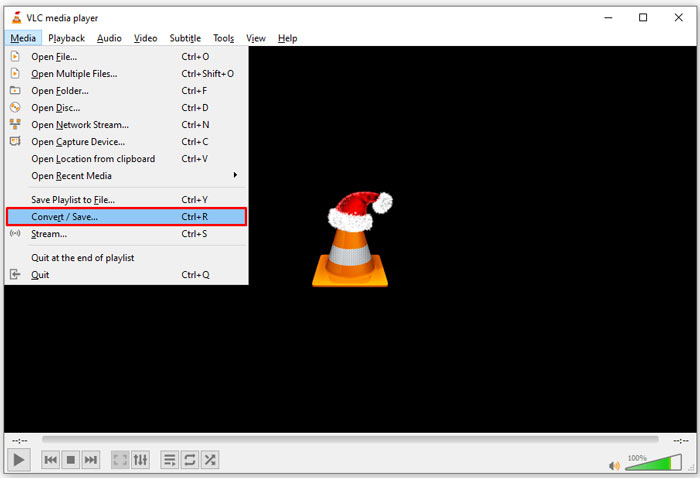
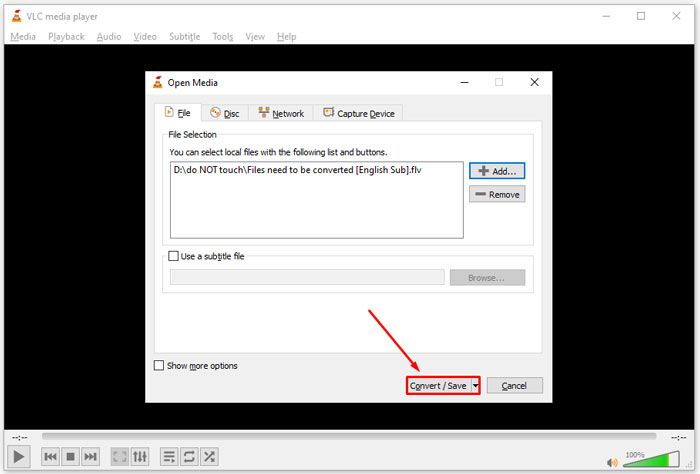
Pas 2: Fes clic al botó Add i obre els fitxers de vídeo DAT a VLC. Prem el botó Convert/Save per continuar.
Pas 3: Desplega la llista Profile i estableix FLV com a format de sortida. Fes clic al botó Browse per seleccionar una carpeta de sortida a la secció Destination.
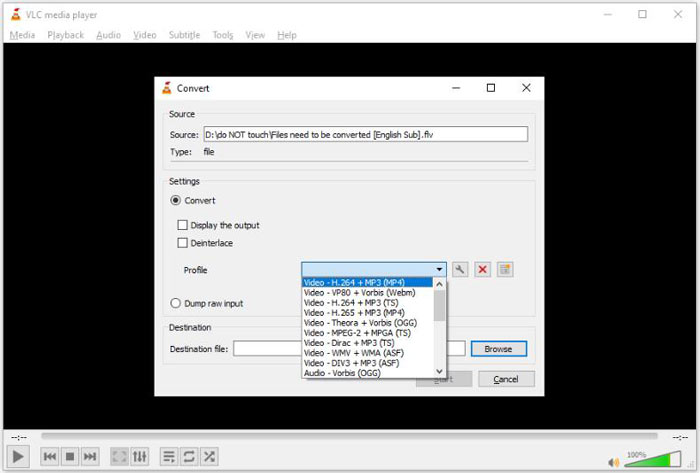
Pas 4: Fes clic al botó Start per iniciar la conversió de DAT a FLV. Trigarà tant com duri el teu fitxer de vídeo a convertir-lo a VLC.
Part 2: Com convertir DAT a FLV en línia
FVC Free Online Video Converter és una manera senzilla de convertir DAT a FLV en línia de manera gratuïta. En comparació amb altres convertidors de vídeo web, et permet fer la feina sense cap límit, com ara mida de fitxer, registre, marca d’aigua, etc.
Pas 1: Obre un navegador i visita https://www.free-videoconverter.net/free-online-video-converter/. Fes clic al botó Add Files to Convert per descarregar el llançador.

Pas 2: Fes clic al botó Add File al llançador i puja els fitxers de vídeo DAT des de l’ordinador. A continuació, ves a la secció de format a la part inferior i selecciona FLV.

Pas 3: Prem el botó Convert per iniciar la conversió de DAT a FLV en línia. Quan s’hagi acabat, descarrega els fitxers de vídeo al disc dur.
Et pot interessar també:
Converteix els teus fitxers TS al format FLV
Part 3: Preguntes més freqüents sobre DAT a FLV
Puc convertir fitxers DAT a FLV des d'Internet Explorer?
Si els fitxers DAT d’IE emmagatzemen contingut de vídeo, els podeu convertir a vídeos estàndard. Tanmateix, DAT no només emmagatzema dades de vídeo, sinó també altra informació. Per a altres dades, no es pot convertir a vídeos.
Com obrir fitxers DAT?
Un fitxer DAT és un fitxer de dades que conté informació sobre el programa al qual està associat. Podeu provar d'obrir un fitxer DAT fent-hi doble clic. El vostre sistema pot distribuir el programa adequat.
Puc convertir DAT a QuickTime?
Depèn de la vostra situació. En primer lloc, els fitxers DAT han d’emmagatzemar dades de vídeo. Llavors també necessiteu un convertidor de vídeo compatible amb DAT i QuickTime.
Conclusió
Aquesta guia ha compartit tres maneres de convertir el vostre DAT a FLV a l'escriptori o en línia. VLC és una forma gratuïta de fer la feina a Windows, Mac i Linux. Tanmateix, el convertidor FVC Free FLV ofereix funcions més a nivell professional amb la sol·licitud de qualsevol pagament. Si teniu altres preguntes, deixeu un missatge a sota d’aquest missatge.
-
 MP4 a FLV | Top 3 convertidor gratuït (en línia / Mac / Windows)
 Aquesta publicació és la guia detallada de la conversió de MP4 a FLV. Podeu agafar els 3 convertidors gratuïts principals per canviar MP4 a FLV en línia, a l’ordinador Windows o Mac amb facilitat.
-
 3 solucions per convertir MTS a FLV gratis i en línia
 Voleu convertir MTS a FLV? Aquí teniu 3 programes gratuïts de conversió de MTS a FLV que podeu provar de convertir MTS a FLV a Mac OS X i Windows 10/8/7.
-
 4 maneres gratuïtes de convertir vídeos FLV a MP4 a l'escriptori i en línia
 Aquesta guia comparteix quatre mètodes gratuïts per convertir els fitxers de vídeo FLV a format MP4 a Windows 10/8/7 / XP i Mac OS X, de manera que pugueu gaudir dels vídeos en qualsevol dispositiu.
