


 Video Converter Ultimate
 Gravadora de pantalla
 Reparació de vídeo
 Baixada segura
Com convertir els vostres fitxers de vídeo FLV a format 3G2 a l'escriptori i en línia
Es diu que la tecnologia canvia la vida i fa que el nostre dia a dia i la feina siguin més fàcils. Tanmateix, tota moneda té dues cares, i la tecnologia també. El vídeo digital, per exemple, ens dona l’oportunitat d’accedir a l’entreteniment i a la informació en qualsevol lloc i en qualsevol moment. El problema és el format de vídeo. Segons una enquesta recent, hi ha més de cent formats de vídeo. Aquesta guia se centra en com ajudar-te a convertir FLV a 3G2 o 3GP a l’ordinador i en línia de manera gratuïta.

Part 1: Com convertir FLV a 3G2 a PC/Mac
Mètode 1: Converteix FLV a 3G2 amb Free FLV Converter
Només hi ha un nombre limitat de convertidors de vídeo que admetin el format 3G2. FVC Free FLV Converter n’és un. A més, pot satisfer les teves necessitats sense pagar ni un cèntim. Si tens molts fitxers FLV, els pot processar tots alhora ràpidament.
Funcions principals del millor convertidor de FLV a 3G2
- 1. Converteix FLV a 3G2 sense pèrdua de qualitat.
- 2. Gestioneu per lots diversos fitxers FLV mitjançant la tecnologia multifil.
- 3. Oferiu una àmplia gamma d'eines de bonificació, com ara l'edició de vídeo.
Descàrrega gratuïtaPer a Windows 7 o posteriorDescàrrega segura
Descàrrega gratuïtaPer a MacOS 10.7 o posteriorDescàrrega segura
Com convertir FLV a 3G2 per lots de forma gratuïta
Pas 1: afegiu fitxers FLV
Quan necessitis convertir FLV a 3G2, instal·la el millor convertidor de vídeo gratuït al teu ordinador i obre’l. Fes clic al botó Add File(s), cerca tots els fitxers FLV que vols convertir i obre’ls.

Pas 2: seleccioneu el format de sortida
Vés a la part inferior un cop s’hagin carregat els vídeos. Fes clic i desplega l’opció Output format, busca 3G2 amb la barra de cerca i selecciona’l al costat dret. Fes clic al botó Open Folder i tria una carpeta específica per desar-hi el resultat.

Pas 3: Converteix FLV a 3G2
Finalment, fes clic al botó Convert per començar a convertir FLV a 3G2 immediatament. Uns minuts més tard, trobaràs els fitxers 3G2 a la carpeta que hagis indicat.

Mètode 2: Com convertir FLV a 3G2 amb VLC
VLC no només és un reproductor multimèdia de codi obert, sinó també un convertidor gratuït de FLV a 3G2. Et permet fer un convertidor de vídeo de forma gratuïta tant a Windows com a Mac. Aquests són els passos:
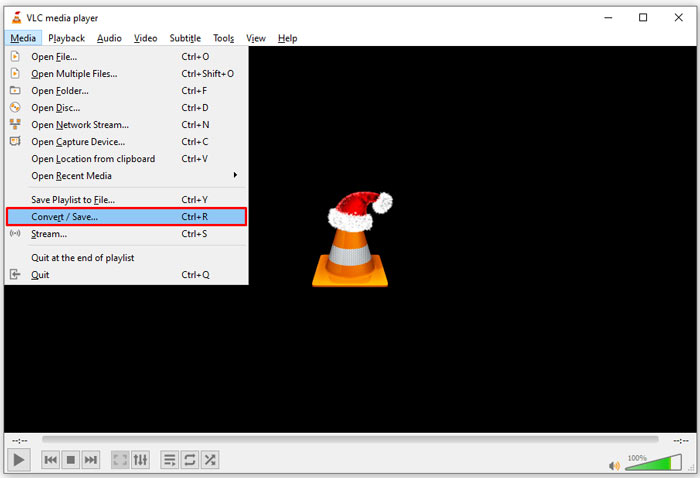
Pas 1: Obre VLC, ves al menú Media a la cinta superior i tria Convert/Save.
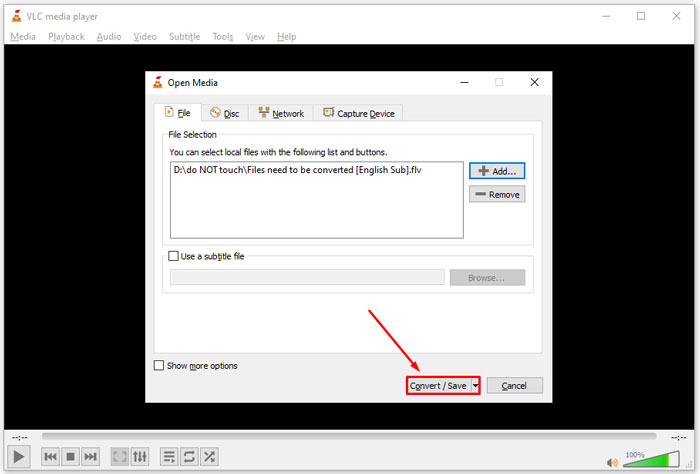
Pas 2: Fes clic al botó Add i obre el fitxer FLV que vols canviar a un altre format. Prem el botó Convert/Save per continuar.
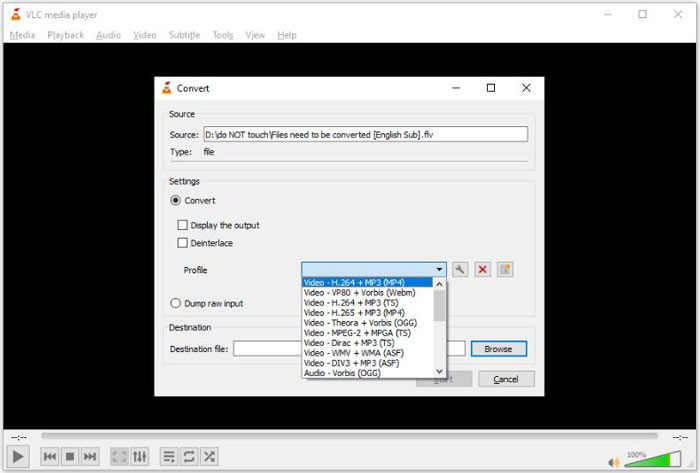
Pas 3: Desplega l’opció Profile i selecciona 3G2 o un format relacionat. Després defineix la carpeta de sortida prement el botó Browse.
Pas 4: Quan facis clic al botó Start, VLC convertirà FLV a 3G2. Trigarà una estona i cal que tinguis paciència.
Part 2: Com convertir FLV a 3G2 en línia
De vegades només necessites convertir FLV a 3G2 de manera ocasional. En aquests casos, una aplicació web és una opció convenient, com ara FVC Free Online Video Converter. És gratuïta, sense registre ni límit de mida de fitxer.
Pas 1: Visita https://www.free-videoconverter.net/free-online-video-converter/ amb qualsevol navegador. Fes clic al botó Add Files to Convert i baixa el llançador.

Pas 2: Quan s’acabi la baixada, el llançador apareixerà. Fes clic al botó Add File i puja els fitxers FLV. Aquesta aplicació web de conversió de vídeo admet la conversió per lots.
Si vols ajustar paràmetres com la resolució, la taxa de fotogrames i més, fes clic a la icona d'engranatge i obre el diàleg de Settings.

Pas 3: Ves a la part inferior i selecciona un format de sortida adequat a la zona de formats. Quan estiguis a punt, fes clic al botó Convert. Després baixa el resultat al teu disc dur.
Et pot interessar també:
Part 3: Preguntes freqüents sobre FLV a 3G2
Què són els fitxers 3G2?
3G2, significa 3rd Generation Partnership Project Group 2, és una extensió per a fitxers multimèdia basada en MPEG-4. Va ser creat per un grup de set organitzacions de desenvolupament estàndard per a telèfons mòbils en xarxes CDMA. És molt semblant al 3GP.
Pot Windows Media Player obrir 3G2?
No, WMP no pot obrir ni reproduir fitxers de vídeo 3G2 perquè no té els còdecs corresponents. Teniu tres opcions per obrir fitxers 3G2: convertir-los al format de vídeo estàndard, descarregar un reproductor de vídeo 3G2 o instal·lar un paquet de còdec addicional per a WMP.
És millor FLV que 3G2?
La resposta depèn del vostre propòsit. Si mireu el vídeo al telèfon mòbil amb xarxa CDMA, 3G2 és una millor opció. Per compartir vídeos, FLV és millor que 3G2.
Conclusió
Ara, hauríeu d'entendre què significa 3G2 i com convertir FLV a 3G2 sense pèrdua de qualitat. VLC és un convertidor de vídeo gratuït que té la capacitat de canviar formats de vídeo. Tanmateix, FVC Free FLV Converter funciona millor. És més fàcil d'utilitzar que VLC i totalment gratuït. Si teniu més problemes, deixeu un missatge a sota d'aquesta publicació i us respondrem ràpidament.
-
 FLV a WAV: converteix FLV a WAV en línia gratuïtament i en Mac / PC
 Com puc convertir un fitxer FLV? Pot VLC convertir FLV a WAV? Aquesta publicació explica 3 maneres gratuïtes de convertir FLV a WAV sense pèrdua de qualitat.
-
 FLV a MPG: com convertir FLV a MPG a Mac, PC i en línia gratuïtament
 Com convertir FLV a MPEG? Puc convertir FLV a MPG de forma gratuïta? Aquesta publicació comparteix 3 convertidors de vídeo gratuïts per ajudar-vos a convertir FLV a MPG sense pèrdues de qualitat.
-
 FLV a Xbox - Com convertir i reproduir FLV a Xbox
 No es poden reproduir fitxers FLV a Xbox One o Xbox 360? Necessiteu convertir FLV a format compatible amb Xbox com MP4, AVI, MOV o WMV? En aquesta publicació es mostren 3 convertidors gratuïts de FLV a Xbox perquè pugueu jugar a FLV a Xbox.
