


 Video Converter Ultimate
 Gravadora de pantalla
 Reparació de vídeo
 Baixada segura
Com convertir els vostres fitxers de vídeo FLV a format AVI a PC / Mac
Aquesta guia se centra en com convertir FLV a AVI amb programari d’escriptori i aplicacions en línia. Hi ha molts motius pels quals pots necessitar convertir els teus vídeos FLV. FLV es va desenvolupar per distribuir continguts de vídeo en línia, però no per reproduir-los en dispositius digitals. Quan vulguis veure FLV a l’ordinador, l’has de canviar a un altre format de vídeo. A més, és una bona idea editar els teus fitxers de vídeo convertint FLV a un format de vídeo no comprimit.

Part 1: 2 maneres gratuïtes de convertir FLV a AVI
Mètode 1: Converteix FLV a AVI amb el convertidor FLV gratuït
Quan converteixes FLV a AVI, et poden preocupar diversos factors, com la qualitat de sortida, la facilitat d’ús i més. FVC Free FLV Converter és la millor opció. Encara que és gratuït, obtindràs moltes funcions de nivell professional sense gairebé coneixements tècnics. A més, proporciona moltes eines addicionals, com l’edició de vídeo.
Característiques principals del millor convertidor FLV
- 1. Converteix vídeos FLV a altres formats multimèdia fàcilment.
- 2. Admet gairebé tots els formats de vídeo, com ara AVI, MP4, MKV, etc.
- 3. Processar per lots centenars de fitxers FLV per conversió.
Descàrrega gratuïtaPer a Windows 7 o posteriorDescàrrega segura
Descàrrega gratuïtaPer a MacOS 10.7 o posteriorDescàrrega segura
Com convertir FLV a AVI a l’escriptori de forma gratuïta
Pas 1: Afegeix fitxers FLV
Un cop hagis instal·lat el millor convertidor FLV gratuït a l’ordinador, obre’l. És compatible tant amb PC com amb Mac. Fes clic al menú Add File(s) a la cantonada superior esquerra per activar el diàleg d’obrir fitxer. Després busca i selecciona els vídeos FLV al teu ordinador i fes clic al botó Open per afegir-los.

Pas 2: Edita el vídeo i configura el format
Si vols canviar els teus fitxers de vídeo, selecciona el fitxer FLV i fes clic al menú Edit. A continuació, aniràs a la finestra de l’editor de vídeo. Segueix les instruccions en pantalla per editar-lo i després torna a la interfície principal.
Feu clic al menú desplegable Format de sortida a la part inferior de la interfície principal per obrir el diàleg de perfil. A continuació, cerqueu AVI i seleccioneu-lo a la pestanya Vídeo general.

Pas 3: Converteix FLV a AVI
Prem la icona de tres punts al costat del camp Output folder i selecciona un directori específic per desar els fitxers AVI. Finalment, fes clic al botó Convert per començar a convertir FLV a AVI immediatament.

Mètode 2: Com convertir FLV a AVI amb VLC
VLC és molt més que un simple reproductor multimèdia. Podeu trobar moltes funcions útils, incloses les conversions de vídeo. Com a projecte de codi obert, VLC us permet convertir FLV a AVI de forma gratuïta. A més, VLC és capaç de reparar vídeos AVI danyats.
Pas 1: Obre el convertidor FLV gratuït. Si no tens VLC, descarrega’l gratuïtament des del lloc web oficial.
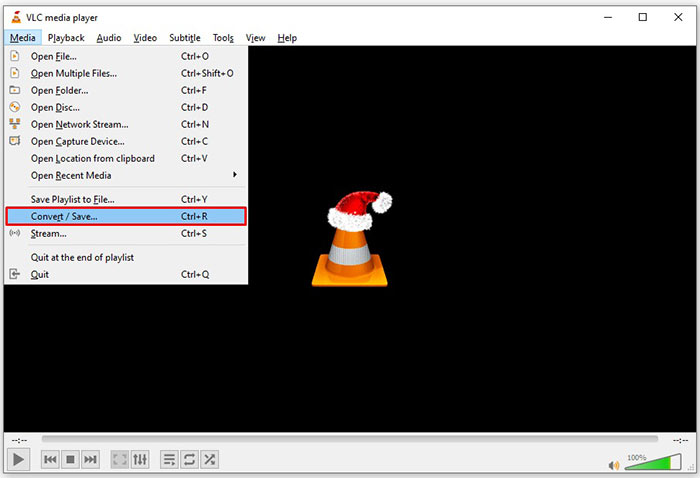
Pas 2: Ves al menú Media de la cinta superior i tria Convert/Save. Tria Convert/Stream al menú File al Mac.
Pas 3: Fes clic al botó Add al diàleg de mitjans oberts i afegeix el fitxer FLV que vols convertir.
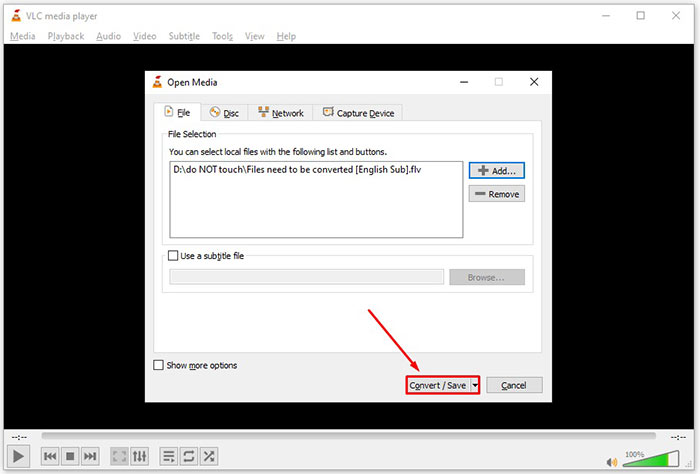
Pas 4: Després prem el botó Convert/Save per passar al diàleg següent.
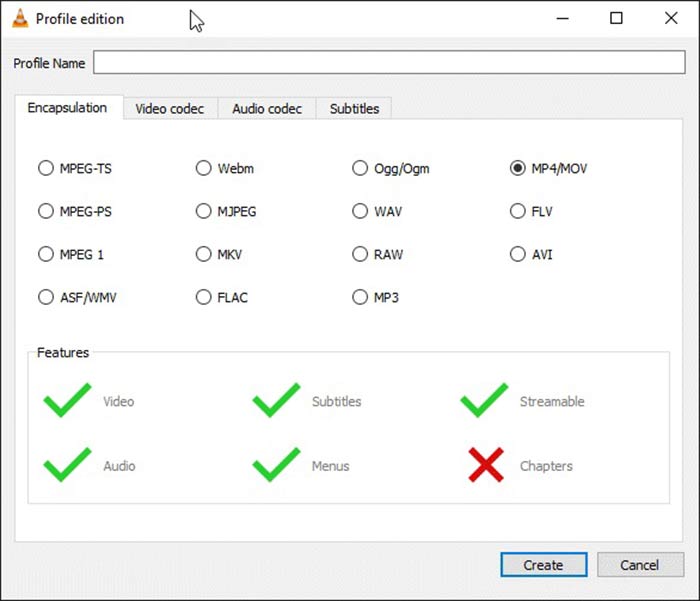
Pas 5: Obre la llista desplegable Profile i selecciona AVI. Si no el pots trobar, fes clic al tercer botó al costat de Profile. S’obrirà el diàleg Profile edition. Selecciona AVI i escriu un Profile Name. Fes clic a Create per confirmar-ho. Després selecciona el nou element a Profile.
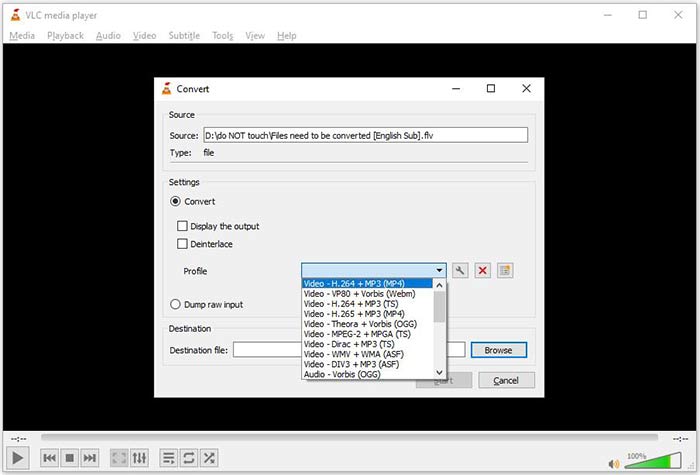
Pas 6: Defineix la carpeta de sortida prement el botó Browse. Fes clic al botó Start i VLC convertirà el FLV a AVI.
No t’ho perdis:
- • 3 maneres principals de convertir FLV a MOV
- • Com convertir els vostres vídeos FLV a fitxers d'àudio MP3 a l'escriptori i en línia
Part 2: Com convertir FLV a AVI en línia
De vegades només necessites convertir FLV a AVI en línia de tant en tant. A més, a algunes persones no els agrada instal·lar programari. FVC Free Online Video Converter pot satisfer aquesta necessitat. Funciona en línia, però és suficient per convertir diversos fitxers FLV a AVI. A diferència d’altres aplicacions web, no té límits de mida de fitxer, marca d’aigua ni altres restriccions.
Pas 1: Visita https://www.free-videoconverter.net/free-online-video-converter/ en un navegador quan necessitis convertir vídeos. Fes clic al botó Add Files to Convert i descarrega el llançador.
Baixa la versió d’escriptori per convertir fitxers per lots.
Pas 2: Després de la descàrrega, el llançador apareixerà automàticament. Fes clic al botó Add File a la part superior esquerra i puja els fitxers FLV que vols convertir. A continuació, tria AVI a la part inferior.
Per canviar la resolució, la velocitat de fotogrames i altres paràmetres, fes clic a la icona d'engranatge per obrir el diàleg de perfils.
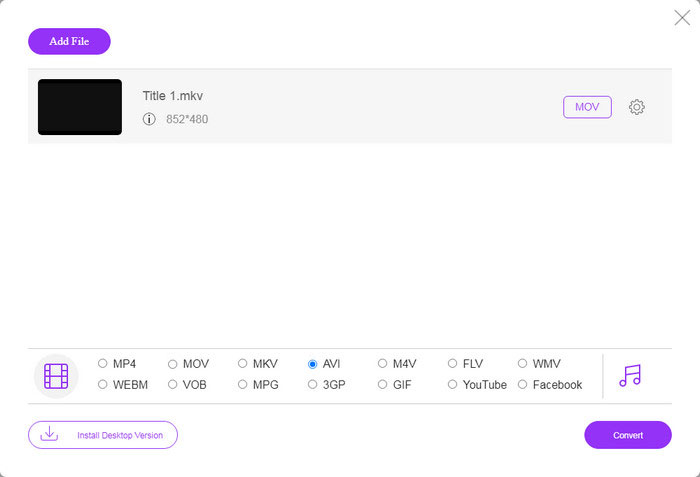
Pas 3: Un cop facis clic al botó Convert, l’aplicació web funcionarà com desitges. Quan se’t demani, descarrega els fitxers de vídeo AVI al disc dur.
En comparació amb altres convertidors de vídeo web, Free Online Video Converter funciona ràpidament, però també necessiteu una bona connexió a Internet.
FLV vs. AVI
Adobe Flash Player va utilitzar FLV per oferir contingut de vídeo com pel·lícules i programes de televisió. Avui en dia, Adobe ja no desenvolupa el reproductor i recomana als usuaris que el desinstal·lin per motius de seguretat. Tanmateix, encara podeu utilitzar el format FLV en molts programes que no són d'Adobe/Macromedia.
Basat en el format de fitxer d'intercanvi de recursos (RIFF), el format AVI va ser introduït per Microsoft l'any 1992. Pot estalviar vídeo/àudio d'alta qualitat ja que utilitza menys compressió. Però això també provoca la gran mida del fitxer d'un fitxer AVI, que pot ser un problema quan hi ha espai limitat.
Part 3: Preguntes més freqüents sobre FLV a AVI
Quant de temps he d'esperar per convertir FLV a AVI?
Depèn de la vostra situació. En termes generals, és molt ràpid convertir vídeos a l’escriptori. Per a les eines en línia, la vostra connexió a Internet determinarà l’eficiència.
És segur convertir FLV a AVI en línia?
La majoria d’aplicacions de conversió de FLV en línia prometen suprimir els vostres vídeos després de convertir-los. Tot i això, no heu de penjar vídeos privats en línia tret que estigueu segur que l’aplicació web és segura d’utilitzar 100%.
L’AVI és millor que FLV?
FLV és un format de vídeo amb pèrdues, mentre que AVI és un format de vídeo sense comprimir. Vol dir que el fitxer FLV és més petit que AVI en la mateixa condició. Tot i això, AVI proporciona una millor qualitat de vídeo. FLV s’utilitza per compartir vídeos en línia, mentre que AVI és una bona opció per editar vídeos.
Conclusió
Aquesta guia ha compartit tres maneres de convertir fitxers de vídeo FLV a format AVI amb programari d'escriptori i aplicació web. VLC és un reproductor multimèdia gratuït i un convertidor de vídeo, tot i que és difícil d’utilitzar. A més, podeu fer la feina en línia sense instal·lar cap programari. Tanmateix, us suggerim que proveu el convertidor FLV Free FLV, ja que la qualitat de sortida és increïble. A més, és bastant fàcil d’utilitzar i navegar. Si teniu altres preguntes relacionades amb la conversió de FLV a AVI, deixeu un missatge a sota d’aquest missatge.
-
 3 maneres lliures de convertir FLV a WAV
 Com puc convertir un fitxer FLV? Pot VLC convertir FLV a WAV? Aquesta publicació explica 3 maneres gratuïtes de convertir FLV a WAV sense pèrdua de qualitat.
-
 3 maneres lliures de convertir FLV a MPG
 Com convertir FLV a MPEG? Puc convertir FLV a MPG de forma gratuïta? Aquesta publicació comparteix 3 convertidors de vídeo gratuïts per ajudar-vos a convertir FLV a MPG sense pèrdues de qualitat.
-
 3 maneres gratuïtes de convertir FLV per jugar a Xbox
 No es poden reproduir fitxers FLV a Xbox One o Xbox 360? Necessiteu convertir FLV a format compatible amb Xbox com MP4, AVI, MOV o WMV? En aquesta publicació es mostren 3 convertidors gratuïts de FLV a Xbox perquè pugueu jugar a FLV a Xbox.

