


 Video Converter Ultimate
 Gravadora de pantalla
 Reparació de vídeo
 Baixada segura
Com convertir fitxers de vídeo FLV a WMV sense perdre qualitat
Els fitxers FLV no són compatibles amb tots els reproductors multimèdia ni amb tots els dispositius mòbils. Per tant, potser voldreu convertir els vostres fitxers FLV a WMV o a un altre format compatible amb el vostre reproductor de vídeo. El nou problema és que necessiteu una eina adequada per fer la feina a l’escriptori o en línia. No perdeu el temps buscant-la a internet. Aquesta demostració us ensenyarà com convertir els vostres vídeos FLV a WMV perquè pugueu continuar el vostre projecte amb facilitat.

Part 1: 2 mètodes fàcils de convertir FLV a WMV de forma gratuïta
Mètode 1: Converteix FLV a WMV amb el convertidor FLV gratuït
FVC Free FLV Converter és una manera potent de convertir els vostres fitxers FLV a WMV. Encara que no requereix cap pagament ni afegeix marques d’aigua, hi trobareu nombroses funcionalitats similars a les del programari professional. El més important és que és molt fàcil d’utilitzar i no requereix coneixements tècnics.
Funcions clau del millor convertidor FLV
- 1. Converteix vídeos FLV a altres formats en un sol clic.
- 2. Gestioneu per lots diversos fitxers de vídeo FLV al mateix temps.
- 3. Admet una àmplia varietat de formats multimèdia.
Descàrrega gratuïtaPer a Windows 7 o posteriorDescàrrega segura
Descàrrega gratuïtaPer a MacOS 10.7 o posteriorDescàrrega segura
Com convertir FLV a WMV de forma gratuïta
Pas 1: Importar FLV
Baixeu i instal·leu el millor convertidor de vídeo FLV gratuït i després executeu-lo. El convertidor de vídeo és compatible amb Windows 10/8/7 i Mac OS X. Feu clic al menú Add File(s) a la cantonada superior esquerra i afegiu tots els fitxers FLV que vulgueu convertir. El programari utilitza multithreading per processar vídeos per lots.

Pas 2: Establiu WMV com a format de sortida
Un cop carregats els vídeos, aneu a la part inferior i feu clic per desplegar la llista desplegable Output format. Aneu a la pestanya General Video i seleccioneu WMV. Podeu trobar ràpidament el format de sortida cercant-lo al quadre Search Profile.
Si voleu editar els vostres vídeos, feu clic al botó Edit a la barra superior per obrir la finestra de l’editor de vídeo.

Pas 3: Convertir FLV a WMV
Feu clic al botó Open Folder i establiu la carpeta de destí al camp Output folder. Finalment, feu clic al botó Convert per començar a convertir FLV a AVI. Segons la nostra recerca, només calen uns minuts per convertir desenes de fitxers FLV.

Mètode 2: Com convertir FLV a WMV amb VLC
Molta gent prefereix els convertidors de vídeo de codi obert. VLC, per exemple, no només és un reproductor de vídeo, sinó que també pot convertir FLV a WMV de forma gratuïta. No obstant això, molts usuaris es van queixar que el VLC és difícil d'utilitzar. Per tant, a continuació publiquem una guia bàsica.
Pas 1: Executeu el convertidor gratuït de FLV a WMV. Podeu instal·lar-lo des del lloc web oficial sense pagar ni un cèntim.
Pas 2: Aneu al menú Media i seleccioneu Convert/Save a l’ordinador. Si feu servir VLC a Mac, trieu Convert/Stream al menú File.
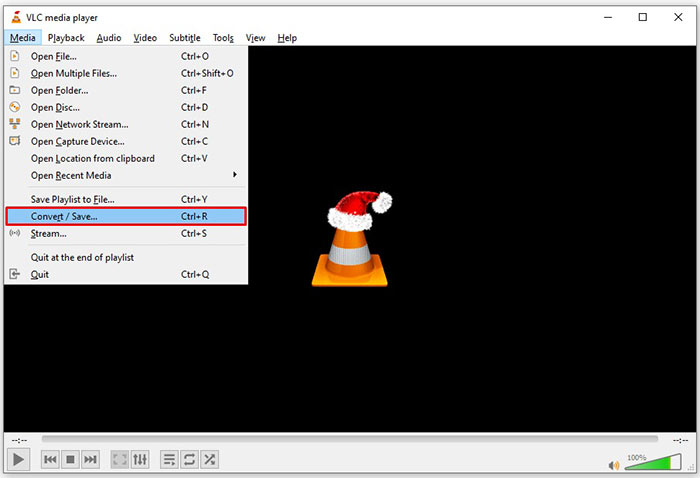
Pas 3: Feu clic al botó Add per afegir un fitxer FLV que vulgueu convertir. En el cas de Mac, feu clic al botó Open media per importar el vídeo FLV.
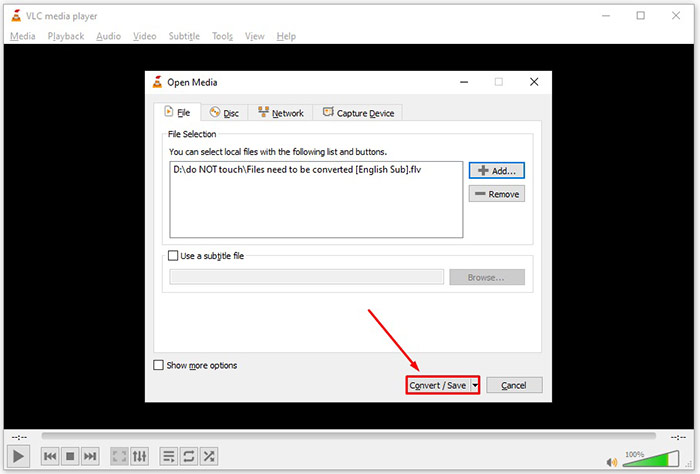
Pas 4: Premeu el botó Convert/Save per passar a la finestra següent. A Mac, desplaceu-vos fins a la secció Choose Profile.
Pas 5: Per defecte, VLC no admet la sortida WMV, però la podeu afegir manualment. Feu clic al botó Profile edit a PC o al botó Customize a Mac per obrir el diàleg Profile edition.
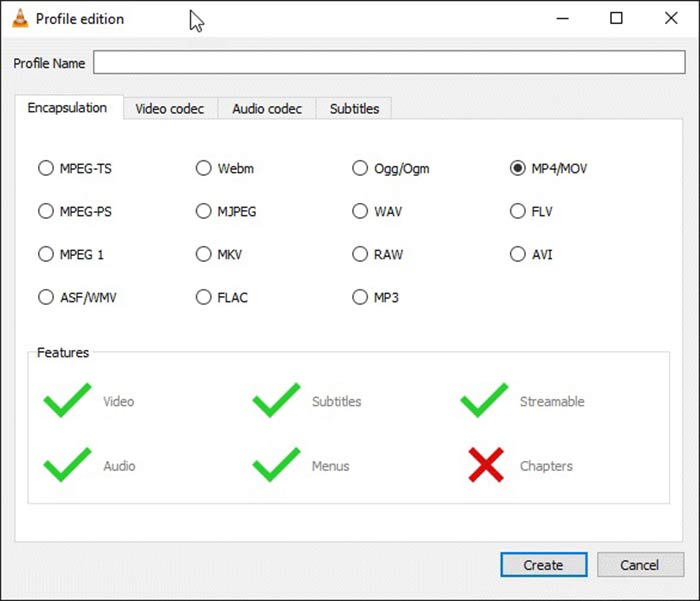
Pas 6: Escriviu WMV al quadre Profile Name i seleccioneu ASF/WMV. Feu clic al botó Create i tanqueu el diàleg. Després, obriu la llista desplegable Profile i seleccioneu WMV.
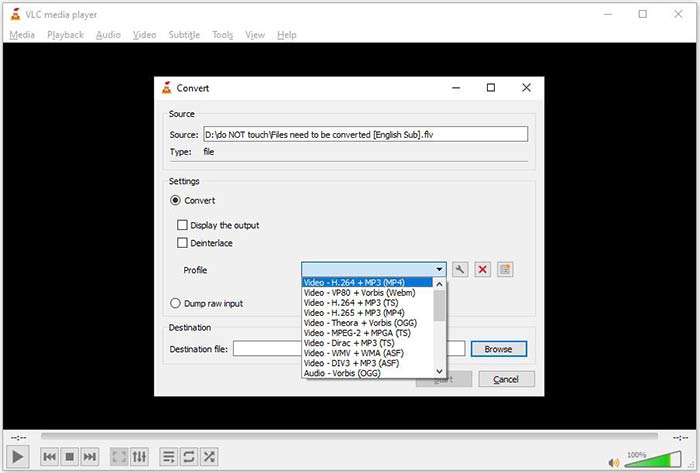
Pas 7: Feu clic al botó Browse i trieu un directori específic per desar-hi el fitxer WMV de sortida. Finalment, feu clic al botó Start per iniciar immediatament la conversió de FLV a WMV. La conversió triga el mateix temps que dura el vídeo, per tant heu de tenir paciència.
Part 2: Com convertir FLV a WMV en línia
Per a les persones a qui no els agrada instal·lar programari, les aplicacions web són solucions alternatives portàtils per dur a terme diverses tasques. FVC Free Online Video Converter, per exemple, us pot ajudar a convertir fitxers FLV a format WMV en línia de manera gratuïta. A diferència d’altres aplicacions web, utilitza tecnologia avançada per convertir vídeos en línia sense límit de mida d’arxiu.
Pas 1: Obriu https://www.free-videoconverter.net/free-online-video-converter/ al navegador quan necessiteu convertir FLV a WMV. Feu clic al botó Add Files to Convert per baixar i instal·lar el llançador.
Baixa la versió d’escriptori per convertir fitxers per lots.
Pas 2: Quan la instal·lació hagi acabat, el llançador es mostrarà automàticament. Feu clic al botó Add File i després pengeu els fitxers FLV que vulgueu convertir.
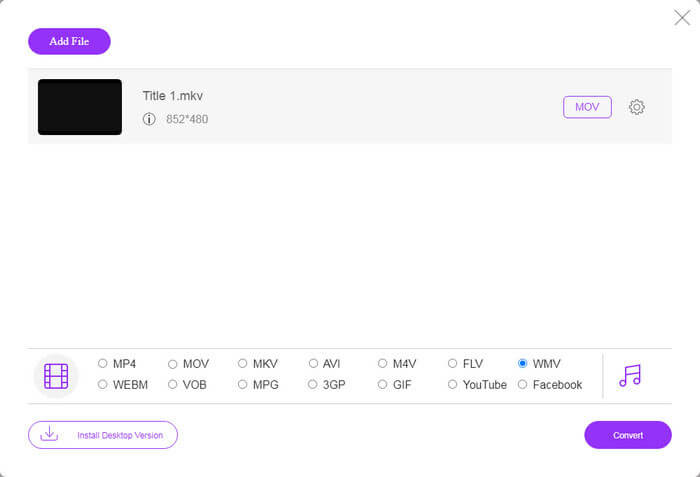
Pas 3: A continuació, seleccioneu l’opció WMV a la part inferior i feu clic al botó Convert. La conversió trigarà una estona a completar-se. Després, baixeu els fitxers de sortida al disc dur.
No t’ho perdis:
FLV vs. WMV
Adobe Flash Player va utilitzar FLV per oferir contingut de vídeo com pel·lícules i programes de televisió. Avui en dia, Adobe ja no desenvolupa el reproductor i recomana als usuaris que el desinstal·lin per motius de seguretat. Tanmateix, encara podeu utilitzar el format FLV en molts programes que no són d'Adobe/Macromedia.
Produït per Microsoft, WMV era un dels formats de vídeo més comuns als anys 2000. Es pot veure a la xarxa i reproduir-lo per diversos reproductors multimèdia a Windows. I també és el format de fitxer de vídeo predeterminat de Windows Media Player. Però recentment ha estat assumit per altres formats.
Part 3: Preguntes més freqüents sobre FLV a WMV
Puc convertir FLV a WMV a Windows 10?
A Windows 10 no hi ha cap funció integrada capaç de convertir fitxers de vídeo. Per fer la feina, també necessiteu un programa o una aplicació de conversió de vídeo instal·lada al vostre PC.
Per què FLV no es reprodueix al Windows Media Player?
Com sabem, FLV és un format que ha guanyat popularitat en la difusió de vídeos a través d’Internet. Tot i això, el reproductor de Windows Media no admet FLV. Aquí teniu dues opcions, utilitzeu un altre reproductor multimèdia o instal·leu el paquet de còdecs a WMP.
És segur convertir FLV a WMV en línia?
És difícil respondre a aquesta pregunta. Tot i que la majoria dels convertidors de vídeo web prometen suprimir els vostres vídeos després de convertir-los, és possible que alguns d’ells posin els vostres fitxers a altres mans. Per tant, heu d’utilitzar una eina de confiança, com ara FVC Free Online Video Converter.
Conclusió
Aquesta guia ha compartit tres maneres de convertir FLV a WMV en ordinadors i en línia. Quan tingueu aquesta necessitat, podeu seguir la nostra guia concreta per acabar la feina fàcilment. FVC Free FLV Converter, per exemple, no només és gratuït, sinó que també converteix els vostres fitxers de vídeo sense perjudicar-ne la qualitat. Si teniu altres problemes, no dubteu a posar-vos en contacte amb nosaltres deixant un missatge a sota d’aquest missatge.
-
 Com convertir els vostres fitxers de vídeo FLV a MP4 sense pagar un cèntim
 Aquesta guia comparteix quatre mètodes gratuïts per convertir els fitxers de vídeo FLV a format MP4 a Windows 10/8/7 / XP i Mac OS X, de manera que pugueu gaudir dels vídeos en qualsevol dispositiu.
-
 Com convertir els vostres vídeos FLV a fitxers d'àudio MP3 a l'escriptori i en línia
 Com convertir un FLV a un fitxer MP3? Tot el que heu de fer és llegir atentament aquest article, trobar el vostre mètode preferit i seguir la nostra guia pas a pas per obtenir el que voleu.
-
 3 maneres principals de convertir FLV a MOV
 Com convertir FLV a MOV? Com puc convertir FLV a MOV a Mac? Hi ha alguna manera gratuïta de convertir FLV de YouTube a MOV en línia? Aquesta publicació comparteix 3 convertidors de FLV a MOV per canviar fitxers FLV a MOV.

