


 Video Converter Ultimate
 Gravadora de pantalla
 Reparació de vídeo
 Baixada segura
3 maneres gratuïtes de convertir FLV per jugar a Xbox
FLV s’utilitza àmpliament en llocs de notícies i de compartició de vídeos. Quan descarregues alguns vídeos en línia de YouTube, Hulu o Facebook, és molt probable que obtinguis fitxers FLV. El format FLV és compatible amb molts reproductors, dispositius, plataformes i navegadors. Però no es pot reproduir a l’Xbox.
Més que una simple consola de videojocs, Xbox també et permet reproduir vídeos i música mitjançant una memòria USB o un disc extern. Xbox és compatible amb molts fitxers multimèdia populars. Però, tal com s’ha esmentat abans, no pots reproduir FLV directament a l’Xbox. Quan vulguis veure fitxers FLV a l’Xbox, has de convertir FLV a un format compatible amb Xbox.

Aquesta publicació comparteix 3 maneres gratuïtes de convertir FLV a Xbox. Quan vulguis veure fitxers FLV a la teva Xbox One, Xbox 360, la nova Xbox Series X o Xbox Series S, pots fer servir aquests mètodes per convertir FLV a un fitxer compatible amb Xbox.
Part 1. Com convertir gratuïtament FLV a Xbox Online
Molts convertidors de vídeo us poden ajudar a convertir FLV a format compatible amb Xbox com AVI o MP4. Si teniu problemes amb alguns petits clips de vídeo FLV, primer heu de provar el convertidor en línia gratuït de FLV a Xbox.
Free Online Video Converter és un convertidor de vídeo fàcil d’utilitzar que et permet convertir FLV a MP4, AVI, WMV, MOV o un altre format compatible amb la consola Xbox. En comparació amb altres convertidors en línia, no requereix crear ni iniciar sessió en cap compte. A més, no hi ha cap límit de mida de fitxer per a la conversió del teu FLV. La guia següent et mostrarà com utilitzar-lo.
Pas 1. Aquest convertidor en línia de FLV a Xbox és compatible amb qualsevol navegador web com Chrome, Safari, IE i Firefox. Pots obrir el navegador i anar al lloc de l'convertidor en línia de FLV a Xbox.
Pas 2. Quan hi arribis, fes clic a Add Files to Convert i després al botó Download per instal·lar un llançador per a la conversió de FLV. Quan el llançador estigui llest, apareixerà una finestra emergent perquè hi afegeixis el teu fitxer FLV.

Pas 3. Veureu que sota el fitxer FLV carregat s’hi llisten alguns formats de vídeo populars, com ara MP4, AVI, MOV, FLV, WMV, MKV i més. Pots triar un format compatible amb Xbox, com MP4 o AVI.
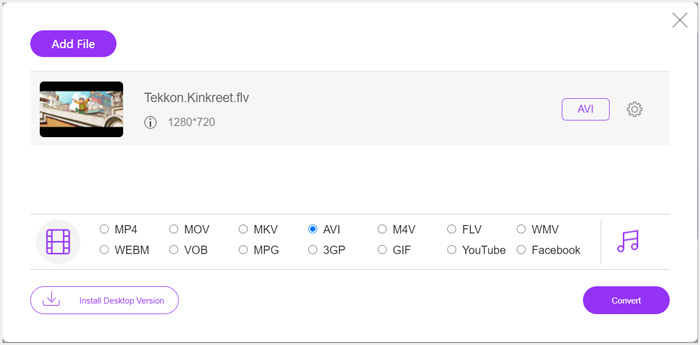
Pas 4. Si vols personalitzar més paràmetres de sortida de vídeo i àudio, pots fer clic a la icona Settings al costat del format de sortida. Després d’això, pots fer clic al botó Convert per començar a convertir FLV a Xbox. El vídeo de sortida es desarà automàticament a l’ordinador tan bon punt acabi la conversió.
Part 2. Com convertir FLV a Xbox Online amb FreeConvert
FreeConvert és un altre convertidor de vídeo i àudio popular que et pot ajudar a convertir FLV a MP4, AVI o WMV compatibles amb Xbox. Disposa d’un FLV to Xbox Video Converter específic perquè puguis convertir directament els teus fitxers FLV a Xbox.
Pas 1. Obre el navegador i ves a aquesta pàgina de FLV to Xbox Video Converter.
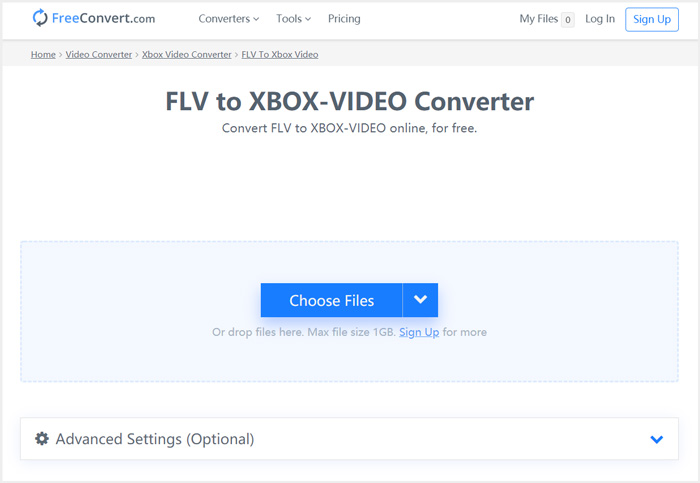
Pas 2. Fes clic al botó Choose Files per examinar i pujar el teu fitxer FLV. També se’t permet afegir fitxers mitjançant URL, Google Drive i Dropbox.
Pas 3. Pots fer clic a Add More Files per pujar altres fitxers FLV que vulguis convertir. El format de destinació s’establirà com a XBOX per defecte. Pots senzillament fer clic al botó Convert to Xbox Video per començar la conversió de FLV a Xbox.
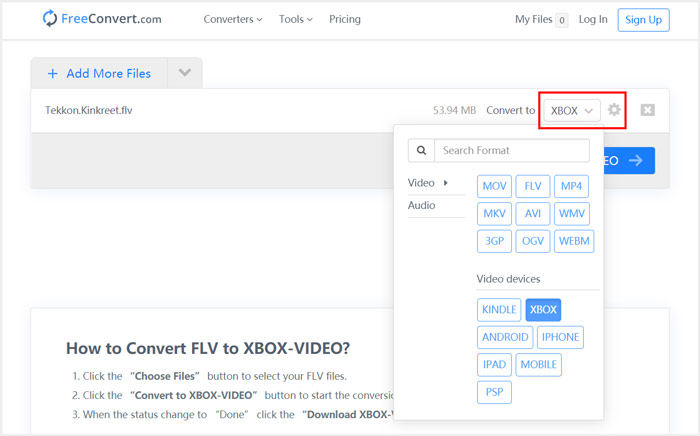
Segueix passos similars i podràs reproduir qualsevol música a l’Xbox després de convertir-la a formats compatibles amb Xbox.
Aquest FLV to Xbox Video Converter començarà a pujar i convertir el teu vídeo. Després de la conversió, pots fer clic al botó Download per desar-lo al teu Mac o PC amb Windows. O pots triar desar-lo a Google Drive i Dropbox. Veureu alguns anuncis mentre feu servir aquest convertidor gratuït de FLV a Xbox.
Part 3. Millor manera de convertir gratuïtament FLV a Xbox en Mac i PC amb Windows
A més dels convertidors FLV en línia, també pots recórrer a altres convertidors de vídeo gratuïts per convertir i reproduir els teus fitxers FLV a la consola de jocs Xbox. Aquí et presentem el potent Free FLV Converter. Està dissenyat especialment per fer diverses conversions FLV.

- Converteix qualsevol format FLV a Xbox compatible com MP4, AVI, WMV, MOV i molt més.
- Oferiu una sèrie de temes per editar i personalitzar el fitxer FLV.
- CPU avançades de múltiples nuclis i acceleracions de GPU per convertir FLV a Xbox a gran velocitat.
- Convertiu un o més fitxers FLV a Xbox sense cap pèrdua de qualitat d'imatge ni de so.
Descàrrega gratuïtaPer a Windows 7 o posteriorDescàrrega segura
Descàrrega gratuïtaPer a MacOS 10.7 o posteriorDescàrrega segura
Pas 1. Primer, pots fer doble clic al botó de descàrrega per instal·lar-lo gratuïtament a l’ordinador. Obre’l i fes clic a Add Files per importar el(s) teu(s) fitxer(s) FLV.

Pas 2. Selecciona MP4 o AVI com a format de destinació del menú desplegable de Output format. Per a més opcions, pots fer clic a la icona Settings al costat del format de sortida per entrar a la finestra de Profile Settings.
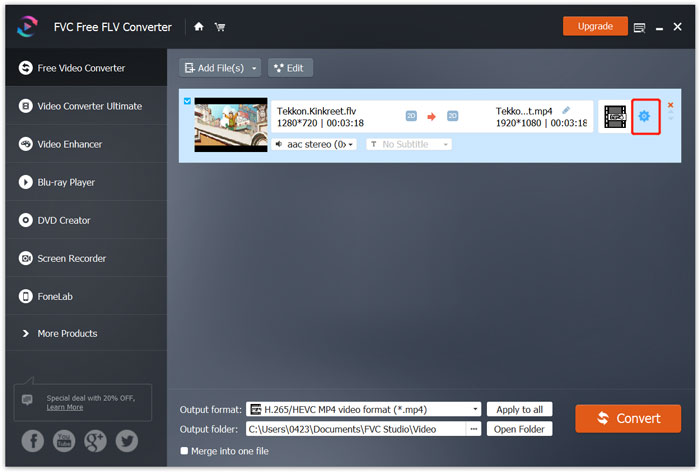
També llista una categoria específica d'Xbox a l’Output format perquè puguis convertir directament FLV a un fitxer compatible amb Xbox One o Xbox 360. Però has d’actualitzar a una versió de pagament.
Pas 3. Fes clic al botó Convert per començar la conversió de vídeo de FLV a MP4 o a un altre format de vídeo compatible amb Xbox.
Part 4. Preguntes més freqüents sobre la reproducció de FLV a Xbox
Pregunta 1. Quins formats poden ser compatibles amb Xbox One?
Com a una de les consoles de jocs més populars, XBox és compatible amb molts formats d'àudio i vídeo que s'utilitzen amb freqüència, inclosos MP4, AVI, M4V, MOV, WMV, MKV, H.264 AVCHD, WAV, WMA, vídeo 3GP, àudio 3GP, AAC , MP3 i molt més.
Pregunta 2. Com es reprodueixen vídeos a Xbox?
Si teniu l'aplicació Movies & TV a la vostra Xbox One o Xbox 360, quan emeteu vídeo a Xbox o connecteu la vostra unitat externa a Xbox, podeu utilitzar-la per veure vídeos amb facilitat.
Pregunta 3. Quin reproductor pot reproduir fitxers FLV?
Quan vulgueu reproduir fitxers FLV al vostre Mac, PC Windows o dispositiu portàtil iOS / Android, VLC Media Player sempre és una bona opció per fer-ho. Ofereix aplicacions per a ordinadors i mòbils per reproduir fitxers FLV a l’ordinador o al telèfon.
Conclusió
No es poden reproduir fitxers FLV a la consola de jocs Xbox? Per fer-ho, primer heu de convertir FLV a fitxer compatible amb Xbox. Podeu trobar 3 mètodes gratuïts per convertir i reproduir FLV a Xbox des d’aquesta publicació.
-
 Els 10 millors reproductors FLV per a Windows, Mac, iOS i Android el 2021
 El reproductor FLV us ajuda a accedir fàcilment als vostres fitxers FLV al vostre dispositiu Windows, Mac, Android i iOS. Consulteu els millors reproductors de fitxers FLV que podeu descarregar ara mateix.
-
 Tutorial per comprimir GIF i reduir la mida del fitxer amb alta qualitat
 Aquí teniu dues maneres senzilles de comprimir GIF a l'ordinador o al telèfon mòbil. Podeu utilitzar el compressor de vídeo en línia FVC Free i Photoshop per reduir la mida del fitxer GIF en diferents aspectes.
-
 4 maneres gratuïtes de convertir vídeos FLV a MP4 a l'escriptori i en línia
 Aquesta guia comparteix quatre mètodes gratuïts per convertir els fitxers de vídeo FLV a format MP4 a Windows 10/8/7 / XP i Mac OS X, de manera que pugueu gaudir dels vídeos en qualsevol dispositiu.
