


 Video Converter Ultimate
 Gravadora de pantalla
 Reparació de vídeo
2 dels millors convertidors de M4V a FLV per a Windows/Mac/Online
Un contenidor de vídeo i àudio creat principalment per utilitzar-se a Apple iTunes, M4V. Aquest format està protegit per evitar problemes de drets d’autor mitjançant la protecció DRM. En aquest cas, el fitxer és difícil de reproduir si no tens un compte a iTunes amb les teves credencials. Així que, si vols veure els vídeos al teu PC o al teu telèfon Android, cal convertir-los a un FLV reproduïble. Per saber com convertir M4V a FLV, llegeix aquest article i fes-te una idea general sobre M4V i FLV.

Part 1. Primera opció per convertir M4V a FLV a Mac i PC
És el convertidor més eficient que t’agradarà utilitzar, especialment si converteixes M4V a FLV en Mac o PC. FVC Video Converter Ultimate és el convertidor preferit en què ja confien molts usuaris. A més, si vols tenir una eina multifunció que proporcioni un resultat fenomenal, aquesta és imprescindible. També hi pots convertir qualsevol fitxer multimèdia i establir-ne la qualitat en SD, HD, 1080 o fins i tot vídeos 4K. No n’esperis menys si descarregues aquesta eina al teu disc, perquè tal com diu el seu nom és “ultimate”. A més, segueix el tutorial escrit a continuació si vols experimentar la màxima capacitat de conversió d’aquesta eina.
Com convertir M4V a FLV amb l’ajuda de FVC Video Converter Ultimate:
Pas 1. Fes clic al botó de descàrrega de sota i tria el sistema operatiu que estàs utilitzant. Després de descarregar, fes clic a Install, apareixerà una interfície de benvinguda i després prem Start Now.
Descàrrega gratuïtaPer a Windows 7 o posteriorDescàrrega segura
Descàrrega gratuïtaPer a macOS 10.7 o posteriorDescàrrega segura
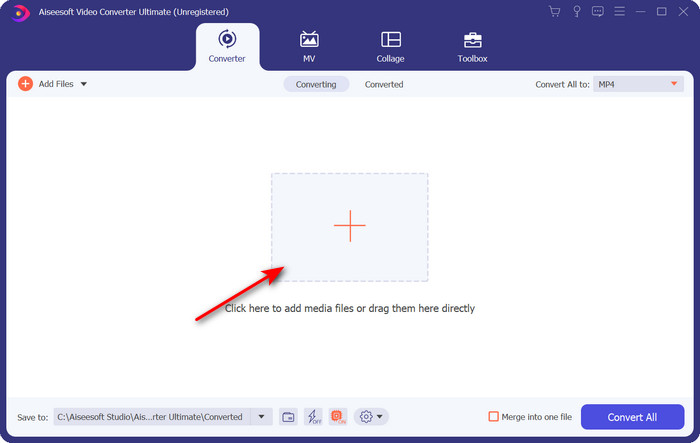
Pas 2. Inicia l’eina, fes clic al signe + al mig de la interfície i selecciona el fitxer .m4 a la carpeta que apareixerà, fes-hi clic i prem Open.
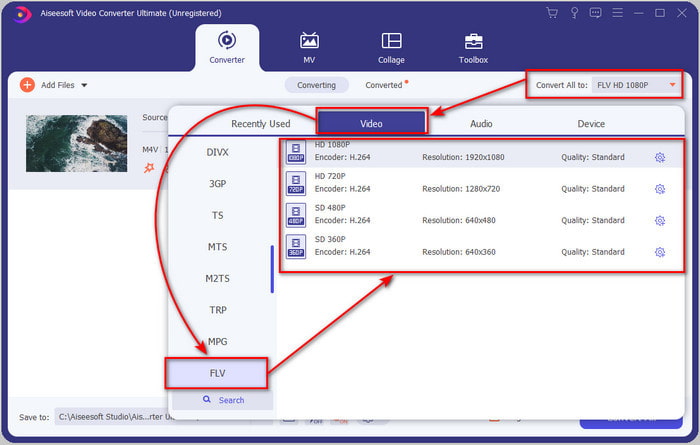
Pas 3. Un cop el fitxer .m4v sigui a la interfície, fes clic a Convert All to i cerca el format FLV.
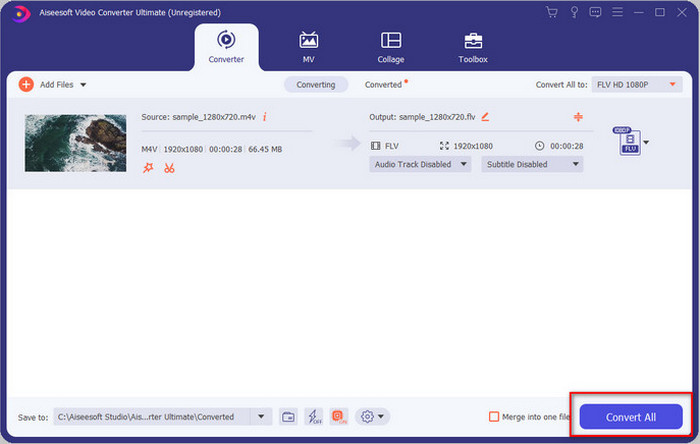
Pas 4. A continuació, fes clic a Convert All per començar a canviar de M4V a FLV.
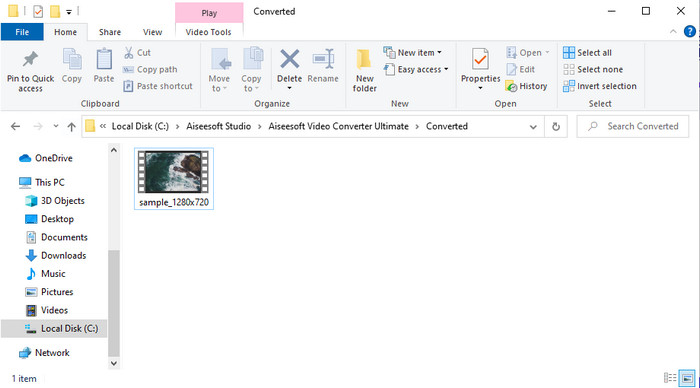
Pas 5. La conversió del fitxer trigarà menys d’un minut gràcies a la velocitat de conversió que ofereix aquesta eina. S’obrirà una carpeta amb el fitxer convertit; fes clic al fitxer per veure’l o compartir-lo en línia.
Pros
- La conversió ràpida i l'acceleració de maquinari estan disponibles per a la millor experiència.
- Disponible en totes les plataformes com PC o Mac.
- L'edició de vídeos per fer-los destacats es pot superar aquí.
Contres
- Pagament abans d'utilitzar, però el preu és assequible.
- Baixeu el programari abans d'utilitzar-lo.
Part 2. Segona opció per convertir M4V a FLV de forma gratuïta mitjançant en línia
Convertir els teus fitxers en línia pot fer-se de manera eficient si fas servir un bon convertidor M4V a FLV en línia amb l’ajuda de FVC Free Video Converter Online. Aquesta eina en línia és el millor convertidor al qual pots accedir des de tots els navegadors web si tens connexió a internet. A més, aquí pots convertir sense límit de mida, però no hi pots fer conversions per lots. Tot i que el programari en línia és excel·lent, continua essent necessària la connexió a internet, de manera que si no en tens, aquesta no és una opció, igual que passa amb altres convertidors web disponibles. Però, si tens connexió i vols gaudir d’una conversió gratuïta ben feta en línia, has de seguir els passos següents.
Com convertir M4V a FLV amb l’ajuda de FVC Free Video Converter Online:
Pas 1. Clica aquest enllaç per anar al convertidor en línia gratuït que FVC posa a la teva disposició.
Pas 2. A la interfície web, fes clic a Add Files to Convert per descarregar l’instal·lador. Un cop s’hagi acabat de descarregar l’instal·lador, torna a prémer Add Files to Convert i s’obrirà una carpeta; després selecciona el fitxer M4V.
Baixa la versió d’escriptori per convertir fitxers per lots.
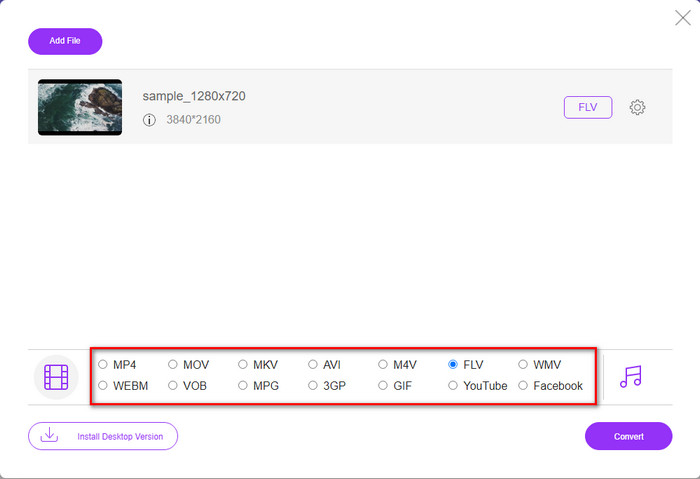
Pas 3. Apareixerà una nova interfície web; a la part inferior, tria el format FLV fent-hi clic.
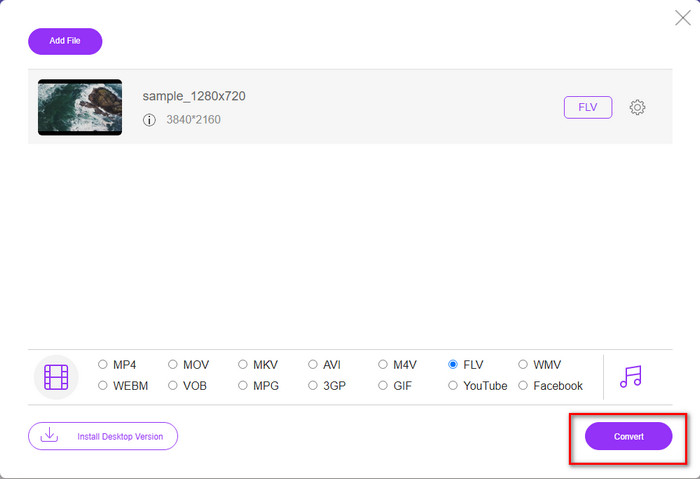
Pas 4. Per començar a convertir M4V a FLV de manera gratuïta, fes clic a Convert.
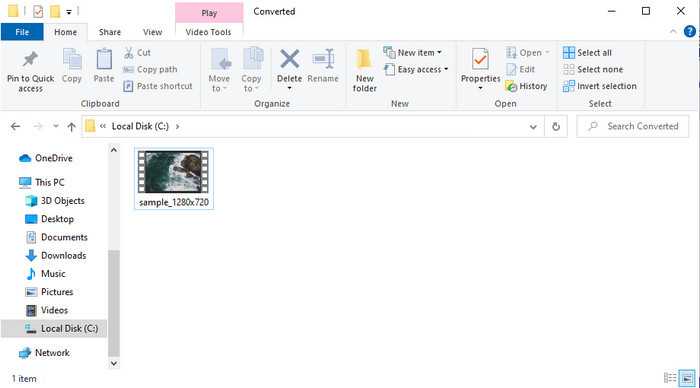
Pas 5. Després de la conversió, a la interfície apareixerà una carpeta; fes clic al fitxer per reproduir-lo al teu reproductor multimèdia local.
Pros
- Gratuït i compatible amb tots els navegadors web.
- Mida i conversió de fitxers il·limitades.
- Segur i sense anuncis a l'eina web principal.
Contres
- Necessita connexió a Internet per utilitzar l'eina.
- Format menys compatible per carregar i convertir.
Part 3. Diferències entre els formats M4V i FLV
M4V emmagatzema la màxima qualitat de vídeo baixada a la vostra botiga d'iTunes d'Apple. Aquest format és similar al MP4 perquè utilitzen el còdec MPEG-4 com a compressor. Però els vídeos M4V estan protegits sota la protecció dels drets d'autor DRM d'Apple FairPlay. Per tant, reproduir vídeos amb aquest format és complicat perquè no es reproduirà immediatament si els inseriu en un reproductor multimèdia que no sigui iTunes o Quicktime Player. Es pot accedir als fitxers M4V no protegits al reproductor multimèdia canviant l'extensió del fitxer a .mp4.
En canvi, FLV s'utilitza per transferir dades de vídeo i àudio a través del web el més ràpidament possible. Flash Video és el format més favorable que hi ha a tots els llocs web HTML 5. Tanmateix, aquest format es va suspendre perquè Adobe Flash ja s'havia retirat. Tot i això, encara podeu reproduir-lo als complements del vostre reproductor multimèdia necessaris un cop l'heu descarregat o convertit.
M4V contra FLV
L'M4V està desenvolupat per Apple, que també utilitza MPEG 4. Els fitxers M4V s'utilitzen sovint per emmagatzemar els vídeos descarregats de la botiga iTunes d'Apple, com ara vídeos musicals, episodis de televisió, etc. És possible que trobeu alguns fitxers M4V protegits contra còpia, ja que Protecció de drets d'autor FairPlay DRM d'Apple.
Adobe Flash Player va utilitzar FLV per oferir contingut de vídeo com pel·lícules i programes de televisió. Avui en dia, Adobe ja no desenvolupa el reproductor i recomana als usuaris que el desinstal·lin per motius de seguretat. Tanmateix, encara podeu utilitzar el format FLV en molts programes que no són d'Adobe/Macromedia.
Part 4. Preguntes freqüents sobre la conversió de M4V a FLV
Quin és millor; MP4 o M4V?
Si voleu protegir el vostre fitxer, M4V és el format que heu d'utilitzar perquè només està disponible a Apples i està protegit. Però suposem que voleu un format compatible amb tots els reproductors multimèdia, l'editor i més. En aquest cas, MP4 és el format multimèdia universal que t'agradaria utilitzar.
Puc jugar a M4V a VLC?
VLC és gratuït i compatible amb totes les plataformes, i també pot reproduir gairebé tots els formats multimèdia. Però l’M4V protegit no es pot reproduir aquí perquè està protegit. Així doncs, si vols veure un .m4v al VLC, cal convertir el fitxer M4V a MP4 o AVI.
Perdo la qualitat després de convertir M4V?
Després de convertir M4V, la seva qualitat hauria de mantenir la taxa estàndard de la qualitat M4V original. Tanmateix, alguns convertidors no admeten la conversió del vídeo a HD, 1080 o 4k. Per tant, és millor que trieu l'eina perfecta i no l'eina adequada que us satisfarà les vostres necessitats per convertir sense perdre la seva qualitat.
Conclusió
En definitiva, les dues eines en línia i fora de línia presentades aquí tenen molt de potencial, sobretot si vols convertir M4V a FLV. A més, hem obtingut informació sobre els dos formats, M4V i FLV. Tot i que cal modificar l’M4V per veure el fitxer protegit, triar l’eina adequada per a cada tasca pot ser complicat. Per això, presentem dues eines que pots utilitzar per convertir el format gratuïtament mitjançant FVC Free Video Converter Online. O bé pots experimentar noves cotes de conversió amb FVC Video Converter Ultimate. I ara, què esperes si vols veure el teu M4V gratis? Tria una de les eines anteriors, segueix els passos ràpids i senzills que t’hem presentat i, voilà, gaudeix del vídeo.
-
 [Guia] Com convertir vídeos M4V a GIF animats a Windows/Mac
 Si voleu crear fitxers GIF animats amb els vostres vídeos M4V preferits, podeu obtenir informació sobre 2 maneres fàcils i eficients de convertir vídeos M4V a GIF amb configuracions personalitzades.
-
 3 Programa de conversió de vídeo utilitzat per convertir iTunes M4V a AVI a Mac
 No tens ni idea de com convertir MKV a un format AVI? A mesura que continuem llegint aquest article, coneixerem les 3 eines que us poden ajudar a convertir aquest format de fitxer.
-
 Convertidor gratuït de M4V a MOV: com convertir M4V a MOV
 Si el vostre reproductor multimèdia'no és compatible amb M4V, heu tingut problemes per veure una pel·lícula al vostre iPhone? El tema principal d'aquest article és convertir-lo en un fitxer de vídeo MOV.

