


 Video Converter Ultimate
 Gravadora de pantalla
 Reparació de vídeo
 Baixada segura
Com convertir gratis VOB a FLV amb solucions d'escriptori i en línia el 2022
Els fitxers en format VOB s’emmagatzemen normalment a la carpeta VIDEO_TS a l’arrel d’un DVD. Els vídeos VOB contenen la major part de les dades desades al disc, incloent-hi vídeo, àudio, subtítols, menús de DVD i altres continguts de navegació. Però si vols pujar fitxers VOB a les xarxes socials, com ara YouTube, has de canviar el format dels fitxers VOB a formats compatibles amb la transmissió de vídeo, com FLV, l’estàndard per a la transmissió de continguts multimèdia per Internet. Així doncs, en aquest article explicarem com convertir VOB a FLV en línia o amb un convertidor de fitxers VOB a FLV gratuït per a una millor reproducció en streaming.

Part 1. Com convertir VOB a FLV amb programari d'escriptori gratuït
Per canviar ràpidament el format dels teus fitxers VOB a FLV, prova FVC Free FLV Converter. Amb aquest programari gratuït, pots transformar fitxers de vídeo de VOB a FLV, MP4, AVI, WMV, MOV i molts altres formats. A més, el programa és capaç de dur a terme tasques bàsiques d’edició de vídeo si cal. Només has de descarregar el convertidor de fitxers de VOB a FLV i seguir els senzills passos que trobaràs a continuació.
Descàrrega gratuïtaPer a Windows 7 o posteriorDescàrrega segura
Descàrrega gratuïtaPer a MacOS 10.7 o posteriorDescàrrega segura
Pas 1. Inicia FVC Free FLV Converter
Primer, descarregueu el convertidor VOB a FLV per al vostre Windows o Mac. Després de descarregar el fitxer d’instal·lació, feu-hi doble clic i seguiu les instruccions que apareixen a la pantalla. Després, inicieu-lo al vostre ordinador i obtindreu la seva interfície com es mostra a continuació.

Pas 2. Afegeix fitxers VOB al programa
Prem el botó Add File(s), selecciona els teus fitxers VOB i fes clic a Next per continuar.

Pas 3. Tria FLV com a format de sortida
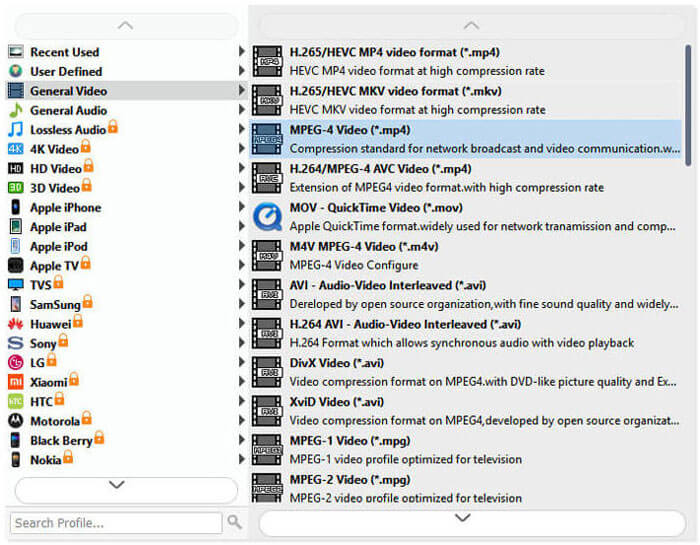
A continuació, tria el format de fitxer FLV al camp Output format.
Pas 4. Converteix VOB a FLV
Fes clic al botó Open Folder i tria la carpeta on vols desar els fitxers convertits. Per començar a convertir els teus fitxers VOB a FLV, fes clic al botó Convert. Un cop finalitzada la conversió, la carpeta que conté els fitxers convertits s’obrirà automàticament.
Part 2. Com convertir VOB a FLV en línia
Utilitzar serveis en línia per convertir VOB en FLV també és una bona opció. Hem escollit dos convertidors de VOB a FLV en línia per triar. Totes aquestes eines en línia són gratuïtes i són freqüentment utilitzades per molts usuaris. Seguiu llegint per obtenir informació sobre com podeu convertir VOB a FLV al vostre ordinador mitjançant les eines en línia.
FVC convertidor de vídeo en línia gratuït
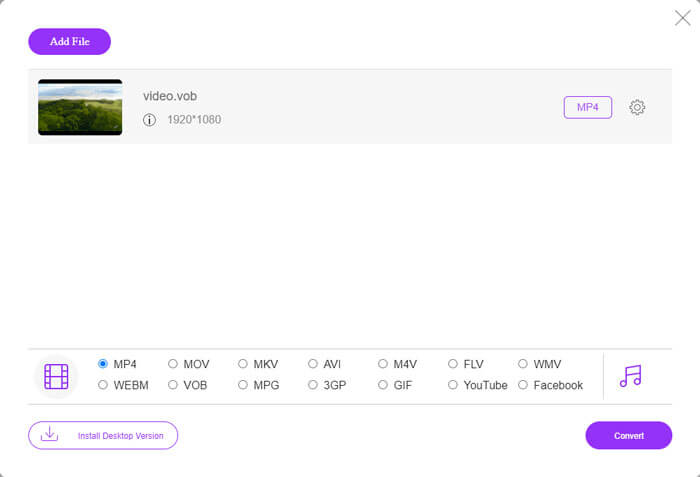
FVC Free Online Video Converter és una eina en línia completa que admet els formats de vídeo i àudio més populars. Convertir fitxers amb aquest servei en línia és segur, i els fitxers convertits s’eliminaran del servidor tan aviat com descarreguis el resultat. La conversió no requereix instal·lar cap programari i tot el procés de conversió és senzill.
Podeu seguir els passos següents per canviar els fitxers VOB a FLV.
Pas 1. A la pàgina web de FVC Free Online Video Converter, fes clic al botó Add Files to Convert per afegir els teus fitxers VOB. La primera vegada que facis servir aquesta eina, hauràs de descarregar i instal·lar primer el llançador.
Pas 2. Assegura’t que FLV estigui seleccionat com a format de sortida a la categoria Video, a la part inferior de la finestra.
Pas 3. Prem el botó Convert i després tria la carpeta de destinació. Quan el procés de conversió hagi finalitzat, el fitxer convertit es descarregarà automàticament i s’obrirà la carpeta on es desen els fitxers convertits.
ConvertFiles
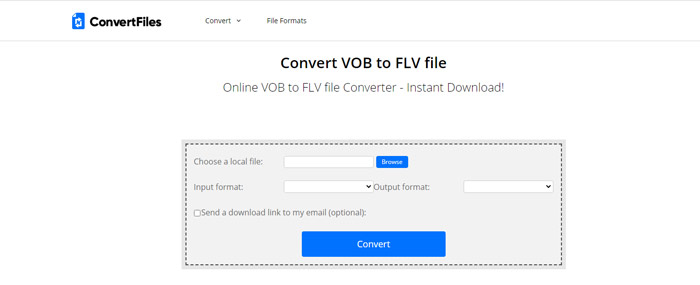
ConvertFiles és un altre convertidor gratuït de fitxers VOB a FLV en línia. Aquest servei pot convertir diversos tipus de fitxers de forma gratuïta en qüestió de minuts. Aquest servei pot enviar l'enllaç de baixada al fitxer convertit a la vostra adreça de correu electrònic si ho necessiteu. La conversió no requereix cap instal·lació de programari i tot el procés de conversió és senzill. Tingueu en compte que aquesta eina en línia pot convertir fitxers de fins a 250 MB.
Així és com podeu utilitzar aquest convertidor de VOB a FLV en línia.
Pas 1. Visita la pàgina web de ConvertFiles, fes clic a Browse i afegeix els teus fitxers VOB al programa.
Pas 2. A continuació, selecciona Flash Video File (.flv) a la llista desplegable Output format.
Pas 3. Fes clic al botó Convert per començar a convertir fitxers VOB a FLV. Quan el fitxer s’hagi convertit correctament, veuràs l’enllaç i podràs fer-hi clic per anar a la pàgina de descàrrega i descarregar els teus fitxers convertits.
Part 3. La comparació entre els formats VOB i FLV
| Paràmetre de comparació | VOB | FLV |
| Extensió de fitxer | .vob | .flv |
| Desenvolupat per | Fòrum de DVD | Adobe Systems |
| Vídeo 00codecs | MPEG-1, MPEG-2 | On2 VP6, Sorenson Spark, vídeo de pantalla, vídeo de pantalla 2, H.264 |
| Còdecs d’àudio | MP1, MP2, PCM, AC-3, DTS | MP3, ADPCM, Nellymoser, Speex, AAC |
| Programes que obren fitxers VOB / FLV | Windows Media PlayerVLC Media Player | VLC Media Player Adobe Flash Player |
Part 4. Preguntes més freqüents sobre la conversió VOB a FLV
Què és VOB?
VOB (de video object) és el format contenidor dels suports DVD-Video. Un fitxer VOB pot contenir vídeo, àudio, subtítols, menús de DVD amb navegació per capítols en un disc DVD. El format VOB sol estar codificat com a MPEG-2 i es pot obrir amb gairebé qualsevol reproductor multimèdia. Llegeix Els 5 millors reproductors VOB per a PC amb Windows 10/8/7 i Mac per conèixer més reproductors VOB.
Què és FLV?
FLV és un format contenidor audiovisual utilitzat per reproduir en streaming contingut de vídeo digital per Internet mitjançant Adobe Flash Player 6 o versions posteriors. Pots reproduir FLV amb Windows Media Player, VLC, Adobe Media Player, Winamp, RealPlayer o altres reproductors FLV.
Els fitxers VOB contenen àudio?
Sí. Un fitxer VOB inclou menús de vídeo, àudio, subtítols i DVD.
Conclusió
Com veieu, podeu transformar MP4 a FLV mantenint fàcilment l’alta qualitat del vídeo original amb un convertidor de fitxers VOB gratuït. A més, també podeu fer la conversió VOB a FLV en línia. Els convertidors d’escriptori i de VOB a FLV en línia esmentats són gratuïts. Esperem que pugueu trobar una solució satisfactòria que s'adapti millor a les vostres necessitats.
-
 Què és el fitxer VOB i com convertir el fitxer VOB en GIF de forma gratuïta
 Voleu saber més sobre els fitxers VOB i com compartir-los després de ser arrencats? o Per què necessiteu convertir VOB a GIF? A continuació, llegiu atentament aquest article.
-
 VOB a MP4: 3 maneres de convertir fitxers VOB a MP4 de manera gratuïta a granel
 Aquest article presenta 3 convertidors gratuïts de VOB a MP4 i els tutorials relacionats. Podeu convertir fitxers VOB a MP4 gratuïtament a Windows / Mac / en línia amb facilitat.
-
 Com comprimir fitxers VOB en línia i gratis
 Esteu cercant mètodes per comprimir fitxers VOB? Apreneu la millor manera de reduir la mida dels fitxers VOB en aquest article.
