


 Video Converter Ultimate
 Gravadora de pantalla
 Reparació de vídeo
Eines fenomenals per utilitzar per convertir XviD a FLV [fora de línia i en línia]
Una biblioteca de còdec de vídeo MPEG-4 de codi obert distribuïda sota els termes de la Llicència Pública General de GNU, XviD és una biblioteca de còdec de vídeo que es pot descarregar gratuïtament. Com a competidor del còdec propietari DivX Pro, que està subjecte a restriccions de llicència i, per tant, només està disponible per als membres del DivX Advanced Research Center (DARC), va ser desenvolupat. Mentrestant, un fitxer amb l’extensió .flv és una abreviatura de Flash Video. L’extensió de fitxer FLV fa referència a un fitxer de vídeo o d’àudio transmès per internet mitjançant Adobe Flash Player o Adobe Air. Aquests dos formats de vídeo s’anul·len mútuament, però podeu transformar o convertir aquests dos formats de vídeo entre si. A continuació teniu les eines que heu de considerar per convertir XviD a FLV.

Part 1. Mètode eficient per utilitzar per convertir XviD a FLV [fora de línia]
La conversió de XviD a FLV mai no ha estat més fàcil gràcies a Video Converter Ultimate, que ofereix una solució tot en un amb zero pèrdua de qualitat. A més, la interfície és fàcil d'utilitzar i podeu convertir fàcilment els vostres fitxers XviD a FLV sense cap problema. A més de la possibilitat de convertir XviD a FLV, Video Converter Ultimate ofereix una gran quantitat d'altres funcions útils. Per exemple, podeu millorar la qualitat d'un vídeo i fer un vídeo musical. Ara que heu après sobre aquest programari, ara podeu aprendre a utilitzar-lo seguint els procediments que s'indiquen a continuació:
Pas 1: Comenceu a descarregar el programari fent clic al botó Descàrrega gratuïta que hi ha a sota d’aquest pas. Està disponible per a Mac i Windows, així que heu de triar el sistema operatiu que feu servir. Després de descarregar el programari, instal·leu-lo a l’ordinador.
Descàrrega gratuïtaPer a Windows 7 o posteriorDescàrrega segura
Descàrrega gratuïtaPer a macOS 10.7 o posteriorDescàrrega segura
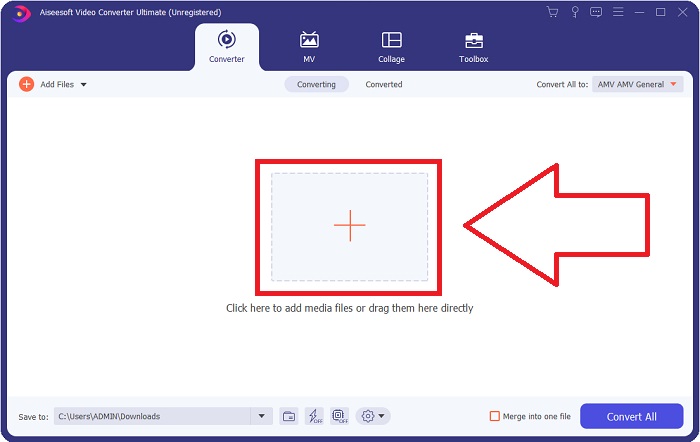
Pas 2: Inicieu el programari per començar a convertir XviD a FLV. Després d’iniciar el programari, veureu que apareix una finestra a la pantalla que mostra la interfície del Convertidor. Feu clic al botó + situat al centre de la finestra o podeu arrossegar vídeos per importar fitxers des de l’ordinador.
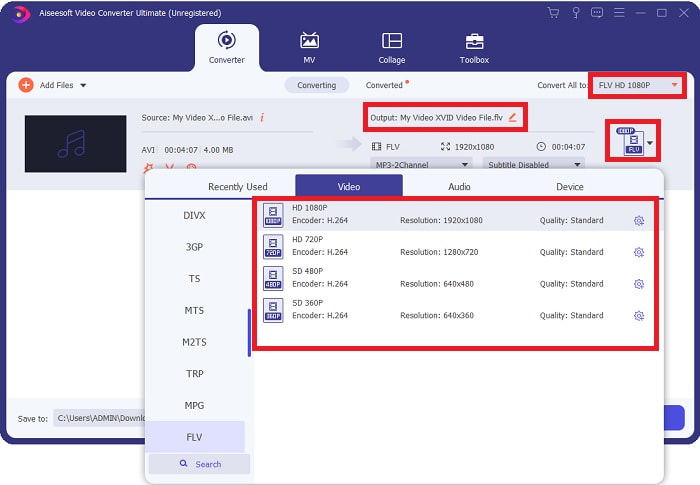
Pas 3: A continuació, veureu que apareix una altra finestra. Feu clic a la selecció de format de vídeo situada a la cantonada dreta de la pantalla. Cerqueu el format de vídeo FLV i feu clic a la qualitat de vídeo que preferiu.
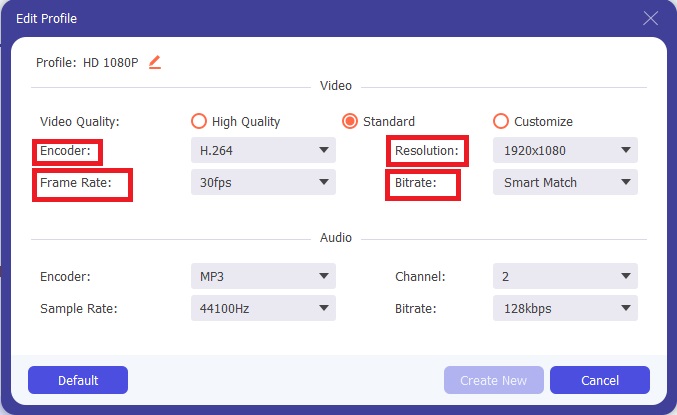
Pas 4: Quan la qualitat que voleu no està disponible entre les qualitats de vídeo que ofereix el programari, podeu crear la vostra pròpia qualitat de vídeo ajustant la resolució, la taxa de bits, la velocitat de fotogrames, etc. Per fer-ho, feu clic a la icona d’engranatge just al costat de la qualitat de vídeo que es mostra després de triar el vostre format de vídeo. Feu clic a D’acord quan hàgiu acabat d’ajustar el vídeo.
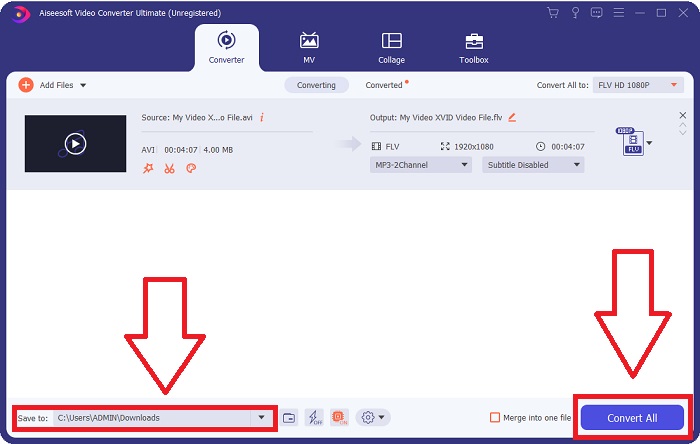
Pas 5: Després de fer tots els ajustos, ja podeu convertir el vídeo fent clic a Converteix-ho tot. També podeu fer clic al botó Desa a i especificar la carpeta on voleu que es desin els vostres vídeos convertits.
Part 2. Excel·lent alternativa per utilitzar per convertir XviD a FLV [en línia]
No cal descarregar, instal·lar ni registrar cap programari per utilitzar convertidors en línia com ara el Free Video Converter Online. Amb aquesta eina en línia, podeu convertir fàcilment i ràpidament els vostres fitxers des de la finestra del navegador. En qüestió de segons, podeu convertir els vostres vídeos HD a MP4, FLV o qualsevol altre format de vídeo popular mantenint-ne la qualitat original. Aquesta eina en línia us pot ajudar en qualsevol cas, per això heu d’aprendre aquests passos que es donen a continuació:
Pas 1: Feu clic en aquest enllaç per anar a la pàgina principal de Free Video Converter Online. Després d’accedir a la pàgina principal, feu clic a Add Files to Convert i llavors apareixerà una finestra a la part superior de la pantalla; feu clic a Download per descarregar el llançador per utilitzar l’eina en línia. Instal·leu-lo a l’ordinador i després feu clic de nou a Add Files to Convert per obrir l’eina en línia.
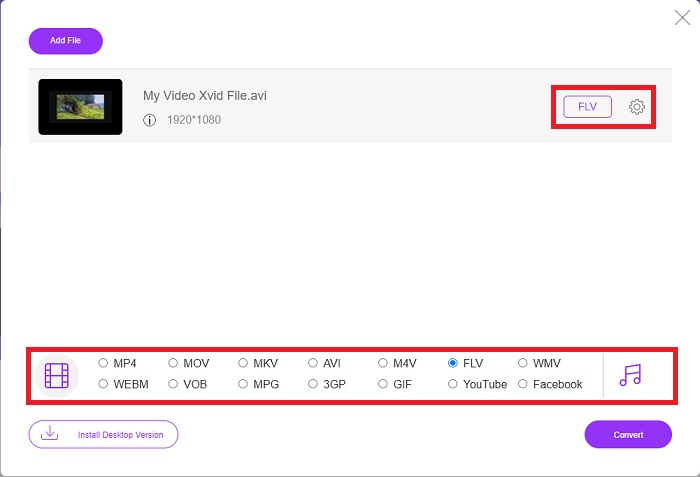
Pas 2: Ara podeu triar el format de vídeo FLV de la selecció de formats situada a la part inferior. I feu clic a la icona d’engranatge just al costat del format de vídeo FLV per ajustar totes les especificacions detallades que té un vídeo, com ara la resolució, la velocitat de fotogrames, etc. Feu clic a D’acord quan hàgiu acabat.
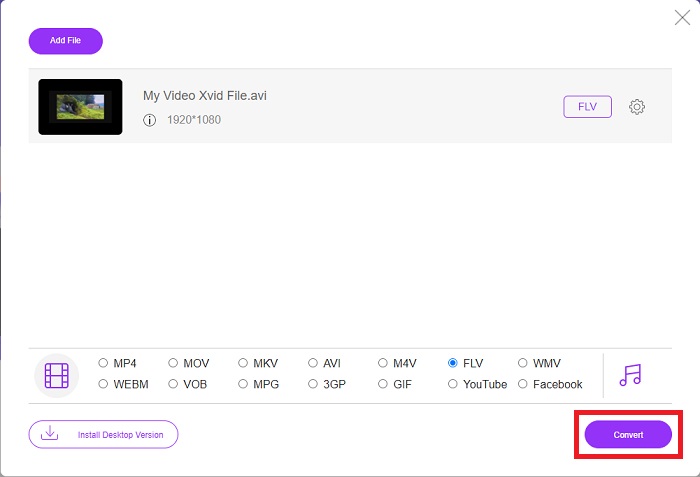
Pas 3: Finalment, ja podeu convertir el fitxer de vídeo fent clic a la icona Convert a la part inferior de la pantalla. Espereu un minut o dos, i apareixerà una finestra emergent indicant que la conversió s’ha completat.
Per cert, també podeu utilitzar aquesta eina per convertir els vostres fitxers FLV a XviD amb facilitat.
Part 3. Quadre de comparació: XviD i FLV
XviD utilitza el còdec del format XviD. Un programa que comprimeix i descomprimeix vídeo a MPEG-4 ASP, un estàndard de compressió, en lloc d'un format de vídeo com MP4, és el que és. Gràcies a les capacitats de compressió del contingut XviD, és possible escurçar una pel·lícula de llarga durada perquè encaixi en un CD mantenint la qualitat del DVD. El contingut de vídeo XviD es pot emmagatzemar en diversos contenidors de fitxers, fins i tot si s'utilitza l'extensió de fitxer .xvid. Un fitxer AVI es pot anomenar video.xvid.avi, per exemple, depenent de qui l'ha creat. XviD està sota la GPL, una llicència gratuïta i de codi obert per al programari.
Tanmateix, els fitxers de vídeo desats en format de contenidor Adobe Flash (FLV) són fitxers FLV. Transmissions d'àudio i dades de vídeo codificades de la mateixa manera que el Flash estàndard. El format SWF i els paquets de metadades s'inclouen a la capçalera curta. Amb el connector Flash Video Exporter (inclòs amb Adobe Animate) o una altra aplicació que admeti fitxers FLV, els usuaris poden exportar el seu contingut de Flash Video en format FLV. A més de QuickTime i Windows Media, Adobe Media Encoder també pot codificar altres formats de vídeo. Per saber més sobre la comparació detallada, us oferim un gràfic de comparació a continuació:
| Extensió de fitxer | XviD | FLV |
| Tipus d'arxiu | Vídeo compatible amb MPEG-4 Part 2 | Arxiu de vídeo Flash |
| Desenvolupat per | DivX, Inc. | Adobe System |
| Pros | DivX és conegut per la seva capacitat d'aconseguir un delicat equilibri entre la qualitat i la mida del fitxer en termes de compressió. Com a resultat, es pot utilitzar per extraure, el procés de copiar fitxers d'àudio i vídeo des d'una font al disc dur d'un ordinador en preparació per a l'emmagatzematge i la conversió. | Adobe Flash és una opció excel·lent per als llocs web que volen incorporar animació i elements interactius. Té el potencial de tenir un impacte important a llarg termini. Els jocs més populars de Flash en aquell moment eren senzills. |
| Contres | No està disponible per a totes les plataformes. | Durant els últims anys, la popularitat de FLV ha disminuït. El contingut FLV requereix molt de temps i diners per produir-lo. Un dels principals inconvenients de Flash és que no es pot visualitzar en dispositius iOS, la qual cosa limita molt la seva capacitat per atraure nous seguidors. |
| Els programes obren el format de vídeo | ◆VLC Media Player◆ Reproductor de Windows Media& ◆ BS Player ◆ Reproductor multimèdia DivX ◆ Elmedia Player | ◆ VLC Media Player ◆ Adobe Flash Player |
Part 4. Preguntes freqüents sobre la conversió de XviD a FLV
El còdec XviD és segur?
Xvid és un còdec popular i efectiu, i és completament segur d’utilitzar. És una mala idea descarregar el còdec Xvid des d’un lloc web o servei que no coneixeu o en què no confieu. Per exemple, desaconsellem fermament instal·lar un paquet de còdecs des d’un lloc web de torrent, ja que podrien ser eines de programari maliciós que es fan passar per programari legítim. El problema també sorgeix quan intenteu mirar vídeos a internet. Per reproduir els vostres fitxers XviD, aquí teniu la ressenya dels millors reproductors XviD que podeu provar.
El còdec XviD és gratuït?
Xvid Codec Pack és un còdec de qualitat i compressió de vídeo gratuït. Xvid és extremadament ràpid perquè es pot optimitzar per a les CPU modernes. La gravació de vídeo en temps real des d'una càmera i la reproducció fluida de vídeo HD no suposa cap problema. La potència restant del vostre ordinador serà suficient per a altres coses!
Què és el flux FLV?
FLV és un contenidor senzill que "admet" la transmissió progressiva basada en fitxers perquè permet rebre només una part de l'interval de bytes d'un vídeo mentre es reprodueix el vídeo en el seu conjunt (per a mp4, necessitareu meta com Moov, etc. per reproduir-lo). . )
Conclusió
Per concloure tots els punts donats, sabem que la conversió de XviD a FLV és possible gràcies a aquests dos millors convertidors fàcils d'utilitzar pel que fa a programari i eines en línia. Aquest article el recomana més, ja que no és una eina comparable a altres programaris i eines en línia i no cal que escolliu si el podeu utilitzar a Windows o Mac perquè podeu utilitzar-lo en tots dos sistemes operatius de manera gratuïta.
-
 4 mètodes verificats per convertir TS a FLV a l'escriptori / en línia
 Per defecte, no podeu obrir TS al vostre ordinador o mòbil. L'única manera de veure els fitxers de vídeo és convertir TS a FLV o altres formats amb la nostra guia concreta.
-
 3 solucions per convertir MTS a FLV gratis i en línia
 Voleu convertir MTS a FLV? Aquí teniu 3 programes gratuïts de conversió de MTS a FLV que podeu provar de convertir MTS a FLV a Mac OS X i Windows 10/8/7.
-
 Les millors maneres de convertir VOB a FLV [Gratis i en línia inclòs]
 Voleu convertir un fitxer VOB a un fitxer FLV? Podeu completar la tasca fàcilment amb convertidors d'escriptori o en línia. Llegiu aquesta guia i apreneu a transformar VOB a FLV fàcilment i ràpidament.
