


 Video Converter Ultimate
 Gravadora de pantalla
 Reparació de vídeo
5 redimensionadors de GIF que podeu utilitzar per redimensionar el vostre GIF animat en línia i fora de línia
Canviar la mida d’un GIF és una tasca fàcil amb qualsevol editor, però no tots els editors admeten aquest tipus de format. En lloc de provar diferents eines i perdre-hi molt de temps, per què no et dediques a llegir aquest article? Per què? Perquè et presentem els redimensionadors que pots utilitzar i només exposarem fets sobre aquestes cinc eines. Aleshores, estàs a punt per conèixer els redimensionadors de GIF animats disponibles a les teves plataformes? Si és així, ara hem de continuar amb una ressenya detallada d’aquests cinc redimensionadors de GIF que tens a continuació i conèixer les diferències entre cadascuna de les eines.

Part 1. Els 5 millors redimensionadors de GIF en línia i fora de línia
1. FVC Video Converter Ultimate [Recomanat]
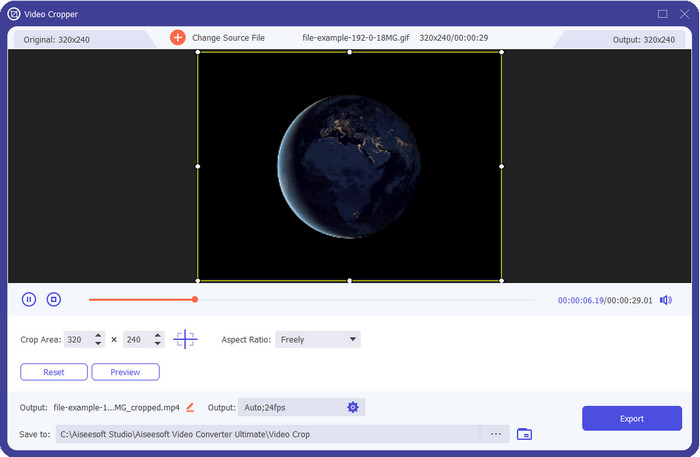
Cap de les eines aquí té allò que FVC Video Converter Ultimate pot oferir als teus GIF. Potser et preguntes què és el que fa única aquesta eina? Aquesta eina definitiva proporciona un redimensionament de GIF complet i econòmic que t’encantarà fer servir. Aquesta eina és excel·lent per obtenir un resultat professional com el que et pot donar Photoshop, però molt més ràpid tant per a principiants com per a professionals. A més, aquesta eina pot canviar la mida del teu GIF, però també pots convertir els teus GIF a MP4, MOV, AVI, MKV i més de 200 formats addicionals per fer-los compatibles amb altres dispositius. Suposa que necessites crear un GIF i vols establir-lo com a fons de pantalla; llavors tens sort de tenir aquesta eina definitiva, perquè disposa d’un creador de GIF que t’ajudarà. Si vols saber com crear GIF i posar-los com a fons de pantalla, fes clic en aquest enllaç. Tot i així, aquesta eina és recomanable per a tots els usuaris per aprendre a redimensionar GIF amb tranquil·litat sense haver de llegir un manual d’ús.
Descàrrega gratuïtaPer a Windows 7 o posteriorDescàrrega segura
Descàrrega gratuïtaPer a macOS 10.7 o posteriorDescàrrega segura
Pros
- Canvia la mida del GIF segons la mida que vulguis arrossegant els punts lliurement.
- Té una vista prèvia que podeu mirar per assegurar-vos que sigui la mida exacta que necessiteu als vostres GIF.
- Té una representació ultra ràpida integrada per a un procés d'exportació de raigs.
- Disponible en qualsevol sistema operatiu d'escriptori com Windows i Mac.
Contres
- Cal comprar.
2. Adobe Photoshop
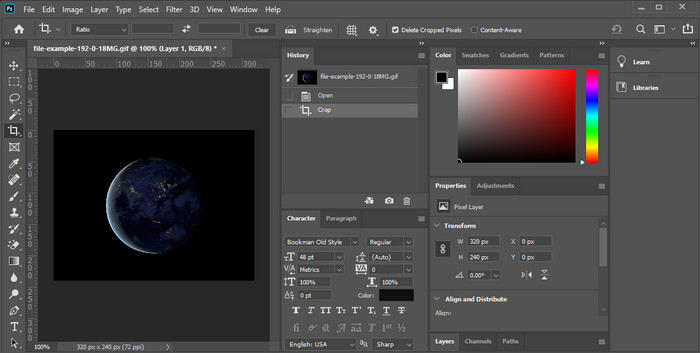
I si el que vols és una eina de redimensionament professional? Aleshores Adobe Photoshop és una opció. Aquesta eina descarregable t’ajuda a canviar la mida de qualsevol GIF fàcilment en qüestió de minuts. Entrant en detalls, aquesta eina és l’elecció de tots els usuaris professionals que volen editar les seves imatges, com els GIF, perquè tinguin un millor aspecte i resultin més atractius visualment. Tot i que és una eina professional, continua essent difícil d’utilitzar per a aquells que no estan familiaritzats amb la tecnologia. A més, si només vols redimensionar el teu GIF, aquesta eina és cara per a aquesta tasca. Però si vols utilitzar PhotoShop per redimensionar GIF i afegir-hi alguns detalls addicionals, aquesta eina t’ajudarà; tanmateix, aprendre a utilitzar-la et portarà més temps que les altres eines.
Pros
- És la millor opció per a l'edició d'imatges professional.
- Eina professional d'ús professional.
- Funcions d'edició avançades per a GIF.
Contres
- Costós.
- Difícil d'utilitzar si sou nou en l'àrea d'edició.
3. GIFGIF
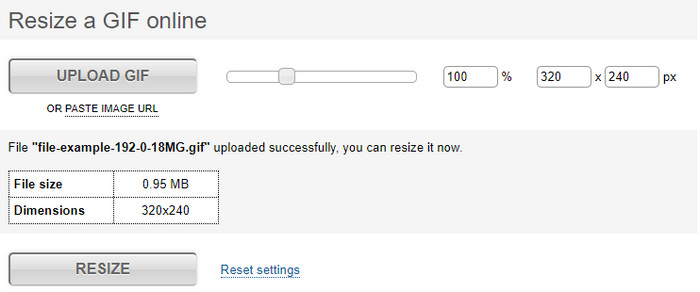
GIFGIFs disposa d’una de les biblioteques de GIF més àmplies que pots utilitzar per desar GIF ja preparats al teu disc i compta amb un editor senzill per redimensionar GIF de gran mida. Aquesta eina ha estat disponible per ajudar els usuaris a ajustar els seus GIF quan calgui mitjançant serveis en línia. Tot i que aquest redimensionador web és gratuït i en línia, no té anuncis a la interfície que et puguin molestar, cosa que és excel·lent. Però el problema principal del seu redimensionador és que hauràs d’indicar la mida exacta de la proporció de la imatge que vols obtenir. Aquest problema és més estressant que els anuncis, perquè hauràs d’anar provant una i altra vegada per assegurar-te que és exactament el redimensionament que vols. No obstant això, si ja tens una idea de la relació d’aspecte que necessites, aquesta és una bona opció per redimensionar els teus GIF.
Pros
- Biblioteca integrada per a GIF.
- No té anuncis al web que us puguin molestar o molestar mentre canvieu la mida del GIF.
- Fàcil i gratuït d'utilitzar.
Contres
- Es necessita Internet per acabar la tasca de canviar la mida dels GIF.
- És difícil saber si aquesta és la mida exacta que necessiteu.
4.RedKetchup.io
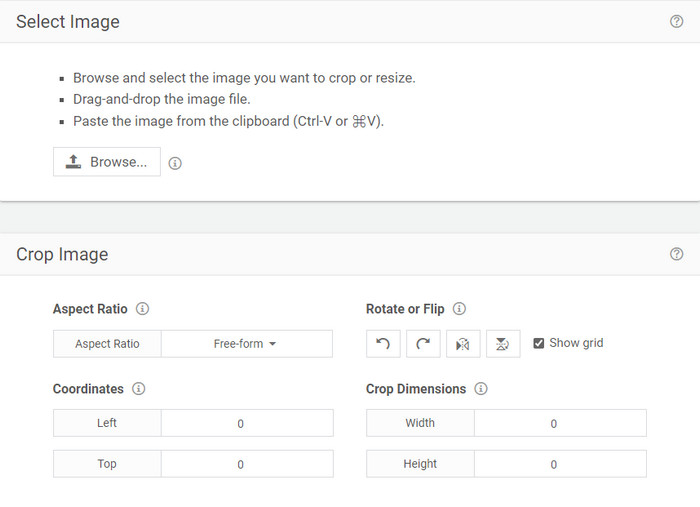
RedKetchup.io ofereix una manera senzilla i interactiva de redimensionar GIF animats dins del límit específic que vulguis. Aquesta eina web permet als usuaris d’internet fer que els seus GIF tinguin un millor aspecte gràcies a les funcions d’edició que proporciona. A més, aquí pots fer un redimensionament molt més detallat que el que Ezgif pot oferir-te. Tot i que aquesta eina és molt més fàcil d’utilitzar que la primera, la seva interfície no té gaire color perquè sembli professional. L’únic color que veuràs quan hi accedeixis és el del seu nom, i és de color vermell. A més, l’eina és d’accés gratuït; tanmateix, hi ha alguns anuncis a la interfície que poden resultar una mica pesats de veure.
Pros
- Disponible per a qualsevol persona que tingui connexió a Internet.
- Redimensionador de GIF molt detallat.
- Gratuït però, és senzill d'utilitzar.
Contres
- Té anuncis molestos a la interfície.
- Depenent d'Internet.
5. Ezgif
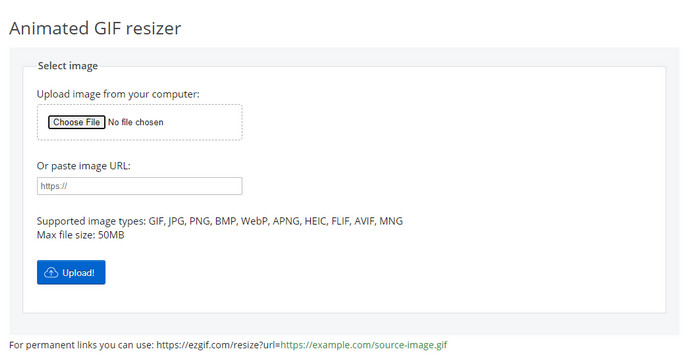
És coneguda per ser una de les principals eines per crear GIF i també pot redimensionar GIF en línia si ho necessites. Ezgif ofereix una interfície intuïtiva per millorar el teu GIF sense haver d’esforçar-te gaire. A més, si no estàs familiaritzat amb la tecnologia, aquesta eina és una excel·lent opció per a aquest tipus d’usuaris. No obstant això, si no tens connexió a internet, aquesta eina no és una opció per redimensionar el teu GIF perquè depèn d’internet, igual que l’altra eina web que veurem. A més, els anuncis a la interfície poden distreure’t mentre redimensiones els GIF. Si fas servir aquest editor, assegura’t de saber el valor exacte de l’amplada i l’alçada que vols establir, perquè no hi ha cap vista prèvia per comprovar si el GIF redimensionat s’ajusta a les teves necessitats, i no pots arrossegar la proporció per ajustar-la segons el que vulguis.
Pros
- Millor creador de GIF en línia.
- Té funcions d'edició de GIF senzilles que necessitareu.
- Accedeix-hi gratuïtament.
Contres
- No té cap vista prèvia per comprovar si la mida del GIF és correcta.
- Hi ha anuncis a la interfície que us poden irritar.
Part 2. Quadre de comparació sobre els 5 GIF Redimensionadors
| Característiques | Video Converter Ultimate [Recomanat] | Photoshop | GIFGIF | RedKetchup.io | Ezgif |
| Funcions d'edició |  | | | | |
| Sense anuncis | | |  | | |
| Fàcil d'usar | | | | | |
| Dependent d'Internet | | | | | |
| Barat o gratuït | | | | | |
| Panell de previsualització | | | | | |
Part 3. Preguntes freqüents sobre GIF Resizer
Després de canviar la mida, canvia la qualitat del GIF?
Pel que fa a la qualitat, el GIF no s'hauria de canviar dràsticament per un de borrós, però la qualitat canviarà després de canviar la mida del GIF, però no hauria d'estar lluny del GIF original. Per tant, si trobeu aquest problema, vol dir que la qualitat ha canviat durant l'exportació i no mentre canvieu la mida del GIF.
La mida del fitxer del GIF es fa petita?
Després de comparar els dos GIF, l'original i el redimensionat, vam veure un canvi significatiu en la mida del fitxer. Tot i que és un petit canvi, podem dir que la seva mida va ser més petita que l'original.
Puc tornar-lo al GIF original després de canviar la mida?
Després de canviar la mida del GIF, podeu tornar-lo a l'estat original si encara no l'heu exportat. Tanmateix, si exporteu el GIF i no esteu satisfet amb el resultat, no podreu tornar-lo a la mida original del GIF. Per evitar aquest problema, heu d'utilitzar un redimensionador de GIF que tingui una vista prèvia per comprovar la sortida abans d'exportar-lo.
Després de convertir JPG a GIF, es mourà?
No, no ho farà, perquè els JPEG no es mouen com els GIF animats. Però pots convertir múltiples JPEG en un GIF si els converteixes en un GIF de fotos. Vols aprendre com fer-ho? En aquest cas, aquest article t’ajudarà molt a convertir la teva compilació de JPEG en un GIF.
Conclusió
Ara que ja sabem quins redimensionadors de GIF pots utilitzar, és el moment de triar. Totes les eines en línia i fora de línia s’han provat de manera individual per oferir informació precisa sobre les eines i les seves capacitats. Però hem arribat a la conclusió que Video Converter Ultimate ofereix el millor resultat pel que fa al redimensionament de GIF. Tot i que l’eina s’ha de comprar, podem afirmar amb confiança que els teus diners no es malgastaran després d’adquirir aquesta eina definitiva. Així que ara, si encara dubtes del que estem dient, has de provar i descarregar aquesta eina definitiva fent clic al botó de descàrrega.
Descàrrega gratuïtaPer a Windows 7 o posteriorDescàrrega segura
Descàrrega gratuïtaPer a macOS 10.7 o posteriorDescàrrega segura
-
 Com fer un GIF a l'iPhone a partir de diverses fotos que vau fer i desar
 Vols saber com fer GIF a l'iPhone des de les teves fotos? Aquesta publicació comparteix 3 programes que podeu utilitzar per fer GIF al vostre iPhone.
-
 Els 3 principals convertidors que no us hauríeu de perdre per convertir PNG a GIF animat
 Vols donar vida al teu PNG? A continuació, proveu de convertir el format animat PNG a GIF amb les eines útils disponibles i els passos sobre com fer-ho.
-
 Les 4 millors maneres de convertir GIF animat en FLV a PC/Mac/Online/Android/iOS
 Vols convertir el teu GIF a FLV i compartir-los en línia? Si és així, mirem els millors convertidors GIF a FLV que podeu utilitzar a PC, Mac, en línia, Android i iOS.
