


 Video Converter Ultimate
 Gravadora de pantalla
 Reparació de vídeo
 Baixada segura
Guia definitiva de GIF animats i com es reprodueix / converteix / crea GIF
En comparació amb les imatges estàtiques, els GIF poden transmetre més informació i expressar millor les teves emocions i intencions. Recentment s’han convertit en una de les eines predeterminades al costat dels mems, l’humor a la web i els vídeos virals. Pots accedir a tota mena d’arxius GIF en diferents aplicacions socials i a internet. La pregunta és, què és un GIF?

Aquesta entrada vol oferir-te una introducció detallada al GIF animat. Pots aprendre què és exactament un GIF, com reproduir arxius GIF i com crear GIFs a partir de vídeos o imatges.
Part 1. Què és un GIF
GIF, que significa Graphics Interchange Format (Format d’Intercanvi de Gràfics), és un format d’arxiu que admet tant imatges estàtiques com animades. De fet, el GIF animat és un tipus de format d’imatge antic. Va ser desenvolupat per un equip del proveïdor de serveis en línia CompuServe el 15 de juny de 1987.
El GIF va ser una vegada l’estàndard per a les imatges en color de 8 bits a Internet. Admet fins a 8 bits per píxel per a cada imatge. El GIF permet que un únic fitxer d'imatge faci referència a la seva paleta de fins a 256 colors diferents, que es tria entre l'espai de color RGB de 24 bits.
Com a format d'imatge de mapa de bits, el GIF pot combinar diverses imatges o marcs en un sol fitxer. Totes les imatges en GIF es mostren successivament amb freqüències de fotogrames variables per crear animacions curtes de poca mida.
El GIF animat es comprimeix amb la tècnica de compressió de dades sense pèrdues Lempel – Ziv – Welch (LZW). Pot reduir la mida del fitxer sense degradar la qualitat visual. A causa del factor sense comprimir, els GIF solen tenir una mida de fitxer gran. A més, el GIF no admet la semitransparència.
El GIF és menys adequat per reproduir fotografies en color i altres imatges amb degradats de color. Però pot ser utilitzat bé per imatges més simples, com ara gràfics o logotips amb àrees sòlides de color. Els GIF són una sèrie d’imatges o vídeos insonoris que s’enllacen contínuament. No requereix cap operació per a la reproducció.
Quin és l’objectiu d’un GIF
Actualment, els GIF són força populars a les xarxes socials i a les aplicacions i blocs de missatgeria instantània. Sempre són divertides i divertides que les paraules reals.
El propòsit del GIF és expressar millor accions, emocions i reaccions. Com s'ha esmentat anteriorment, GIF és adequat per a gràfics sòlids amb un nombre limitat de colors. Per tant, poden ser molt adequats per a logotips. El GIF s'utilitza per mostrar la marca o la personalitat d'una empresa.
Els GIF també es poden utilitzar per emmagatzemar dades sprite de baix color. A més, es pot utilitzar per fer petites animacions i videoclips de baixa resolució. Una cosa que heu de saber és que no s’han d’utilitzar GIF per a fotografies.
El GIF és una bona opció per afavorir la interacció en aplicacions socials, fer una comunicació client-client mitjançant correus electrònics, crear vídeos visuals i molt més.
Part 2. Reproductor GIF: com es reprodueixen fitxers GIF
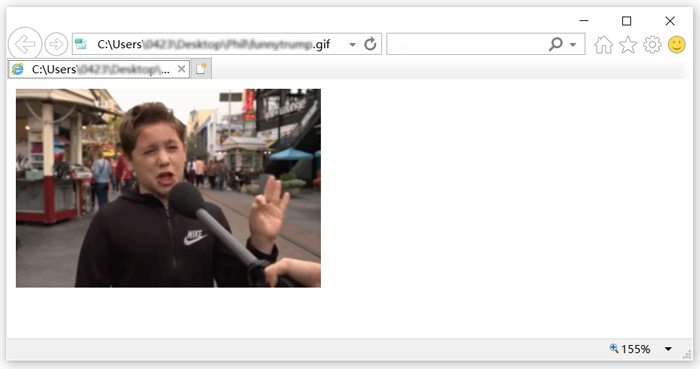
El format GIF pot ser compatible amb molts reproductors d'ús freqüent, inclòs el Windows Media Player a Windows PC i QuickTime Player a Mac. A més, els GIF es poden veure directament a les aplicacions socials. A més, podeu obrir fàcilment fitxers GIF animats amb alguns lectors de fotos populars. Per reproduir GIF a l'ordinador, també podeu fer-hi clic amb el botó dret i seleccionar un navegador web com Chrome, IE o Safari per a la reproducció de GIF.
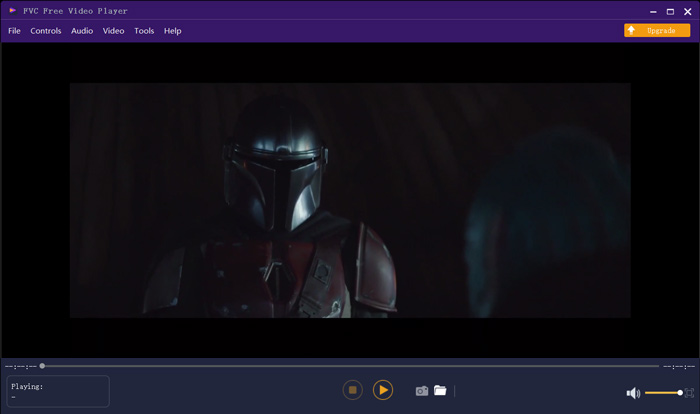
FVC Free Video Player és una eina gratuïta de reproducció de fitxers multimèdia que pot reproduir qualsevol arxiu GIF tant en PC amb Windows 10/8/7 com en Mac. Si estàs buscant un reproductor de GIF de tercers, el pots provar. A més de ser un reproductor de GIF gratuït, és compatible amb molts formats de vídeo i àudio, incloent-hi MP4, MOV, M4V, AVI, FLV, WMV, VOB, i MP3, AAC, M4A, WAV, FLAC, etc. Consulta els 5 millors reproductors de GIF per a ordinadors, Android i iPhone.
Part 3. GIF Maker: Com crear fitxers GIF amb vídeos i imatges
Hi ha dues maneres comunes de crear els vostres propis GIF. Podeu fer GIF amb fitxers d’imatges o clips de vídeo. Aquesta part us presentarà dos fabricants de GIF per fer-ho.
Converteix el vídeo a GIF
Per convertir vídeos en GIFs animats, pots confiar en el popular Free Video to GIF Maker. Té la capacitat de convertir vídeo en qualsevol format popular. Per exemple, pots convertir MP4, MOV, AVI, M4V, WMV i FLV a GIF amb alta qualitat.
Descàrrega gratuïtaPer a Windows 7 o posteriorDescàrrega segura
Descàrrega gratuïtaPer a macOS 10.7 o posteriorDescàrrega segura
Pas 1. Descarrega, instal·la i executa gratuïtament aquest Free Video to GIF Maker a l’ordinador. Fes clic a More Products a l’esquerra per mostrar més eines d’edició. Localitza el Video to GIF Converter i instal·la’l de manera gratuïta.
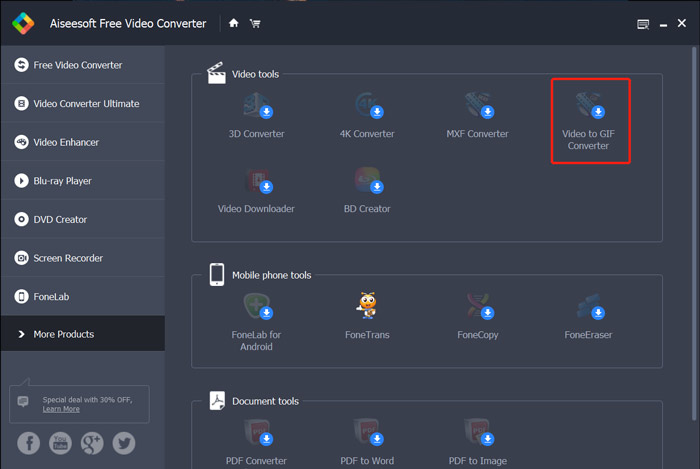
Pas 2. Ara veuràs que el Video to GIF Converter apareix a la pantalla. Fes clic a Add File per importar el vídeo que vols convertir a GIF.
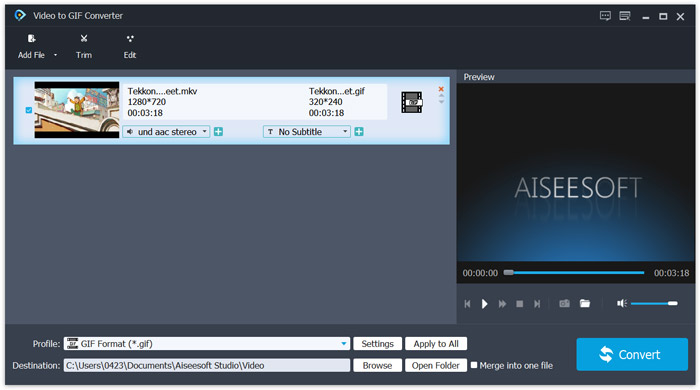
Pas 3. Pots fer clic al botó Settings al costat de Profile per personalitzar diversos paràmetres de sortida del GIF. Per exemple, pots ajustar la resolució, la taxa de bits, el codificador, la velocitat de fotogrames i més. Fes clic al botó OK per desar els canvis.
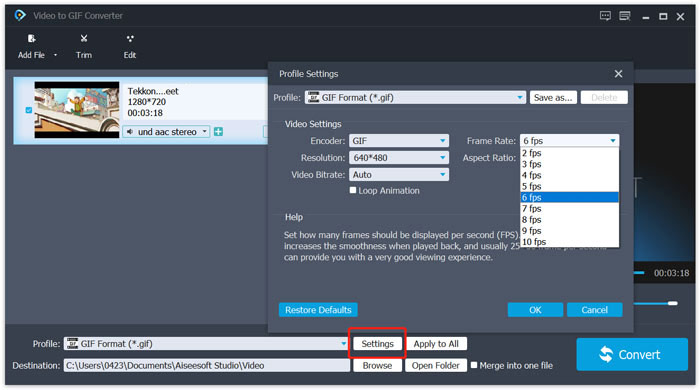
Pas 4. Ara tornaràs a la finestra inicial. Aquí pots fer clic al botó Convert per començar a crear el GIF.
Crea GIFs amb imatges
Si tens molts arxius d’imatge i vols unir-los en un sol fitxer GIF, pots provar el creador de GIF en línia gratuït, Imgflip Animated GIF Maker. Et permet convertir fotos en qualsevol format d’imatge popular, com JPG i PNG, en un GIF.
Pas 1. Obre el teu navegador web, com IE, Chrome, Safari o Firefox, i ves a aquest lloc d’Animated GIF Maker. Com pots veure, també et permet convertir vídeo a GIF en línia de manera gratuïta.
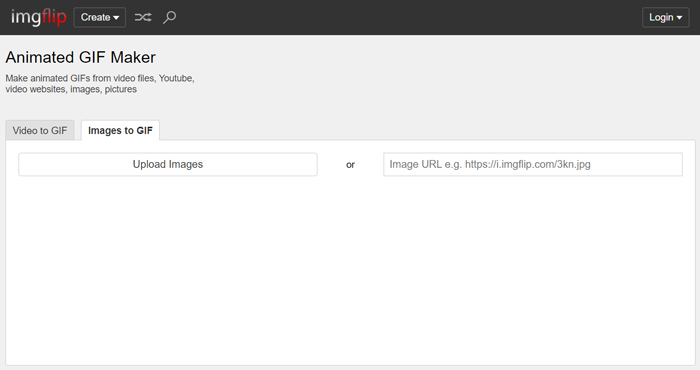
Pas 2. Tria Images to GIF i després fes clic a Upload Images per pujar els teus arxius d’imatge. Aquí també pots afegir imatges mitjançant una URL. Després d’això, se t’ofereixen moltes opcions per personalitzar el fitxer GIF de sortida.
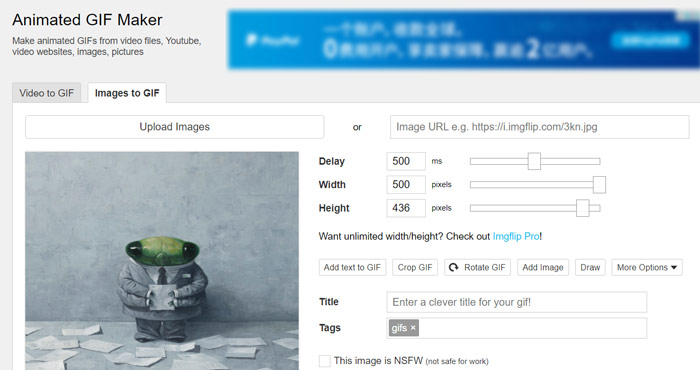
Pas 3. Després de totes aquestes operacions, pots fer clic al botó Generate GIF per crear un GIF amb aquestes imatges.
Part 4. Preguntes més freqüents sobre què és un GIF
Pregunta 1. Com desar els GIF als telèfons iPhone i Android?
Podeu accedir fàcilment a diversos GIF al vostre dispositiu portàtil iOS i Android. Quan veieu un fitxer GIF en alguna aplicació social, podeu mantenir-lo premut fins que aparegui la sol·licitud de baixada / desat. A continuació, només podeu tocar l’opció Desa per desar-la a la carpeta Roll Camera o a l’aplicació Fotos.
Pregunta 2. El reproductor multimèdia VLC pot reproduir fitxers GIF?
El VLC Media Player no admet la reproducció de GIF. Quan carregueu un fitxer GIF a VLC, només el pot obrir com a imatge estàtica.
Pregunta 3. Quant de temps poden durar els GIF?
Amb tantes aplicacions de fabricació de GIF que s’ofereixen al mercat, podeu crear fàcilment un fitxer GIF gran sempre que vulgueu, sobretot quan convertiu un vídeo a GIF. Però en moltes aplicacions socials i llocs en línia, la càrrega o la compartició de GIF es limita a un temps específic, com ara 15 segons. Mentrestant, també hi ha algunes limitacions a la mida del fitxer GIF. Se us recomana enviar un fitxer GIF inferior a 10 MB.
Conclusió
Què és un GIF? Després de llegir aquesta entrada, esperem que tinguis una millor comprensió del format GIF i de com utilitzar-lo. Pots obtenir una guia detallada sobre com reproduir i crear GIFs. També pots convertir vídeos d’altres formats, com AVI a GIF, fàcilment.
-
 Una guia pas a pas sobre la conversió de MP4 a GIF a l’escriptori o en línia
 Esteu buscant la millor manera de convertir el vostre vídeo MP4 en GIF animats? Aquí teniu una guia detallada per fer-ho a Photoshop, Windows Movie Maker, convertidor de vídeo en línia i molt més.
-
 Tutorial per comprimir GIF i reduir la mida del fitxer amb alta qualitat
 Aquí teniu dues maneres senzilles de comprimir GIF a l'ordinador o al telèfon mòbil. Podeu utilitzar el compressor de vídeo en línia FVC Free i Photoshop per reduir la mida del fitxer GIF en diferents aspectes.
-
 Com es pot comprimir el vídeo per a Vimeo abans de penjar-lo
 En aquest post, us mostrarem com comprimir el fitxer de vídeo per penjar-lo a Vimeo, juntament amb les directrius que necessiteu per a la compressió de vídeo i àudio.
