


 Video Converter Ultimate
 Gravadora de pantalla
 Reparació de vídeo
Fotor Elimina les funcions de fons i la revisió de millora
Quan et dediques a l’edició de fotografies, l’eliminació de fons i els potenciadors d’imatge són pràctiques habituals en aquest camp, i poden elevar la qualitat del teu resultat i fer-lo destacar. És en aquest context que eines com Fotor van aparèixer en l’escena de l’edició de fotos, amb èmfasi en l’eliminació de fons i la millora de fotografies. Preguntes habituals com ara «És segur Fotor?» sorgeixen sovint. En aquesta ressenya, analitzem amb detall les múltiples funcions de Fotor i en desvelem les capacitats. Al mateix temps, emprenem un recorregut per descobrir una alternativa destacable que també podries considerar. Continua llegint la ressenya de Fotor per conèixer les capacitats de Fotor en l’eliminació de fons i la millora de fotografies i decidir si realment és l’eina adequada per a les teves necessitats.

Part 1. Fotor Review - Eliminador de fons i millorador de fotos
L'accés a eines d'edició versàtils i potents és crucial en el món dinàmic de la fotografia digital i el disseny creatiu. Fotor, un programa complet d'edició de fotografies, destaca per oferir als usuaris les eines necessàries per navegar per aquest àmbit en constant evolució. Exploreu les seves capacitats, especialment les funcions destacades com l'eliminador de fons i el millorador de fotos, per millorar el vostre viatge creatiu avui!
Fotor
Fotor, una eina versàtil d’edició de fotografies, és coneguda per la seva interfície intuïtiva i per les seves funcions impressionants d’enfortiment de la imatge i d’eliminació de fons. El seu Background Remover permet eliminar els fons i millorar les imatges amb facilitat. Si el combines amb el seu potenciador de fotos obtindràs el resultat perfecte i d’alta qualitat que estàs buscant. Aquesta eina no només està pensada per a l’edició de fotos, sinó que també ofereix un gran nombre de plantilles perquè els no professionals puguin començar o treballar en els seus projectes. Si busques un programari que inclogui gairebé totes les funcions bàsiques, a més de les d’eliminació de fons i millora de fotos, pots considerar Fotor com una de les teves opcions.
Millor per
Fotor és ideal per a persones i empreses que busquen una plataforma intuïtiva per millorar les seves fotos, especialment quan l'eliminació de fons de precisió és essencial per a un resultat final polit. A continuació es mostren algunes de les capacitats que realment té Fotor i per a les quals s'utilitza millor:
◆ Particulars i empreses. Aquest programari fàcil d’usar està pensat tant per a professionals com per a principiants, i és una solució perfecta que permet a persones i empreses crear i millorar projectes amb facilitat gràcies a la seva interfície i funcions senzilles.
◆ Eines de millora d’imatge. Fotor inclou plantilles i filtres perquè les teves fotos tinguin la millor qualitat possible. A més, Fotor corregeix el desenfocament i altres defectes quan s’utilitzen les seves funcions de millora de foto, fet que el converteix en una eina ideal quan cal resoldre problemes de qualitat en les imatges.
◆ Eliminador de fons. La precisió de Fotor en la supressió de fons és innegablement encomiable, ja que ofereix resultats precisos en comparació amb altres programaris disponibles a la web.
◆ Edició de fotos. Inclou les eines necessàries per a les tasques d’edició de fotografies i similars. Com a resultat, Fotor es converteix en el programari de referència per afrontar múltiples tasques d’edició d’imatges.
Preus
Model de preus: Bàsic i Pro
Fotor Basic: Gratuït
Fotor Pro: $8,99/mes
◆ Processament d'imatges per lots.
◆ Editor i potenciador d'imatges.
◆ Disponibilitat en diversos dispositius.
◆ Plantilles preconstruïdes.
◆ Eliminador de fons.
◆ Eina de collage de fotos.
◆ Convertidor de fitxers RAW.
◆ Filtres i efectes avançats.
◆ Dissenyador.
Passos per utilitzar Fotor Photo Enhancer
Pas 1. Ves al lloc web de Fotor Photo Enhancer i puja la foto que vols millorar al camp Enhance Photo Now.
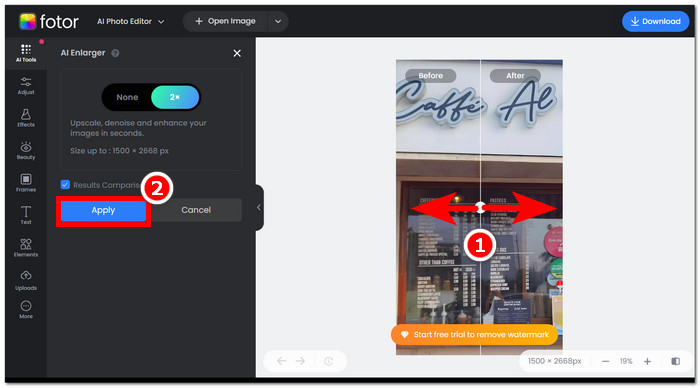
Pas 2. Fotor processarà automàticament la teva imatge. Només et quedarà comparar la previsualització d’abans i després arrossegant el cursor en forma de fletxa d’esquerra a dreta.
Pas 3. Quan estiguis satisfet, fes clic a Apply per desar el progrés de la teva foto.
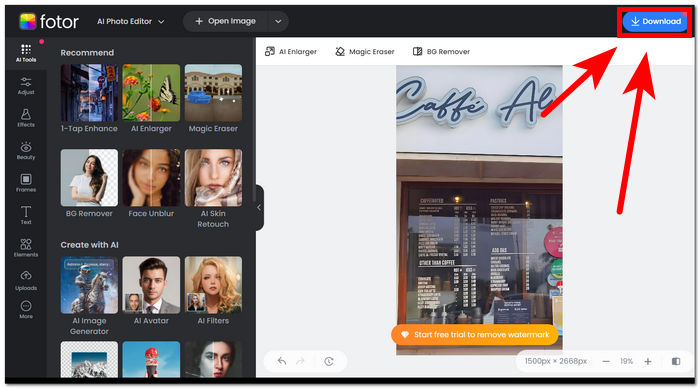
Pas 4. Quan guardis la imatge ja millorada, fes clic a Download, situat a l’angle superior dret de la pantalla.,
Passos per utilitzar l'eliminador de fons de Fotor
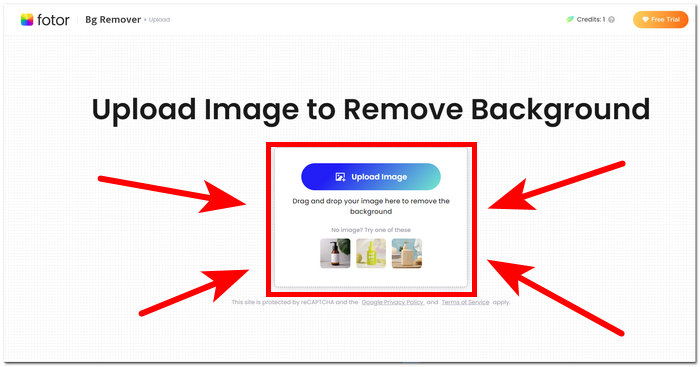
Pas 1. Ves al lloc web de Fotor Background Remover i puja la foto de la qual vols eliminar-ne el fons al camp Upload Image.
Pas 2. Un cop la foto s’hagi carregat al programari, se’n suprimirà automàticament el fons.
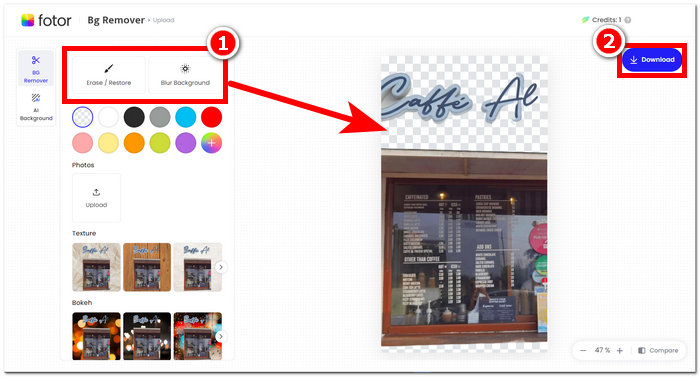
Pas 3. Pots esborrar o restaurar manualment el fons experimentant amb l’eina Erase/Restore segons les teves preferències, situada al menú de navegació de l’angle superior esquerre.
Pas 4. Quan estiguis satisfet amb el resultat, fes clic a Download, situat a l’angle superior dret de la pantalla, per desar-la a l’escriptori.
Per resumir la ressenya de Fotor, les seves característiques són massa grans en el camp de l'edició de fotos. Per tant, això us permetrà crear projectes meravellosos amb facilitat. A més d'estar compost per totes les eines bàsiques per a la manipulació de fotografies, l'èmfasi en la millora de la foto i l'eliminació de fons és perfecta, ja que és fàcil navegar per la seva interfície. No obstant això, de totes les seves característiques posades a la taula, només podeu gaudir plenament de les característiques i funcionalitats de Fotor quan us subscriviu al seu pla mensual.
Part 2. Fotor Alternativa per eliminar el fons i les fotos d'alt nivell
FVC s’ha ampliat per crear eines i programaris que responen a les necessitats dels creadors en la indústria de l’edició visual. Dues d’aquestes eines creades són el FVC Free Background Remover i el FVC Free Image Upscaler; totes dues tenen el seu propi domini web per separar-les i no confondre els usuaris sobre la seva funció. En canvi, els programes d’escriptori reuneixen totes les eines per a tasques diferents en un sol programari, cosa que fa que la feina resulti força lenta fins que et familiaritzes amb el programa. A més, aquestes eines FVC ajuden els creadors a utilitzar-ne les funcions lliurement i amb menys complicacions en el procés de descàrrega i instal·lació. A continuació es detallen els passos per utilitzar les eines FVC Background Remover i Image Upscaler.
Passos per utilitzar FVC Free Background Remover:
Pas 1. Visita el lloc web de FVC Free Background Remover i puja la foto de la qual vols eliminar-ne el fons.
Pas 2. La IA de FVC detecta i elimina automàticament el fons de la teva foto.
Pas 3. Un cop el procés s’hagi completat, ja pots descarregar la teva foto.
Passos per utilitzar les funcions de FVC Free Image Upscaler:
Pas 1. Puja la teva foto al lloc web de FVC Image Upscaler.
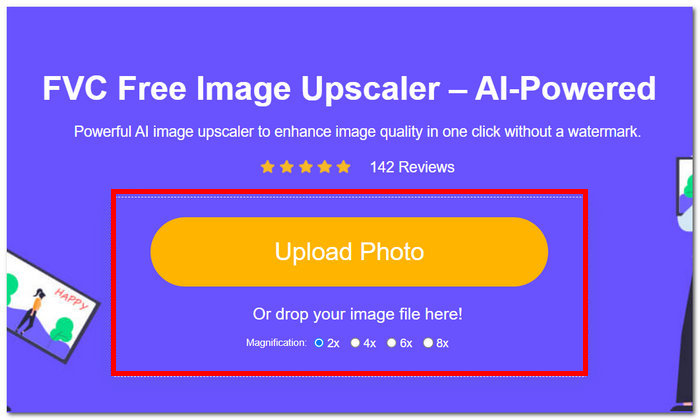
Pas 2. Selecciona la magnificació desitjada i simplement fes-hi clic.
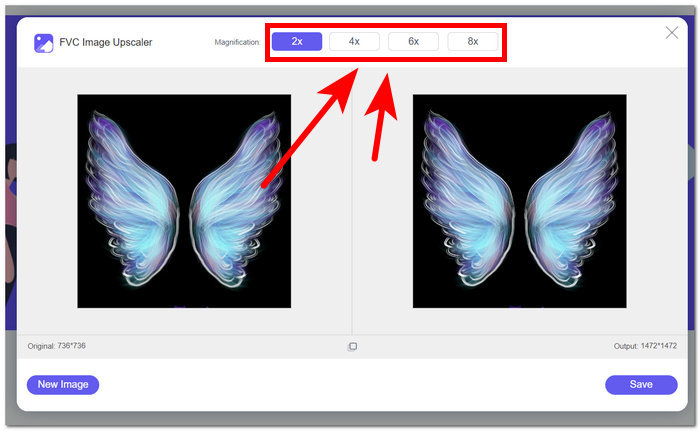
Pas 3. L’eina processarà automàticament la foto, i podràs veure’n la diferència segons la magnificació seleccionada.
Pas 4. La teva foto ja escalada està llesta per ser desada. Només has de fer clic a Download.
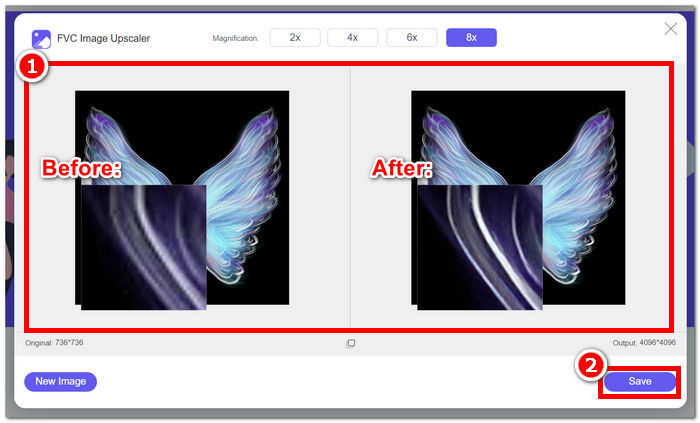
Les eines Fotor i FVC poden produir els mateixos resultats de qualitat i precisió quan es tracta de gestionar l'eliminació de fons i l'augment de la imatge. No obstant això, difereixen en la seva disponibilitat quan les eines FVC són gratuïtes per a qualsevol navegador local, mentre que Fotor pot tenir funcions bàsiques gratuïtes, però limitades. Assegureu-vos de comprovar primer la funcionalitat i la comoditat que us ofereixen i deixeu-vos submergir en l'ús d'eines en línia ràpides, eficients i segures. FVC t'ajuda per estalviar temps i tornar a acabar els teus projectes pendents a temps.
Part 3. Preguntes freqüents sobre Fotor
Fotor és d'ús gratuït?
Sí, Fotor ofereix una versió gratuïta de la seva plataforma d'edició de fotos, que permet als usuaris accedir a eines fonamentals sense cap cost. Això permet als individus utilitzar les funcions essencials sense incórrer en cap càrrec.
Quant costa Fotor al mes?
Fotor ofereix diversos plans de preus, que inclouen subscripcions mensuals i anuals, amb variacions de cost en funció de les funcions incloses. Per veure informació de preus actualitzada i precisa, es recomana als usuaris que consulten el lloc web oficial de Fotor per obtenir més informació sobre les seves ofertes actuals.
Quant dura la prova gratuïta de Fotor?
Fotor pot oferir una prova gratuïta de les seves funcions premium, tot i que la durada de la prova està subjecta a canvis. Per obtenir la informació més actual sobre la durada de la prova gratuïta, és recomanable consultar el lloc web oficial de Fotor.
La foto no funciona?
Si teniu problemes amb Fotor que no funciona, penseu a comprovar la vostra connexió a Internet, esborrar la memòria cau del navegador o actualitzar l'aplicació si feu servir una versió d'escriptori. Si els problemes persisteixen, es recomana contactar amb l'assistència al client de Fotor per obtenir ajuda. Us poden guiar per resoldre problemes tècnics o oferir informació sobre qualsevol possible actualització del sistema.
Fotor és un bon programa?
Sí, Fotor es considera un bon programa per a l'edició de fotografies, que ofereix una interfície fàcil d'utilitzar adequada tant per a usuaris principiants com per a usuaris més experimentats. Les seves diverses funcions, inclòs l'eliminador de fons, el fan versàtil per a diverses necessitats d'edició. Tanmateix, la idoneïtat de Fotor depèn de les preferències individuals i dels requisits específics per a la millora fotogràfica.
Conclusió
Fotor es manté com un competidor destacat, sobretot per les seves funcions d’eliminació de fons i de millora d’imatge. S’ha convertit en una de les eines estàndard per editar fotografies gràcies a la seva diversitat de funcions i a una interfície que inclou gairebé totes les eines bàsiques necessàries en aquest àmbit. Tanmateix, atesa la diversitat de necessitats dels usuaris, explorar alternatives com FVC ofereix una perspectiva més àmplia. Tant si tries Fotor com alguna de les seves alternatives, l’essencial és potenciar el teu camí creatiu amb eines que s’alineïn amb la teva visió. Assegura’t de provar i aprofitar al màxim cada eina per trobar la millor opció per als teus projectes d’eliminació de fons i millora de fotografies.
-
 Com eliminar el fons de la imatge amb GIMP
 Comenceu amb GIMP i el procés pas a pas per eliminar fons de les imatges. Descobriu maneres eficients de crear imatges transparents amb GIMP avui!
-
 Com augmentar la mida de la imatge en línia i fora de línia
 Descobriu la manera més senzilla d'augmentar la mida de la imatge sense perdre qualitat. Consulteu les nostres eines i programari de canvi de mida per garantir una qualitat òptima per a les vostres imatges.
-
 Com canviar la mida d'una imatge a Photoshop: Guia imprescindible
 Apreneu el procés pas a pas de com canviar la mida d'una imatge a Photoshop. Seguiu aquesta guia per canviar de manera eficient la mida de les vostres imatges amb facilitat i qualitat!
