


 Video Converter Ultimate
 Gravadora de pantalla
 Reparació de vídeo
Allibera la teva creativitat: revisió integral de Luminar Neo
Esteu buscant una solució tot en u per millorar imatges i eliminar fons? No cal que busqueu més, Luminar Neo podria ser l’eina perfecta per a vosaltres. Amb una interfície fàcil de navegar i potents funcions impulsades per IA, aquesta eina destaca com un editor fotogràfic versàtil apte per a qualsevol tipus d’usuari. Tant si voleu potenciar la vivacitat dels colors, substituir els fons de manera fluida o simplement afinar els detalls de les vostres preses, aquesta eina ofereix un ampli conjunt d’eines i funcions eficients per satisfer les vostres necessitats creatives. En aquesta ressenya de Luminar Neo, explorarem com aquesta potent eina pot elevar sense esforç el vostre nivell de fotografia, proporcionant-vos la informació necessària per desbloquejar tot el potencial de les vostres imatges. Acompanyeu-nos mentre aprofundim en les característiques i funcionalitats que fan de Luminar Neo una opció destacada en el món de la millora d’imatges.

Part 1. Revisió Luminar Neo
Luminar Neo, un programari innovador d’edició de fotos creat per Skylum, és un punt d’inflexió per als fotògrafs i artistes visuals que busquen un conjunt complet d’eines per potenciar les seves imatges. En essència, aquesta eina utilitza tecnologia d’IA avançada per simplificar processos d’edició complexos, fent-los accessibles a usuaris de tots els nivells. Tot i que ofereix una àmplia gamma d’eines creatives d’edició i presets, allò que diferencia Luminar Neo són les seves excepcionals funcions d'augment de resolució d’imatge i d’eliminació de fons. L’eina d’escalat d’imatges garanteix que les vostres fotografies mantinguin nitidesa i detall fins i tot quan s’amplien, mentre que l’eina d’eliminació de fons ofereix una solució fluida per modificar i perfeccionar fons sense esforç.
Principals característiques
◆ Utilitzeu IA avançada per obtenir millores precises, incloses eines especialitzades per al cel i la pell.
◆ Diverses eines i preajustos per afegir tocs únics a les teves fotos.
◆ Integració amb programari d'edició popular com Photoshop per a un flux de treball fluid.
◆ Processament ràpid per gestionar fitxers grans i edicions complexes sense esforç.
◆ Preserveu la vostra imatge original mentre experimenteu amb edicions.
◆ Interfície fàcil d'utilitzar.
◆ Eliminador de fons.
Pros
- Flux de treball adaptable.
- Fortes capacitats d'IA.
- Preus assequibles.
- Fàcil per a principiants.
- Descomptes per als usuaris de Skylum.
- Atenció al client 24/7.
Contres
- Algunes funcions necessiten millores.
- No hi ha cap aplicació mòbil per editar fotos.
Part 2. Luminar Neo vs. Luminar AI
Aquí teniu una taula de comparació entre Luminar Neo i Luminar AI.
| Característica | Luminar Neo | Luminar AI |
| Edició impulsada per IA | Sí | Sí |
| Interfície | Avançat i personalitzable | Fàcil d'usar i simplificat |
| Eines d'edició | Àmplia gamma d'eines i presets | Plantilles impulsades per IA i eines intel·ligents |
| Integració | Integració perfecta amb altres programes d'edició | Rendiment eficient, optimitzat per al processament d'IA |
| Públic objectiu | Fotògrafs professionals i usuaris avançats | Fotògrafs principiants i casuals |
És important recordar que l'elecció entre Luminar Neo i Luminar AI es redueix a les vostres preferències individuals i requisits d'edició. Tant si us inclineu cap a les funcions avançades i personalitzables de Luminar Neo com si preferiu la senzillesa fàcil d'utilitzar de Luminar AI, ambdues eines són solucions potents en l'àmbit de l'edició de fotografies.
Part 3. Com utilitzar Luminar Neo?
A continuació s'explica com podeu utilitzar Luminar Neo per augmentar les imatges:
Pas 1. Obriu Luminar Neo com a programa independent.
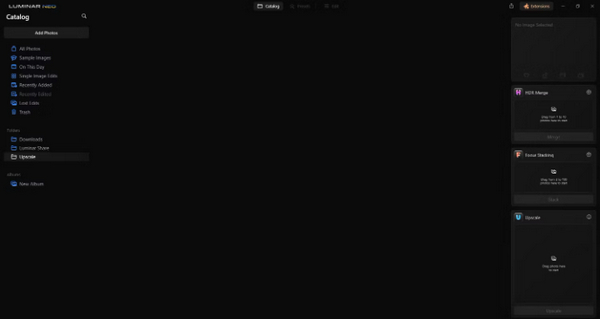
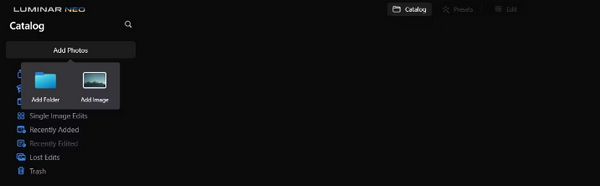
Pas 2. Feu clic a Add Photos i, tot seguit, seleccioneu Add Image.
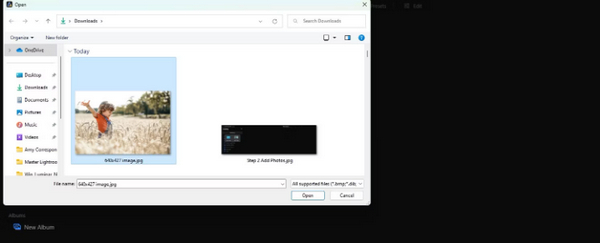
Pas 3. Trieu el fitxer desitjat i feu clic a Open.
Pas 4. Ara, feu clic a Catalog a la part superior del menú.
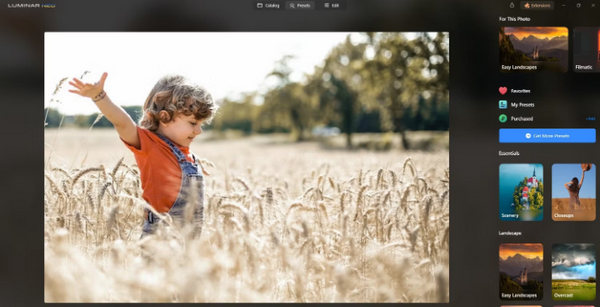
Pas 5. Arrossegueu la imatge cap avall fins al quadre Upscale AI situat a la part inferior, amb l’etiqueta Drag photo here to start.
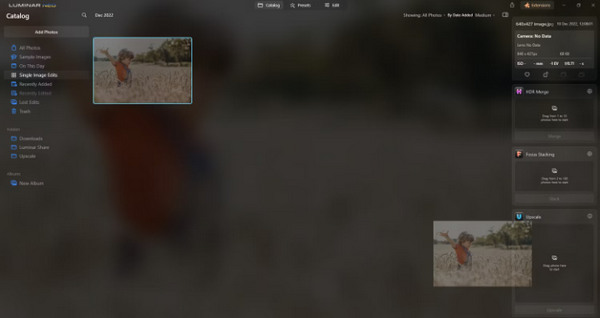
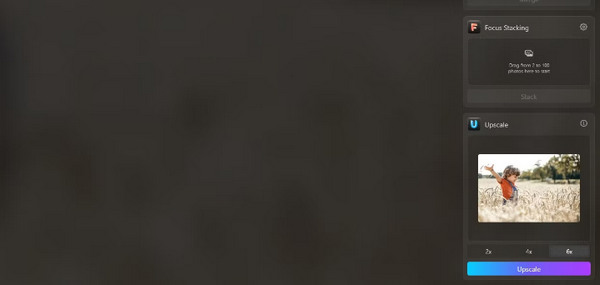
Pas 6. Completeu el procés seleccionant el grau d’escalat que preferiu; per exemple, en aquesta demostració, hem optat per un augment de 6x.
Pas 7. Finalment, feu clic a Upscale per aplicar el nivell d’escalat triat a la vostra imatge.
Transferiu la vostra imatge acabada de millorar des de l'ordinador al telèfon sense esforç mitjançant Luminar Share.
A continuació, es mostra com podeu utilitzar Luminar Neo per eliminar el fons de la imatge:
Pas 1. Comenceu important la foto que voleu editar. Localitzeu i feu clic al botó Add Photos a la part superior esquerra de la pantalla. Després de seleccionar la vostra imatge, feu clic a Open.
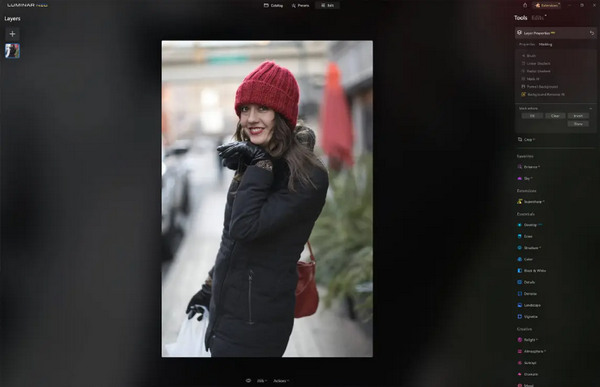
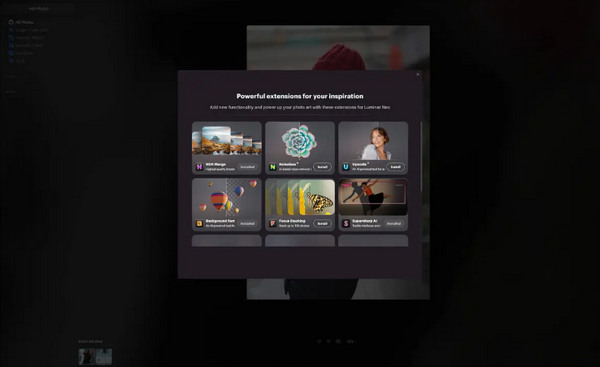
Pas 2. Això és crucial per als usuaris novells. Heu de descarregar l’extensió Background Removal AI des de la pestanya d’extensions a la part superior dreta de la pantalla. Un cop descarregada, feu doble clic a la vostra foto, cliqueu Edit i comenceu a editar.
Pas 3. A la barra d’edició del costat dret de la pantalla, aneu a Layer Properties, després a Masking i seleccioneu Background Removal AI. Això us permet triar el vostre subjecte. Un cop ressaltat en vermell, premeu Remove per esborrar el fons de manera màgica. Utilitzeu el refinements brush per a qualsevol retoc a les zones que la IA pugui haver passat per alt.
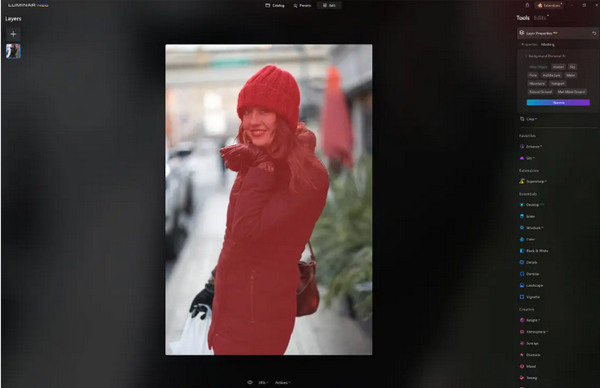
L'únic que té Luminar Neo és que la seva versió gratuïta no conté aquesta funció. No obstant això, si teniu un pressupost limitat i voleu millorar la vostra foto al següent nivell, aquesta eina és per a vosaltres.
Part 4. 2 millors alternatives gratuïtes a Luminar Neo
Luminar Neo pot ser car per a alguns i massa complex per navegar fàcilment, així que, si esteu buscant eines alternatives per a Luminar Neo, aquí teniu les millors eines que podeu comprovar.
Escalador d'imatges en línia FVC
FVC Online Image Upscaler és un escalador d’imatges en línia gratuït. Sí, heu llegit bé. És gratuït, però no en subestimeu encara la capacitat. Aquesta eina està integrada amb tecnologia d’IA per automatitzar un procés de millora fluid. A més, podeu ampliar la imatge fins a 8x sense comprometre’n la qualitat.
A continuació s'explica com podeu utilitzar aquesta eina
Pas 1. Aneu al seu lloc web oficial.
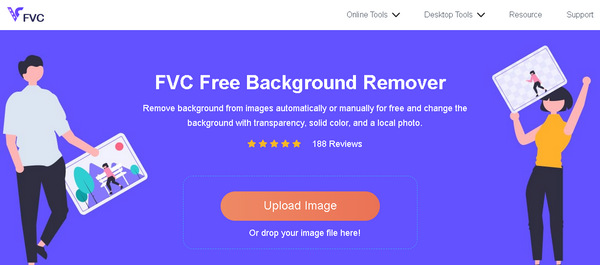
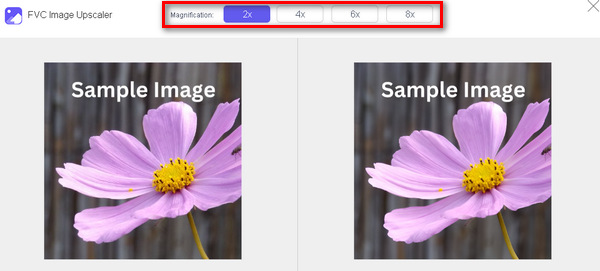
Pas 2. Feu clic a Upload Photo i seleccioneu la imatge que voleu escalar.

Pas 3. Després, aquesta eina previsualitzarà la vostra imatge. Podeu utilitzar l’opció Magnifier per comprovar la qualitat de la imatge.
Pas 4. Fes clic a Save per descarregar la teva imatge.
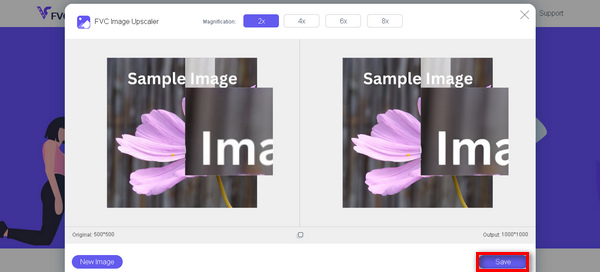
FVC Free Image Upscaler és la millor alternativa a Luminar Neo quan es tracta d'augmentar les imatges. A més, amb aquesta eina, els usuaris poden millorar fàcilment les seves imatges. Sense interfície complexa, només necessiteu uns quants clics per millorar les vostres imatges a la perfecció.
Eliminador de fons en línia FVC
Mentrestant, podeu utilitzar FVC Online Background Remover com a alternativa per eliminar fons de les imatges. Aquesta eina és versàtil i ha estat creada per automatitzar el procés d’eliminació del fons de la imatge. Admet múltiples formats d’imatge populars com PNG, JPG i JPEG. A més, podeu personalitzar el resultat de la vostra imatge: podeu canviar el fons per colors sòlids, girar el subjecte, moure’l i retallar-lo.
Aquests són els passos sobre com podeu utilitzar fàcilment aquesta eina:
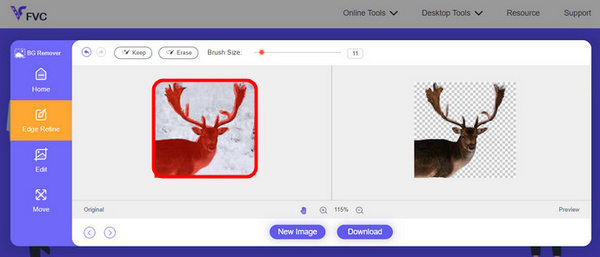
Pas 1. Primer, aneu al seu lloc web oficial i feu clic a Upload Image.
Pas 2. Després d’obtenir el resultat, podeu editar la imatge afinant les vores i movent el subjecte.
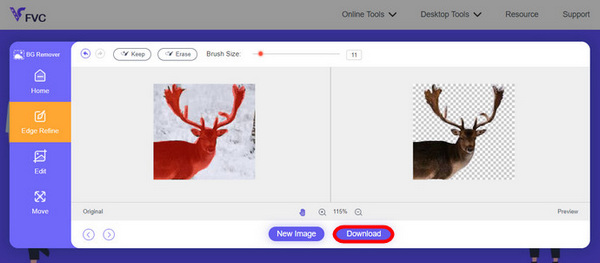
Pas 3. Per desar el resultat, fes clic al botó Download.
FVC Image Background Remover és realment una eina útil per retallar una imatge i la millor alternativa per a Luminar Neo. I a part que és gratuïta, l'eina és fàcil de navegar. Sense molèsties, només resultats de qualitat.
Part 5. Preguntes freqüents sobre Luminar Neo Review
Luminar Neo és millor que Lightroom?
La comparació entre Luminar Neo i Lightroom sovint depèn de les preferències individuals i de les necessitats específiques. Lightroom és conegut per la seva perfecta integració amb Creative Cloud d'Adobe, el que el converteix en el favorit dels fotògrafs professionals. D'altra banda, Luminar Neo ofereix funcions avançades d'IA i un flux de treball flexible. L'elecció entre els dos depèn en última instància de l'estil d'edició de l'usuari i dels requisits del flux de treball.
Luminar Neo és tan bo com Photoshop?
Luminar Neo i Photoshop tenen propòsits diferents en l'àmbit de l'edició de fotografies. Photoshop és un estàndard del sector, que ofereix un conjunt complet d'eines avançades per a l'edició complexa i el disseny gràfic. Luminar Neo, tot i que és potent, atén més als fotògrafs amb les seves funcions basades en IA. La idoneïtat d'una sobre l'altra depèn de les necessitats específiques de l'usuari.
Luminar Neo és bo per a principiants?
Sí, Luminar Neo està dissenyat per ser fàcil d'utilitzar, per la qual cosa és una opció excel·lent per als principiants. La seva interfície intuïtiva, juntament amb capacitats avançades d'IA, permet als usuaris aconseguir resultats impressionants sense una corba d'aprenentatge pronunciada. L'ampli ventall de preajustos i eines creatives del programari també permet als principiants explorar i millorar les seves fotos amb facilitat.
Luminar Neo és una compra única o un model de subscripció?
Luminar Neo segueix un model de compra única. Els usuaris poden comprar el programari i accedir a les seves funcions sense necessitat d'una subscripció recurrent. Aquesta estructura de preus proporciona un enfocament senzill i rendible per als usuaris que prefereixen un pagament únic per a les seves necessitats d'edició de fotos.
Conclusió
En poques paraules, aquesta ressenya de Luminar Neo us ha proporcionat informació valuosa sobre aquesta eina d’edició de fotos tan potent com fàcil d’utilitzar. Amb funcions avançades com l’escalat amb IA i l’eliminació de fons, s’adreça tant a professionals com a principiants. Tot i que hi ha marge de millora, la seva versatilitat, la potència de la seva IA i el preu assequible la converteixen en una opció molt atractiva per potenciar les vostres habilitats fotogràfiques. Tant si busqueu personalització com simplicitat, Luminar Neo ofereix una solució completa per transformar les vostres imatges.
-
 Afegeix fons a la foto a iPhone, Android, ordinador i en línia
 Puc afegir un fons blanc a la foto? Com fer-ho? Apreneu 3 maneres d'afegir fons a les fotos en línia, a l'ordinador, iPhone o Android.
-
 Canva Image Enhancer: el nou reforç de la qualitat d'imatge? [Revisió]
 Descobriu com Canve Image Enhancer pot portar les vostres fotos al següent nivell. Consulteu la nostra revisió detallada que cobreix totes les característiques, pros i contres d'aquesta eina.
-
 Vance AI Image Enhancer: una revisió en profunditat [2024]
 Esteu buscant una eina potent i eficient per millorar la imatge? Llegiu la nostra revisió en profunditat de Vance AI Image Enhancer i vegeu com pot transformar les vostres fotos.
