


 Video Converter Ultimate
 Gravadora de pantalla
 Reparació de vídeo
 Baixada segura
Com restaurar fotos antigues d'època al vostre ordinador
Busques una solució per a la restauració de fotos antigues? Hi ha moltes eines que t’ajudaran a restaurar les fotos velles que tinguis. La restauració de fotos antigues és coneguda per ser utilitzada per moltes persones que intenten millorar les seves imatges antigues. A més, aquest procés també s’utilitza per restaurar imatges malmeses i fer que semblin noves. Per tant, si també tens una foto antiga que vols restaurar, pots fer servir els mètodes que t’ensenyarem a continuació. Llegeix aquesta entrada del blog per aprendre les millors maneres de restaurar una imatge antiga o arreglar una foto danyada utilitzant eines d’escalat.

Part 1. Restauració de fotos antigues en línia gratuïtament
Tens una foto antiga d'època que vols fer nova? Augmentar la vostra imatge permet restaurar una foto antiga i fer-la nova i bella. I si creus que és impossible de fer, t'equivoques. Perquè utilitzant aquesta fantàstica aplicació en línia, podeu restaurar fàcilment l'antiga foto vintage que teniu.
FVC Free Image Upscaler
FVC Free Image Upscaler és un escalador d’imatges en línia gratuït i fàcil d’utilitzar. Aquesta eina pot ampliar la teva imatge a 2x, 4x, 6x i 8x de magnificació. A més, els principiants poden utilitzar fàcilment aquest optimitzador d’imatges perquè té una interfície d’usuari senzilla i clara. A més a més, el pots fer servir en tots els navegadors web, incloent-hi Google, Firefox i Safari. A més, admet els formats d’imatge estàndard més habituals, com ara JPG, JPEG, PNG i BMP. El que encara és millor d’aquesta aplicació és que utilitza tecnologia d’IA (Intel·ligència Artificial) que detecta automàticament les parts de baixa qualitat de les teves imatges i les millora. I, a diferència d’altres aplicacions en línia, FVC Free Image Upscaler té un procés de millora ràpid, cosa que el fa molt pràctic.
Com millorar les fotos antigues amb FVC Free Image Upscaler:
Pas 1. Ves al navegador web i cerca FVC Free Image Upscaler al quadre de cerca. També pots fer clic a l’enllaç per anar directament a la seva pàgina principal.
Pas 2. A la interfície principal, fes clic al botó Upload Photo per importar la foto antiga que vols millorar o ampliar.
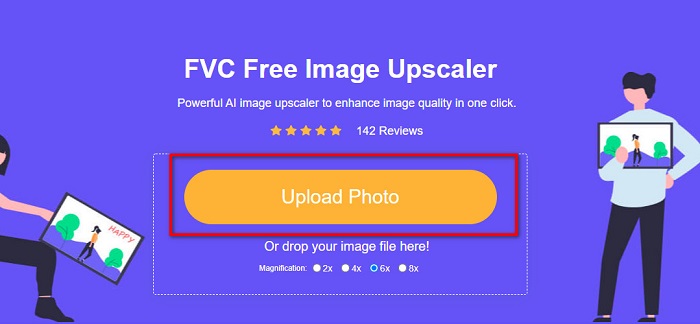
Pas 3. Després de pujar la teva imatge, tria el valor de Magnification que vulguis per a la imatge. Pots triar entre 2x, 4x, 6x i 8x. Com més alta sigui la magnificació, millor serà la qualitat final de la imatge.
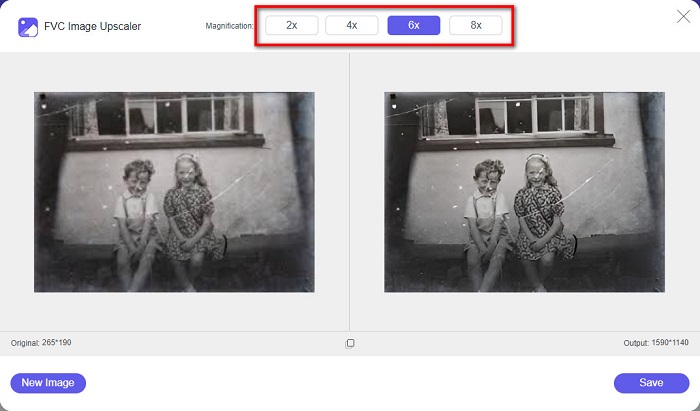
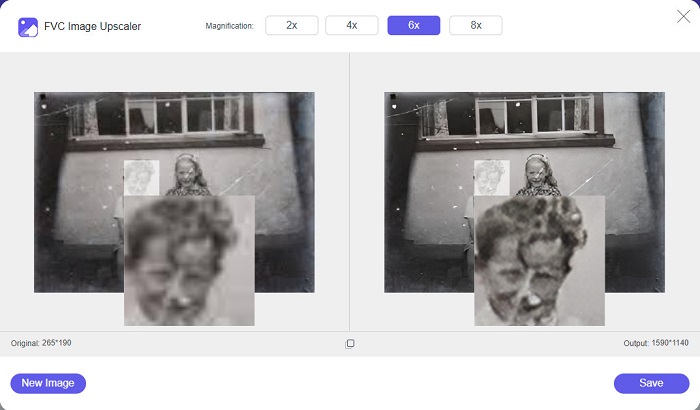
Pas 4. Després, mou el ratolí per sobre de la imatge per veure la diferència entre la imatge millorada i l’original.
Pas 5. Quan hagis acabat de millorar la imatge, fes clic al botó Save per desar-la al teu dispositiu.
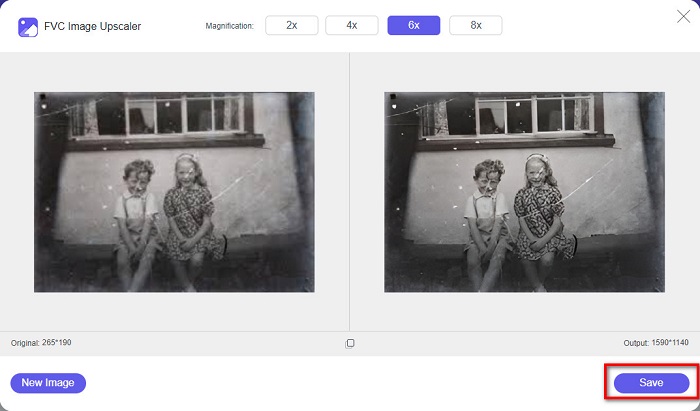
I ja està! Tan fàcil com 1-2-3, pots millorar la teva foto antiga antiga per fer-la semblar nova i millor.
Zyro
L’escalador d’imatges Zyro és una de les eines d’escalat d’imatges més famoses d’internet. Té una interfície de programari fàcil d’utilitzar, cosa que la converteix en una eina intuïtiva. A més, també utilitza un procés de retoc d’imatge amb IA que amplia automàticament la foto antiga que vols millorar. També és accessible en tots els navegadors web, com Google i Firefox. A més, admet alguns dels formats d’imatge estàndard, com ara JPG i PNG.
A més, aquesta eina augmenta la resolució de la vostra imatge, millorant-la en qualitat. Tanmateix, observareu que no augmenta massa la vostra imatge. També té anuncis que us poden distreure. No obstant això, molts principiants encara utilitzen aquesta eina perquè té una interfície d'usuari senzilla.
Restauració de fotografies en línia gratuïtament amb Zyro:
Pas 1. Cerca el millorador d’imatges en línia Zyro al teu navegador i ves directament a la seva pàgina principal. A la primera interfície, fes clic al botó Upload Image per pujar la foto antiga que vols millorar.
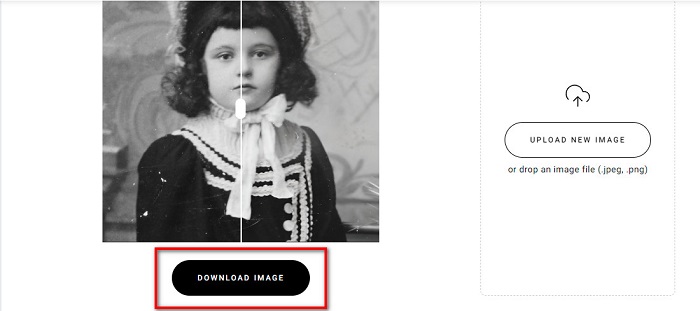
Pas 2. Com que Zyro utilitza un procés de millora amb IA, la teva imatge es millorarà automàticament. A continuació, veuràs la diferència entre la imatge original i la imatge antiga millorada.
Pas 3. Finalment, marca el botó Download per descarregar la imatge millorada al teu dispositiu.
Part 2. Com millorar les fotos antigues fora de línia
Si no voleu utilitzar una aplicació dependent d'Internet per millorar una foto antiga, us presentarem una eina fora de línia que val la pena provar. Un cop utilitzeu una aplicació fora de línia, ja no necessitareu accedir a Internet per millorar una imatge. Per tant, llegiu aquesta secció detingudament per saber com millorar una foto antiga fora de línia.
HitPaw Photo Enhancer és un escalador d’imatges fora de línia que pots descarregar en gairebé totes les plataformes, incloent-hi Windows i Mac. També utilitza un procés d’escalat amb tecnologia d’IA que ajusta automàticament la saturació, el contrast i la brillantor de la teva foto i n’arregla la qualitat. A més, pots canviar el model d’IA que vulguis. Pots triar entre els models Denoise, Face i Colorize. A més, pots fer zoom a la imatge per veure la part millorada. També pots descarregar aquesta aplicació de manera gratuïta, però amb limitacions. L’inconvenient de HitPaw Photo Enhancer és que has de contractar la versió premium per poder exportar la imatge millorada.
Com millorar les fotos antigues amb HitPaw Photo Enhancer:
Pas 1. Descarrega HitPaw Photo Enhancer al teu dispositiu. Segueix el procés d’instal·lació i, a continuació, executa l’aplicació.
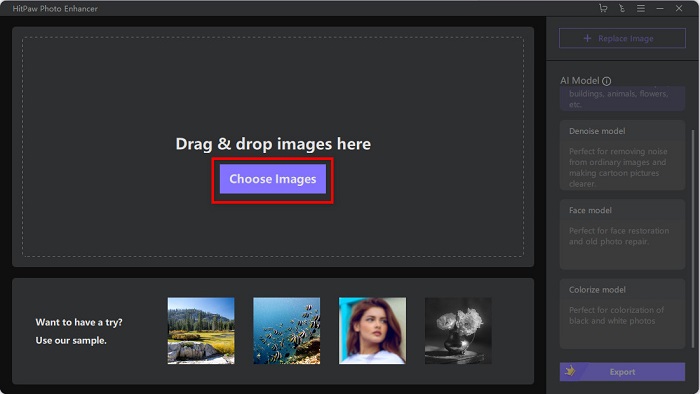
Pas 2. A la interfície principal del programari, fes clic al botó Choose Images per cercar la imatge que vols millorar.
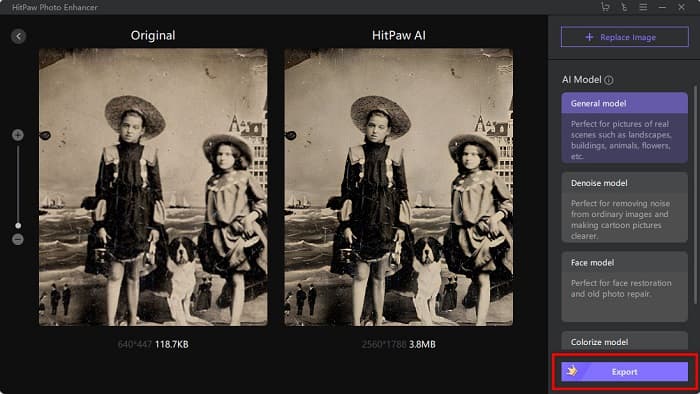
Pas 3. Després, fes clic al General Model del model d’IA i al botó Preview per veure el resultat.
Pas 4. A continuació, veuràs que la teva imatge ja està millorada. Fes clic al botó Export per desar-la.
Part 3. Preguntes freqüents sobre com millorar les fotos antigues
La mida del fitxer augmenta quan millores la teva imatge?
Sí. Quan s'augmenta la qualitat d'una imatge, és probable que la resolució de la imatge també augmenti, fent que la mida del fitxer sigui més gran que l'original.
Augmentar els píxels millora la qualitat de la foto?
L'alta resolució significa més píxels per polzada, el que significa més informació de píxels, la qual cosa fa que la vostra imatge sigui d'alta qualitat i mida. En canvi, si teniu una imatge de baixa resolució, la vostra foto té pocs píxels. Per tant, si augmenteu els píxels de la vostra imatge, la vostra imatge tindrà una millor qualitat.
Quants píxels té una imatge de bona qualitat?
La millor resolució per a la impressió és de 330 PPI (píxels per polzada). A 330 PPI, la vostra imatge apareixerà nítida i nítida. I si tens 330 PPI, tindreu una imatge d'alta resolució, fent-la semblar una imatge d'alta qualitat.
Conclusió
La restauració de fotos antigues no és complicada si segueixes els mètodes presentats més amunt. I, com que totes les eines esmentades t’ajudaran a millorar la teva imatge antiga, et serà fàcil ampliar-la. No obstant això, no tots els escaladors d’imatges produeixen resultats d’alta qualitat, així que utilitza FVC Free Image Upscaler per obtenir una compressió d’imatge d’alta qualitat.
-
 Com convertir imatges de baixa resolució en alta resolució en línia
 Si voleu aprendre a convertir imatges de baixa resolució en imatges d'alta resolució en línia, aquest article és per a vosaltres. Llegeix completament per saber com.
-
 Com millorar fàcilment la qualitat de la imatge a Windows i Mac
 Vols millorar la qualitat de la teva imatge? Apreneu a augmentar la qualitat de la imatge en línia i fora de línia al vostre ordinador o iPhone llegint la guia senzilla.
-
 Els 6 millors eliminadors de fotos de taques que heu de tenir ara [2022]
 Necessites un removedor de taques fotogràfiques per tenir una pell llisa? No et preocupis més! Aquí, presentarem diferents eines que poden ajudar al vostre dispositiu.
