


 Video Converter Ultimate
 Gravadora de pantalla
 Reparació de vídeo
 Baixada segura
Aplicacions d'ampliació de fotos en línia i fora de línia que no us podeu perdre
Canviar la mida d’una imatge pot ser una mica arriscat perquè, quan n’augmentes la mida, en pots perdre la qualitat. Algunes persones volen redimensionar les seves fotos per tenir-ne una qualitat millor. Una imatge està composta per milers de píxels, i quan l’intentes engrandir, pot perdre qualitat perquè, en augmentar-ne la mida, els píxels es tornen visibles. Per tant, si vols engrandir la teva imatge però no en vols perdre la qualitat, t’oferim aquestes eines fantàstiques. Per conèixer les millors eines de foto enlarger, llegeix aquesta entrada amb atenció.

Part 1. Millors ampliadors de fotos en línia
És la millor opció per utilitzar una ampliadora de fotos en línia perquè estalviarà espai al dispositiu. Una eina en línia no requerirà baixar res al vostre dispositiu, sempre que tingueu una velocitat d'Internet ràpida. A més, la majoria de les aplicacions en línia són accessibles de forma gratuïta. Dit això, aquí teniu els tres millors redimensionadors d'imatges en línia.
FVC Free Image Upscaler
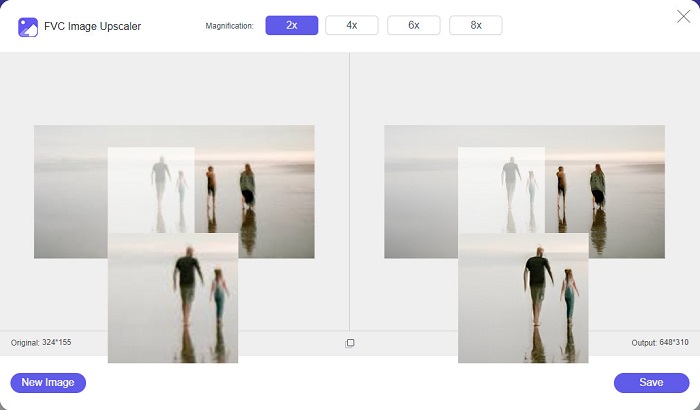
FVC Free Image Upscaler és la primera de la llista dels millors redimensionadors d’imatges en línia. Aquesta aplicació en línia és gratuïta i segura d’utilitzar. Pots millorar o engrandir la teva imatge amb magnificacions de 2x, 4x, 6x i 8x sense perdre’n la qualitat. A més, admet gairebé tots els formats d’imatge, com ara PNG, JPG, JPEG i BMP. El que encara és més fantàstic d’aquesta eina és que utilitza tecnologia d’IA (Intel·ligència Artificial) que detecta automàticament les parts borroses de la teva imatge i després les millora. A més a més, hi pots accedir des de tots els navegadors web, inclosos Google, Firefox i Safari. FVC Free Image Upscaler és una eina fàcil de fer servir per a principiants, així que, si n’ets un, aquesta pot ser la millor opció per a tu.
Pros
- Amplia la teva imatge sense pèrdues.
- Té un procés d'augment ràpid.
- Us permet corregir píxels perduts, textures de color i molt més.
- Podeu utilitzar-lo al vostre dispositiu Windows o Mac.
Contres
- És una eina dependent d'Internet.
Foto Enlarger.com
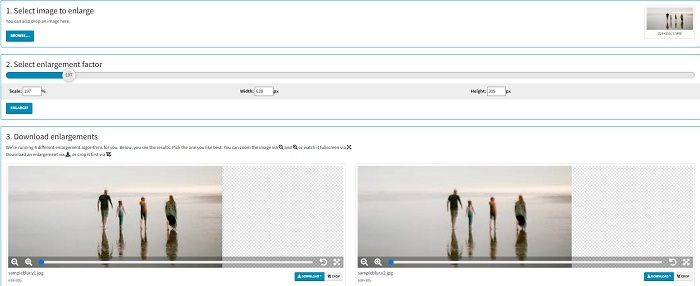
Photo Enlarger.com és un ampliador de fotos en línia que molts principiants fan servir gràcies a la seva interfície senzilla. Aquest redimensionador de fotos en línia et permet engrandir la teva imatge seleccionant el factor d’augment. A més, pots ajustar l’escala i el percentatge d’amplada i alçada de la teva imatge. Photo Enlarger.com t’oferirà quatre resultats amb diferents resolucions i factors d’ampliació. També pots triar descarregar aquestes imatges fàcilment.
A més, podeu retallar les sortides de la imatge ampliada per eliminar les parts innecessàries de la imatge. Tanmateix, conté molts anuncis molestos que poden ser inquietants mentre amplieu una imatge. No obstant això, és una eina eficaç per ampliar la vostra imatge.
Pros
- Admet els formats d'imatge més comuns, com PNG i JPG.
- És gratuït i segur d'utilitzar.
- Podeu utilitzar-lo en gairebé tots els navegadors web, inclosos Google i Firefox.
Contres
- És depenent d'Internet.
- Té molts anuncis.
Imatge Enlarger.com
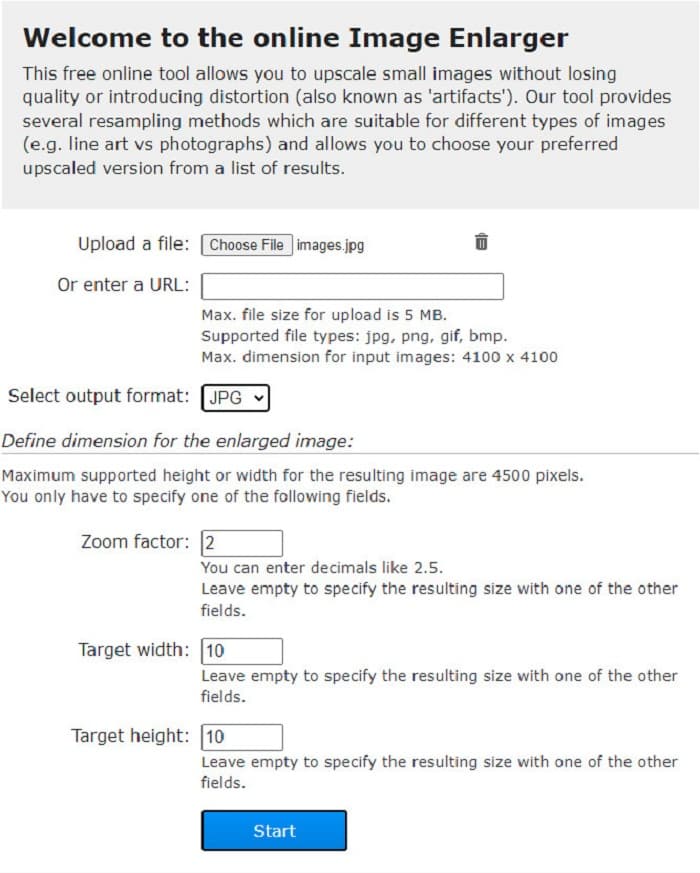
Una altra eina gratuïta en línia per engrandir imatges que pots utilitzar és Image Enlarger.com. Aquest redimensionador de fotos en línia et permet ajustar el factor de zoom, l’amplada i l’alçada de la teva imatge. Addicionalment, té una interfície intuïtiva, cosa que la converteix en una eina fàcil d’usar. També admet els formats d’imatge estàndard més comuns, com PNG i JPG. Image Enlarger.com té una alçada i amplada màximes admeses de fins a 4500 píxels. A més, proporciona diferents mètodes de remostreig que s’adapten a diversos tipus d’imatges. El desavantatge d’aquesta eina en línia és que tindràs dificultats per engrandir la teva imatge si la connexió a internet és lenta.
Pros
- És una eina segura d'utilitzar.
- És gratuït d'utilitzar.
Contres
- Conté anuncis que et poden distreure.
- No podeu previsualitzar la sortida de la imatge.
Part 2. Millors ampliadors de fotos fora de línia
De vegades, la gent prefereix utilitzar un programari d'ampliació d'imatges en comptes d'un editor d'imatges normal perquè pot arruïnar-ne la qualitat quan utilitzeu un editor d'imatges estàndard per ampliar una imatge. És per això que hem cercat els millors ampliadors d'imatges fora de línia del mercat i hem seleccionat els millors entre ells. Aquestes ampliadores de fotos que presentarem estan disponibles per descarregar-se en dispositius Windows o Mac. Aquests són els tres primers canvis de mida de fotos fora de línia més potents sense més preàmbuls.
Smilla Enlarger
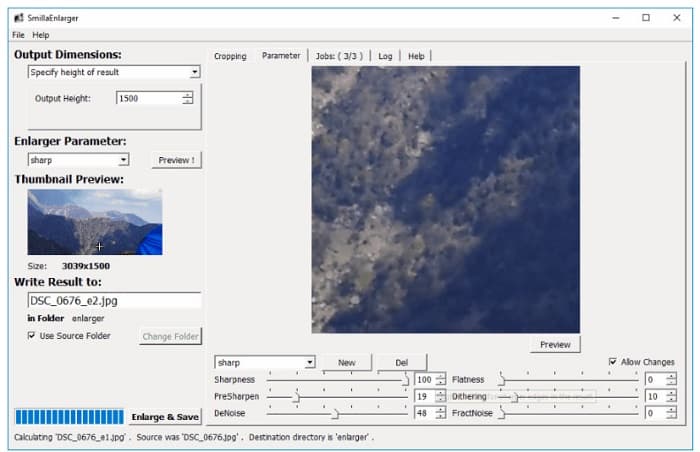
Smilla Enlarger és un ampliador d’imatges fora de línia que pots utilitzar per canviar la mida de la teva imatge fàcilment. Aquesta aplicació de programari és gratuïta i de codi obert per a ordinadors amb Windows. A més, pots utilitzar-ne les opcions de retall per engrandir qualsevol imatge que aquesta eina admeti. També pots definir les dimensions de la imatge i els paràmetres d’ampliació per ajustar-ne la nitidesa i el soroll. Totes aquestes opcions t’ajudaran a obtenir l’ampliació que vulguis per a la teva imatge.
A més, admet gairebé tots els formats d'imatge, com ara PNG, JPEG, JPG i WebP. A més, podeu veure la vostra sortida amb aquesta eina perquè us permet previsualitzar la vostra imatge. L'inconvenient d'aquesta aplicació és que heu de comprar l'aplicació abans d'accedir a les seves altres funcions úniques.
Pros
- És una eina fàcil d'utilitzar.
- Es pot descarregar gratuïtament en un ordinador Windows.
- Té perfils de millora per millorar la teva imatge.
Contres
- De vegades té un procés de càrrega lent.
Reshade Image Enlarger
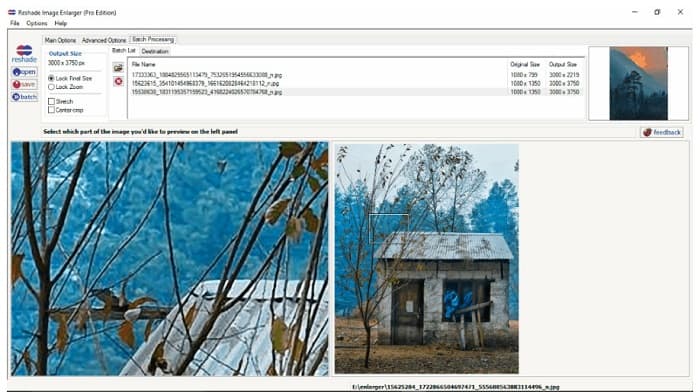
Reshade Image Enlarger és una aplicació per engrandir fotos que pots descarregar si vols engrandir o millorar la teva imatge. Reshade Image Enlarger també és un ampliador d’imatges amb IA perquè millora automàticament la imatge amb la seva tecnologia d’intel·ligència artificial. A més, aquesta eina engrandeix la teva imatge permetent-te definir l’amplada i l’alçada personalitzades que prefereixis, habilitar funcions de retall, reducció de soroll, reducció d’artefactes i altres opcions. El que és encara més extraordinari d’aquesta aplicació és que les seves opcions avançades et permeten controlar la compressió JPEG, la fidelitat del processament i els degradats suaus del resultat final. I, per utilitzar-ne la funció de processament per lots, ves a la pestanya Batch Processing.
Pros
- Podeu descarregar-lo a totes les plataformes multimèdia, inclosos Windows i Mac.
- Té un procés d'ampliació de lots.
- Té funcions avançades per utilitzar.
Contres
- Té una interfície d'usuari difícil d'utilitzar.
Una escala més nítida
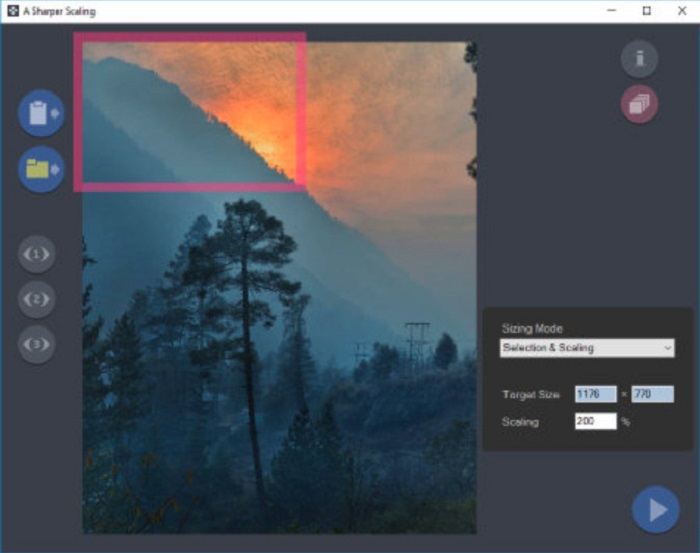
Una altra lupa per a fotos que val la pena utilitzar és l’aplicació A Sharper Scaling. Aquesta aplicació de programari és una eina fantàstica si vols canviar la mida de les teves imatges. Encara que és una mica més avançada que les altres eines fora de línia presentades anteriorment, continua oferint molt bons resultats. A més, A Sharper Scaling amplia una part de la teva imatge i l’afina sense afegir-hi soroll, de manera que la imatge tindrà un aspecte nítid i definit. El que impressiona d’aquesta eina és que també pot engrandir per lots les teves imatges ràpidament sense perdre’n la qualitat. A més a més, té una interfície fàcil d’usar, cosa que la fa adequada per a principiants. Per tant, si vols redimensionar la teva imatge ràpidament, A Sharper Scaling segur que t’ajudarà.
Pros
- Podeu seleccionar modes per ampliar la vostra imatge.
- Pot ampliar moltes imatges simultàniament
- Admet els formats de fitxer estàndard, com PNG, JPG i JPEG.
Contres
- Té algunes opcions d'edició per utilitzar.
- Té un procés d'exportació lent.
Kneson Imagener
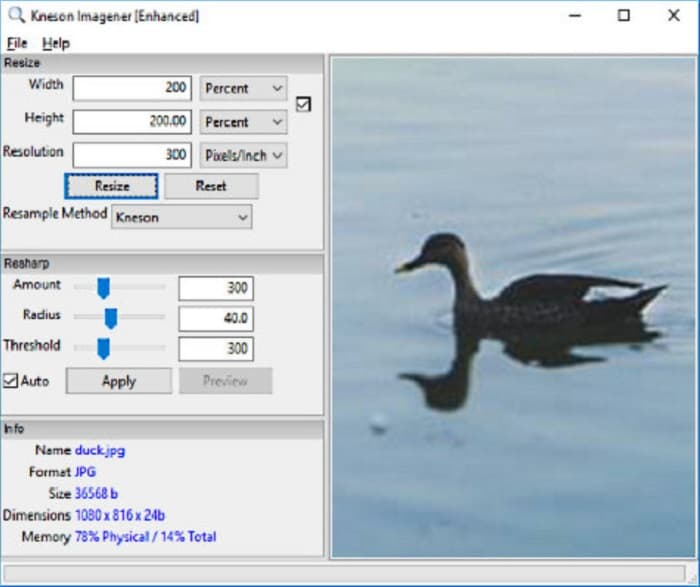
Kneson Imagener també es troba entre els millors amplificadors de fotos per a PC. Aquesta magnífica aplicació és gratuïta i es pot descarregar en gairebé totes les plataformes. A més, et permet engrandir la teva imatge segons el percentatge, els píxels, les polzades i els centímetres de la imatge. També pots canviar la resolució de la imatge per millorar-ne la qualitat. Igualment, pots usar aquesta eina si vols reduir la mida de la teva imatge per estalviar espai al teu dispositiu.
A més, aquí teniu els mètodes de remuestreig disponibles que podeu utilitzar per ampliar la vostra imatge: Normal, Bilineal, Bicúbic, Kenson i Kenson Progressiu. Però tingueu en compte que si voleu descarregar aquesta aplicació de programari, heu d'inscriure un ID de correu electrònic que funcioni al seu lloc web per rebre un butlletí. Després d'això, rebreu un enllaç de descàrrega al vostre correu electrònic on podreu descarregar l'aplicació completament.
Pros
- Té una funció de retall.
- Pots ajustar la quantitat, el radi i el llindar de reafirmació de la teva imatge.
- Té una interfície d'usuari senzilla.
Contres
- Cal que us registreu en un correu electrònic de treball per descarregar-lo.
Relacionat amb:
Els 7 millors potenciadors de píxels per a tots els navegadors web que has de fer servir
La millor aplicació per canviar la mida de fotos en línia, fora de línia, per a Android i iPhone
Part 3. Preguntes freqüents sobre les aplicacions d'ampliació de fotos
Puc reduir la mida de la meva imatge?
Sí. Ajustant la resolució, els píxels i el format de la imatge. La resolució, els píxels i el format de la imatge en determinen la mida. Per tant, si voleu comprimir la mida de la vostra imatge, utilitzeu una eina de compressor fotogràfic.
Puc ampliar la meva foto amb Adobe Photoshop?
Adobe Photoshop és ideal per a molts professionals perquè podeu ampliar la vostra imatge sense pèrdues i amb una qualitat excel·lent. Tanmateix, moltes persones tenen dificultats per utilitzar aquesta eina per ampliar una foto perquè té una interfície difícil d'utilitzar.
Kapwing Photo Resizer és una aplicació excel·lent per ampliar imatges?
Kapwing Photo Resizer és un ampliador d'imatges en línia gratuït que moltes persones recomanen. També és una gran aplicació per millorar o ampliar la vostra imatge sense pèrdues.
Conclusió
Tots aquests photo enlargers presentats més amunt figuren entre els amplificadors d’imatges més destacats que trobaràs a internet. A més, t’assegurem que les aplicacions esmentades són segures d’usar i que totes les descripcions són precises. Però, si prefereixes utilitzar una eina gratuïta en línia, et recomanem el millor ampliador d’imatges en línia, FVC Free Image Upscaler.
-
 Restauració de fotos antigues en línia i fora de línia [Passos fàcils]
 Vols restaurar una foto antiga? Amb aquestes eines, coneixeràs el procés de restauració de fotografies antigues. Llegiu aquesta publicació per aprendre els mètodes més senzills.
-
 Com arreglar la qualitat de la imatge en línia i a Adobe Photoshop
 Si teniu una imatge de baixa qualitat, heu d'arreglar la resolució de la vostra foto. Si voleu aprendre a corregir la qualitat de la imatge, llegiu aquest article completament.
-
 Millor 7 Pixels Enhancer per a tots els navegadors web que heu d'utilitzar
 Si voleu conèixer els millors potenciadors de píxels per utilitzar, millor que consulteu aquesta publicació. Aquest article enumera els set millors potenciadors de píxels fotogràfics per a tots els navegadors web.
