


 Video Converter Ultimate
 Gravadora de pantalla
 Reparació de vídeo
 Baixada segura
Les 5 millors aplicacions de redimensionament de fotos increïbles que heu de provar
A altres persones els costa canviar la mida d’una foto perquè no troben cap eina que la pugui comprimir sense pèrdua de qualitat. I moltes persones redimensionen les seves fotos per millorar la qualitat de les imatges. Encara que canviar la mida d’una imatge n’afectarà la qualitat, és la millor opció si no tens prou emmagatzematge al dispositiu. A més, redimensionar una imatge també és una gran opció per millorar una imatge borrosa. La bona notícia és que hi ha aplicacions en línia, fora de línia, per a Android i per a iPhone que poden canviar la mida de la teva imatge sense perdre qualitat. Per tant, acaba de llegir aquest article per conèixer les cinc millors aplicacions per redimensionar fotos.

Part 1. Aplicació Photo Resizer gratuïta en línia
Moltes persones volen utilitzar un redimensionador de fotos en línia perquè no us requerirà que baixeu res al vostre dispositiu. Una eina en línia és la millor opció si voleu estalviar emmagatzematge per al vostre dispositiu. A més, sovint les aplicacions en línia són gratuïtes, igual que l'eina que molts usuaris recomanen, que és FVC Free Image Upscaler.
FVC Free Image Upscaler és una aplicació en línia per canviar la mida accessible en tots els navegadors web, incloent-hi Google, Firefox i Safari. A més, aquesta aplicació sorprenent pot ampliar la teva imatge amb magnificacions de 2x, 4x, 6x i 8x. Addicionalment, admet gairebé tots els formats d’imatge, com PNG, JPG, JPEG i BMP. El que és encara més excel·lent d’aquesta eina és la seva interfície intuïtiva, que la converteix en una eina fàcil d’utilitzar per a principiants. A més, FVC Free Image Upscaler utilitza tecnologia d’IA (Intel·ligència Artificial) que identifica automàticament les parts borroses de la teva imatge i les millora immediatament. A banda d’augmentar la mida de la imatge triant la magnificació que vols, aquesta eina és coneguda per les seves capacitats de millora amb IA. I com que és una aplicació en línia, no cal descarregar res al dispositiu, cosa que et permet estalviar espai d’emmagatzematge. Així doncs, què estàs esperant? Navega ara per aquesta millor aplicació gratuïta per canviar la mida de fotos.
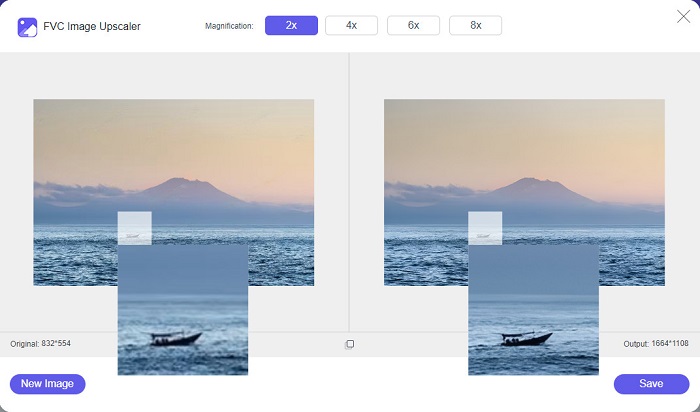
Pros
- Té un procés d'augment ràpid.
- No requereix que inicieu sessió per obtenir un compte.
- Té una interfície de programari fàcil d'utilitzar.
- Podeu accedir-hi des del vostre dispositiu Windows o Mac.
Contres
- És una eina dependent d'Internet.
Part 2. Millor aplicació Photo Resizer per al vostre ordinador
Podeu utilitzar moltes aplicacions al vostre ordinador si busqueu un canvi de mida o un millorador d'imatges. Tanmateix, no totes les aplicacions que es poden baixar són gratuïtes. Sovint, les aplicacions de programari per al vostre ordinador no són gratuïtes. Per sort, hem trobat una aplicació per al vostre ordinador que es pot descarregar gratuïtament. Llegiu aquesta secció per obtenir més informació sobre aquesta millor aplicació gratuïta de redimensionament de fotografies per al vostre ordinador amb Windows.
PNGOUTWin és una eina fora de línia per canviar la mida de fotos que pots descarregar gratuïtament a l’ordinador amb Windows. Aquesta aplicació per redimensionar fotos admet formats d’imatge estàndard, com PNG i JPG. A més, redimensiona automàticament la teva foto després de pujar la imatge que vols comprimir. Encara que és fàcil d’utilitzar, les seves funcions són difícils de navegar. Però després de molts usos, segur que t’acostumaràs a aquesta eina. Disposa d’un procés de redimensionament per lots que et permet canviar la mida de diverses imatges alhora i desar-les en una sola carpeta.
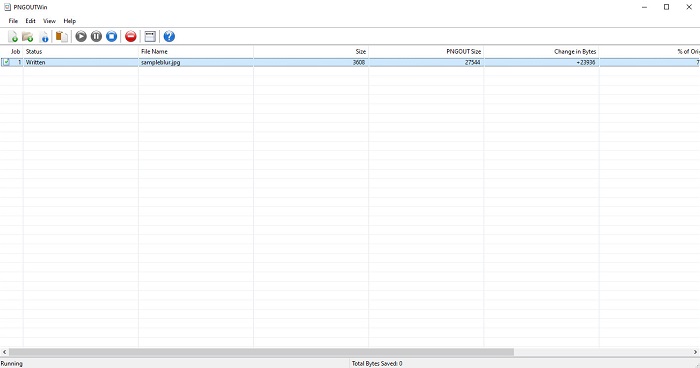
Pros
- Es pot descarregar gratuïtament.
- És segur i fàcil d'utilitzar.
- Ofereix procés d'augment d'escala per lots.
Contres
- Només disponible en dispositius Windows.
- No podeu previsualitzar la vostra imatge augmentada.
Part 3. Millor aplicació per canviar la mida de les fotos a Android
Avui en dia, molta gent utilitza telèfons Android. I si teniu una imatge de baixa qualitat a la vostra galeria, potser voldreu millorar-la amb una aplicació de redimensionament de fotos. Afortunadament, hi ha moltes aplicacions gratuïtes de redimensionament de fotografies que podeu descarregar a PlayStore per ajudar-vos a millorar la vostra imatge de baixa qualitat.
Photo & Picture Resizer és el primer de la llista si cerques aplicacions per canviar la mida de fotos al PlayStore. És una de les millors aplicacions per redimensionar imatges que pots descarregar al dispositiu Android. A més, ofereix un procés d’escalat per lots, amb el qual pots comprimir dues o més imatges simultàniament. A més a més, pots seleccionar a partir de preajustos de dimensions quina mida vols per a la teva imatge. A més, també pots canviar la mida del fitxer i la resolució de la imatge. L’aplicació Photo & Picture Resizer també pot comprimir vídeos. L’inconvenient de Photo & Picture Resizer és que cal comprar la versió premium abans d’accedir a les seves funcions especials d’edició.
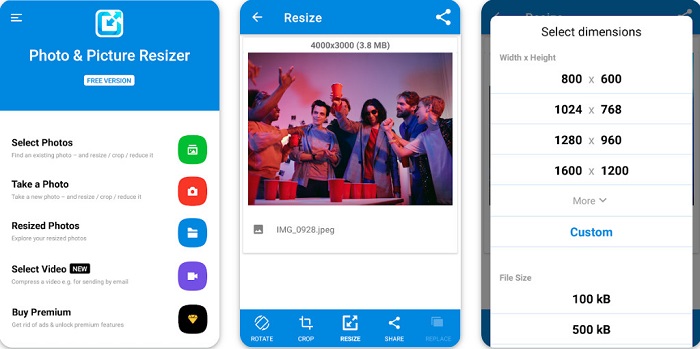
Pros
- És gratuït i segur de descarregar.
- Té un procés de redimensionament ràpid.
- Podeu exportar la vostra sortida a altres plataformes de xarxes socials.
Contres
- Compra la versió premium per utilitzar funcions especials.
- Conté anuncis molestos.
Part 4. Millors aplicacions de redimensionament de fotos per a iPhone
Molta gent fa servir iPhones en aquests dies, i ho sabíeu? Podeu baixar moltes aplicacions gratuïtes de redimensionament de fotos al vostre iPhone per canviar la mida o millorar la vostra imatge. I si voleu saber quin és el millor per utilitzar, llegiu aquesta part tot inclòs.
Remini
Remini és la millor aplicació per canviar la mida de fotos per a iPhone. Remini es pot descarregar gratuïtament de l’AppStore i és segura d’utilitzar. També utilitza tecnologia d’IA (Intel·ligència Artificial) que redimensiona i millora automàticament la teva imatge. A més, aquesta aplicació et permet veure els canvis fets a la imatge abans de desar-la al dispositiu. També et permet exportar el resultat a les plataformes de xarxes socials més populars com Facebook, Instagram i TikTok. I a la seva versió Pro, hi ha més funcions d’edició que pots utilitzar per millorar la teva imatge. Així que, si vols que la teva imatge tingui un aspecte nítid i clar, aquesta aplicació pot ser just el que estaves buscant.
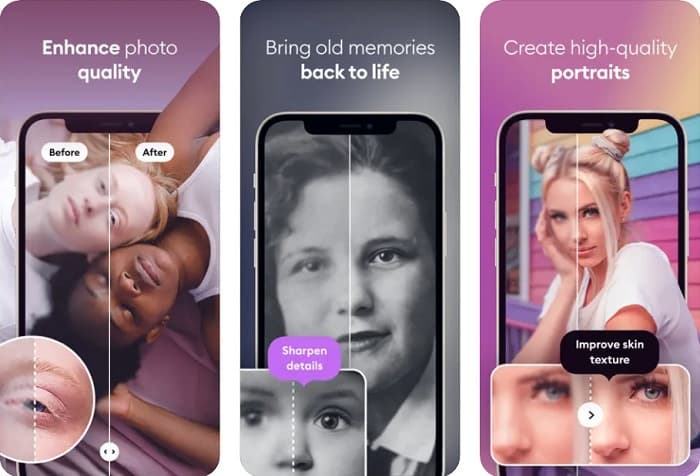
Pros
- Admet els formats d'imatge per a l'iPhone.
- Té una interfície d'usuari senzilla.
- Pot corregir imatges de baixa resolució.
Contres
- Heu de comprar l'aplicació per millorar les imatges.
Canviar la mida de la imatge
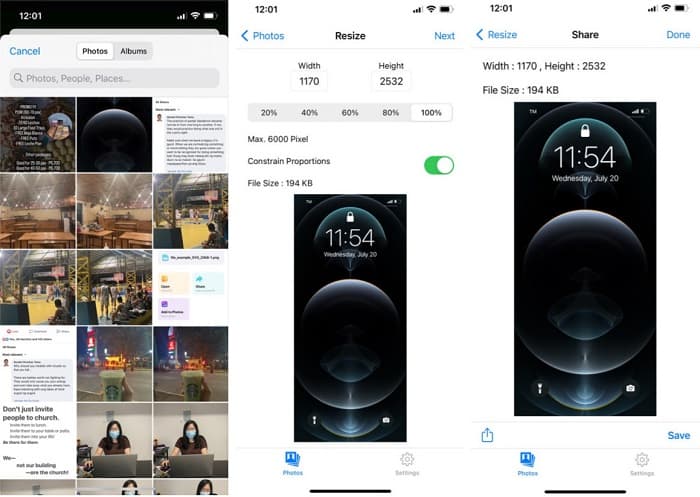
Una altra de les millors aplicacions per canviar la mida d’una imatge és Image Resize. Image Resize també es pot descarregar gratuïtament al teu iPhone. Aquesta aplicació et permet redimensionar la teva imatge triant el percentatge que vulguis per a la imatge. A més, amb aquesta aplicació pots ajustar l’amplada i l’alçada de la imatge. El que encara és més fantàstic d’aquesta aplicació és el seu procés ràpid de redimensionament, que molts usuaris troben molt pràctic.
Pros
- Admet imatges HEIC, Exif i PNG.
- És una aplicació fàcil d'utilitzar.
Contres
- Només pot canviar la mida dels marcs de la vostra imatge, però no la millora.
Relacionat amb:
Com millorar fàcilment la qualitat d’una imatge a Windows i Mac
Com augmentar la resolució d’una imatge [5 maneres de millorar-la]
Part 5. Preguntes freqüents sobre l'aplicació Best Photo Resizer
Puc canviar la mida d'una foto sense perdre qualitat?
Canviar la mida d'una imatge no vol dir necessàriament que arruïni la qualitat de la imatge. Tot i que afecta la mida de la imatge, la majoria de vegades, les aplicacions poden canviar la mida d'una imatge sense perdre qualitat.
Puc canviar la mida d'una imatge amb Adobe Photoshop?
Sí. Adobe Photoshop és l’aplicació d’edició de fotos més sorprenent que disposa d’una funció amb la qual pots canviar la mida de la teva imatge. Per fer-ho, obre Adobe Photoshop, selecciona la imatge que vols redimensionar i després vés a la barra de menú principal > Selecciona Imatge > Mida de la imatge per obrir el quadre de diàleg Mida de la imatge i ajustar la mida de la imatge.
Quins formats d'imatge admet Adobe Photoshop?
Adobe Photoshop admet gairebé tots els formats d'imatge coneguts, com ara JPG, JPEG, PNG, GIF, TIFF i més.
Conclusió
Ara que ja coneixes la millor aplicació per canviar la mida de fotos, pots triar la que prefereixis. Hi ha diferents aplicacions en línia, fora de línia, per a Android i per a iPhone, i depèn de quin dispositiu facis servir. Però si no vols descarregar res al dispositiu, utilitza ara FVC Free Image Upscaler.
-
 Millorar la resolució de les fotos de l'iPhone amb els millors potenciadors
 Voleu millorar la resolució de fotos de l'iPhone? Bé, en aquest article cobrim les millors eines que pots utilitzar i altres trucs que has de conèixer!
-
 Restauració de fotos antigues en línia i fora de línia [Passos fàcils]
 Vols restaurar una foto antiga? Amb aquestes eines, coneixeràs el procés de restauració de fotografies antigues. Llegiu aquesta publicació per aprendre els mètodes més senzills.
-
 Millor 7 Pixels Enhancer per a tots els navegadors web que heu d'utilitzar
 Si voleu conèixer els millors potenciadors de píxels per utilitzar, millor que consulteu aquesta publicació. Aquest article enumera els set millors potenciadors de píxels fotogràfics per a tots els navegadors web.
