


 Video Converter Ultimate
 Gravadora de pantalla
 Reparació de vídeo
 Baixada segura
Com eliminar fàcilment la filigrana de les imatges de graduació
Les filigranes són una vergonya sempre que les veieu a qualsevol foto i arruïnen la qualitat de la foto. Veureu filigranes a les fotos sempre que el creador no vulgui que li roben la seva obra. I si sou estudiant, probablement veureu filigranes a la vostra foto de graduació, indicant el nom de l'estudi o el fotògraf que l'ha fet.
Si vols eliminar la marca d’aigua de la teva foto de graduació, necessites eines que t’ajudin a eliminar-ne la marca d’aigua. En aquest article, hem llistat les tres eines per eliminar marques d’aigua més utilitzades, i també aprendràs els passos per eliminar marques d’aigua de fotos de graduació.

Part 1. Com eliminar la filigrana de les imatges de graduació en línia
Hi ha moltes eines per eliminar la filigrana que veureu a Internet. Tanmateix, no tots són gratuïts i fàcils d'utilitzar. A més, en aquesta part, sabreu com eliminar les marques d'aigua de manera còmoda i eficient.
FVC Free Watermark Remover és un eliminador de marques d’aigua en línia que et permet suprimir fàcilment les marques d’aigua de les teves fotos de graduació. Aquesta eina en línia és popular perquè no cal descarregar res per utilitzar-la. A més, admet els formats d’imatge més comuns, com ara PNG, JPG, JPEG, BMP i més. I fins i tot si elimines la marca d’aigua de la teva imatge, quan la descarreguis mantindrà el mateix format d’imatge que tenia abans.
Amb aquest eliminador de filigrana, podeu triar entre els valors predefinits de l'eliminador en seleccionar l'àrea de la filigrana. Podeu triar entre poligonal, llaç o pinzell. A més, podeu utilitzar aquesta eina per esborrar altres coses innecessàries de la vostra imatge.
Pros
- Té una interfície de programari de funcionament ràpid.
- És segur d'utilitzar.
- És 100% d'ús gratuït.
- Disponible en tots els navegadors web, inclosos Google, Firefox i Safari.
Contres
- És depenent d'Internet.
Com desfer-se de la filigrana a les imatges de graduació mitjançant l'eliminador de marques d'aigua gratuït de FVC:
Pas 1. Al navegador que facis servir, cerca FVC Free Watermark Remover. Pots fer clic en aquest enllaç per anar directament a la seva pàgina web.
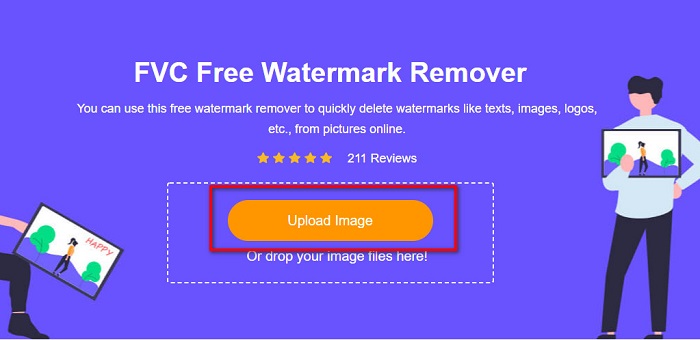
Pas 2. A la interfície principal del programa, fes clic al botó Upload Image. Se t’obriran les carpetes de l’ordinador, on seleccionaràs la foto de graduació i la pujaràs.
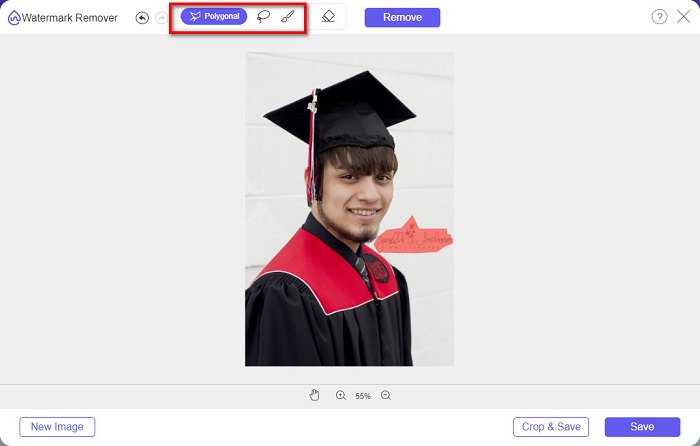
Pas 3. A continuació, selecciona l’eina d’eliminació que vulguis utilitzar per suprimir la marca d’aigua. Tria entre Polygonal, Lasso o Brush. Després, selecciona la zona de la marca d’aigua que vols eliminar.
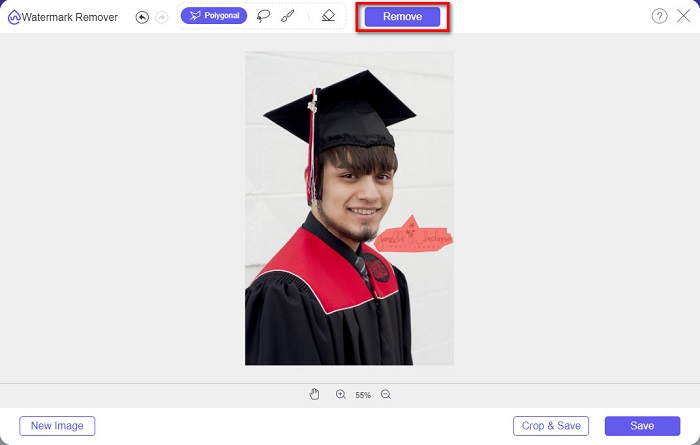
Pas 4. Després de seleccionar l’àrea de la marca d’aigua, fes clic al botó Remove per esborrar-la.
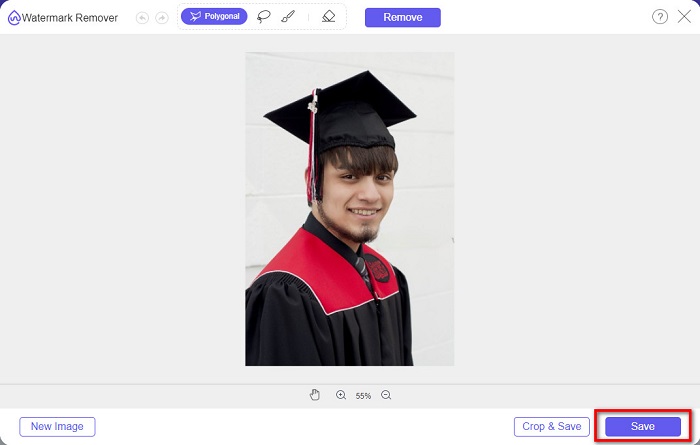
Pas 5. Veureu que la marca d’aigua s’ha eliminat. Fes clic al botó Save per descarregar la imatge al teu dispositiu. A més, aquesta eina d’eliminació de marques d’aigua en línia també és un eliminador de marques d’aigua de Photobucket.
Part 2. Com eliminar la filigrana de les imatges de graduació amb Inpaint
De vegades, la gent retoca la marca d'aigua per aconseguir que la foto tingui el seu aspecte original. Però com ho fan? Els professionals utilitzen un editor de fotos i pinten l'etiqueta píxel per píxel, el que resulta en un parell d'hores de treball. Tanmateix, hi ha una altra eina que us ajudarà a facilitar-vos la vida. En aquesta part, aprendràs a utilitzar Inpaint i els seus avantatges.
Inpaint és un eliminador de marques d’aigua en línia que també t’ajudarà a eliminar marques d’aigua de la teva foto de graduació. Aquest programa en línia també té una versió descarregable disponible per a Windows i Mac. A més, et permet eliminar elements no desitjats de la foto, com ara logotips, textos, objectes, etc. El més sorprenent és que té una funció per restaurar fotos antigues i retornar-les a la seva qualitat original. També disposa d’eines d’eliminació per seleccionar la zona de la marca d’aigua que vols suprimir.
Pros
- Té una interfície de programari fàcil d'utilitzar.
- Permet fer retocs facials digitals.
- Us permet omplir les zones negres de Panorames.
- Accessible a gairebé tots els navegadors web, com ara Google i Firefox.
Contres
- Depèn d'Internet.
Com eliminar la marca d'aigua de la imatge de graduació amb Inpaint:
Pas 1. Cerca Inpaint al navegador i després ves a la seva pàgina web. A continuació, a la interfície principal del programa, fes clic al botó Upload Image per pujar-hi la teva foto de graduació.
Pas 2. A continuació, selecciona l’eina d’eliminació que vols utilitzar per marcar la zona de la marca d’aigua. Tria entre marker tool, lasso tool i polygonal lasso tool.
Pas 3. Després, amb l’eina que hagis triat, selecciona l’àrea de la marca d’aigua que vols eliminar.

Pas 4. Finalment, fes clic al botó Erase per eliminar la marca d’aigua de la teva foto de graduació. Després fes clic al botó Download per descarregar la foto.
Part 3. Com eliminar la filigrana de la imatge de graduació amb Photoshop
Adobe Photoshop és el programari d'edició més famós que utilitzen molts professionals. Però el que molts usuaris no saben és que no és només un programari d'edició; també pot eliminar les marques d'aigua no desitjades de la teva foto. Per saber com eliminar la marca d'aigua de la vostra foto, llegiu aquesta part de manera exhaustiva.
Adobe Photoshop és el programa d’edició de fotos més popular i disposa de moltes funcions d’edició. Molts professionals fan servir aquesta aplicació d’edició perquè permet retocar la imatge de moltes maneres professionals. Conté eines que et permeten editar la imatge amb tot detall. A més, produeix resultats d’alta qualitat que pots compartir a qualsevol plataforma de xarxes socials.
Pros
- Té moltes funcions d'edició avançades per utilitzar.
- Conté moltes eines per a l'edició.
- Produeix sortides d'alta qualitat.
- Us permet editar i crear imatges tant impreses com web.
Contres
- Té una interfície de programari difícil d'utilitzar.
- Heu de comprar l'aplicació per descarregar-la.
Com eliminar les marques d'aigua de la vostra foto amb Adobe Photoshop:
Pas 1. Descarrega Adobe Photoshop al teu dispositiu i executa l’aplicació. A la interfície principal d’usuari, obre la imatge al Photoshop.
Pas 2. Selecciona la zona de la marca d’aigua. Pots utilitzar la Pen tool, l’Quick Selection tool o la Magic Wand tool.
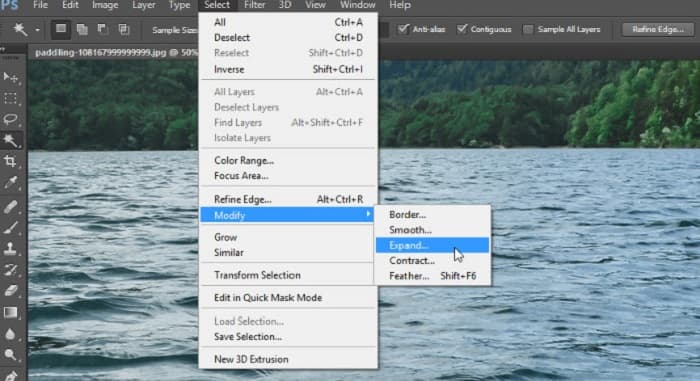
Pas 3. Ves a Select > Modify > Expand per incorporar el píxel de fons.
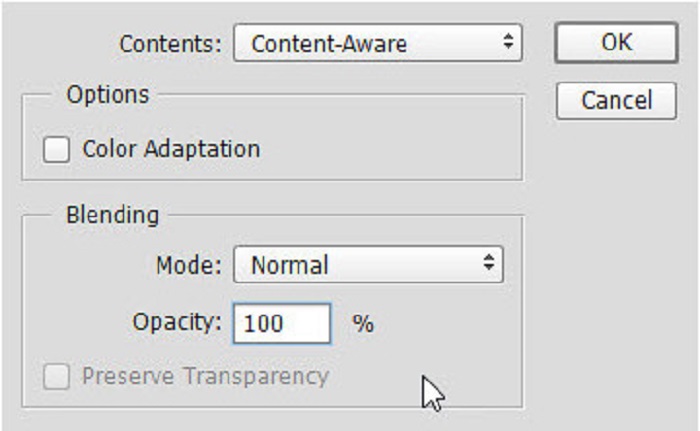
Pas 4. Ves a Edit > Fill i després selecciona Content-Aware a l’apartat Contents.
Pas 5. A continuació, prem CTRL+D. Veureu que la marca d’aigua s’ha omplert amb el fons. Després, per eliminar el contorn de la marca d’aigua, utilitza la Clone Stamp Tool.
Pas 6. Mantén premuda la tecla Alt i ressegueix el contorn de la marca d’aigua. Quan hagis acabat d’eliminar-ne els rastres, observaràs que la marca d’aigua ha desaparegut.
Part 4. Preguntes freqüents sobre l'eliminació de la filigrana de la imatge de graduació
Eliminar les marques d'aigua de les imatges de graduació arruïna la qualitat?
L'eliminació de la marca d'aigua de les imatges de graduació no necessàriament arruïnarà la qualitat. Tanmateix, quan elimineu la marca d'aigua, algunes eines encara deixen marques.
Podeu eliminar les filigranes de Canva?
Sí. Canva té una funció on podeu eliminar les marques d'aigua de forma gratuïta. Només cal que feu clic al botó Elimina les filigranes per fer-ho.
Podeu eliminar les filigranes d'un PDF?
Amb les eines mostrades més amunt, pots eliminar qualsevol marca d’aigua del teu fitxer PDF.
Conclusió
Ara que ja has après com eliminar marques d’aigua de fotos de graduació, ja ho pots fer tu mateix i provar les eines que s’han presentat més amunt. Eliminar la marca d’aigua és fàcil si utilitzes un eliminador de marques d’aigua. Tot i això, molta gent recomana utilitzar FVC Free Watermark Remover perquè és una eina pràctica i fàcil d’utilitzar.
-
 Com eliminar la filigrana Lumion a Windows i Mac fàcilment
 Necessites eliminar la marca d'aigua Lumion per presentar-la professionalment? Bé, hi ha eines que podeu utilitzar per ajudar-vos a desfer-vos de la marca d'aigua que deixa.
-
 Com treure la marca d'aigua de Weibo en vídeos i imatges fàcilment
 Teniu problemes per eliminar la marca d'aigua de Weibo al vídeo i la imatge exportats? En aquest cas, necessiteu un eliminador de filigrana que us enumerem a continuació que us pugui ajudar.
-
 Apreneu a treure la filigrana de Movavi gratuïtament $91;Must Have!$93;
 Exportar un vídeo o una imatge a Movavi deixarà una marca d'aigua, però és possible eliminar-la? Per ensenyar a eliminar la filigrana de forma gratuïta, llegiu això.
