


 Video Converter Ultimate
 Gravadora de pantalla
 Reparació de vídeo
 Baixada segura
Passos senzills sobre com canviar la mida de la foto per a Facebook
Molts mil·lennials i adults utilitzen Facebook com la plataforma de xarxes socials més popular. Facebook és una aplicació on pots pujar imatges i compartir-les o enviar-les als teus amics. I molta gent vol tenir una imatge de gran qualitat per pujar-la a Facebook. Si també vols pujar fotos en alta resolució i d’alta qualitat, tenim l’eina que t’hi pot ajudar. Per sort, hem trobat aplicacions per a iPhone, Android i en línia que poden redimensionar imatges de manera ràpida i eficient. Així que, corda’t el cinturó, perquè en aquesta publicació aprendràs ràpidament com redimensionar fotos per a Facebook.

Part 1. Com canviar la mida de la foto a l'iPhone per a Facebook
Si utilitzeu un dispositiu iPhone, podeu baixar aplicacions a l'AppStore per ajudar-vos a canviar la mida de la vostra foto. A més, hi ha aplicacions gratuïtes que podeu utilitzar al vostre dispositiu iPhone. Tanmateix, no totes les aplicacions produeixen sortides d'alta qualitat. És per això que hem cercat la millor aplicació per canviar la mida de les imatges a l'instant.
Remini és l’aplicació de canvi de mida de fotos més popular que pots descarregar al teu iPhone. Aquesta aplicació té una interfície fàcil d’utilitzar perquè disposa de funcions intuïtives. A més, Remini pot millorar la teva imatge mitjançant el seu potenciador amb IA (intel·ligència artificial), que redimensiona automàticament la imatge i l’optimitza a la màxima qualitat. I no només això: amb aquesta aplicació també pots millorar el teu vídeo amb la funció d’enfocament de vídeo. A més, admet tots els formats d’imatge habituals, com JPEG, JPG i PNG. El que també és fantàstic d’aquesta app és que la pots descarregar gratuïtament a l’App Store. Per tant, si vols utilitzar aquesta aplicació per redimensionar una foto per a la portada de Facebook, segueix els procediments següents.
Com canviar la mida d'una imatge amb l'aplicació Remini:
Pas 1. Obre l’App Store, busca l’aplicació Remini i descarrega-la al teu dispositiu. Després d’instal·lar l’aplicació, obre-la.
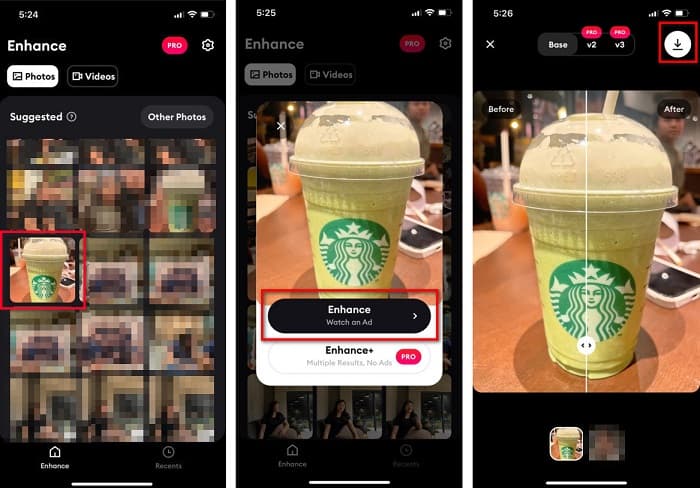
Pas 2. Un cop hagis obert l’aplicació, veuràs les teves fotos i podràs seleccionar la imatge que vols millorar. Després, toca el botó Enhance per anar a la següent interfície.
Pas 3. Abans de passar a la pantalla següent, primer has de mirar un anunci. A continuació veuràs el abans i el després de la teva imatge. Toca la icona de Descàrrega a la part superior dreta de la pantalla.
Part 2. Com canviar la mida de la foto a Android per a Facebook
Ets usuari d'Android? No et preocupis; també presentarem una aplicació que podeu utilitzar per canviar la mida d'una imatge. Tot i que hi ha moltes aplicacions que pots descarregar de PlayStore, hem escollit la millor entre elles per presentar-te. Llegiu a continuació per saber com canviar la mida de les imatges per a Facebook a Android.
AI Photo Enhancer & PixelLeap és una altra gran aplicació que t’ajudarà a redimensionar la teva imatge per obtenir una millor qualitat. Aquest canviador de mida de fotos es pot descarregar gratuïtament des del Play Store i és segur d’utilitzar. A més, si vols millorar o restaurar una imatge antiga, pots fer-ho amb AI Photo Enhancer & PixelLeap. I amb la seva tecnologia d’IA, només cal que pengis la imatge que vols redimensionar i l’aplicació la millorarà automàticament. A més, té una interfície senzilla, cosa que la converteix en una aplicació molt adequada si ets principiant. També disposa d’altres funcions d’edició que pots utilitzar, com ara corregir, acolorir, animar, afegir expressions i aclarir la teva imatge. Tanmateix, el problema d’aquesta aplicació és que conté molts anuncis que triguen una estona a acabar-se i deixa una marca d’aigua al resultat. Tot i així, aquesta aplicació és la solució si vols redimensionar una foto per a Facebook sense retallar-la.
Com canviar la mida d'una imatge amb AI Photo Enhancer i PixelLeap:
Pas 1. Instal·la AI Photo Enhancer & PixelLeap al teu dispositiu Android.
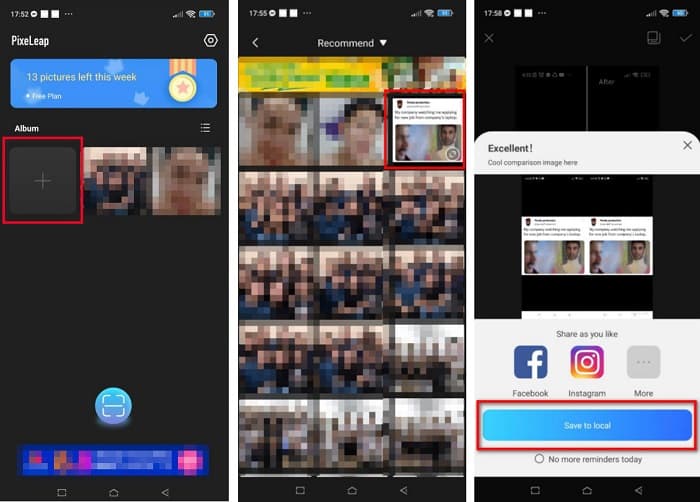
Pas 2. A continuació, a la interfície principal de l’aplicació, toca el quadre amb el signe + per pujar la imatge que vols redimensionar. Després, l’aplicació et demanarà que miris un anunci abans de passar a la pantalla següent.
Pas 3. Navega fins a la imatge que vols redimensionar i toca-la. Després de seleccionar la imatge, toca l’opció Enhance. A continuació, l’aplicació millorarà automàticament la teva imatge. Toca Save to local per descarregar el resultat.
Part 3. Com canviar la mida de la foto en línia per a Facebook
L'avantatge d'utilitzar una aplicació en línia és que us permet estalviar espai al vostre dispositiu. A més d'això, hi ha moltes aplicacions web d'accés gratuït que podeu utilitzar al vostre navegador. Per tant, si voleu utilitzar una aplicació en línia per canviar la mida d'una imatge per penjar-la a Facebook, us mostrarem com canviar la mida d'una foto per a Facebook.
FVC Free Image Upscaler és el millor redimensionador de fotos en línia que et permet ampliar la teva imatge fins a 2x, 4x, 6x i 8x de magnificació. Amb la seva interfície senzilla, els principiants poden canviar la mida d’una imatge amb facilitat. A més, admet tots els formats d’imatge, inclosos JPEG, JPG, PNG i BMP. El més impressionant d’aquesta aplicació és que utilitza una tecnologia d’IA que detecta automàticament les parts de baixa resolució d’una imatge i després les millora. A més, pot arreglar completament i perfectament els píxels perduts, les textures de color i més detalls. També és accessible en tots els navegadors web, com Google, Firefox i Safari. Per tant, si vols utilitzar FVC Free Image Upscaler per redimensionar o millorar la teva imatge, segueix els senzills passos següents.
Com canviar la mida d'una imatge per a Facebook amb FVC Free Image Upscaler:
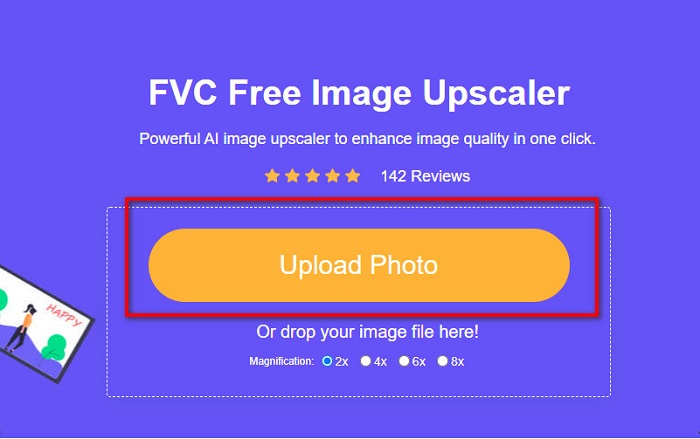
Pas 1. Obre el navegador i escriu FVC Free Image Upscaler al quadre de cerca. Pots fer clic a l’enllaç proporcionat per anar directament al lloc web. Fes clic a Upload Photo per iniciar l’aplicació.
Pas 2. A la interfície principal del programari, fes clic a Upload Photo per importar la imatge que vols redimensionar.
Pas 3. A la pantalla següent, selecciona el nivell de magnificació que vols per al resultat de la teva imatge. Pots triar entre 2x, 4x, 6x i 8x de magnificació. Després, passa al pas següent.
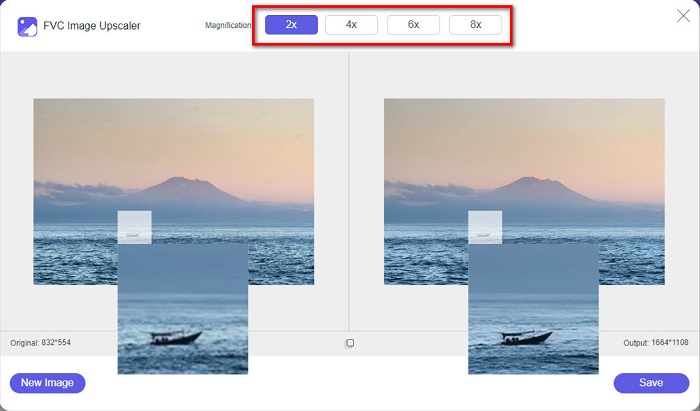
Pas 4. Finalment, marca el botó Save per desar el resultat a l’ordinador. I veuràs la diferència entre el teu fitxer original i la imatge redimensionada. En només un segon, la teva imatge quedarà desada.
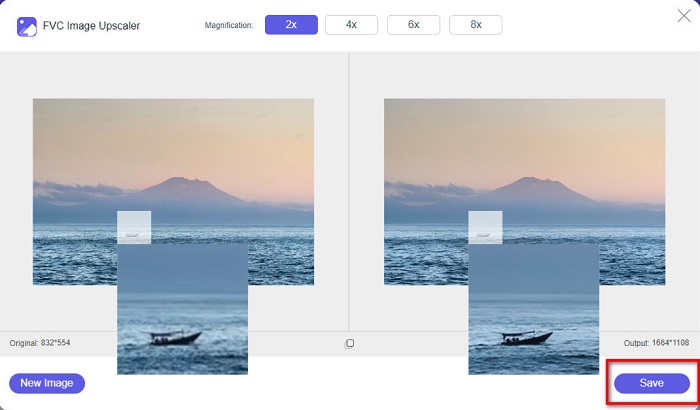
I ja està! Tan fàcil com l'ABC, ara la teva imatge està millorada i canviada de mida.
Relacionat amb:
Com afinar una imatge en línia i fora de línia amb 4 mètodes senzills
Com redimensionar una imatge – Adobe Resize Image [en línia i fora de línia]
Part 4. Preguntes freqüents sobre com canviar la mida de la foto per a Facebook
Quina és la millor relació fotogràfica per a Facebook?
Pel que fa a la relació fotogràfica, és millor utilitzar una imatge vertical amb una relació d'aspecte de 4:5 i 1200 x 1500 px. I si voleu una imatge quadrada, la resolució ha de ser de 1080 x 1080 px.
Quina és la mida d'una publicació de Facebook?
La mida d'imatge recomanada per a una publicació de Facebook és de 1200 x 630 píxels per evitar la pixelació i tenir un temps de càrrega més ràpid.
Quin és el millor format d'imatge per penjar a Facebook?
El format d'imatge millor i recomanat per pujar a Facebook és el format JPG. El millor és carregar un format JPG amb un color RGB de menys de 15 MB.
Conclusió
Tenim les solucions anteriors si vols redimensionar una foto per a Facebook. Després de llegir aquest article amb deteniment, esperem que hagis après tot el que cal fer. Sens dubte podràs redimensionar qualsevol imatge que vulguis utilitzant aplicacions per a iPhone, Android o en línia. Però per obtenir millors resultats, utilitza FVC Free Image Upscaler, que també et permetrà estalviar espai al dispositiu.
-
 Millor aplicació Photo Resizer en línia, fora de línia, Android i iPhone
 Quines són les millors aplicacions de redimensionament de fotos? Feu clic a la pàgina per conèixer les cinc aplicacions de redimensionament de fotos més potents que podeu utilitzar per millorar o canviar la mida del vostre fitxer.
-
 Com canviar la mida de la imatge - Adobe Canvia la mida de la imatge [en línia i fora de línia]
 Si esteu buscant una imatge de redimensionament d'Adobe, tenim la solució per a vosaltres. Consulteu aquesta publicació a fons per aprendre a canviar la mida de les imatges amb Adobe al vostre ordinador.
-
 Els 4 millors ampliadors GIF fora de línia i en línia que no us podeu perdre
 Aquesta publicació és per a tu si esteu buscant els millors ampliadors de GIF. Hem enumerat els ampliadors GIF en línia i fora de línia de millor rendiment per al vostre ordinador.
