


 Video Converter Ultimate
 Gravadora de pantalla
 Reparació de vídeo
 Baixada segura
Conversió perfecta de M4B i MP3: gaudiu dels audiollibres a qualsevol lloc i en qualsevol moment
Descobreix la porta d’entrada a la versatilitat dels audiollibres amb remarcables convertidors de MP3 a M4B. Si busques una manera senzilla d’ampliar la teva biblioteca d’audiollibres, els convertidors analitzats aquí et permeten convertir sense esforços arxius MP3 al format M4B o a la inversa. Totalment compatibles amb les plataformes i dispositius d’audiollibres més populars per gaudir de les teves històries preferides a tot arreu. Allibera el veritable potencial de la teva col·lecció d’audiollibres amb pràctics convertidors de M4B a MP3, dissenyats per optimitzar el teu viatge d’escolta. Comença a explorar avui mateix possibilitats il·limitades i endinsa’t en una transició fluida cap a un univers d’audiollibres sense fronteres.

Part 1. M4B vs. MP3
Abans d'endinsar-nos en el procés de conversió, aquí teniu una taula comparativa que destaca les principals diferències entre els formats M4B i MP3:
| M4B | MP3 | |
| DRM | Es pot protegir amb DRM, restringint l'ús en dispositius específics | Pot estar lliure de DRM o protegit per DRM segons el fitxer |
| Metadades | Admet metadades extensives per organitzar audiollibres | Compatibilitat limitada de metadades per a la informació bàsica de la pista |
| Mida de l'arxiu | En general, una mida de fitxer més gran a causa de les funcions millorades | Mida del fitxer més petita a causa de la compressió més alta |
| Compatibilitat | S'utilitza habitualment en dispositius iTunes i Apple | Compatible universalment amb una àmplia gamma de dispositius |
| Qualitat | Ofereix àudio d'alta qualitat amb compressió eficient | Qualitat variable segons la taxa de bits |
| Compressió | Utilitza compressió avançada AAC (Advanced Audio Coding). | Utilitza un algorisme de compressió amb pèrdues |
Part 2. Converteix MP3 a M4B o MP3 a M4B a Windows i Mac
1. Video Converter Ultimate
Quan es tracta de convertir vídeo i música, Video Converter Ultimate és l’estàndard d’or. Admet una gran varietat de formats de fitxer de vídeo i àudio per a la conversió, incloent-hi M4B, MP3, AIFF, OGG, AAC i molts altres. També pots canviar el format segons el dispositiu que facis servir. El programari seleccionarà automàticament els millors paràmetres i el format òptim per als teus dispositius. En pocs segons, el teu fitxer es pot convertir de MP3 a M4B o a l’inrevés. Aquest convertidor també permet la conversió per lots, cosa molt útil quan es treballa amb un gran nombre de fitxers o quan vols convertir M4B a MP3 amb capítols. Tot seguit, trobaràs una guia senzilla per ajudar-te a utilitzar aquest programa.
Pas 1. Adquireix el programari
En primer lloc, obtén l’instal·lador del programa seleccionant l’opció Descàrrega gratuïta. Després, instal·la l’aplicació a l’ordinador i, tot seguit, obre-la.
Baixada gratuïtaPer a Windows 7 o posteriorBaixada segura
Descarrega gratisPer a MacOS 10.7 o posteriorBaixada segura
Pas 2. Continua amb la càrrega del fitxer MP3 o M4B
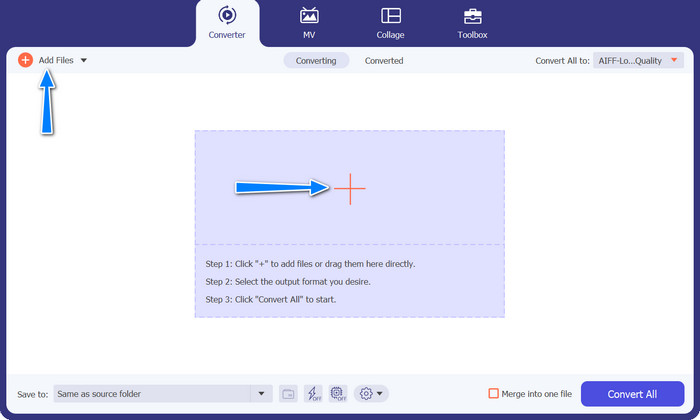
Per afegir fitxers d’àudio, fes clic al botó amb el signe Plus a la interfície principal o selecciona el botó Afegeix fitxers. Després d’això, s’hauria de mostrar la miniatura de l’àudio.
Pas 3. Selecciona un format de sortida
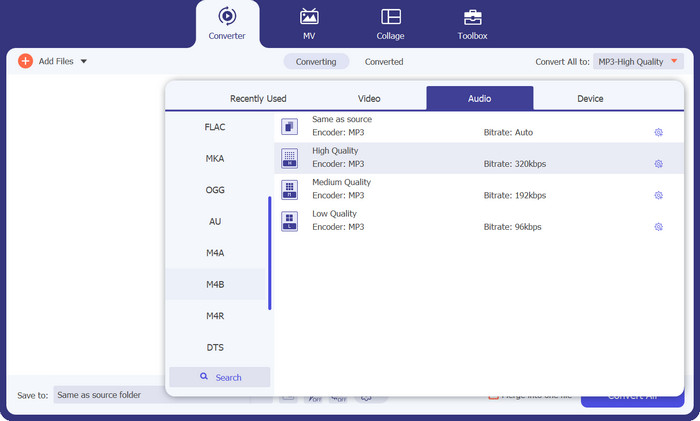
A continuació, ves a la pestanya Perfil i després a la pestanya Àudio. A la columna de l’esquerra, cerca i selecciona el format M4B o MP3.
Pas 4. Inicia el procediment de conversió
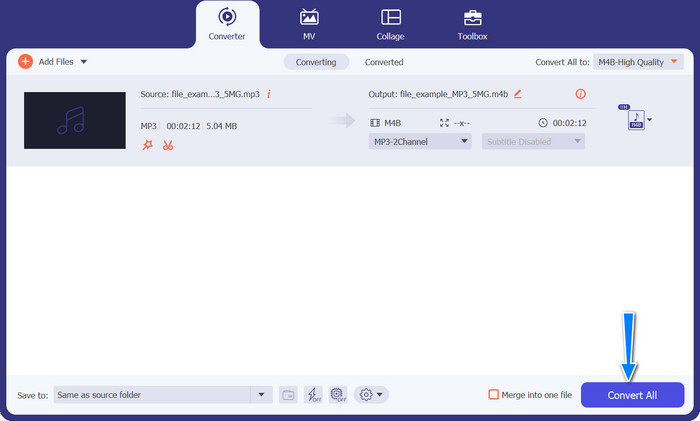
Ara que ja està tot configurat, pots canviar M4B a MP3 i a l’inrevés. Prem amb decisió el botó Converteix-ho tot situat a la part inferior del cantó dret per iniciar el procés de conversió. El procés s’hauria d’iniciar immediatament.
Pros
- Accés fora de línia.
- Capacitat de conversió per lots.
- Personalització i control.
Contres
- Les eines riques en funcions poden tenir un preu.
2. Convertidor de MP3 gratuït en línia
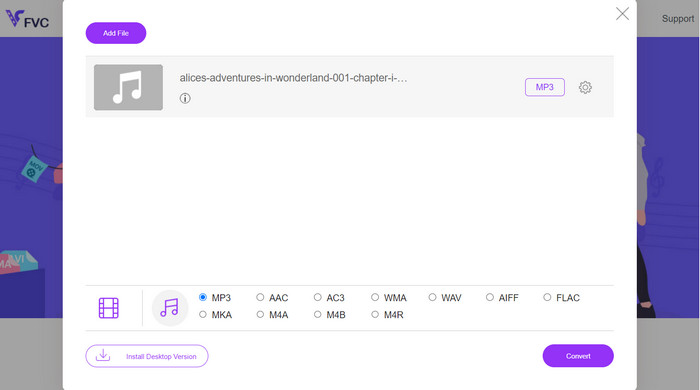
Us recomanem que utilitzeu Free MP3 Converter Online com una eina eficaç de conversió de M4B a MP3. El lloc web no imposa càrrecs ni mostra anuncis a la seva pàgina web. És possible la conversió il·limitada d'arxius d'àudio i vídeo. El registre és innecessari. Aquest és el convertidor en línia més eficaç. Les instruccions següents proporcionen una guia per utilitzar l'eina per convertir M4B a MP3 de forma gratuïta.
Pas 1. Primer de tot, només has d’anar al lloc web principal del programa. Pots accedir-hi amb qualsevol navegador que prefereixis.
Pas 2. Fes clic al botó Afegeix fitxers per convertir a la part superior de la pàgina per començar a pujar els teus fitxers d’àudio. Cal instal·lar el llançador abans si encara no ho has fet.
Pas 3. En tercer lloc, decideix el tipus de fitxer de sortida. A Format d’àudio, selecciona el botó d’opció AIFF. L’últim pas és fer clic al botó Converteix per iniciar la transformació.
Pros
- Admet diversos formats de fitxer.
- Plataforma independent.
Contres
- Programa dependent d'Internet.
- Riscos de seguretat i privadesa.
3. iTunes
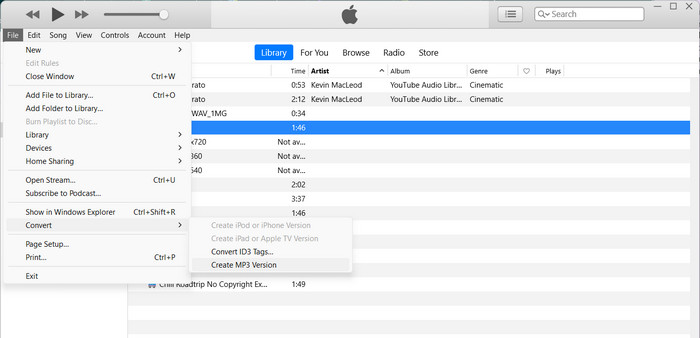
iTunes d'Apple és un reproductor i organitzador de fitxers d'àudio popular que admet molts formats digitals diferents. Si teniu un Mac, podeu utilitzar iTunes per convertir els vostres M4B a MP3. A continuació es mostren alguns dels passos per aprendre a convertir M4B a MP3 a iTunes.
Pas 1. Obre iTunes a l’ordinador. A continuació, ves al menú Edita (Windows) o al menú iTunes (Mac) i selecciona Preferències.
Pas 2. A la finestra de Preferències, prem la pestanya General i, després, fes clic al botó Configuració d’importació.
Pas 3. Apareixerà una finestra nova. Al menú desplegable Importa fent servir, selecciona Codificador MP3. També pots ajustar la configuració de l’MP3 fent clic al botó Configuració si ho desitges. Quan acabis, fes clic a D’acord per tancar la finestra de configuració.
Pas 4. Ara, ves a la teva biblioteca d’iTunes i localitza l’audiollibre M4B que vols convertir a MP3. Si encara no és a iTunes, el pots afegir anant a Fitxer (Windows) o iTunes (Mac) i seleccionant Afegeix fitxer a la biblioteca o Afegeix carpeta a la biblioteca.
Pas 5. Fes-hi clic dret (o Control-clic) i tria Crea una versió MP3. iTunes començarà a convertir el fitxer M4B a format MP3. La versió MP3 convertida apareixerà al costat del fitxer M4B original a la teva biblioteca d’iTunes.
Part 3. Converteix MP3 a M4B o MP3 a M4B a iOS i Android
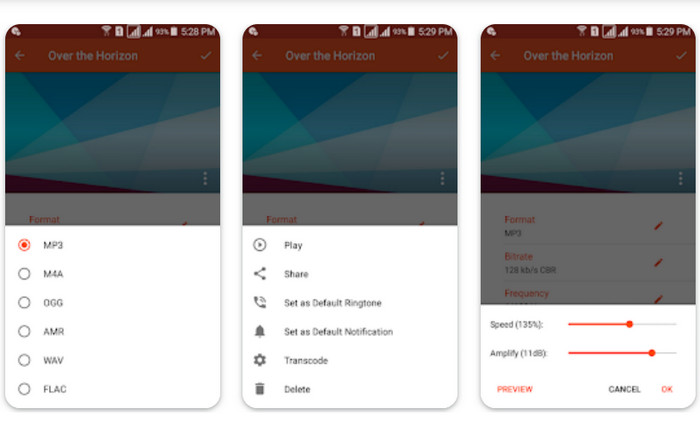
Audio Converter és una popular aplicació mòbil disponible per a dispositius iOS i Android. Admet la conversió de M4B a MP3 juntament amb altres formats d'àudio. L'aplicació us permet importar els vostres fitxers M4B, triar el format MP3 com a sortida i ajustar la configuració d'àudio, com ara la taxa de bits i la freqüència de mostreig. També ofereix opcions per retallar i combinar fitxers d'àudio. Seguiu el procediment següent per dominar com utilitzar aquesta aplicació de conversió de M4B a MP3 al vostre dispositiu mòbil.
Pas 1. Obre Audio Converter. Normalment, el programa té una interfície senzilla per seleccionar i convertir fitxers d’àudio.
Pas 2. Tria el fitxer M4B que vulguis convertir a MP3. El programa pot importar fitxers des del teu dispositiu, l’emmagatzematge al núvol o altres aplicacions.
Pas 3. Després de seleccionar el fitxer M4B, veuràs opcions de format de sortida. Selecciona MP3 com a format de sortida. L’aplicació pot incloure més opcions de personalització, com ara qualitat/bitrate de l’àudio, freqüència de mostreig, configuració de canals i fins i tot retallar o unir fitxers d’àudio. Si cal, personalitza aquests paràmetres.
Pas 4. Inicia la conversió després d’haver seleccionat el format de sortida i modificat les opcions necessàries. El programa convertirà M4B a MP3.
Pros
- Funcions addicionals com ara retallar, combinar o edició bàsica.
- Ofereix comoditat mòbil.
Contres
- El procés de conversió pot trigar una mica.
Lectures relacionades:
Els 5 millors programes gravadors M4B per a PC i Mac [Gratuïts i de pagament]
M4A vs MP3: Quin format de fitxer d’àudio et convé més?
Part 4. Preguntes freqüents sobre la conversió de M4B i MP3
Puc convertir fitxers M4B a MP3 sense perdre la qualitat de l'àudio?
La conversió d'un format amb pèrdua com M4B a MP3 implicarà una certa pèrdua de qualitat d'àudio a causa de la compressió. Tanmateix, podeu controlar la qualitat de la sortida ajustant la configuració durant el procés de conversió.
Els fitxers MP3 convertits conservaran la informació dels capítols dels audiollibres M4B originals?
La conversió a MP3 pot provocar la pèrdua de marcadors de capítols i altres funcions avançades presents als fitxers M4B. MP3 està dissenyat principalment per a àudio d'una sola pista.
Puc convertir fitxers M4B protegits per DRM a MP3?
La conversió de fitxers M4B protegits amb DRM a MP3 pot estar restringida a causa de les mesures de protecció dels drets d'autor. Assegureu-vos que teniu els drets i els permisos necessaris per a qualsevol procés de conversió.
Conclusió
Convertir M4B a MP3 obre un món de possibilitats tant per als amants dels audiollibres com per als oients ocasionals. Tant si tries utilitzar programari d’escriptori com aplicacions mòbils per a la conversió, hi ha nombroses opcions disponibles per simplificar el procés.
-
 Les millors eines que podeu utilitzar per convertir MP3 a M4R per lots
 Esteu buscant un convertidor que pugui transformar el vostre fitxer MP3 en un to de trucada M4R per al vostre iPhone o iPad per lots? Llegeix l'article per descobrir alguns dels millors que hi ha.
-
 Conversió MP3 a AAC: com millorar la qualitat de l'àudio
 Converteix AAC a MP3 i MP3 a AAC amb facilitat! Aquesta guia d'articles cobreix tot sobre aquests formats d'àudio populars, inclosa la mida, la qualitat i la compatibilitat dels fitxers.
-
 FLAC vs. MP3: quin format de fitxer d'àudio impera
 Aquesta publicació compararà les diferències clau entre FLAC i MP3. Això inclou la seva qualitat de so, mida del fitxer, compatibilitat i molt més.
