


 Video Converter Ultimate
 Gravadora de pantalla
 Reparació de vídeo
 Baixada segura
Augmenta el teu joc de música: converteix MP3 a MIDI i cançons de remixes
If you're a musician or music producer, you are aware that the right tools can make all the difference in your creative process. One tool that can take your music to the next level is the ability to convert MP3 files to MIDI. While MP3s are great for listening to music, MIDI files offer unparalleled flexibility and customization options. By converting your MP3s to MIDI, you can manipulate individual notes, change the tempo and key of a song, and even add new instruments or sounds to an existing track.
Amb l'eina de conversió adequada, les possibilitats són infinites. Tant si voleu crear remixes úniques de les vostres cançons preferides, transcriure una peça musical per a partitures o experimentar amb nous sons i arranjaments, convertir MP3 a MIDI pot revolucionar la vostra música i portar la vostra creativitat a nous nivells.

Part 1. Comparació de MP3 i MIDI
Si voleu inspeccionar una comparació específica d'aquests dos formats en diferents aspectes, podeu consultar la taula següent.
| Característiques | MP3 | MIDI |
| Mida de l'arxiu | Relativament gran | Molt petita |
| Qualitat del so | Compressió amb pèrdues, alta qualitat | Baixa qualitat, però personalitzable |
| Editabilitat | No es pot editar fàcilment | Altament editable |
| Instrumentació | Instrumentació fixa | Instrumentació personalitzable |
| Ús | Escoltant música | Edició i producció de música |
| Compressió | Compressió amb pèrdues | Sense compressió |
Part 2. Maneres de convertir MP3 a MIDI o MIDI a MP3 a Windows i Mac
FVC Video Converter Ultimate is a multifaceted tool for video conversion, facilitating the effortless conversion of videos to a diverse range of formats. This software tool has the capability to accommodate a diverse array of file formats, such as MP4, AVI, MOV, WMV, and others. This feature renders it a highly desirable option for individuals seeking to transform their video files to suit various devices or platforms.
A més de les seves robustes funcionalitats de conversió de vídeo, FVC Free Video Converter Ultimate incorpora atributs sofisticats com l'edició de vídeo, la conversió per lots i altres funcions avançades. FVC ofereix un disseny fàcil d'utilitzar i una interfície intuïtiva que facilita les tasques d'edició de vídeo com ara retallar, retallar, afegir filigranes i ajustar efectes de vídeo. Aquest programari permet als usuaris crear vídeos personalitzats adaptats a les seves necessitats específiques. A més, pot funcionar com a convertidor MIDI a MP3. Apreneu a utilitzar-lo mitjançant el procediment pas a pas.
Key Features:
◆ Velocitat de conversió ràpida: FVC utilitza una tecnologia de conversió avançada, donant lloc a temps de conversió més ràpids en comparació amb altres eines similars.
◆ Opcions de personalització: FVC us permet personalitzar la vostra configuració de conversió, com ara còdec de vídeo i àudio, velocitat de bits, velocitat de fotogrames i resolució.
◆ Interfície fàcil d'utilitzar: FVC té una interfície intuïtiva i fàcil d'utilitzar.
Step 1. Obtain and install the application
Initially, it is imperative to procure and install FVC Video Converter Ultimate software on your personal computer. Tick on the Free Download button below and subsequently initiate the software.
Baixada gratuïtaPer a Windows 7 o posteriorBaixada segura
Descarrega gratisPer a MacOS 10.7 o posteriorBaixada segura
Step 2. Include MIDI or MP3 files in the program
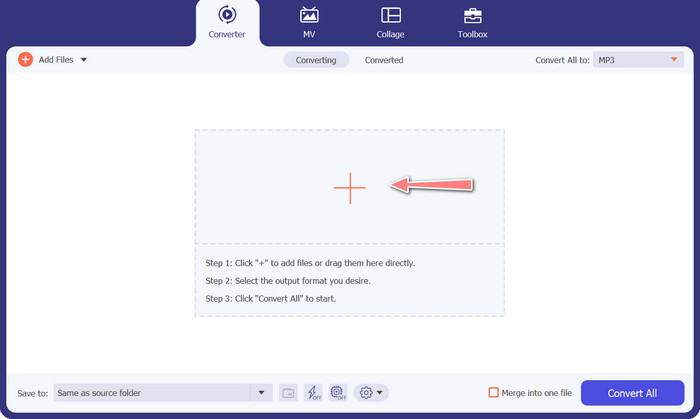
Subsequently, include the MIDI or MP3 audio file that you intend to transform. Hit the Add Files button to import your audio files. Upon successful addition of the audio to the program, the thumbnail associated with the audio should become visible.
Step 3. Select an output format
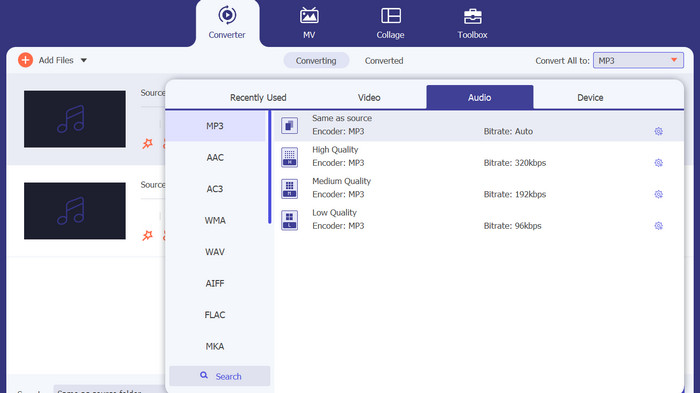
Following the aforementioned procedure, it is advisable to select an appropriate output format. Choose the MP3 format as the designated output option from the dropdown menu located adjacent to the Convert All to section. In the event of a preference for customization, the output video settings can be tailored by selecting the Custom Profile button.
Step 4. Initiate the conversion procedure
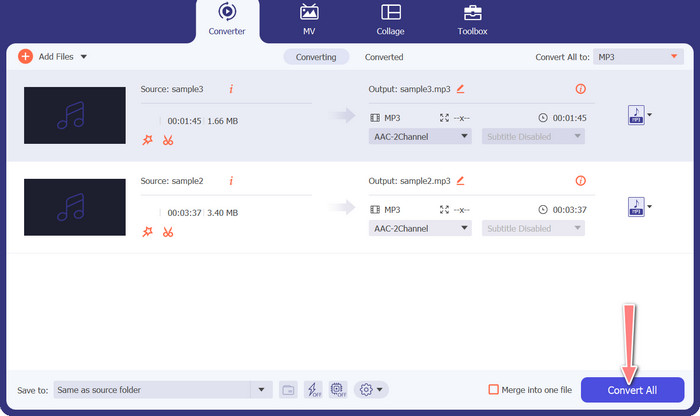
Ultimately, select the Convert All option to initiate the process of conversion. Upon completion of the conversion process, the MP3 files will be stored in the designated output directory.
2. Convertidor d'àudio gratuït en línia
Another way you can use is the Free Audio Converter Online. As its name implies, this is an online program that runs on the web directly. Thus, you need not to have an MP3 to MIDI converter app. All is accessible and can be done using just your browser. It does not lack behind in terms of the features. You can also upload many files or batch convert and customize the profile of a video or audio file. Learn about this best MP3 to MIDI converter online by following the steps below.
Funcions clau
◆ Accessibilitat en línia: com a eina en línia, es pot accedir a un convertidor d'àudio gratuït en línia des de qualsevol lloc.
◆ Conversió per lots: aquesta eina de conversió gratuïta de MIDI a MP3 en línia permet als usuaris convertir diversos fitxers d'àudio simultàniament, estalviant temps i esforç.
◆ Velocitat de conversió ràpida: és un servidor basat en núvol que pot gestionar el procés de conversió, permetent velocitats de conversió ràpides.
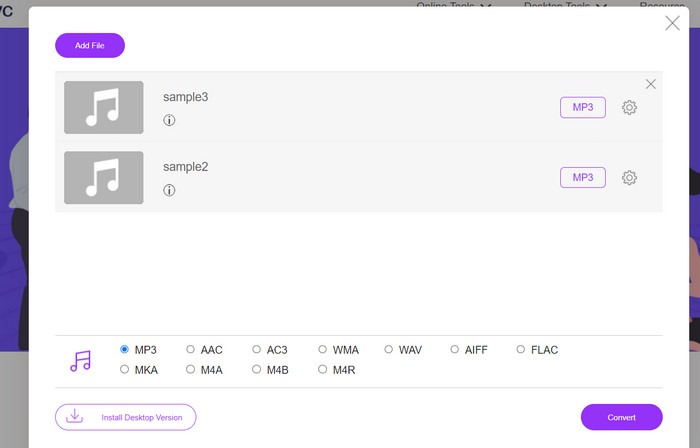
Step 1. In order to begin using Free Audio Converter Online, you should first open your favorite web browser and go to the website directly.
Step 2. Click the Add Files to Convert option, and the tool will prompt you to download and install its bit-sized launcher. When the installation is finished, you may now upload your MIDI or M3 files.
Step 3. From the Audio format menu, select MP3 as the format to use for the final output. The quality of the resulting MP3 file can be adjusted by choosing a different bitrate.
Step 4. Lastly, tick the Convert button to initialize the conversion process.
Part 3. Converteix MP3 a MIDI o MIDI a MP3 al mòbil
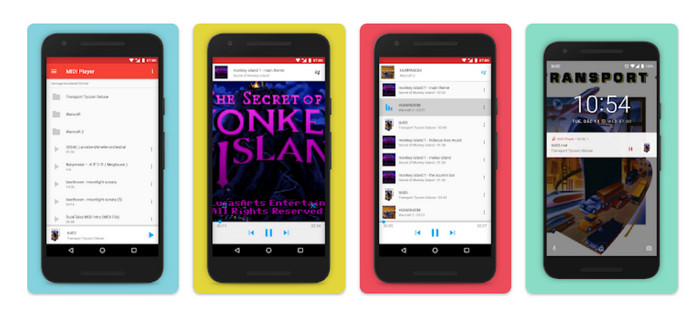
MIDI Player & Converter és una aplicació mòbil dissenyada per a dispositius Android i que s'utilitza principalment per reproduir i convertir fitxers MIDI a altres formats d'àudio. El programa es pot descarregar gratuïtament i ofereix una interfície fàcil d'utilitzar. Una de les característiques clau de MIDI Player & Converter és el seu reproductor MIDI integrat, que permet als usuaris escoltar fitxers MIDI amb un so d'alta qualitat. A més de les seves capacitats de reproducció MIDI, MIDI Player & Converter també inclou eines per convertir fitxers MIDI a altres formats d'àudio, com ara MP3, WAV i AAC.
Funcions clau
◆ Conversió d'àudio: l'aplicació permet als usuaris convertir fitxers MIDI a altres formats d'àudio, inclosos MP3, WAV i AAC.
◆ Configuració de sortida personalitzable: els usuaris poden ajustar la qualitat d'àudio de sortida, la freqüència de mostreig i la taxa de bits segons les seves preferències.
◆ Ajust de tempo i to: l'aplicació també inclou eines per ajustar el tempo i el to del fitxer d'àudio durant el procés de conversió.
◆ Conversió per lots: el reproductor i convertidor MIDI permet als usuaris convertir diversos fitxers MIDI a formats d'àudio simultàniament.
Step 1. To change a MIDI file to MP3, one may procure and deploy the MIDI Player & Converter through the Google Play Store.
Step 2. Launch the application and opt for the Convert feature from the primary menu.
Step 3. Navigate to the Source category and opt for the MIDI option. Proceed to select the desired MIDI file for conversion. Within the Target category, opt for the MP3 format as the designated output.
Step 4. Tailor the output parameters, including but not limited to the audio quality, sample rate, and bitrate, in accordance with your personal preferences. Utilize the integrated tools to modify the tempo and pitch of the audio. Initialize the conversion process by selecting the Convert option.
Lectures relacionades:
Convert MP3 to OGG and Enjoy Superior Sound Quality
FLAC vs. MP3: Which Audio File Format Reigns Supreme
Part 4. Preguntes freqüents sobre la conversió de MP3 a MIDI
És legal convertir fitxers MIDI a MP3?
La legalitat de convertir fitxers MIDI a MP3 pot variar en funció de les lleis de drets d'autor del vostre país. Si teniu els drets del fitxer MIDI o teniu permís del titular dels drets d'autor, convertir-lo en un MP3 hauria de ser legal. D'altra banda, sempre és una bona idea inspeccionar les lleis de la vostra regió per assegurar-vos que no infringiu cap normativa de drets d'autor.
Puc personalitzar la configuració de sortida en convertir un fitxer MIDI a un MP3?
Sí, la majoria de les eines de conversió de MIDI a MP3 us permeten personalitzar la configuració de sortida, com ara la qualitat d'àudio, la freqüència de mostreig i la taxa de bits. Això us pot ajudar a aconseguir la qualitat de so i la mida del fitxer desitjades per al vostre MP3.
Puc convertir MP3 a MIDI a Audacity?
R: Audacity no pot convertir directament fitxers MP3 a fitxers MIDI. Tot i que Audacity és un potent programari d'edició i gravació d'àudio, no té la capacitat de reconèixer i extreure notes individuals d'un fitxer MP3, que és necessari per crear un fitxer MIDI.
Conclusió
The process of converting MIDI to MP3 format, or vice versa, can serve as a practical means of facilitating the sharing and playback of musical compositions across various platforms and devices. Various tools are at the disposal for this objective, such as software installed on desktop computers, converters accessible online, and applications designed for mobile devices.
-
 M4A vs MP3: quin format de fitxer d'àudio us convé?
 Estàs dividit entre els formats d'àudio M4A i MP3? La nostra revisió exhaustiva i comparació de M4A amb MP3 us ajudarà a triar el millor tipus de fitxer per a les vostres necessitats
-
 Com convertir MP3 a M4A per millorar la qualitat del so
 Milloreu la qualitat dels vostres fitxers de música convertint MP3 a M4A amb els nostres consells i trucs experts. La nostra guia ofereix instruccions pas a pas i programari recomanat
-
 Convertidors de MP3 a AIFF excepcionals per a Windows i Mac
 Aquest tutorial us guiarà a través de cada etapa de la conversió de MP3 a AIFF mitjançant eines de confiança. Visiteu-los per saber-ne més
