


 Video Converter Ultimate
 Gravadora de pantalla
 Reparació de vídeo
 Baixada segura
Principals convertidors de MP3 a M4A: conversió d'àudio ràpida i senzilla
No estàs satisfet quan escoltes àudio de baixa qualitat que no fa justícia a les teves cançons preferides? És hora d’actualitzar la teva experiència d’escolta amb la potència de la conversió de MP3 a M4A! En convertir els teus fitxers d’àudio a M4A, pots desbloquejar el veritable potencial de la teva biblioteca musical i notar la diferència per tu mateix. En aquesta guia, t’explicarem els avantatges de la conversió de MP3 a M4A i et proporcionarem el millor programari convertidor per garantir un procés de conversió fluid. Prepara’t per transformar la teva experiència d’escolta i gaudir de la música com mai abans.

Part 1. Millors maneres de convertir MP3 a M4A
Aquests són alguns dels millors convertidors d'àudio de MP3 a M4a. Hi ha una manera fora de línia, que és una aplicació d'escriptori, i una altra eina en línia, que és un programa basat en web. Consulteu-los per obtenir més informació.
1. Video Converter Ultimate
Video Converter Ultimate és un programari flexible que ofereix un ampli ventall de funcions per a la conversió d’àudio i vídeo. Quan es tracta de convertir MP3 a M4A, Video Converter Ultimate és una opció excel·lent, ja que proporciona als usuaris un procés senzill i directe per convertir els seus fitxers d’àudio. L’eina admet una gran varietat de formats d’àudio, i la seva tecnologia avançada de còdec d’àudio garanteix una sortida d’alta qualitat. Tant si necessites convertir fitxers d’àudio per a ús personal com professional, Video Converter Ultimate fa que el procés sigui ràpid, permetent-te centrar en allò que és més important: gaudir dels teus fitxers d’àudio d’alta qualitat.
Pas 1. Obtenir el programa i instal·lar-lo
Per començar, selecciona un dels botons de Baixada gratuïta i després segueix les instruccions en pantalla per desar el fitxer a l’ordinador. El pas següent és iniciar l’aplicació i familiaritzar-te amb els controls intuïtius.
Baixada gratuïtaPer a Windows 7 o posteriorBaixada segura
Descarrega gratisPer a MacOS 10.7 o posteriorBaixada segura
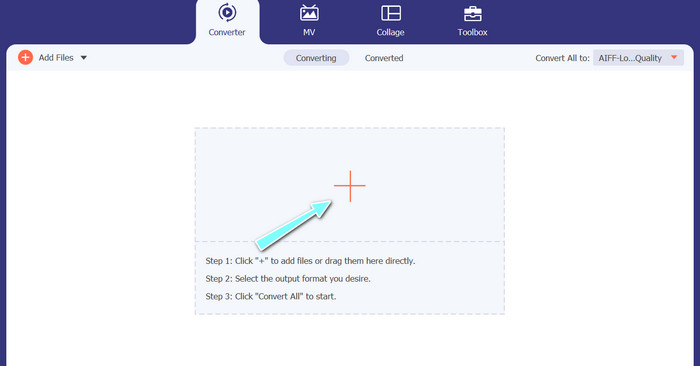
Pas 2. Afegir fitxers d’àudio
A continuació, selecciona el signe més de la interfície principal i navega fins a la ubicació del fitxer d’àudio que vols convertir. Després de pujar un fitxer, se’n mostrarà una previsualització a la interfície d’usuari. Si vols convertir diversos MP3 a M4A alhora, pots pujar una carpeta sencera de fitxers.
Pas 3. Triar un format de sortida
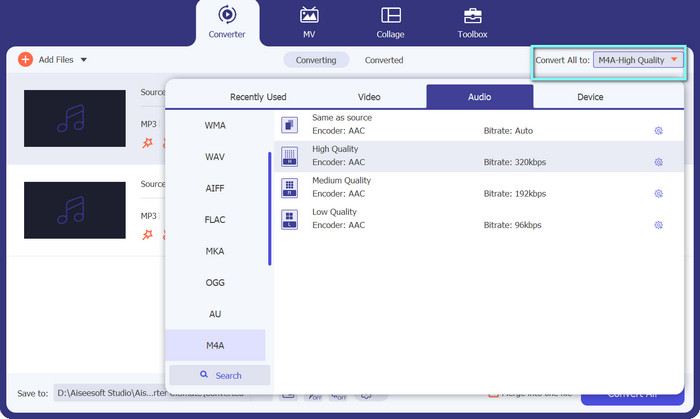
Després, tria el format de sortida fent clic a la pestanya Àudio al menú Perfil (situat a la part superior dreta de l’eina). Pots convertir a o des de MP3 utilitzant el format MP3 o M4A.
Pas 4. Desar la sortida
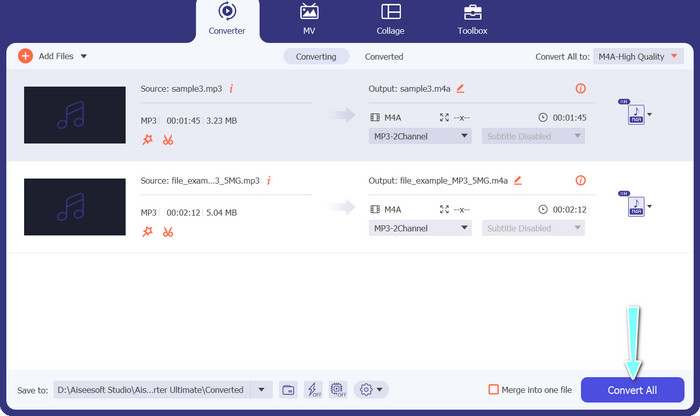
A la part inferior de la pantalla, tria la carpeta de destinació. Quan estiguis a punt per començar la conversió, fes clic al botó Convertir-ho tot.
2. Convertidor de vídeo gratuït en línia
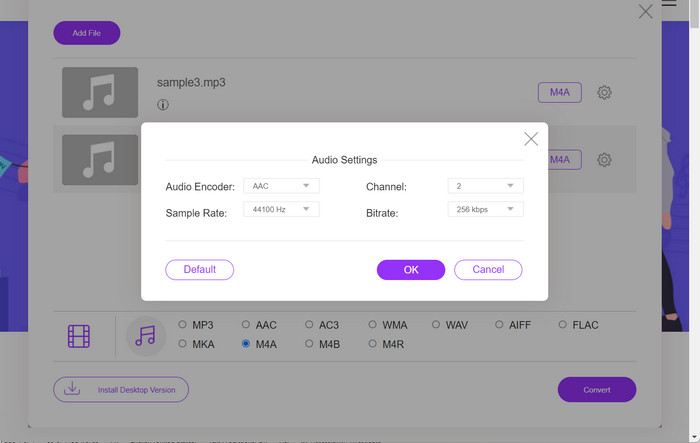
No tens espai per instal·lar un altre programa? No et preocupis, perquè pots optar per una eina en línia que t’ajudarà a convertir fitxers sense haver de descarregar cap programa. L’aplicació web Free Video Converter Online et permet convertir directament des del navegador. A més, admet molts formats tant per a fitxers de vídeo com d’àudio. I, per si fos poc, amb aquesta eina en línia pots fer conversions per lots. A sobre, una altra gran funció és poder personalitzar la sortida del fitxer d’àudio. Mira com funciona aquest convertidor en línia de MP3 a M4A.
Pas 1. Per començar a utilitzar Free Video Converter Online, primer has d’obrir el teu navegador preferit i anar directament al lloc web.
Pas 2. Després, selecciona el fitxer MP3 que vols convertir a M4A fent clic al botó Add Files to Convert.
Pas 3. A l’opció de format Àudio, selecciona M4A com a fitxer de sortida desitjat. També pots modificar la qualitat de sortida, o bitrate, del fitxer M4A.
Pas 4. Fes clic al botó Convert per començar el procés de conversió. Així és com es converteix MP3 a M4A en línia.
Part 2. Converteix MP3 a M4A a Windows
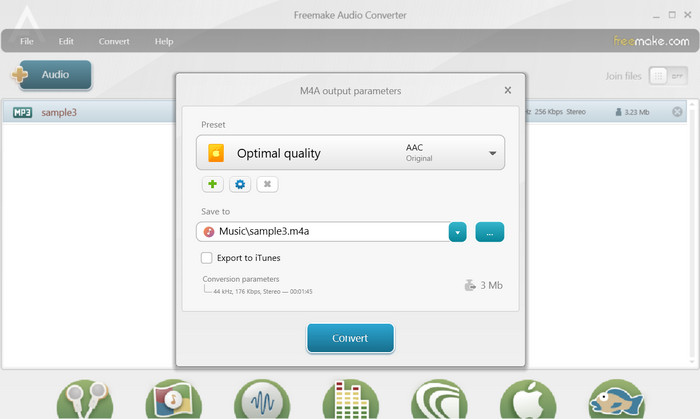
Freemake Audio Converter és un programa gratuït i fàcil d'utilitzar que permet als usuaris convertir fitxers d'àudio a diversos formats, com ara M4A, MP3, WAV i molt més. Amb la seva senzilla interfície d'arrossegar i deixar anar, els usuaris poden afegir fàcilment els seus fitxers MP3 i convertir-los a M4A sense cap configuració o configuració complicada. L'eina també té una sèrie d'opcions de personalització, que permeten als usuaris ajustar paràmetres com ara la taxa de bits i la freqüència de mostreig per obtenir la qualitat de sortida desitjada. Amb tot, és un dels millors convertidors de MP3 a M4A que podeu utilitzar.
Pas 1. Baixa i instal·la Freemake Audio Converter a l’ordinador amb Windows.
Pas 2. Inicia el programa i fes clic al botó +Audio per afegir-hi el(s) teu(s) fitxer(s) MP3.
Pas 3. Selecciona M4A de la llista de formats disponibles a la part inferior de la finestra del programa. Utilitza el menú desplegable per triar la qualitat desitjada per al fitxer de sortida.
Pas 4. Tria la carpeta de sortida on vols que es desi el fitxer convertit. Finalment, marca el botó Convert per començar el procés de conversió.
Part 3. Converteix MP3 a M4A a Mac
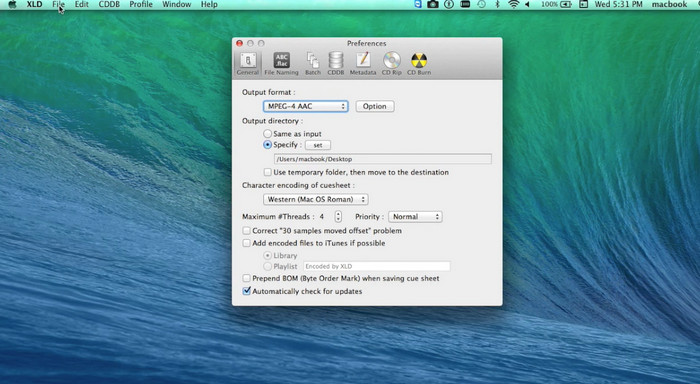
XLD és un programa gratuït i fàcil d'utilitzar que permet als usuaris de Mac convertir fitxers d'àudio a diversos formats, com ara M4A, MP3, FLAC i més. Amb la seva senzilla interfície d'arrossegar i deixar anar, els usuaris poden afegir fàcilment els seus fitxers MP3 i convertir-los a M4A sense cap configuració o configuració complicada. XLD també ofereix una sèrie d'opcions de personalització, que permeten als usuaris ajustar paràmetres com ara la taxa de bits i la freqüència de mostreig per aconseguir la qualitat de sortida desitjada.
Pas 1. Baixa i instal·la XLD al teu ordinador Mac.
Pas 2. Inicia el programa i fes clic al botó Open per afegir-hi el(s) teu(s) fitxer(s) MP3.
Pas 3. Selecciona M4A de la llista de formats disponibles a les preferències del programa. Pots utilitzar el menú desplegable per triar la qualitat desitjada per al fitxer de sortida.
Pas 4. A continuació, tria la carpeta de sortida on vols que es desi el fitxer convertit. Finalment, prem el botó Convert per iniciar el procés de conversió. Així és com convertir MP3 a M4A en un Mac de manera gratuïta.
Part 4. Converteix MP3 a M4A a Android
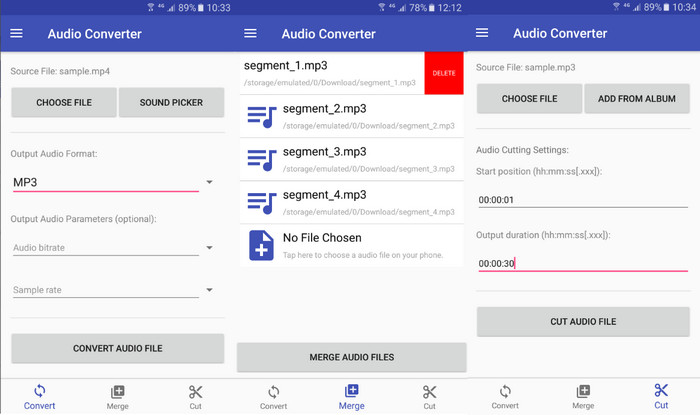
Quan es tracta de convertir fitxers d'àudio, el programari gratuït i senzill d'Android Audio Converter de Online-Convert.com és difícil de superar. Els usuaris poden simplement arrossegar i deixar anar els seus fitxers MP3 a la interfície del programa per començar el procés de conversió a M4A. La qualitat de sortida d'un fitxer d'àudio es pot ajustar canviant paràmetres com la taxa de bits i la freqüència de mostreig a Audio Converter. Aquests són els passos per canviar MP3 a M4A a Android:
Pas 1. Descarrega i instal·la Audio Converter d’Online-Convert.com des de Google Play Store al teu dispositiu Android. Obre l’aplicació i toca el botó Convert Audio.
Pas 2. Després, selecciona MP3 com a format d’entrada i M4A com a format de sortida.
Pas 3. Ara, toca el botó Select Files per afegir el(s) teu(s) fitxer(s) MP3 a l’aplicació. Finalment, toca el botó Start Conversion per iniciar el procés de conversió. És així de fàcil! Ara ja has après com convertir MP3 a M4A a Android.
Part 5. Converteix MP3 a M4A a iOS
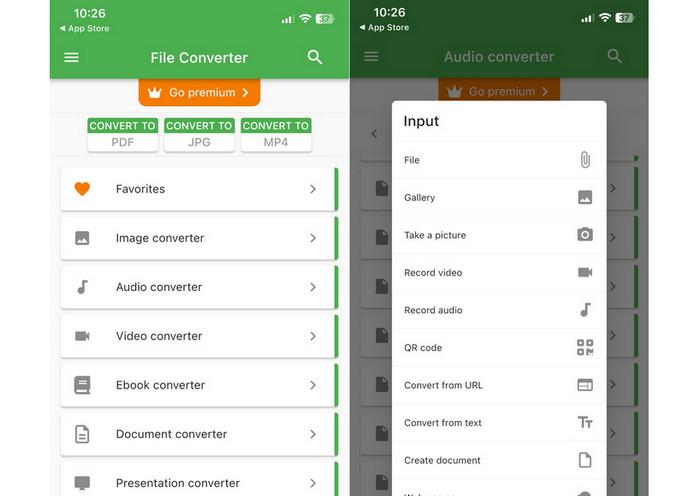
Els fitxers d'àudio, com ara MP3, es poden convertir al format M4A més portàtil i sense pèrdues amb l'ajuda de File Converter Free, un programari d'iOS gratuït i senzill. El seu disseny senzill fa que sigui fàcil per a qualsevol persona carregar fitxers MP3 i convertir-los a M4A sense haver de jugar amb cap configuració o configuració.
Pas 1. File Converter Free es pot trobar a l’App Store i es pot descarregar i utilitzar gratuïtament. Inicia el programa i prem la pestanya Audio.
Pas 2. Tria MP3 com a format d’entrada i M4A com a format AAC d’Apple. Selecciona la qualitat desitjada del fitxer de sortida mitjançant el menú desplegable. Per importar un MP3 al programa, selecciona el botó Add File.
Pas 3. Per iniciar el procés de conversió, fes clic al botó Convert.
Part 6. Preguntes freqüents sobre la conversió de MP3 a M4A
Puc convertir MP3 a M4A amb Windows Media Player?
Sí, pots convertir MP3 a M4A amb el Windows Media Player, però cal fer alguns passos addicionals, ja que M4A no és un format admès de manera nativa al Windows Media Player. O bé, simplement pots utilitzar una alternativa a Windows Media Player.
Convertir MP3 a M4A provocarà una pèrdua de qualitat d'àudio?
La conversió de MP3 a M4A pot provocar una lleugera pèrdua de qualitat de l'àudio a causa de les diferències en els algorismes de compressió utilitzats pels dos formats.
Puc tornar a convertir M4A a MP3?
Sí, molts programes i eines de conversió d’àudio permeten convertir M4A a MP3 si cal. Tanmateix, tingues en compte que convertir entre formats diverses vegades pot comportar una pèrdua de qualitat.
Conclusió
La conversió de MP3 a M4A és un procés valuós per a qualsevol persona que vulgui millorar la qualitat i la compatibilitat dels seus fitxers d’àudio. Seguint els passos i consells exposats en aquesta explicació, pots convertir fàcilment els teus fitxers MP3 a M4A i gaudir d’àudio d’alta qualitat en qualsevol dispositiu.
-
 Gratuït i en línia | Com convertir MP4 a M4A a Windows / Mac
 Com puc convertir MP4 a M4A en línia? Puc extreure l'àudio dels fitxers MP4? Llegiu aquest missatge i obtindreu totes les respostes sobre la conversió de MP4 a M4A.
-
 Les millors eines que podeu utilitzar per convertir fitxers MP3 a M4R per lots
 Esteu buscant un convertidor que pugui transformar el vostre fitxer MP3 en un to de trucada M4R per al vostre iPhone o iPad per lots? Llegeix l'article per descobrir alguns dels millors que hi ha.
-
 5 talladors de MP3 per tallar qualsevol àudio fàcilment [Actualitzat el 2023]
 Necessites un tallador de MP3 per retallar l'àudio? En aquest cas, llegiu aquest article perquè oferim les eines de les quals podeu confiar que us proporcionen un tall fàcil de l'àudio.
