


 Video Converter Ultimate
 Gravadora de pantalla
 Reparació de vídeo
 Baixada segura
Convertir MP3 a OGG per aconseguir mides de fitxer més petites i una qualitat de so excel·lent
En els últims anys, la conversió de MP3 a OGG s'ha tornat més popular a causa dels avantatges que ofereix. Tot i que els fitxers MP3 són molt populars, sovint es sacrifica la qualitat del so per fer-los més petits. Això vol dir que es perden detalls i nitidesa. Els fitxers OGG, d'altra banda, tenen una millor qualitat de so i mides de fitxers més petites. Això els converteix en una opció fantàstica per a les persones que volen treure el màxim profit de la seva biblioteca musical.
Es necessita un convertidor de MP3 a OGG per canviar fitxers MP3 a OGG. Els usuaris poden canviar fàcilment els seus fitxers MP3 al format OGG fent servir un convertidor. Això els ofereix una qualitat de so millor sense haver de reduir la mida del fitxer. En aquesta època d’àudio en streaming d’alta qualitat, qualsevol amant de la música que vulgui millorar la seva experiència d’escolta necessita un convertidor de MP3 a OGG.

Part 1. La millor manera de convertir MP3 a OGG
FVC Video Converter Ultimate és una eina de programari versàtil que permet als usuaris convertir fitxers de vídeo i àudio en diversos formats. Entre les moltes funcions que ofereix, FVC és un excel·lent convertidor de MP3 a OGG, que permet transformar fàcilment la música de format MP3 a OGG amb només uns quants clics.
A més, permet als usuaris ajustar la qualitat de sortida per aconseguir l'equilibri perfecte entre la qualitat del so i la mida del fitxer, assegurant que la seva música soni molt bé sense importar on es reprodueixi. Tant si sou un entusiasta de la música com si simplement voleu optimitzar la vostra col·lecció d'àudio, FVC Video Converter Ultimate és una opció excel·lent per a totes les vostres necessitats de conversió. Prova-ho avui mateix i experimenta la diferència de qualitat del so per tu mateix.
Pas 1. Aconsegueix l’aplicació i afegeix els fitxers MP3
Descarrega i instal·la FVC Free Video Converter des del lloc web oficial. Obre el programa i fes clic al botó amb el signe Plus per importar el fitxer MP3 que vols convertir.
Baixada gratuïtaPer a Windows 7 o posteriorBaixada segura
Descarrega gratisPer a MacOS 10.7 o posteriorBaixada segura
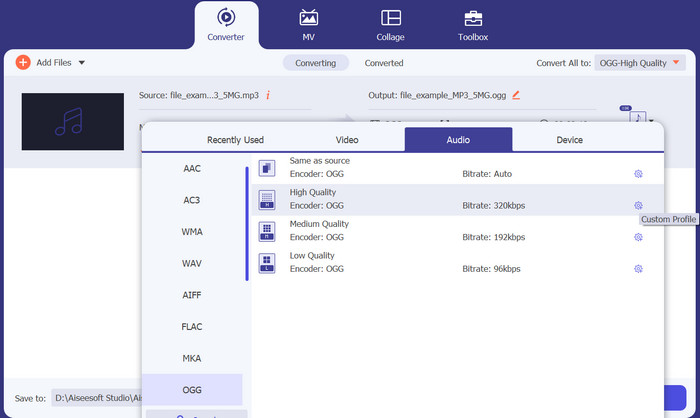
Pas 2. Tria OGG com a format de sortida
Selecciona OGG com a format de sortida fent clic al menú desplegable Profile i triant OGG de la llista de formats disponibles. Si cal, també pots ajustar els paràmetres de sortida fent clic al botó Settings. Això et permetrà personalitzar paràmetres com el bitrate, la freqüència de mostreig i els canals.
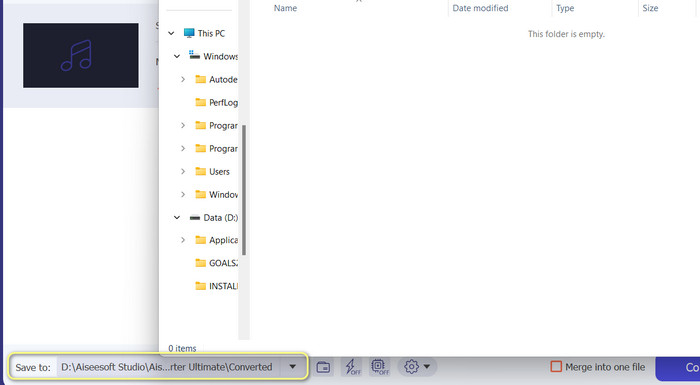
Pas 3. Especifica la destinació de sortida
Tria la carpeta de sortida on vols desar el fitxer convertit fent clic al botó Browse que hi ha al costat del camp Output Folder.
Pas 4. Converteix fitxers MP3 a OGG
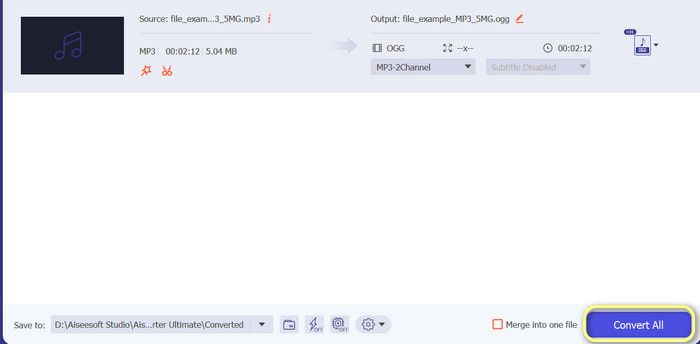
Quan estiguis satisfet amb la configuració, prem el botó Convert All per iniciar el procés de conversió. FVC Free Video Converter començarà a convertir el teu fitxer MP3 al format OGG. La barra de progrés et mostrarà en quin punt es troba el procés de conversió i també podràs veure el temps estimat restant.
Pros
- Personalitza la configuració de sortida d'àudio.
- Velocitat de conversió ràpida.
- Ofereix moltes utilitats per a diferents necessitats.
Contres
- S'ofereixen funcions limitades per als usuaris gratuïts.
- Pot requerir alguns recursos informàtics superiors per accelerar el maquinari.
Part 2. Com convertir MP3 a OGG mitjançant un convertidor d'àudio gratuït
El convertidor d'àudio en línia 123apps és una eina potent que facilita el canvi de MP3 a OGG en línia. Amb la seva interfície fàcil d'utilitzar, els usuaris poden afegir ràpidament fitxers MP3 i triar convertir-los al format OGG. El convertidor també permet als usuaris canviar la configuració de la sortida, com ara la velocitat de bits i la freqüència de mostreig, per obtenir la qualitat dels fitxers OGG que desitgen. El procés de conversió és ràpid i fàcil, i els usuaris poden obtenir els fitxers modificats directament des del lloc web. A més, el convertidor d'àudio en línia funciona amb molts fitxers d'àudio diferents, cosa que el converteix en una eina útil per a les persones que necessiten convertir l'àudio de diferents maneres. Mentrestant, seguiu les instruccions següents per saber com canviar MP3 a OGG directament des del lloc web.
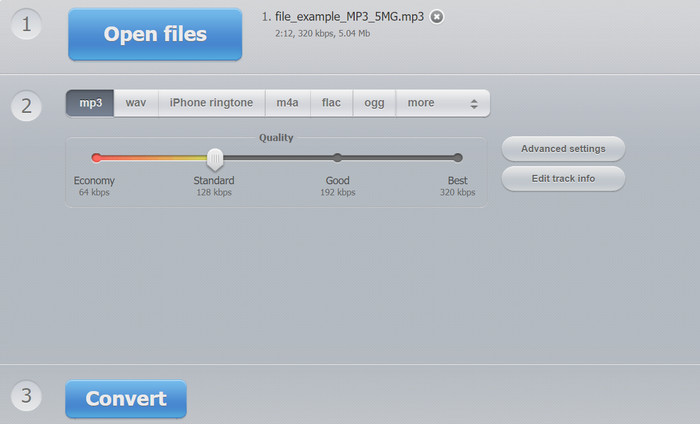
Pas 1. Obre el navegador web i ves al lloc web Online Audio Converter de 123apps. Fes clic al botó Open files per seleccionar el fitxer MP3 que vols convertir.
Pas 2. Tria OGG com a format de sortida al menú desplegable. Opcionalment, pots personalitzar els paràmetres de sortida com el bitrate, la freqüència de mostreig i el canal. Aquest pas és opcional però pot ser útil si vols controlar la qualitat del fitxer de sortida.
Pas 3. Fes clic al botó Convert per començar el procés de conversió. Això pot trigar uns instants, depenent de la mida del fitxer i de la velocitat de la connexió a Internet. Finalment, fes clic al botó Download per desar el fitxer OGG a l’ordinador.
Pros
- Admet la conversió per lots.
- No hi ha límit per a la mida del fitxer de càrrega.
Contres
- El lloc web mostra anuncis.
- Sempre es necessita una connexió a Internet.
Part 3. Com convertir MP3 a OGG amb Audacity
També hi ha el convertidor Audacity MP3 a OGG. Sí, ho heu sentit bé. Aquest programa és un programari d'edició d'àudio de codi obert que ofereix la capacitat de convertir fitxers de MP3 a OGG. A més de la conversió, Audacity també ofereix una sèrie d'eines i efectes d'edició que permeten als usuaris modificar i millorar els seus fitxers d'àudio, convertint-lo en una eina versàtil per a tasques d'edició i conversió d'àudio.
A més, Audacity està disponible per als sistemes operatius Windows, macOS i Linux, per la qual cosa és accessible. Amb les seves funcions avançades i la seva facilitat d'ús, Audacity és una opció excel·lent per a qualsevol persona que vulgui convertir els seus fitxers MP3 al format OGG. Apreneu com funciona aquest programa fent una ullada a la guia següent.
Pas 1. Descarrega Audacity i instal·la’l a l’ordinador. Obre Audacity i, a continuació, obre el fitxer MP3 que vols convertir. Pots fer-ho prement File i Open, després localitzant el fitxer MP3 a l’ordinador i fent-hi clic.
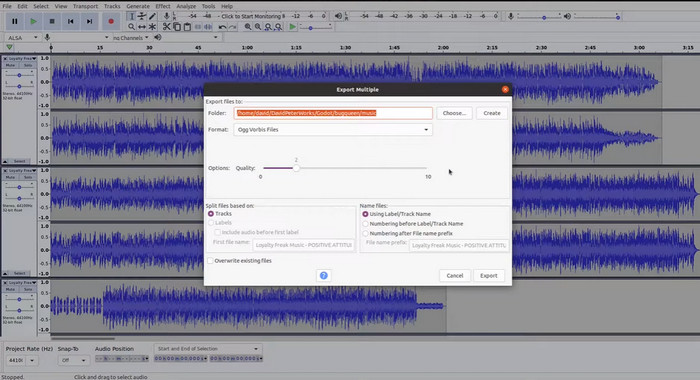
Pas 2. Fes clic a File i després a Export quan el fitxer MP3 ja estigui obert a Audacity. Tria OGG Vorbis Files com a tipus de fitxer al quadre de diàleg Export Audio.
Pas 3. Movent el control lliscant de Quality, pots establir el nivell de qualitat que vols per al fitxer OGG. Una qualitat més alta farà que la mida del fitxer sigui més gran, mentre que una qualitat més baixa reduirà la mida del fitxer però pot afectar la qualitat de la música.
Pas 4. Fes clic a Save per desar el fitxer OGG a la ubicació de l’ordinador que triïs. Fes clic a OK per acabar de canviar el format.
Pros
- Pot convertir per lots MP3 a OGG.
- Es pot instal·lar al sistema operatiu Windows, macOS i Linux.
Contres
- Una comunitat de suport dedicada no recolza el programa.
- No hi ha exportació directa de MP3.
Lectures relacionades:
Millors eines que pots utilitzar per convertir per lots fitxers MP3 a M4R
2 millors maneres d’editar les metadades OGG que hauries de provar gratuïtament
Part 4. Com convertir MP3 a OGG amb FFmpeg
FFMPEG és una opció fantàstica per als usuaris que necessiten convertir fitxers MP3 al format OGG i requereixen un alt grau de control i flexibilitat en el procés de conversió. Pot gestionar una àmplia gamma de formats d'àudio i vídeo, i és compatible amb una varietat de còdecs i configuracions que es poden utilitzar per ajustar el format de sortida per satisfer requisits específics. A més, com que FFMPEG és una eina de línia d'ordres, es pot accedir a una àmplia gamma de sistemes operatius, inclosos Windows, macOS i Linux convertir MP3 a OGG. Seguiu els passos per convertir MP3 a OGG de FFmpeg a continuació.
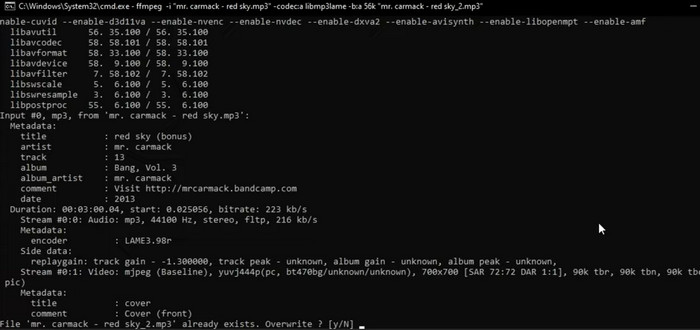
Pas 1. Obre el terminal o la línia d’ordres de l’ordinador. Cerca la ubicació on es troba el fitxer MP3 que vols convertir.
Pas 2. Escriu ffmpeg -i input.mp3 output.ogg, on input.mp3 és el nom del teu fitxer MP3 i output.ogg és el nom que vols donar al fitxer OGG. Per executar l’ordre, prem Enter.
Pas 3. Espera que FFMPEG acabi el procés de conversió. Quan la conversió hagi finalitzat, hauria d’aparèixer un missatge indicant que la conversió s’ha realitzat correctament. Ara desa el nou fitxer OGG a la mateixa carpeta que el fitxer MP3 original.
Pros
- Ofereix als usuaris un alt grau de flexibilitat i control.
- Converteix fitxers de manera ràpida i eficient.
- Compatibilitat multiplataforma.
Contres
- La majoria dels usuaris no se senten còmodes amb l'ús d'eines de línia d'ordres.
- Pot trigar una mica a aprendre a utilitzar-lo de manera eficaç.
Part 5. Com convertir MP3 a OGG amb VLC Media Player
El reproductor multimèdia VLC és una potent eina multimèdia que s'utilitza àmpliament per reproduir diversos tipus de fitxers multimèdia. Tanmateix, és possible que molts usuaris no sàpiguen que aquest programari també pot servir com a convertidor eficaç de MP3 a OGG. Amb la seva eina de conversió integrada, el reproductor multimèdia VLC pot convertir ràpidament i fàcilment fitxers MP3 a format OGG, permetent als usuaris gaudir de la seva música preferida en diversos formats. Tant si voleu convertir un únic fitxer com un lot d'arxius, el reproductor multimèdia VLC ofereix una solució senzilla i fàcil d'utilitzar per a totes les vostres necessitats de conversió d'àudio. Obteniu informació sobre com convertir MP3 en OGG mitjançant els passos següents:
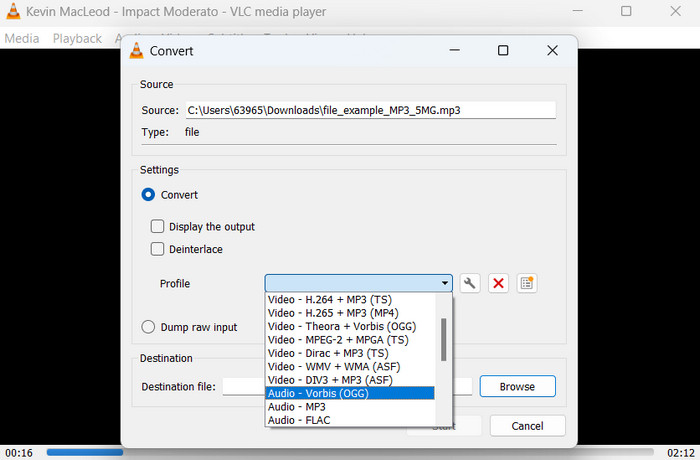
Pas 1. Per reproduir un vídeo, obre VLC i selecciona Media a la barra de menús del reproductor. L’opció Convert /Save apareixerà en un menú desplegable; selecciona-la.
Pas 2. A la secció File Selection, selecciona el fitxer MP3 que vols convertir fent clic al botó Add. Quan estiguis a punt per convertir o desar el fitxer, és el moment de prémer el botó Convert / Save.
Pas 3. Fes clic al menú desplegable Profile i tria Audio - Vorbis (OGG) com el perfil desitjat.
Pas 4. Per indicar una ubicació i un nom de fitxer nous per al fitxer convertit, fes clic al botó 'Browse' a la dreta de la secció Destination file. Pots iniciar la conversió fent clic al botó Start situat a la part inferior de la finestra.
Pros
- Admet múltiples formats.
- Senzill i fàcil d'utilitzar.
Contres
- Opcions d'edició limitades.
- Possible pèrdua de qualitat d'àudio.
Part 6. Preguntes freqüents sobre MP3 a OGG
Hi ha alguna diferència en la qualitat del so entre els fitxers MP3 i OGG?
Sí, hi ha una diferència en la qualitat del so entre els fitxers MP3 i OGG. Els fitxers OGG solen tenir una millor qualitat de so a causa del seu millor algorisme de compressió, però és possible que la diferència de qualitat del so no sigui reconeguda per l'oient mitjà.
Quant de temps triga a convertir un fitxer MP3 a OGG?
El temps que triga a convertir un fitxer MP3 a OGG depèn de la mida del fitxer i de la velocitat de l'ordinador. Normalment, es triguen uns quants minuts a convertir un únic fitxer, però això pot variar en funció de diversos factors.
Es poden utilitzar convertidors de MP3 a OGG en un dispositiu mòbil?
Sí, també hi ha convertidors de MP3 a OGG disponibles per a dispositius mòbils. Aquests convertidors es poden descarregar com a aplicacions de les respectives botigues d'aplicacions per a dispositius Android i iOS.
Conclusió
Convertir de MP3 a OGG és possible mitjançant diverses vies. Cada un dels convertidors que s’han comentat té els seus propis avantatges i inconvenients. Alguns són més intuïtius i fàcils d’utilitzar, mentre que d’altres ofereixen més flexibilitat i funcions potents. El convertidor que acabi triant cada usuari dependrà, en última instància, de les seves necessitats particulars.
-
 Excel·lents reproductors OGG per a Windows i Mac que no us heu de perdre
 Quan vulgueu reproduir el vostre àudio preferit en format OGG, especialment quan hi ha menys emmagatzematge. Podeu obtenir més informació sobre els 5 millors jugadors OGG d’aquest article.
-
 Obteniu informació sobre com convertir MP3 a un format WAV
 Vols saber com convertir MP3 a WAV? Determineu quina de les eines produeix la conversió de millor qualitat que podeu obtenir.
-
 4 millors mètodes per arreglar i editar metadades MP3 a Windows i Mac
 Vols conèixer els secrets de l'edició de metadades MP3 amb facilitat? Aquest bloc t'ensenyarà diferents tècniques amb les diferents eines a les que accedeixes fàcilment.
