


 Video Converter Ultimate
 Gravadora de pantalla
 Reparació de vídeo
 Baixada segura
5 mètodes per convertir WMA a MP3: escriptori i en línia
WMA és un format d’àudio desenvolupat per Microsoft. Òbviament, és compatible amb dispositius Windows, però fora d’aquest entorn, l’adequació és més aviat mediocre. Alguns models antics de dispositius mòbils i reproductors de música no admeten aquest format. Si volem assegurar-nos que el contingut d’aquest fitxer d’àudio es pugui reproduir en qualsevol dispositiu o plataforma, prova de convertir WMA a MP3. Els fitxers MP3 són més petits i, per tant, també ens estalvien molt espai d’emmagatzematge al disc dur. I pràcticament totes les plataformes poden editar i reproduir música sempre que admetin MP3.
Convertir WMA a MP3 és una opció molt econòmica, i molts programes i plataformes ho poden fer per nosaltres. Després de la investigació i l'ús real, aquest article en selecciona 5 dels millors. Aquí trobareu detalls sobre com utilitzar-los i veureu els avantatges i els desavantatges de cada convertidor.

Part 1. Com convertir WMA a MP3 a Win/Mac [Sense pèrdua de qualitat]
FVC Video Converter Ultimate
Si t’agrada el rendiment estable del programari a l’escriptori, has de ser el primer a provar FVC Video Converter Ultimate. Aquest programari és amigable tant per a usuaris de Windows com de Mac i és compatible amb més de 1.000 formats, cosa que garanteix que amb prou feines ens trobem amb problemes de compatibilitat quan el fem servir. La seva funció de conversió per lots i la tecnologia d’acceleració per maquinari permeten gestionar múltiples tasques de conversió de WMA a MP3 amb una eficiència fins a 30 vegades més ràpida en tot moment. FVC Video Converter Ultimate no és només un convertidor de formats; disposa d’un conjunt complet d’eines d’edició de vídeo, àudio i imatge a la seva caixa d’eines, com ara retallada, millora, compressió, eliminació de soroll, etc. En descarregar aquest programari, ja no cal passar per múltiples plataformes, sinó que podem resoldre tots els problemes d’una sola vegada.
Baixada gratuïtaPer a Windows 7 o posteriorBaixada segura
Descarrega gratisPer a MacOS 10.7 o posteriorBaixada segura
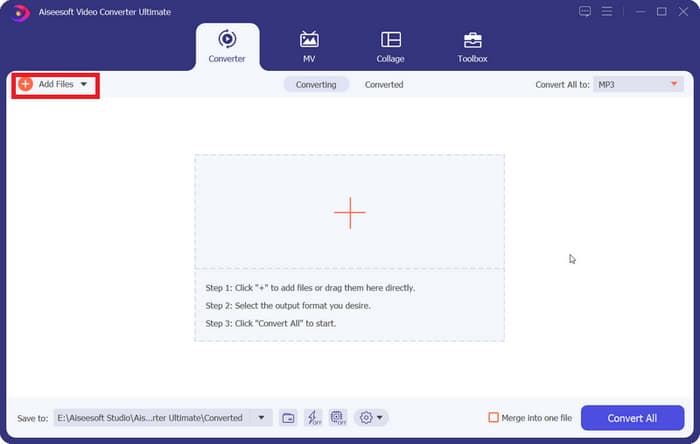
Pas 1. Descarrega i instal·la FVC Video Converter Ultimate a l’ordinador. Farem servir un dispositiu Windows com a exemple. Prem Converter > Add Files per pujar-hi el teu àudio WMA.
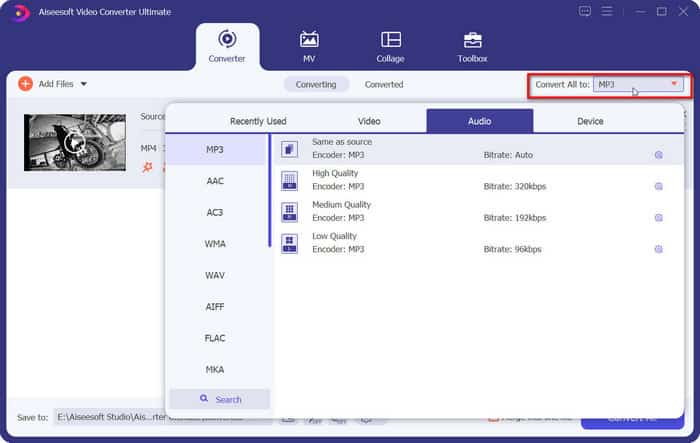
Pas 2. Ves a Convert All to, desplega la llista sota aquesta pestanya i tria Audio > MP3. Hi ha moltes opcions diferents per a la qualitat de l’àudio. Escull la que vulguis obtenir.
Si vols retallar el fitxer d’àudio afegit, fes clic a Cut sota el nom del fitxer.
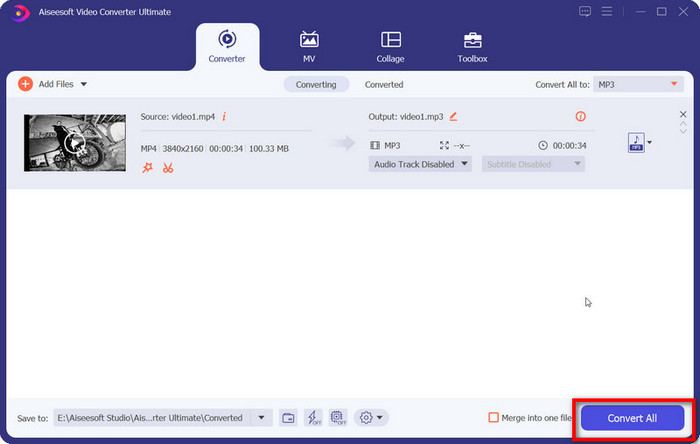
Pas 3. Quan hagis acabat tots aquests ajustos, fes clic a Convert All per exportar el teu àudio MP3.
Part 2. Com convertir WMA a MP3 gratuïtament
Com convertir WMA a MP3 amb el reproductor multimèdia VLC
A més de FVC Video Converter Ultimate, hi ha un altre programa d'escriptori al qual podeu recórrer: VLC Media Player. Tot i que l'ús més comú d'aquesta aplicació és obrir i reproduir fitxers multimèdia, també admet la realització d'algunes operacions d'edició senzilles, com ara conversions de format. A més de la seva excel·lent compatibilitat, VLC Media Player té l'avantatge de ser completament gratuït i fàcil d'utilitzar.
A continuació s'explica com canviar fitxers WMA a MP3 amb VLC Media Player.
Pas 1. Prepara el teu ordinador per a VLC Media Player. A la cantonada superior esquerra, tria Media > Convert/Save.
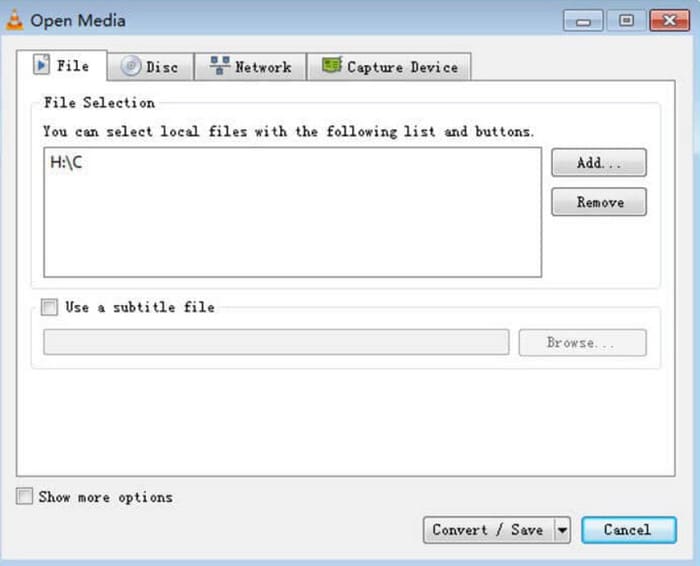
Pas 2. A continuació s’obrirà la finestra Open Media. Tria File i fes clic a + Add per seleccionar el teu àudio WMA preparat. Després, fes clic a Convert/Save.
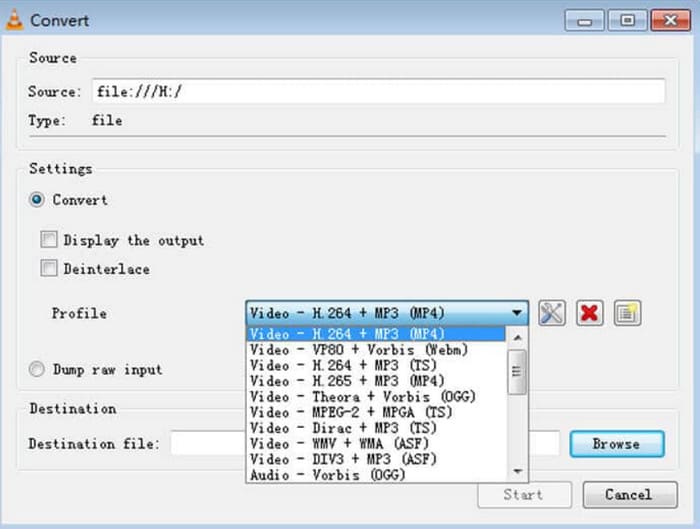
Pas 3. Ves a l’opció Profile i desplega la llista al seu costat. Tria el format de destinació i fes clic a Browse per trobar-hi una carpeta d’emmagatzematge.
Pas 4. Quan hagis acabat tots els ajustos anteriors, fes clic a Start per iniciar la conversió de WMA a MP3.
El reproductor multimèdia VLC no admet moltes opcions de format de sortida i només hi podem trobar eines d'ajust de paràmetres d'àudio molt bàsiques. Està bé per transferir WMA a MP3 simplement, però per a una edició més especialitzada, recomanem FVC Video Converter Ultimate.
amb el reproductor multimèdia VLC
iTunes, un reproductor multimèdia desenvolupat per Apple, pot fer més que reproduir i emmagatzemar fitxers d'àudio. També podem deixar que faci algunes tasques bàsiques de conversió de format. Tot i que és reconegut com el més compatible amb dispositius Mac, també ofereix una versió que els usuaris de Windows poden descarregar.
Alguns dels serveis bàsics d'iTunes són gratuïts. A continuació, mostrarem com convertir WMA a MP3 amb iTunes.
Pas 1. Obre iTunes a l’ordinador. Tria Edit > Preference.
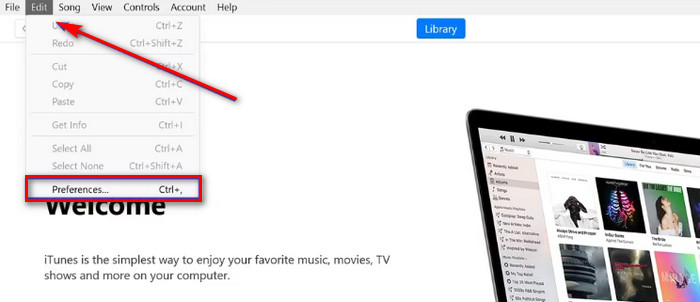
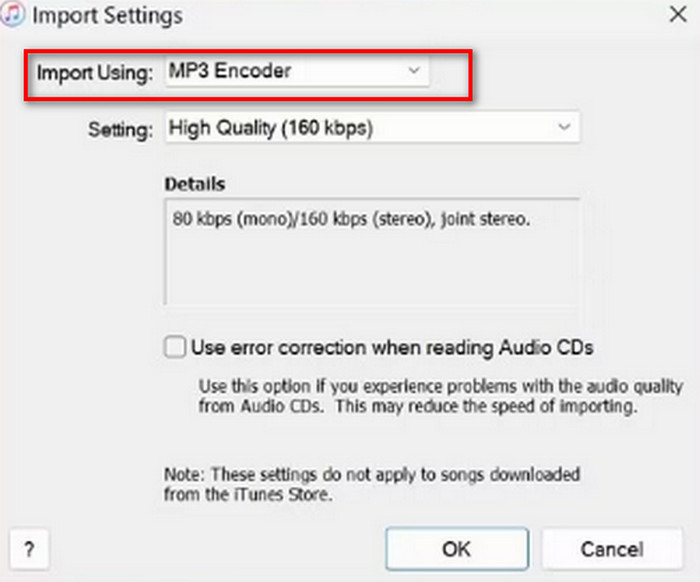
Pas 2. Després d’obrir la finestra General Preference, tria General i ves a Import Settings. Selecciona MP3 Encoder i tria OK per desar els canvis.
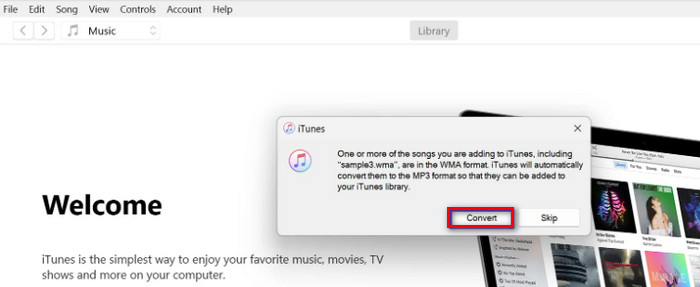
Pas 3. Torna a File i prem Add File to Library. Apareixerà una finestra emergent. Hauràs de fer clic a Convert.
És important tenir en compte que iTunes també ofereix algunes eines professionals d'edició d'àudio, i l'aplicació es va deixar de fabricar per a dispositius Apple després del llançament de la versió de macOS Catalina. Assegureu-vos que el model del vostre dispositiu coincideixi abans de descarregar-la.
Part 3. Com canviar WMA a MP3 en línia
Convertidor d'àudio gratuït FVC
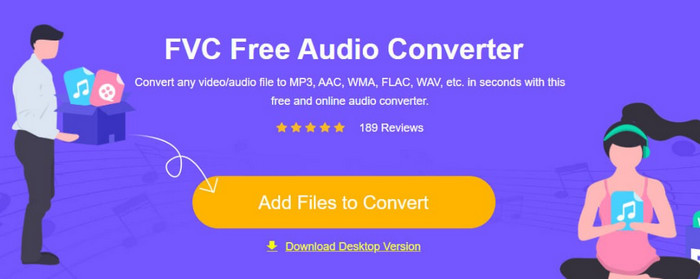
Aquests són els suggeriments per als usuaris que prefereixen aplicacions d’escriptori. Si et sembla massa feixuc descarregar i instal·lar programari i prefereixes una plataforma on puguis començar a convertir tan bon punt hi accedeixis, prova FVC Free Audio Converter.. Es pot obrir al navegador i la interfície de disseny és molt senzilla. Aquest convertidor gratuït i eficient és el nostre ajudant més fidel quan tenim qualsevol necessitat urgent d’ajustar formats d’àudio.
Aquí teniu com canviar WMA a MP3 en línia amb FVC Free Audio Converter.
Pas 1. Obre FVC Free Audio Converter amb el navegador. Fes clic a Add Files to Start i puja-hi el teu fitxer d’àudio WMA.
Pas 2. Tria MP3 com a format de sortida. Després fes clic a Convert per iniciar el procés. Si vols ajustar alguns paràmetres del teu àudio, tria la icona Settings a la banda dreta del fitxer d’àudio.
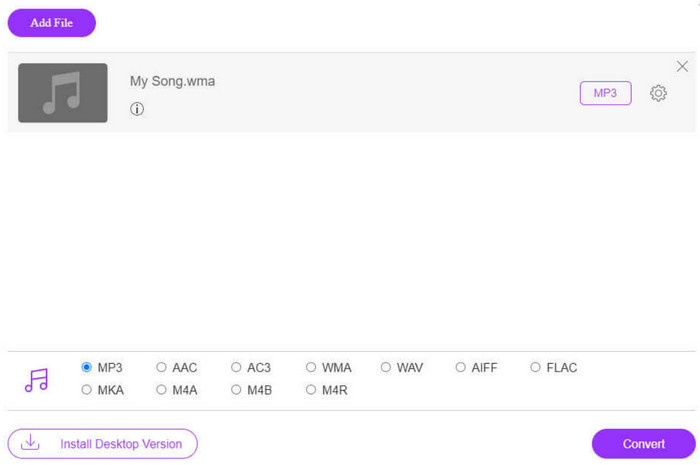
La velocitat de conversió de FVC Free Audio Converter és molt ràpida, però encara té menys funcions que FVC Video Converter Ultimate. Si voleu un nivell de sortida d'àudio més alt, us recomanem que baixeu la versió per a escriptori.
FreeConvert
Un altre conversor de formats en línia que també funciona amb pocs recursos és FreeConverter. Admet més de 1500 conversions de formats de fitxer i gestiona fitxers de llibres electrònics a més de vídeo, àudio i imatges. La plataforma afirma que elimina automàticament el fitxer font al cap d'unes hores després que l'usuari acabi d'editar per garantir que la privadesa no es vegi compromesa.
Llegiu la guia següent per aprendre a convertir WMA a MP3 amb FreeConverter.
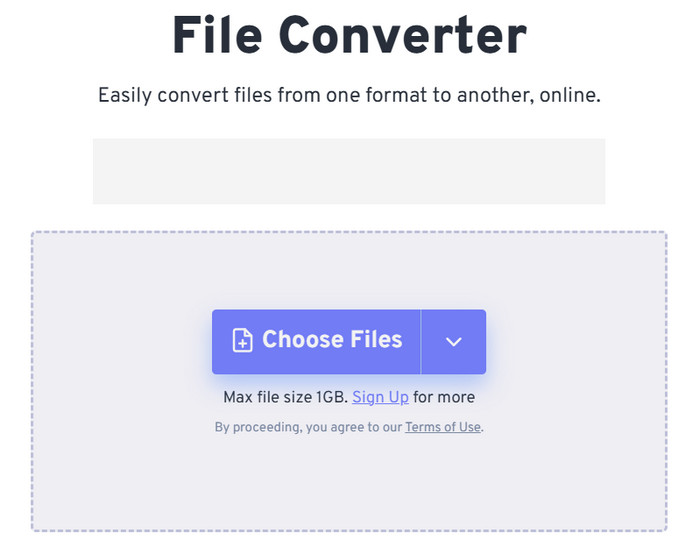
Pas 1. Visita el lloc web oficial de FreeConvert. Fes clic a Choose Files per afegir el teu àudio WMA a aquesta plataforma.
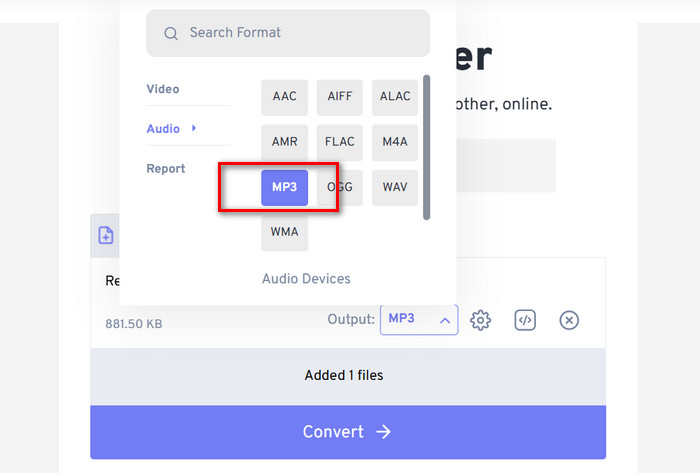
Pas 2. Desplega el menú de Output. Tria Audio > MP3.
Si vols millorar la qualitat de l’àudio, fes clic a la icona Advanced settings.
Pas 3. Fes clic a Convert per iniciar el procés de conversió.
Tot i que FreeConvert afirma que convertir formats d’àudio és completament gratuït, no hem d’oblidar que té un límit de mida de fitxer. No pot gestionar àudios de més d'1 GB, de manera que, si el nostre fitxer supera aquest límit, haurem de pagar per continuar convertint correctament amb aquest convertidor de WMA a MP3.
Part 4. Preguntes freqüents sobre la conversió de WMA a MP3
Fitxers WMA VS MP3, quin és millor?
Depenent de com ho comparem, l'MP3 és clarament superior al WMA pel que fa a la compatibilitat. Els fitxers MP3 són més petits que els del WMA, una característica que el fa més adequat per emmagatzemar i transferir àudio. Però el WMA és millor pel que fa a la qualitat del so.
Com puc reproduir fitxers WMA antics?
Quan es tracta d’escollir un reproductor d’àudio WMA, l’opció més recomanable és Windows Media Player, que ve integrat a Windows. Per descomptat, alguns reproductors de tercers, com VLC Media Player i MPlayer, també val la pena provar-los.
Pot YouTube Music reproduir fitxers WMA?
Sí, WMA actualment forma part de la gamma de formats d'àudio oficialment compatibles amb YouTube.
Part 4. Conclusió
Aquesta és una guia que t’ensenya com convertir WMA a MP3. Encara que la qualitat de so del format WMA és lleugerament millor, els seus fitxers alhora són més grans. A més, actualment no hi ha gaires plataformes ni reproductors de música que admetin aquest format. Per assegurar-te que res no t’impedeixi escoltar els teus àudios, és necessari convertir WMA a MP3. Aquí trobaràs cinc eines, incloent-hi tres programes d’escriptori i dues plataformes en línia. Comparant aquestes cinc eines, FVC Video Converter Ultimate és l’opció més versàtil.
-
 Reproductor de música WMA: revisió dels 10 millors reproductors de música WMA del 2025
 Google Music Play WMA pot? Quin és el millor reproductor de música WMA? Quin reproductor de música Android pot reproduir fitxers WMA? Aquesta publicació inclou una llista dels 10 millors reproductors de música WMA per reproduir música WMA a Mac, PC amb Windows, Android i iPhone.
-
 2 mètodes per convertir àudio FLV a WMA [gratuït i en línia]
 Voleu extreure àudio WMA del vídeo FLV? Aquí hi ha 2 extractors d’àudio WMA gratuïts per convertir FLV (Flash Video) a WMA (Windows Media Audio) amb una velocitat de conversió ràpida a Mac OS X i Windows 10/8/7.
-
 Top 3 Gravadores WMA fàcils d'utilitzar adequades per a talents de veu
 Ets un talent de veu? Aquest article parla de les gravadores WMA que produeixen una alta qualitat com WMA per als creadors de contingut de veu.

