


 Video Converter Ultimate
 Gravadora de pantalla
 Reparació de vídeo
 Baixada segura
Com convertir fàcilment F4V a MP4 amb eines fora de línia i en línia
El format de fitxer FLV és un dels formats estàndard utilitzats per Adobe Flash, però si vols reproduir un vídeo amb més qualitat, has de convertir el teu fitxer F4V a altres formats com MP4. Pots reproduir el format MP4 a gairebé tots els dispositius, com iPhones, iPad, Android i ordinadors. Per tant, si prefereixes un vídeo d’alta qualitat, et proporcionarem els mètodes més eficients per convertir F4V a MP4 amb l’ajuda d’eines en línia i fora de línia.

Part 1: Mètode bàsic per convertir F4V a MP4 a Mac i Windows
Si fas servir Mac i t’agrada convertir fitxers de vídeo, pots utilitzar el Video Converter Ultimate. Aquest convertidor d’escriptori és excel·lent per convertir F4V a MP4 tant a Mac com a Windows, cosa que el fa molt pràctic per a tots els usuaris. A més, pot convertir gairebé tots els fitxers de vídeo, ja que admet AVI, MP4, MOV, FLV, VOB, MTS, SWF, MKV, WMV i més. A més a més, convertir fitxers F4V amb aquesta aplicació és fàcil perquè té una interfície fàcil de seguir amb mètodes de conversió bàsics. D’aquesta manera, pots assegurar-te que és adequat per utilitzar, sobretot per a principiants. A més, pel que fa a la velocitat de conversió, sempre en quedaràs satisfet. Video Converter Ultimate ofereix un procés de conversió ultra ràpid, 30 vegades més ràpid que altres convertidors. També pots convertir diversos fitxers de vídeo simultàniament, ja que permet la conversió per lots. A més, amb aquesta aplicació pots fer més coses a banda de convertir vídeos. També hi pots crear un vídeo musical si ho desitges. Aquesta aplicació ofereix un Creador de vídeos musicals i proporciona diversos temes, com senzill, feliç, nit de neu, net i més. A més, aquest convertidor de vídeo té una funció de Creador de collatges, amb la qual pots fer un collage amb diferents plantilles i filtres. Podràs experimentar encara més funcions excel·lents quan facis servir el FVC Video Converter Ultimate.
Funcions
◆ Converteix més de 100 formats de fitxer de vídeo, com ara MP4, F4V, MOV, AVI, MKV, WMV, VOB, etc.
◆ Creeu un collage amb plantilles i filtres gratuïts.
◆ Fes un vídeo musical fantàstic amb diversos temes.
◆ Comprimiu un vídeo a la mida de fitxer desitjada.
◆ Ajusteu la velocitat del vídeo de 0,125x a 8x més ràpid que la velocitat mitjana del vídeo.
◆ Afegeix i elimina la marca d'aigua d'un vídeo.
◆ Converteix formats de fitxer d'imatge, com ara BMP, PNG, JPG, TIF, etc.
Seguiu els mètodes senzills següents per convertir ràpidament F4V a MP4 amb FVC Video Converter Ultimate.
Pas 1: Descarrega el Video Converter Ultimate a l’ordinador fent clic al botó Descarregar que hi ha a continuació. Després, procedeix amb el procés d’instal·lació i inicia l’aplicació.
Descàrrega gratuïtaPer a Windows 7 o posteriorDescàrrega segura
Descàrrega gratuïtaPer a macOS 10.7 o posteriorDescàrrega segura
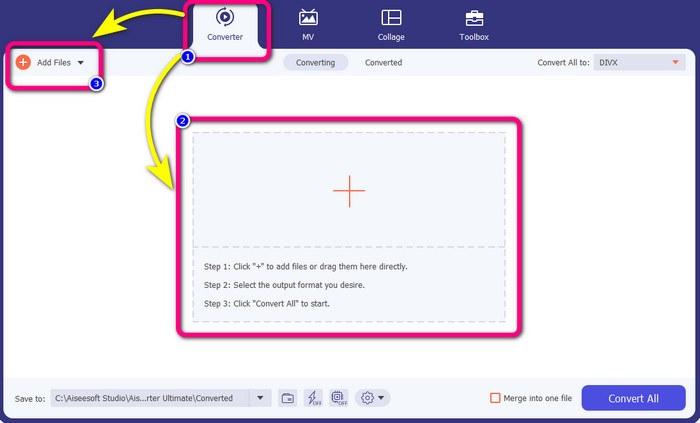
Pas 2: Per convertir el teu vídeo F4V, ves a l’opció Convertidor i selecciona la icona Plus o el botó Afegeix fitxer per inserir-hi el teu vídeo amb format de fitxer F4V.
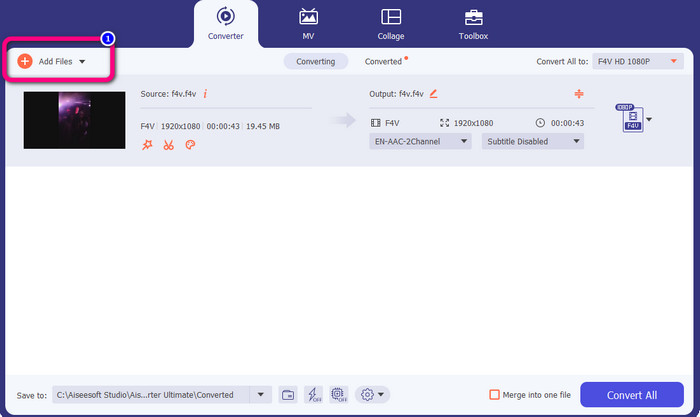
Pas 3: Si vols convertir més fitxers F4V simultàniament, prem el botó Afegeix fitxers i insereix un altre fitxer F4V.
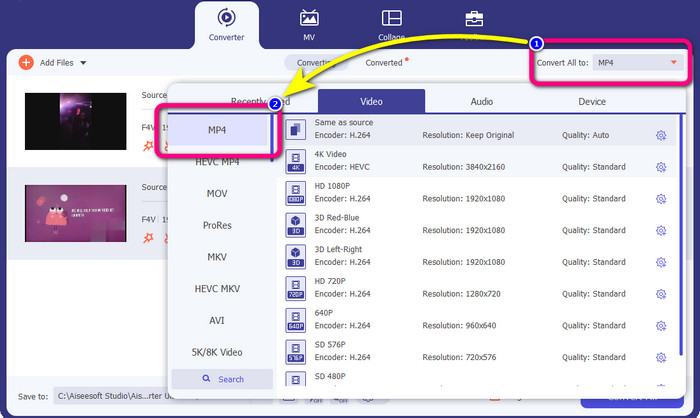
Pas 4: Ves al botó Converteix-ho tot a per canviar el format de sortida. Veureu les opcions de format i tria el format MP4. També pots triar la qualitat de vídeo que prefereixis.
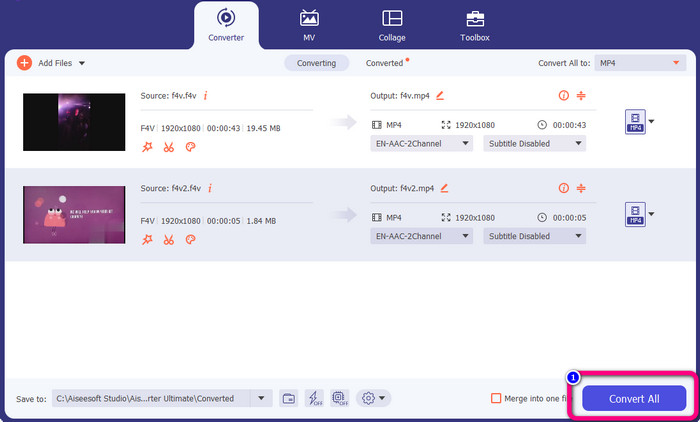
Pas 5: Quan hagis acabat de canviar el format de sortida, pots convertir els fitxers fent clic al botó Converteix-ho tot. El procés de conversió començarà i el teu vídeo F4V es convertirà en un fitxer MP4 en pocs segons.
Part 2: Passos senzills per convertir F4V a MP4 amb VLC
En aquesta part, aprendràs a convertir F4V a MP4 amb VLC Media Player. Sí! Ho has llegit bé! A part de reproduir vídeos, VLC és una altra eina que podeu utilitzar per convertir fitxers. A més, admet diversos formats de fitxer, com ara MP4, WEBM, OGG, TS, ASF i molt més. Tanmateix, cal saber prou sobre aquesta eina perquè té una interfície confusa. Mireu tutorials o demaneu a alguns usuaris avançats que es facin una idea sobre com convertir fitxers amb VLC. A més, es necessita molt de temps per descarregar aquest convertidor. Seguiu els procediments següents per convertir F4V a MP4 amb VLC Media Player.
Pas 1: Descarrega el VLC Media Player a l’ordinador. Inicia l’aplicació després del procés d’instal·lació.
Pas 2: Ves a Mitjana > botó Converteix/Desa. Després, fes clic al botó Afegeix per adjuntar el teu vídeo F4V.
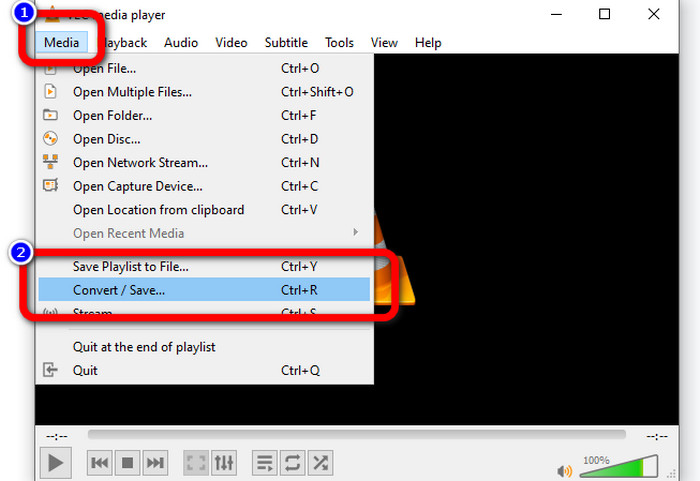
Pas 3: Després d’afegir el vídeo F4V, torna a fer clic al botó Converteix/Desa a la part inferior de la interfície.
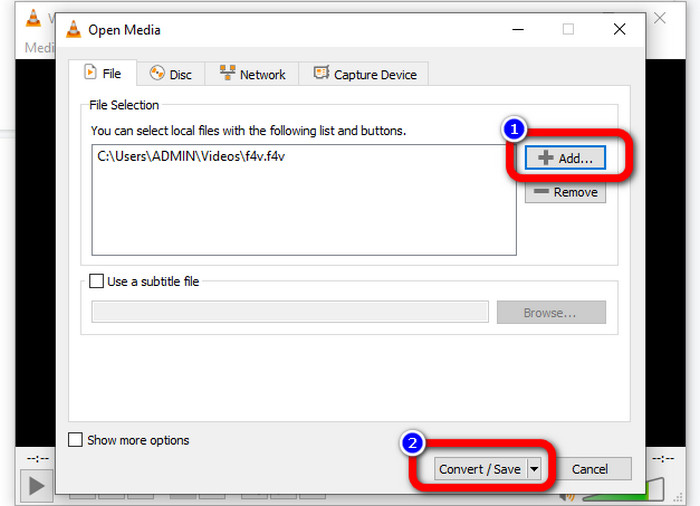
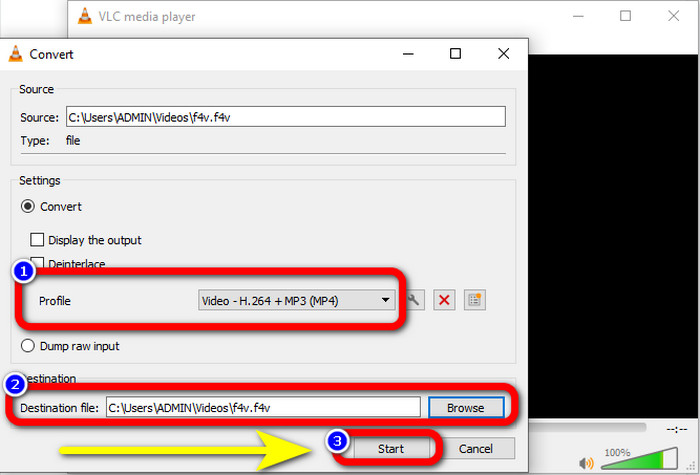
Pas 4: Ves al perfil i tria el format de fitxer MP4. A continuació, ves a Navega per establir una ubicació de fitxer on vulguis desar el vídeo. Prem el botó Inicia per continuar amb el procés de conversió.
Part 3: manera fàcil de convertir F4V a MP4 amb el fre de mà
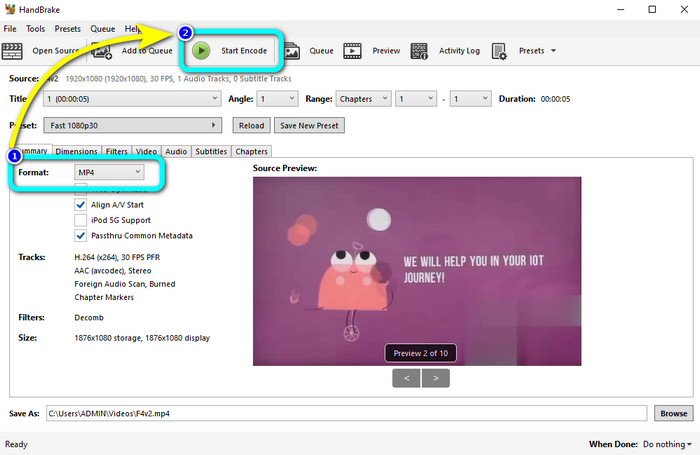
Si encara estàs buscant un altre convertidor de F4V a MP4 per a Windows, pots utilitzar el Handbrake. És una eina d’escriptori que admet diversos formats de vídeo, com MP4, MKV, WEBM, etc. No obstant això, aquesta eina és complicada perquè té moltes opcions que poden resultar confuses. Fes servir els passos següents per convertir el teu fitxer F4V a format MP4.
Pas 1: Descarrega el Handbrake a l’ordinador amb Windows. Després, inicia l’aplicació quan acabis d’instal·lar-la.
Pas 2: Fes clic al botó Fitxer per afegir el teu fitxer F4V.
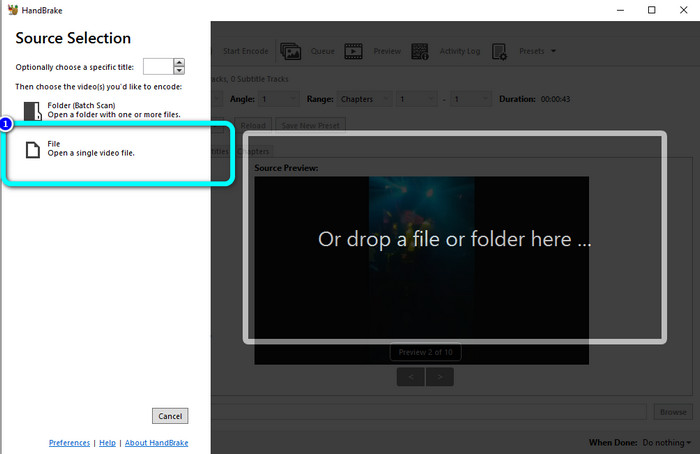
Pas 3: Ves a les opcions de format i selecciona el format de fitxer MP4. Després, prem el botó Start Encode. Espera el procés de conversió i desa el teu vídeo final.
Part 4: Passos detallats per convertir F4V a MP4 gratuït en línia
Vols utilitzar una aplicació en línia per convertir F4V a MP4 gratuïtament? Fes servir el FVC Free Video Converter Online. Pots convertir el teu fitxer F4V sense gastar ni un cèntim. A més, aquest convertidor té una interfície senzilla, adequada per a usuaris no professionals. Admet diversos formats de vídeo, com FLV, WMA, MOV, AVI, WMV i més. El millor és que pots convertir fitxers de vídeo sense perdre qualitat. Segueix els passos detallats següents per convertir F4V a MP4 fàcilment.
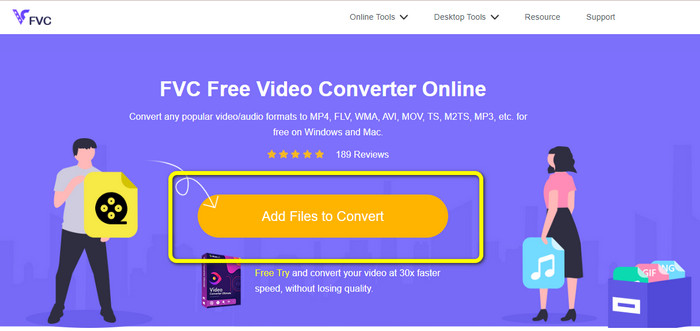
Pas 1: Visita el lloc web de FVC Free Video Converter Online. Prem el botó Afegeix fitxers per convertir per penjar el teu fitxer de vídeo F4V.
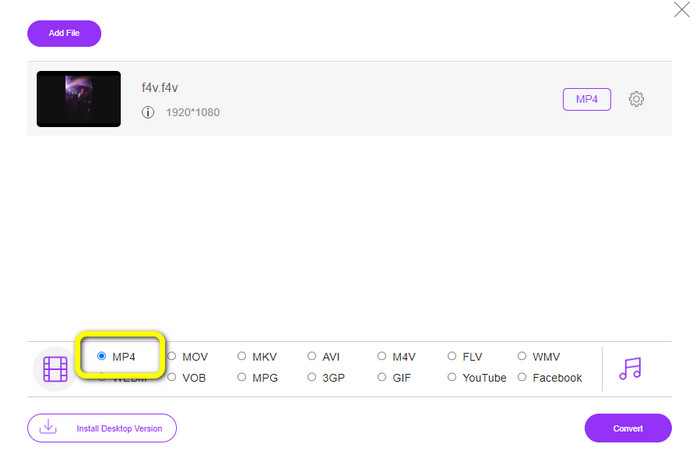
Pas 2: Després de penjar el vídeo, ves a la part inferior de la interfície i fes clic al format de fitxer MP4
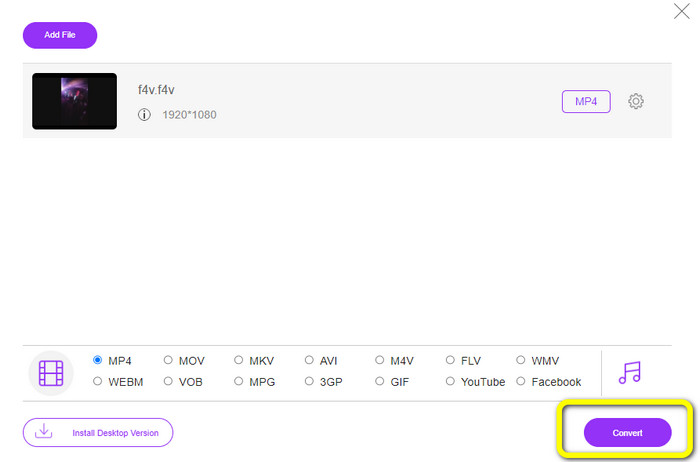
Pas 3: Finalment, prem el botó Converteix. Espera el procés de conversió i desa el fitxer a la ubicació que desitgis
Part 5: F4V vs. MP4
Vegeu la informació addicional a continuació sobre aquests dos formats de fitxer.
| F4V | MP4 | |
| Extensió de fitxer | .f4v | .mp4 |
| Desenvolupat per | poma | Grup d’experts en imatges en moviment |
| Descripció | Aquest és el format de fitxer flash original. També es basa en el format de fitxer multimèdia base ISO que admet el reproductor flash 9. A més, els fitxers F4V no es poden reproduir en dispositius iOS, però en navegadors que admeten flash, els podeu reproduir. | Aquest és un fitxer multimèdia. El contenidor pot emmagatzemar dades de subtítols, àudio i vídeo. A més, com altres formats de contenidor, MP4 permet la transmissió a Internet. |
| Programes associats | XVLC Media Player LAN de vídeo Reproductor de Windows Media FFDShow Microsoft Windows Visualitzador de galeries de fotos | Apple QuickTime Player LAN de vídeo Reproductor multimèdia VLC Apple iTunes Microsoft Windows Media Player |
Per llegir més:
2 de les opcions de convertidor preferides per convertir F4V a WMV [2023]
2 de les maneres més ràpides de convertir F4V a FLV [En línia i fora de línia]
Part 6: Preguntes freqüents sobre la conversió de F4V a MP4
1. Puc convertir MP4 a F4V?
Si, tu pots! Podeu utilitzar Video Converter Ultimate. Aquesta aplicació pot convertir instantàniament el vostre fitxer MP4 al format F4V.
2. Quina diferència hi ha entre F4V i FLV?
La principal distinció entre aquests dos formats és que l'F4V admet vídeos d'alta qualitat codificats per H.264, però el format FLV en general utilitza H.263.
3. Com utilitzar FFmpeg per convertir F4V a MP4?
Baixeu l'FFmpeg al vostre ordinador. Obriu l'indicador d'ordres. Escriviu Desktop per canviar la línia d'ordres. L'ordre de conversió comença amb FFmpeg-i, després escriviu el nom del vídeo i el seu format de fitxer. També, el tipus del fitxer de sortida. Premeu Intro i espereu el procés de conversió. Després d'això, podeu veure el vostre fitxer a l'escriptori
Conclusió
Aquesta guia et mostra instruccions detallades per convertir F4V a MP4 en línia i fora de línia. Els usuaris prefereixen una manera més simple i ràpida de convertir vídeos. Llavors, pots utilitzar el Video Converter Ultimate per convertir els teus fitxers de vídeo a l’instant, ja que té una velocitat de conversió 30 vegades més ràpida que altres convertidors. També pots fer servir el FVC Free Video Converter Online per convertir vídeos d’una manera senzilla, que només et requereix uns quants clics.
-
 4 convertidors en línia i fora de línia més nous per convertir F4V a format AVI
 No tens idea de quin convertidor hauries d'utilitzar per convertir F4V a AVI o a qualsevol altre format de vídeo? A continuació, llegiu aquest article mentre aprenem a convertir amb l'eina disponible.
-
 Com convertir F4V a MOV sense perdre qualitat [Resolt]
 Si teniu problemes per reconèixer alguns formats de vídeo com F4V. Llegiu aquest article per obtenir més informació sobre el format de vídeo F4V i MOV i aprendre a convertir F4V a MOV mitjançant diferents mètodes.
-
 Mètodes amb èxit per convertir DIVX a MP4 immediatament
 Com puc convertir DIVX a MP4? Si busqueu la millor solució, esteu a l'article adequat. Us mostrarem com convertir fàcilment DIVX a MP4
