


 Video Converter Ultimate
 Gravadora de pantalla
 Reparació de vídeo
Com convertir HTML a MP4 en línia: els 3 principals convertidors que val la pena tenir en compte
People often download HTML videos from the internet for various reasons. One main reason is to watch them later without needing a good internet connection. This comes in handy, especially during travel or when internet access is spotty. The next common reason is to keep the video and share it with others who may not have access to the online source. Regardless of the reason you have for having HTML files, converting them to a much more accessible video format like MP4 is necessary. This is to accomplish smooth and non-problematic device compatibility. Now, to convert HTML to MP4 format, you will need a tool known for handling HTML very well. Fortunately, we have gathered the best online converters that you can consider using.

Part 1. Per què cal convertir vídeos HTML a MP4
Com s'ha esmentat anteriorment, hi ha diverses raons per convertir vídeos web, com ara HTML, en un format de vídeo universal, com ara MP4. Però per aprofundir en aquesta necessitat, aquí hi ha una explicació més detallada. Aquest tipus de conversió pot ser necessari quan es vol preservar el contingut d'un fitxer HTML. Això és particularment cert en elements multimèdia com els vídeos en un format universalment accessible a través de reproductors multimèdia i diferents plataformes.
Ja veieu, els fitxers HTML contenen diversos tipus d'informació que els navegadors web poden representar, però no tots els reproductors multimèdia els admeten. Per tant, el motiu principal per buscar un convertidor HTML a MP4 per a una conversió eficient és que podeu encapsular el contingut multimèdia en un format de vídeo estàndard que es pot reproduir fàcilment en diversos reproductors. A més, aquesta conversió també garanteix la idoneïtat per compartir i consumir contingut multimèdia en diverses plataformes.
Part 2. Com convertir HTML a MP4 en línia
Anem a la persecució coneixent els convertidors en línia eficients que us ajudaran a aconseguir les millors sortides MP4 dels vostres fitxers HTML.
1. Online-Convert.com
El primer convertidor de la llista és Online-Convert.com. És un convertidor de fitxers pràctic però multifuncional que podeu utilitzar al web per canviar ràpidament els vostres fitxers HTML a diversos formats de sortida. A part de convertir a i des de fitxers HTML, també podeu modificar altres paràmetres, com ara triar el preajust adequat i canviar la mida de la pantalla, la taxa de bits de vídeo i la velocitat de fotogrames. A més, us permet girar, tallar, mirar, capgirar, retallar i configurar l'àudio del vostre projecte de vídeo. Segurament, aquest convertidor d'HTML a MP4 ofereix moltes opcions preparades per a diferents necessitats. La millor part és que no us costarà ni un cèntim d'utilitzar, sense que apareguin anuncis molests que us molestin! Tanmateix, inclou un límit de mida de fitxer i no admet la conversió massiva de fitxers. Independentment, aquí teniu els passos per realitzar la conversió ràpidament.
Step 1. On the main website, choose the right converter tool that it offers for this conversion need. Now, get your HTML uploaded by clicking the Choose File button.
Step 2. When the file is successfully uploaded, you can browse to the lower part to do some editing you need for the output. Otherwise, click the START button to commence the conversion process.
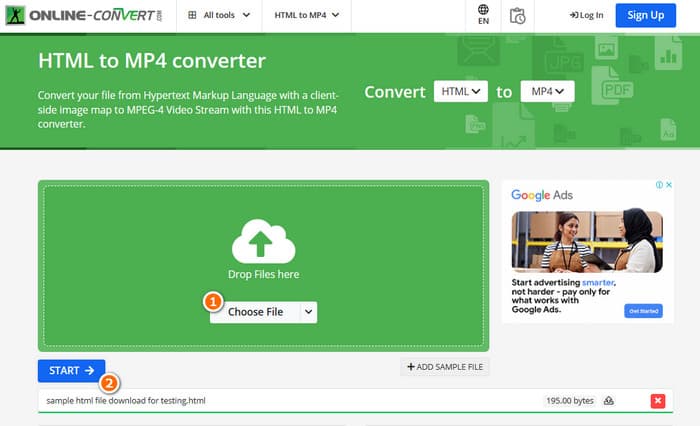
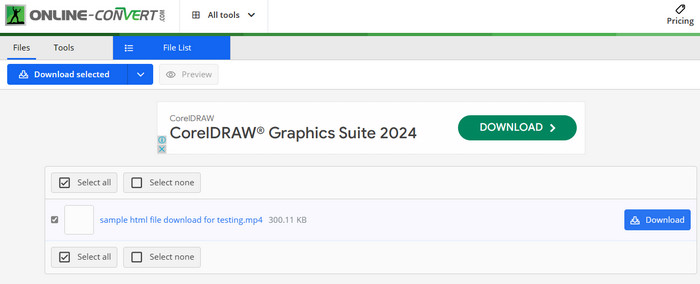
Step 3. When the conversion is done, you will need to download the converted file to save it to your device.
2. AConvertir
Un altre convertidor flexible que us permet convertir HTML a MP4 en línia és AConvert. Aquest convertidor en particular és una eina fàcil d'utilitzar per convertir diversos formats de fitxer sense cap cost. A més, AConvert està dissenyat per atendre qualsevol persona amb o sense experiència que necessiti serveis de conversió en línia. Una de les seves característiques més destacades és la conversió massiva, que us ofereix la possibilitat de convertir diversos fitxers d'una vegada, estalviant temps quan teniu molts fitxers per processar. Tanmateix, el procés de conversió pot trigar una mica més del que s'esperava i els anuncis al lloc poden ser una mica intrusius. Mentrestant, aquí teniu una guia ràpida per ajudar-vos a convertir fitxers HTML amb AConvert.
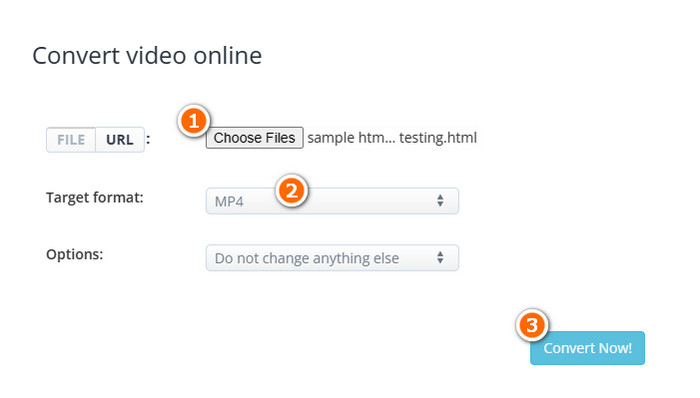
Step 1. Click the Choose Files button upon reaching the official tool converter. Then, select the HTML file that you want to convert.
Step 2. After that, navigate to the Target format section and choose the MP4 as your output.
Step 3. When all is set, click the Convert Now button to begin the process. Once the conversion succeeds, download the converted file for exportation.
3. Converterpoint - Convertidor de vídeo en línia HTML5
Per completar el conjunt dels nostres 3 potents convertidors en línia per a HTML, aquí teniu el Converterpoint. Aquesta eina en línia pot ser útil no només per als usuaris normals, sinó també per a persones o empreses que busquen convertir vídeos per utilitzar-los en llocs web, plataformes de xarxes socials o altres canals digitals compatibles amb HTML5.
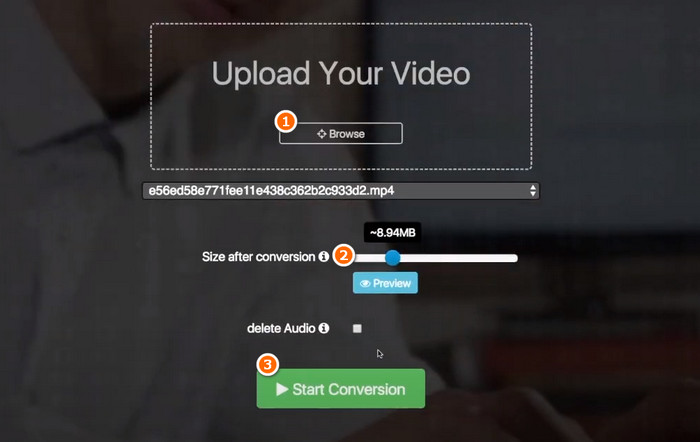
Step 1. Upload your video when you click its Browse button.
Step 2. Once uploaded, set your preferred output file size after the conversion.
Step 3. After that, click the Start Conversion button to begin the process.
Part 3. Consell de bonificació: Converteix formats multimèdia a MP4 gratuïtament en línia
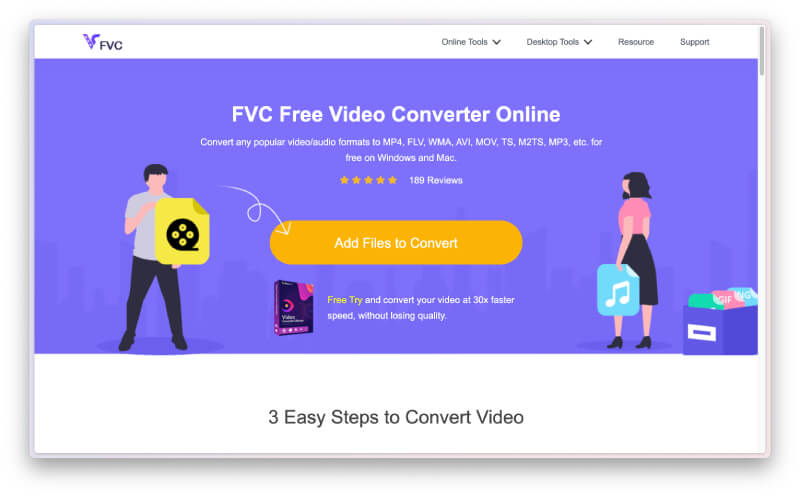
Don’t get enough and want more than just a converter to convert HTML to MP4 online? Then, see how this FVC Free Video Converter Online helps you with your various video and audio file conversion tasks. It is an excellent media file converter that lets you convert unlimited files without any restrictions! Furthermore, it is rapid when it comes to processing the conversion as it works with a special technology that makes the conversion much faster than the others. Thus, if you have bulk audio or video files there that you need to convert into MP4, follow the steps below.
Step 1. Click the Add Files to Convert button when you land on its official website. This will enable you to upload your first file.
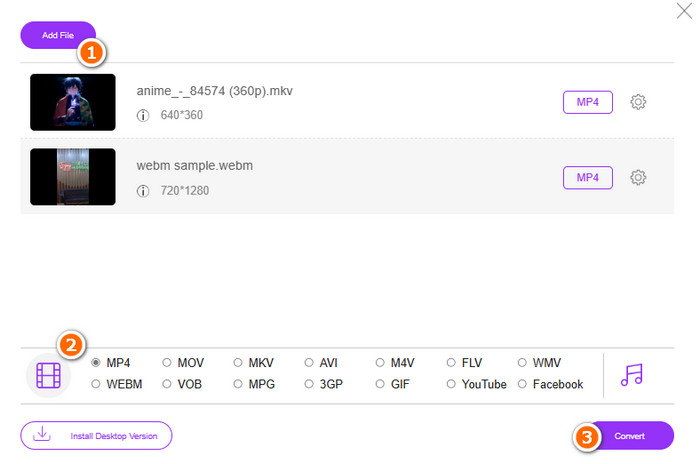
Step 2. After picking your first file to upload, you can upload more when you click the Add file button on the main window. Then, set the files to MP4 as you toggle the format from its location at the bottom.
Step 3. Finally, click the Convert button to start the bulk conversion process.
Part 4. Preguntes freqüents sobre la conversió de fitxers HTML a MP4
Es poden convertir els fitxers HTML a format MP4?
Yes, HTML files can be converted into MP4 format by grabbing a copy of your own and transforming it to MP4.
Quant de temps triga a convertir el fitxer HTML a format MP4?
La durada sempre depèn de diverses coses, com ara la mida del fitxer i la fiabilitat de l'eina de conversió.
Puc gravar el vídeo HTML?
Yes, you can. You can also find some free MP4 recorders online to help record while the HTML video is playing.
Conclusió
Above are the online converters that are notorious for converting HTML to MP4. You now have plenty of choices for doing the conversion. On the other hand, if you want a notorious audio-video file converter that remarkably offers excellence in the conversion process and produces high-quality outputs, FVC Free Video Converter Online is the best.
-
 Com convertir RAR a MP4 tant en línia com fora de línia
 Si esteu buscant un convertidor eficient de RAR a MP4, sou a la pàgina correcta. Aquesta publicació us ofereix maneres d'adquirir en línia i fora de línia.
-
 AVCHD vs. MP4: revisió de quin és millor triar
 Consulta aquesta publicació AVCHD vs. MP4 i aprèn quin format de vídeo s'adapta millor a tu. Excava més per conèixer les seves descripcions, diferències, etc.
-
 Millor tècnica per transformar HEIC a MP4 de manera eficient
 Apreneu les millors maneres de realitzar la conversió HEIC a MP4 al vostre ordinador i dispositius iPhone. Aquesta publicació conté la tècnica per a una conversió efectiva.
