


 Video Converter Ultimate
 Gravadora de pantalla
 Reparació de vídeo
 Baixada segura
Com convertir MKV a MP4 al Windows / Mac
Quan reproduïu una pel·lícula, veieu que no es pot obrir perquè algun programa no admet el format MKV. Aleshores us podeu preguntar per què passa això i com solucionar-ho.
El motiu pel qual no es pot reproduir MKV pot ser causat per la manca de determinats còdecs al dispositiu. Per això, tot i que avui dia podeu veure MKV a tot arreu, alguns dispositius o programes encara no admeten el format MKV. Per tant, heu de convertir-lo a un format més comú, com ara MP4, un format molt més útil que es pot carregar correctament a gairebé tots els dispositius.
Avui us presentarem 2 convertidors gratuïts perquè pugueu convertir fitxers MKV a MP4.

Part 1. Com canviar MKV a MP4 en línia i gratuït
Si no suporteu instal·lar gaire programari a l'ordinador com jo, us proposo provar un convertidor en línia basat en web.
Hi ha un munt de convertidors de vídeo en línia gratuïts al mercat, però, per ser sincer, la majoria d’aquests convertidors anomenats “gratuïts” tenen una infinitat de límits. Els heu de pagar per aconseguir un pla millor. Només d'aquesta manera es poden convertir ràpidament fitxers grans en lots sense filigrana.
Per tant, hi ha un convertidor de vídeo realment gratuït, ràpid i potent? La resposta és sí.
FVC Free Online Video Converter és un convertidor de vídeo eficient d’MKV a MP4 que us pot ajudar a convertir vídeos sense cap límit. Admet la conversió de gairebé tots els formats de vídeo principals a formats populars com MP4, MOV, WMV, AVI i FLV en qüestió de segons. També permet la conversió per lots, és a dir, podeu convertir un gran nombre de vídeos i alhora mantenir-ne la qualitat original.
Com que FVC Free Online Video Converter és una eina basada en el web, la podeu utilitzar fàcilment tant a Windows com a Mac, sempre que tingueu una connexió estable i un navegador. Quant a l’ús, podeu dominar aquest convertidor d’MKV a MP4 amb només uns quants passos.
Pas 1. Aneu al lloc web de FVC Free Online Video Converter al vostre navegador. Després feu clic al botó Add Files to Convert. Si no heu descarregat FVC Launcher a l’ordinador abans, us recordarà que primer heu de descarregar el llançador. Només heu de seguir les instruccions i instal·lar-lo.
Baixa la versió d’escriptori per convertir fitxers per lots.

Pas 2. Després de la instal·lació, la finestra Open File apareixerà automàticament. Ara trieu el fitxer MKV que voleu convertir. Per cert, si voleu convertir diversos vídeos MKV d’una sola vegada, seleccioneu tots els fitxers MKV que necessiteu.
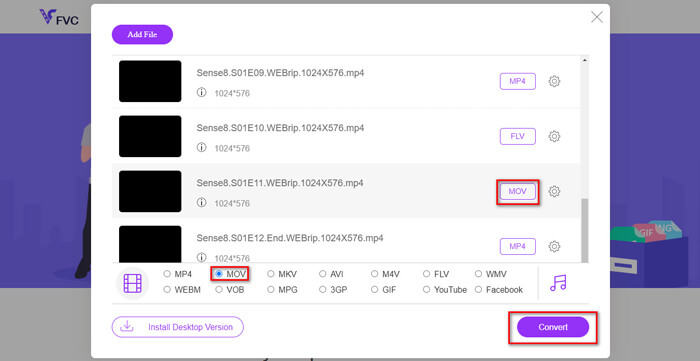
Pas 3. A continuació, feu clic a Open i veureu una llista dels fitxers seleccionats. Trieu el format de sortida MP4 sota aquesta llista.
També podeu seleccionar diferents formats per a fitxers diferents per separat fent clic al format que hi ha al costat de la icona Setting i canviant el format de sortida a sota. Però podeu ometre aquest pas i simplement fer clic al botó Convert. Després, trieu una carpeta de destinació per desar-hi els vídeos convertits.
Part 2. Com convertir MKV a MP4 amb VLC Media Player
Potser coneixeu VLC com a reproductor multimèdia, disponible per a la majoria de sistemes operatius d’escriptori. Però, de fet, també és un convertidor de vídeo «amagat». Us permet convertir fitxers MKV al format MP4. Si ja teniu VLC a l’ordinador, el podeu provar.
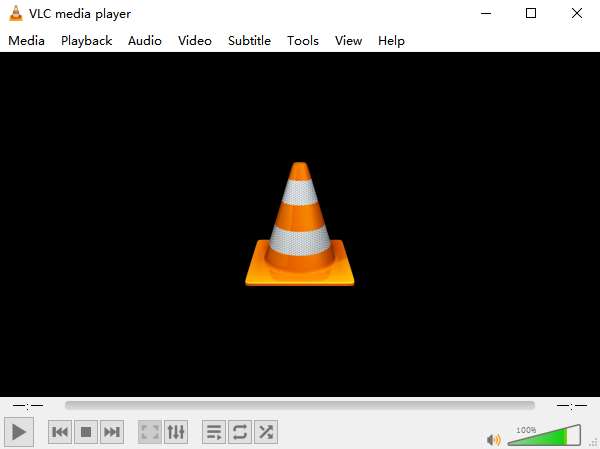
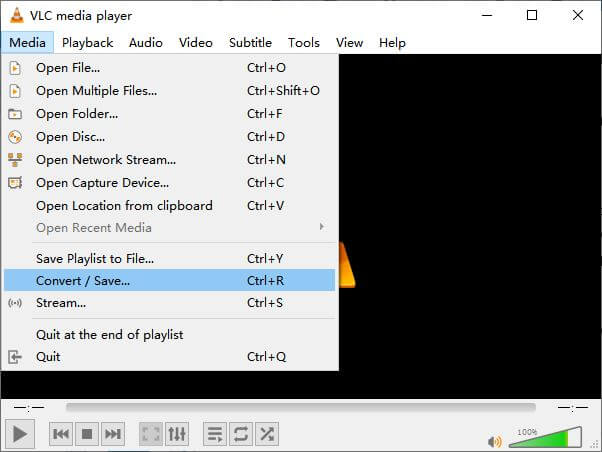
Pas 1. Primer, inicieu VLC Media Player a l’ordinador. Feu clic al menú Media. Cerqueu Convert / Save a la llista desplegable.
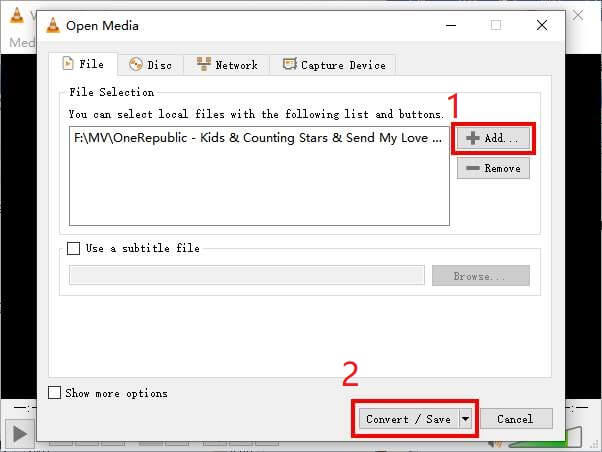
Pas 2. Feu clic a + Add i cerqueu el vídeo MKV que voleu convertir. Després feu clic al botó Convert / Save que hi ha a sota.
Pas 3. Trieu el format MP4 a la finestra Convert.
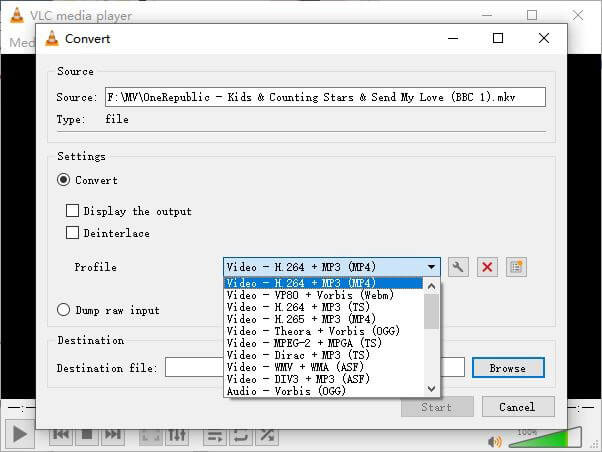
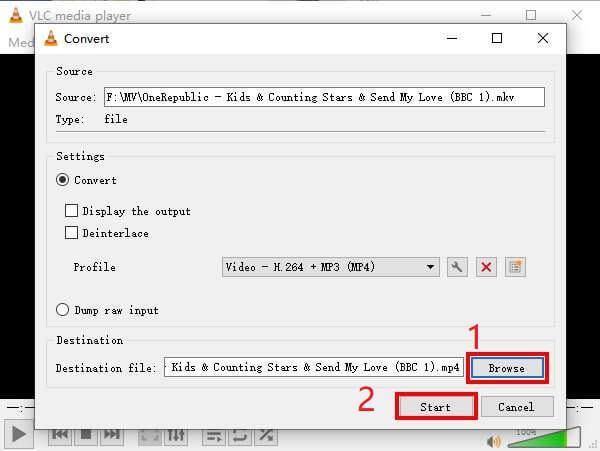
Pas 4. Feu clic al botó Browse per confirmar la carpeta de destinació on es desarà el fitxer. Finalment, feu Start a la conversió i espereu a obtenir el vostre vídeo MP4.
MKV vs. MP4
El format de contenidor multimèdia Matroska, llançat l'any 2002, és un format de codi obert que pot incloure una sèrie de pistes de vídeo, àudio, imatge i subtítols. Per tant, podeu utilitzar-lo per emmagatzemar vídeos curts, programes de televisió i pel·lícules fàcilment. És força popular per a la substitució de fans d'anime.
Publicat pel Moving Picture Experts Group (MPEG) l'any 2001, el format MP4 us pot ajudar a desar dades de vídeo, àudio, subtítols i imatges en pistes separades. És l'abreviatura de MPEG-4 Part 14. A més, és un dels formats més populars utilitzats per transmetre i compartir vídeos.
Part 3. Preguntes més freqüents sobre la conversió de MKV a MP4
1. Es pot convertir ffmpeg en MKV a MP4?
Sí, podeu convertir MKV a MP4 amb ffmpeg. Però pot ser una mica complex entendre com funciona, encara que el pas més efectiu només sigui una seqüència de caràcters: ffmpeg -i my_movie.mkv -vcodec copy -acodec copy my_movie.mp4
2. HandBrake pot exportar MP4 de MKV?
Si només voleu obtenir un fitxer MP4 després de la conversió, HandBrake us pot ajudar, en efecte. Tanmateix, no pot convertir els vostres fitxers a altres formats, com ara WMV, MOV o FLV. HandBrake admet la majoria de fitxers multimèdia comuns, però això correspon a les seves fonts d’entrada admeses. Quant als formats de sortida, les vostres opcions són MP4(.M4V) i MKV.
3. La conversió de MKV a MP4 perd qualitat?
La majoria dels convertidors de vídeo perden qualitat quan es converteixen fitxers MKV a MP4, potser 1% o 5%. Tot i tornar a codificar els fitxers MKV a MP4, és difícil evitar la pèrdua de dades completament. Però podeu augmentar la resolució de les imatges perquè la qualitat dels vídeos MP4 exportats s’acosti al vídeo original.
Conclusió
Hi ha innombrables convertidors de vídeo que podeu triar. És difícil trobar un convertidor gratuït i eficient tot sol. Aquesta publicació us presenta 2 mètodes per convertir MKV a MP4. Un és VLC Media Player i l’altre és FVC Free Online Video Converter.
Si només voleu un fitxer MP4, ja n'hi ha prou amb VLC. Tanmateix, VLC només admet un nombre finit de formats. Per tant, si voleu un convertidor més professional, FVC Free Online Video Converter sembla ser una millor opció.
Espero que trobeu útil aquesta publicació. I no dubteu en explicar-nos la vostra opinió.
-
 Com convertir els vostres fitxers de vídeo MP4 a imatges GIF animades sense pèrdua de qualitat
 Esteu buscant la millor manera de convertir el vostre vídeo MP4 en GIF animats? Aquí teniu una guia detallada per fer-ho a Photoshop, Windows Movie Maker, convertidor de vídeo en línia i molt més.
-
 Com convertir MOV a MP4 sense perdre qualitat
 Voleu convertir fitxers MOV (Apple QuickTime Movie) a MP4? Aquesta publicació comparteix 4 mètodes gratuïts per convertir els fitxers de vídeo MOV a format MP4 a Windows 10/8/7 / XP i Mac OS X.
-
 4 maneres fàcils de convertir WMV a MP4 a Mac i Windows
 Com convertir fitxers WMV a MP4? Aquí hi ha les 4 maneres fàcils de convertir WMV a MP4 a Mac i Windows amb senzills passos.

