


 Video Converter Ultimate
 Gravadora de pantalla
 Reparació de vídeo
 Baixada segura
Com convertir MP4 a 3GP en línia i fora de línia
MP4 és un popular format de vídeo que es pot reproduir en reproductors MP4, telèfons mòbils i tauletes. Les pel·lícules que baixem del lloc web normalment es mantenen en format MP4. Però alguns telèfons mòbils només admeten la reproducció de vídeos 3GP. Aquest article us mostrarà 3 convertidors gratuïts de MP4 a 3GP i podeu convertir MP4 a 3GP sense problemes.

Part 1. Com convertir MP4 a 3GP a Windows i Mac
Si vols convertir MP4 a 3GP fora de línia, pots utilitzar un convertidor d’escriptori de MP4 a 3GP. FVC Free FLV to 3GP Converter és un programari de conversió de vídeo gratuït i fàcil d’utilitzar per a Windows i Mac. Pot convertir sense complicacions diversos vídeos com FLV, MP4, MOV, MKV, MTS, M2TS, etc. a 3GP. A més, ofereix funcions d’edició per afegir temes i ajustar l’autor, l’hora i el proveïdor a la part inicial/final.

- Converteix vídeos en MP4, MKV, AVI, MOV, MP3, AAC, AIFF, etc. a 3GP.
- Exporteu vídeos 3GP i fitxers d'àudio sense pèrdues des d'un fitxer MP4 amb un sol clic.
- Permetre als usuaris editar el proveïdor, el títol, l'autor, l'hora i afegir tema.
- Convertiu per lots MP4 a 3GP per reproduir-lo en alguns telèfons mòbils.
Descàrrega gratuïtaPer a Windows 7 o posteriorDescàrrega segura
Descàrrega gratuïtaPer a macOS 10.7 o posteriorDescàrrega segura
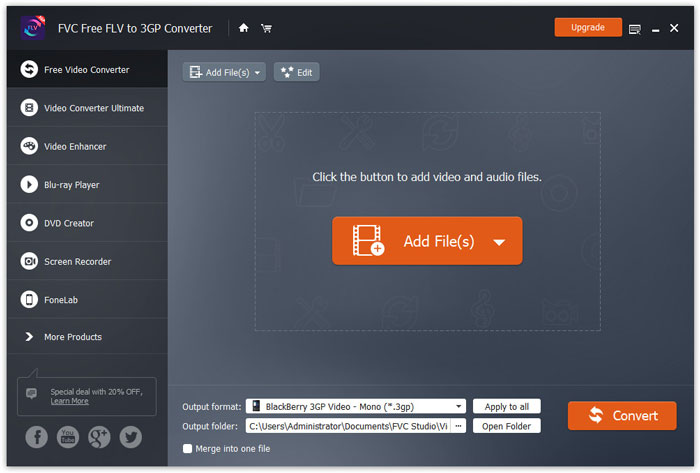
Pas 1. Descarrega gratuïtament, instal·la i executa FVC Free FLV to 3GP Converter al teu Windows o Mac. Fes clic al botó Add Files per carregar els fitxers MP4 des de l’ordinador. Pots convertir més d’un fitxer MP4 al mateix temps.
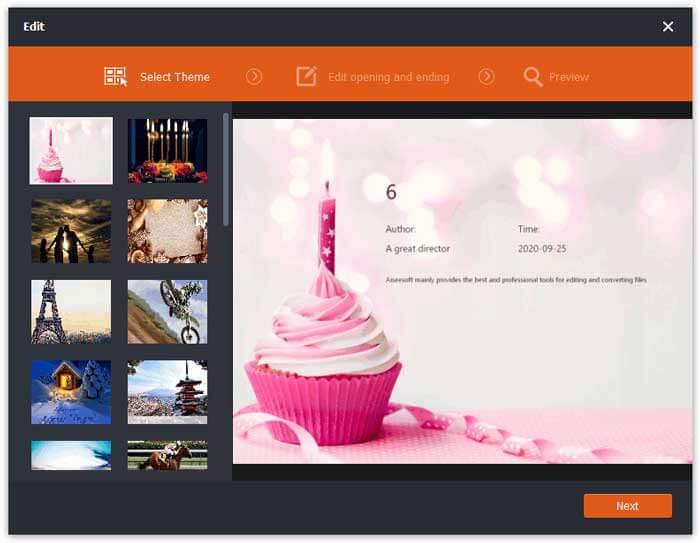
Pas 2. Fes clic al teu fitxer MP4 i, després, al botó Edit. Pots afegir un tema al teu fitxer MP4 i editar-ne el contingut d’inici i de final. Després fes clic a Next per previsualitzar i desar els canvis.
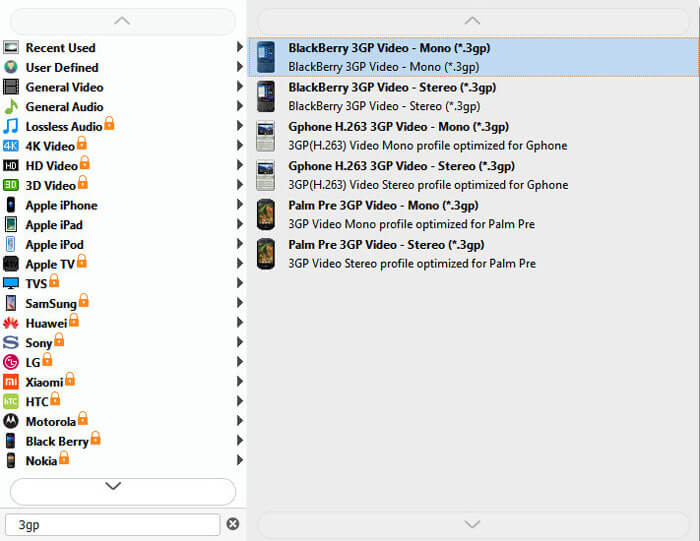
Pas 3. Selecciona 3GP al menú desplegable de Output format a la part inferior. Pots triar BlackBerry 3GP Video - Mono (*.3gp) o qualsevol altra opció que vulguis.
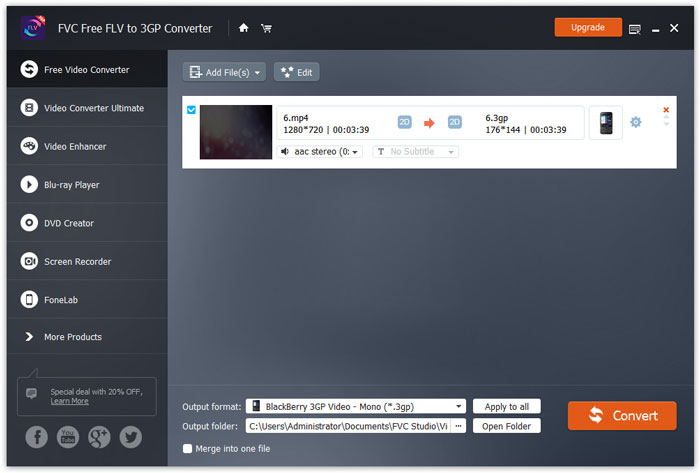
Pas 4. Finalment, selecciona la carpeta de sortida a l’ordinador i fes clic al botó Convert per començar a canviar MP4 a 3GP.
Part 2. Exporta 3GP des de MP4 amb dos convertidors 3GP en línia
En comparació amb la instal·lació d’un convertidor 3GP d’escriptori, utilitzar un convertidor basat en web és molt més senzill i fàcil de convertir MP4 a 3GP. En aquesta part, compartirem 2 convertidors 3GP en línia per ajudar-vos a convertir MP4 a 3GP sense dificultats.
1. FVC Free Video Converter en línia
FVC Free Online Video Converter és una plataforma de conversió de vídeo molt coneguda amb la qual pots convertir formats de vídeo i àudio populars a 3GP, MKV, MOV, WMV, AVI, MP3 i més.
Pas 1. Ves al lloc web oficial de FVC Free Video Converter. Fes clic al botó Add Files to Convert per descarregar i instal·lar el llançador.
Baixa la versió d’escriptori per convertir fitxers per lots.

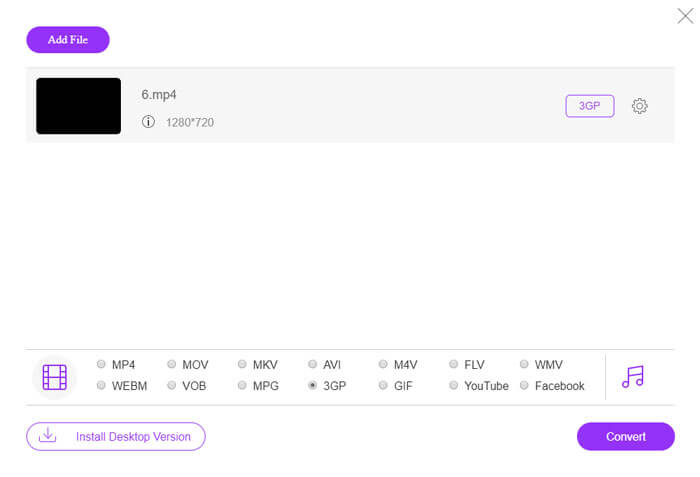
Pas 2. Selecciona els fitxers MP4 de l’ordinador local. Pots fer clic a la icona d’engranatge per ajustar el bitrate de vídeo, la freqüència de mostreig, la velocitat de fotogrames, la resolució i el volum.

Pas 3. Estableix el format de sortida en 3GP a la part inferior. Després fes clic al botó Convert per començar a convertir MP4 a 3GP. Pots convertir per lots diversos fitxers MP4 a 3GP al mateix temps.
2. Zamzar
Zamzar és un convertidor de vídeo en línia, convertidor d’àudio, convertidor d’imatges i convertidor de llibres electrònics. És convenient convertir MP4 a diversos altres formats mitjançant Zamzar. Els passos següents són senzills per convertir MP4 a 3GP.
Pas 1. Ves a zamzar.com/convert/mp4-to-3gp/ i fes clic al botó Add Files per pujar els teus fitxers MP4.
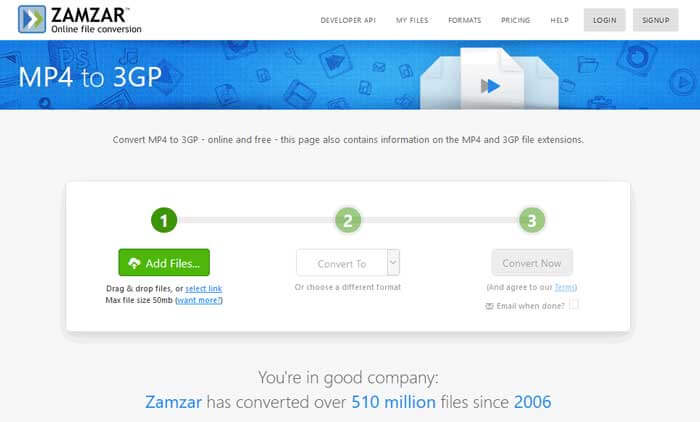
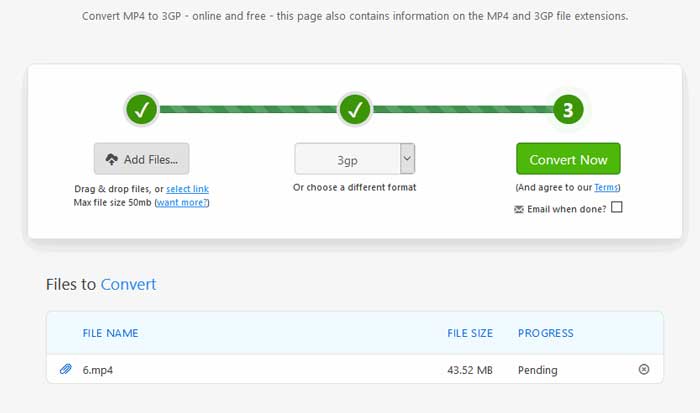
Pas 2. Pots triar un format de sortida diferent. Normalment, s’establirà 3gp com a format de sortida per defecte. Fes clic al botó Convert Now per començar a convertir MP4 a 3GP.
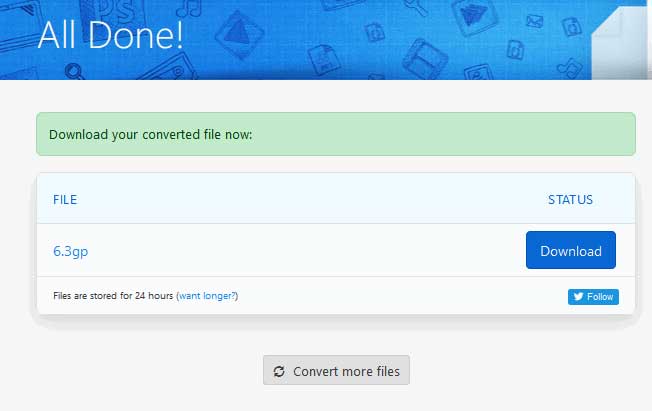
Pas 3. Després es dirigirà a una altra pàgina. Pots fer clic al botó Download per desar el fitxer 3GP convertit a l’ordinador.
Què passa si el teu fitxer MP4 és de gran mida? Consulta aquí com comprimir fitxers MP4.
MP4 contra 3GP
Publicat pel Moving Picture Experts Group (MPEG) l'any 2001, el format MP4 us pot ajudar a desar dades de vídeo, àudio, subtítols i imatges en pistes separades. És l'abreviatura de MPEG-4 Part 14. A més, és un dels formats més populars utilitzats per transmetre i compartir vídeos.
El projecte d'associació de tercera generació (3GPP) va produir el format 3GP/3GPP com a format de contenidor multimèdia. De fet, es basa en el format de fitxer multimèdia ISO. Sovint l'utilitzem per desar fluxos de vídeo/àudio que es transmeten entre telèfons mòbils 3G i en línia.
Part 3. Preguntes més freqüents sobre la conversió de MP4 a 3GP
1. El 3GP és millor que MP4?
El format 3GP està dissenyat per a telèfons mòbils amb xarxa 3G. Pots reproduir fitxers 3GP en reproductors com QuickTime, VLC i RealPlayer. El MP4 és molt més compatible que el 3GP. És universalment compatible amb molts reproductors multimèdia portàtils i telèfons intel·ligents.
2. Què és el 3GP?
3GP és un format de contenidor multimèdia definit per la tercera generació. Pot emmagatzemar vídeos i reproduccions d’àudio que es reprodueixen en telèfons mòbils 3G, però també es poden reproduir en alguns telèfons 2G o 4G.
3. Com puc convertir MP4 a FLV?
Amb l’ajuda de FVC Free Online Video Converter, pots convertir MP4 a FLV en línia fàcilment. Accedeix a aquest lloc en línia i fes clic al botó Add Files to Convert per instal·lar el llançador. Després selecciona els fitxers MP4 de l’ordinador i marca FLV com a format de sortida. Fes clic al botó Convert per convertir MP4 a FLV.
Conclusió
Hem parlat principalment de tres mètodes per convertir MP4 a 3GP a Windows i Mac. Si preferiu una solució en línia, podeu provar FVC Free Online Video Converter o Zamzar en línia. Si voleu editar el fitxer MP4 per a una major perfecció, podeu utilitzar el convertidor FLV gratuït a 3GP. Si teniu solucions millors, no dubteu a deixar un comentari.
-
 3 maneres gratuïtes de convertir MP4 a VOB ràpidament
 Com convertir MP4 a VOB en PC amb Windows i Mac? Per solucionar aquest problema, aquesta publicació compartirà tres millors maneres d'ajudar-vos a convertir MP4 a VOB de forma gratuïta.
-
 Gratuït | 3 millors mètodes per convertir MP4 a WMV sense perdre qualitat
 Aquesta publicació explica com es converteix el vídeo MP4 a format WMV a Mac o Windows. També us oferirem diverses opcions, inclosos programes d'escriptori i convertidors en línia basats en web. A punt per conèixer les millors eines de conversió de MP4 a WMV?
-
 3 mètodes per convertir MP3 a MP4 amb imatge
 Com convertir MP3 a MP4 en alta qualitat? Aquesta publicació mostra 3 mètodes gratuïts i eficients per canviar MP3 a MP4 amb imatges al Windows i al Mac.

