


 Video Converter Ultimate
 Gravadora de pantalla
 Reparació de vídeo
 Baixada segura
Com convertir MP4 a WMV per a Mac / Windows
Abans de presentar una llista suggerida de convertidors de MP4 a WMV, deixa’m preguntar-te alguna cosa sobre formats de vídeo.
Per desar dades de vídeo digital en un ordinador, hem d’utilitzar un format de fitxer dissenyat per a vídeo. Aleshores, quins formats de vídeo coneixes? MP4? WMV? FLV? AVI? Aquests són realment formats de vídeo d’ús comú per emmagatzemar dades de vídeo digital. Però t’has preguntat mai per què hi ha tants formats de fitxer de vídeo? Quina diferència hi ha entre MP4 i WMV?
En general, MP4 és compatible amb gairebé tots els tipus de dispositius del mercat, cosa que significa que podeu reproduir MP4 a tot arreu, fins i tot al reproductor de vídeo predeterminat de l’ordinador o del telèfon. Tot i això, si utilitzeu dispositius Windows, crec que WMV us pot servir millor. No només perquè ha estat desenvolupat per Microsoft, sinó perquè pot desar el vídeo HQ en un petit espai de disc.
Avui aprendràs com canviar un fitxer MP4 a WMV amb els millors convertidors de vídeo que et recomanem.

Part 1. Com convertir MP4 a WMV en línia de forma gratuïta
A més d’instal·lar programari d’escriptori clàssic, avui en dia també és una opció utilitzar convertidors basats en web. Tot i que són simples, molts convertidors en línia són una mica lents durant la conversió. Alguns fins i tot limiten la mida i la quantitat dels fitxers que pengeu i no poden garantir la qualitat dels vídeos de sortida.
Per això et presentem FVC Free Online Video Converter, un convertidor de vídeo gratuït, ràpid i eficient que pot ajudar-te a convertir un munt de vídeos o àudios sense pèrdua de qualitat.
Com a convertidor en línia gratuït de MP4 a WMV multifunció, FVC Video Converter admet gairebé tots els tipus de formats de vídeo. Pots convertir fitxers MP4 de gran mida cap a/des de MKV, MOV, WMV, AVI, TS, etc. També pots editar el teu vídeo segons les teves necessitats. És molt fàcil ajustar el bitrate de vídeo, la taxa de mostreig, la velocitat de fotogrames, la resolució i el volum a FVC. I no hi haurà cap marca d’aigua al teu vídeo després de la conversió.
Ara us pot preocupar que, amb totes aquestes funcions, sigui difícil entendre com operar aquest convertidor. De fet, la veritat és ben contrària. Només cal fer uns quants passos per dominar aquest convertidor de MP4 a WMV.
Pas 1. Fes clic aquí per anar a FVC Free Online Video Converter. Després fes clic a Add Files to Convert per descarregar primer el FVC Launcher.
Baixa la versió d’escriptori per convertir fitxers per lots.
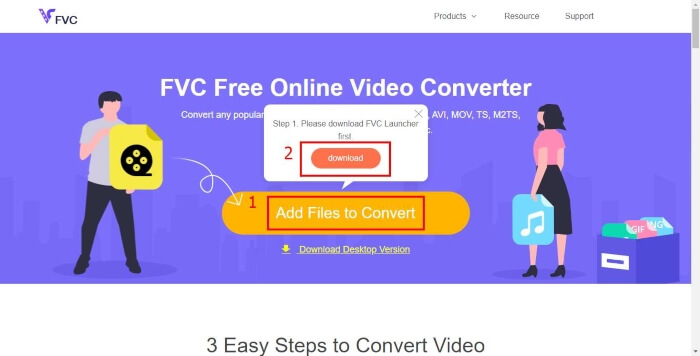
Pas 2. Després d’instal·lar el llançador, apareixerà la finestra Open File. Només cal que trobis el fitxer MP4 que vols canviar.
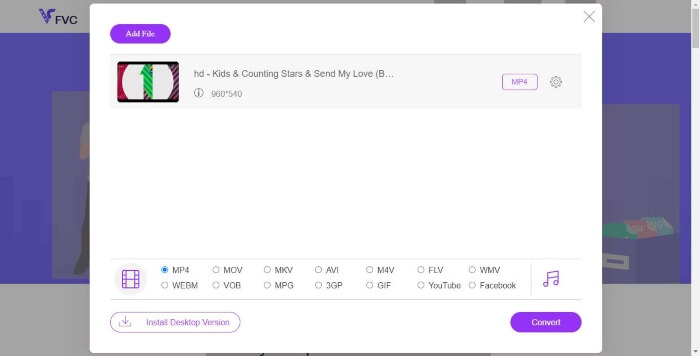
Pas 3. A continuació, a la pàgina de conversió, tria el format de sortida WMV. Per cert, si vols canviar els paràmetres del vídeo, simplement obre la finestra de Configuració fent clic a la icona Setting. Fes clic al botó Convert i tria una destinació per desar el vídeo convertit.
Part 2. Converteix MP4 a WMV amb el programari d'escriptori
1. RealPlayer
RealPlayer s’ha convertit en un dels reproductors multimèdia més populars des de 1995. No només t’ajuda a gestionar fàcilment els teus vídeos, música i imatges, sinó també a convertir vídeos a múltiples formats i transferir-los a altres dispositius mòbils.
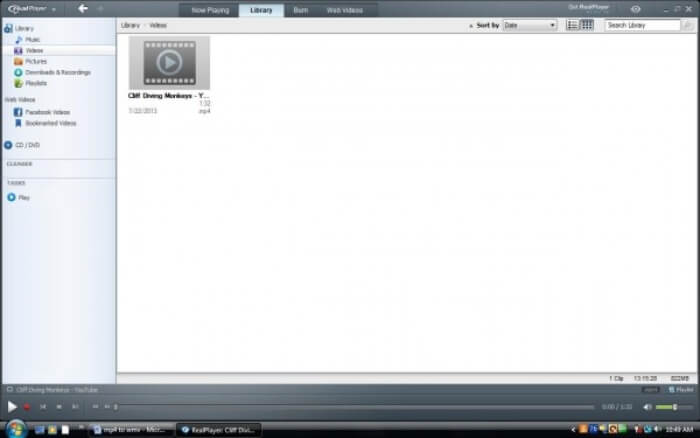
Pas 1. Si RealPlayer està instal·lat a l’ordinador, desa el fitxer MP4 a la biblioteca de RealPlayer. Després d’obrir RealPlayer, selecciona Library. Troba el teu fitxer a la llista de Video.
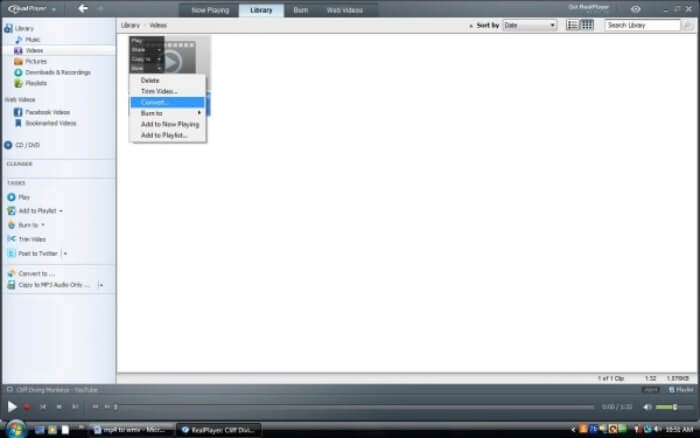
Pas 2. Fes clic al fitxer i selecciona l’opció More al menú emergent. Aleshores selecciona l’opció Convert.
Pas 3. Tria WMV al menú Select a Device i fes clic a OK. Ara fes clic al botó Start. En pocs segons, el teu vídeo estarà a la biblioteca de RealPlayer.
2. Reproductor multimèdia VLC
VLC és un reproductor de codi obert i multiplataforma que pot reproduir vídeos en diferents formats. També admet la conversió de fitxers a molts formats populars. Segueix els passos següents per exportar un fitxer WMV a partir d’un MP4.
Pas 1. Obre VLC Media Player i fes clic a Convert / Save al menú Media.
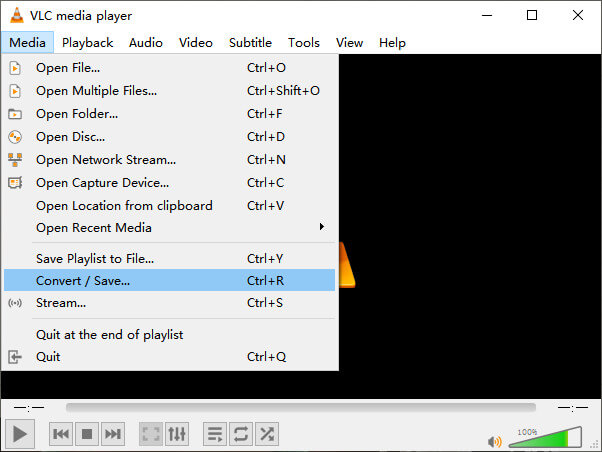
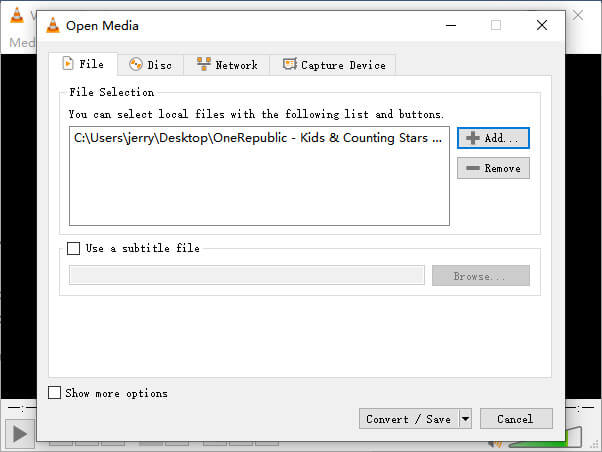
Pas 2. Afegeix el fitxer a VLC. Després fes clic al botó Convert / Save.
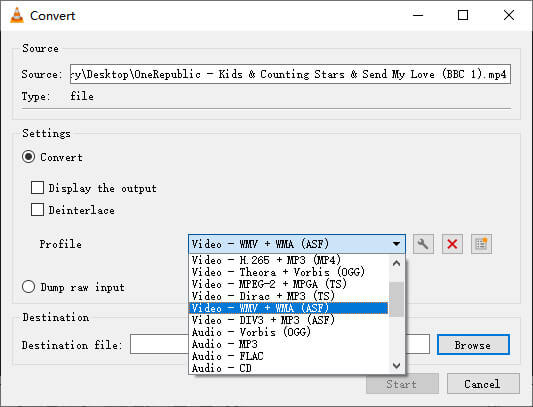
Pas 3. Cerca WMV a Profile i selecciona una carpeta com a destinació per desar el fitxer de sortida. A continuació, fes clic a Start.
MP4 vs. WMV
Publicat pel Moving Picture Experts Group (MPEG) l'any 2001, el format MP4 us pot ajudar a desar dades de vídeo, àudio, subtítols i imatges en pistes separades. És l'abreviatura de MPEG-4 Part 14. A més, és un dels formats més populars utilitzats per transmetre i compartir vídeos.
Produït per Microsoft, WMV era un dels formats de vídeo més comuns als anys 2000. Es pot veure a la xarxa i reproduir-lo per diversos reproductors multimèdia a Windows. I també és el format de fitxer de vídeo predeterminat de Windows Media Player. Però recentment ha estat assumit per altres formats.
Part 3. Preguntes més freqüents sobre la conversió de MP4 a WMV
1. El fre de mà pot convertir MP4 a WMV?
Després d’investigar-ho, per desgràcia la darrera versió de Handbrake no pot convertir MP4 a WMV. És cert que Handbrake admet la majoria de fitxers multimèdia habituals, però això és per a les fonts d’entrada. Les opcions de formats de sortida són MP4(.M4V) i MKV.
2. Puc convertir un fitxer MP4 de més de 100 MB a WMV en línia de forma gratuïta?
Depèn. Diferents convertidors de vídeo en línia gratuïts tenen limitacions diferents. Alguns convertidors com FVC Free Online Video Converter et permeten convertir més de 100 MB. Però alguns altres convertidors poden cobrar-te per això.
3. El Windows Media Player pot convertir MP4 a WMV?
No pots convertir un fitxer MP4 a WMV amb Windows Media Player. Això és perquè només és un reproductor, no un convertidor. Si vols convertir MP4 a WMV, has d’utilitzar un convertidor de vídeo eficient.
4. Puc reproduir fitxers WMV al Mac?
Les eines de vídeo integrades al Mac no poden reproduir fitxers WMV. Però tens altres maneres de reproduir vídeos WMV a macOS. Pots convertir WMV a un altre format compatible amb Mac. O bé instal·lar Windows Media Player for Mac per reproduir fitxers WMV.
Conclusió
Tot i que MP4 i WMV tenen certes semblances, també tenen les seves pròpies característiques. Per tant, has de prendre decisions d’acord amb les condicions específiques. Esperem que, després de llegir aquest article, els problemes de convertir MP4 a WMV ja no siguin un maldecap per a tu. La propera vegada que necessitis un fitxer WMV, només cal que segueixis la guia anterior i converteixis el fitxer fàcilment.
-
 Com convertir els vostres fitxers de vídeo MP4 a imatges GIF animades sense pèrdua de qualitat
 Esteu buscant la millor manera de convertir el vostre vídeo MP4 en GIF animats? Aquí teniu una guia detallada per fer-ho a Photoshop, Windows Movie Maker, convertidor de vídeo en línia i molt més.
-
 Com convertir els vostres fitxers de vídeo FLV a MP4 sense pagar un cèntim
 Aquesta guia comparteix quatre mètodes gratuïts per convertir els fitxers de vídeo FLV a format MP4 a Windows 10/8/7 / XP i Mac OS X, de manera que pugueu gaudir dels vídeos en qualsevol dispositiu.
-
 Com convertir MOV a MP4 sense perdre qualitat
 Voleu convertir fitxers MOV (Apple QuickTime Movie) a MP4? Aquesta publicació comparteix 4 mètodes gratuïts per convertir els fitxers de vídeo MOV a format MP4 a Windows 10/8/7 / XP i Mac OS X.

