


 Video Converter Ultimate
 Gravadora de pantalla
 Reparació de vídeo
 Baixada segura
Mètodes sense problemes per convertir fàcilment MTV a MP4
En l’actualitat, molts usuaris es pregunten com convertir fitxers de vídeo MTV a altres formats. Aquest és un gran dia per a tu, perquè t’ensenyarem els mètodes més efectius que pots utilitzar per convertir diversos fitxers de vídeo. En aquest article també coneixeràs dues aplicacions molt recomanables que et poden ajudar a transformar fitxers. Per tant, llegeix aquest article sense més dilació i aprèn el millor procés per convertir MTV a MP4.

Part 1: Per què cal fer la conversió?
Centenars de plataformes s'ocupen de fitxers de vídeo en l'era digital actual, i cadascuna té les seves pròpies preferències. És possible que hagis gravat un vídeo, però ara l'has de convertir perquè s'adapti als requisits d'una altra plataforma. Aquests són els tres millors motius pels quals necessiteu fer la conversió.
1. La compatibilitat del dispositiu amb el format de fitxer.
Quan transferiu un fitxer d'un dispositiu digital a un altre, sovint podeu trobar problemes de compatibilitat amb el dispositiu. Pot ser perquè un gadget específic afavoreix un format de fitxer sobre un altre i no admet altres. Per exemple, una càmera digital pot estar conservant els seus fitxers de vídeo en un format que el reproductor de vídeo del telèfon pot necessitar ajuda per poder llegir. En aquesta situació, haureu de convertir el vostre vídeo a altres formats com MOV a MP4 o MP4 a MP3, ja que MP4 és actualment el format que rep un gran suport.
2. La mida del fitxer és gran.
La mida del fitxer s'ha de reduir amb freqüència durant la transferència de vídeos per Internet. Per exemple, si teniu un fitxer de mida gran i no el podeu obrir, la millor solució és convertir el vídeo a altres formats de fitxer per comprimir-lo i reduir-ne la mida.
3. Per millorar la taxa de bits del vídeo.
Una taxa de bits és el nombre de bits per segon. S'utilitza per determinar la mida i la qualitat d'un fitxer de vídeo. La qualitat d'un fitxer de vídeo millora amb l'augment de la taxa de bits. No obstant això, una taxa de bits més alta comporta una mida de fitxer més gran, cosa que alenteix la capacitat del vídeo d'emmagatzemar plataformes en línia. Per tant, convertir el vostre vídeo a un fitxer de velocitat de bits moderada és essencial per reproduir-lo ràpidament i fer-lo més satisfactori per als espectadors.
Part 2: manera sense esforç de convertir MTV a MP4
Si voleu un convertidor MTV a MP4 descarregat gratuïtament, feu servir Video Converter Ultimate. Podeu convertir un nombre il·limitat d'arxius de vídeo sense pagar res. Quan es tracta de convertir molts fitxers simultàniament, aquest convertidor fora de línia és fiable. Com que converteix fitxers 30 vegades més ràpid que altres convertidors, també podeu convertir fitxers de manera instantània. A més, aquest convertidor té una interfície fàcil d'utilitzar accessible per a tots els usuaris i fa que sigui fàcil d'utilitzar aquest programa. A més, podeu editar o alterar els vostres vídeos MTV aquí. Els vostres vídeos es poden editar a la longitud desitjada, girar 360 graus, afegir efectes i molt més. A més d'aquestes opcions, també podeu utilitzar vídeos o imatges per crear el vostre GIF.
Funcions
◆ Converteix més de 100 formats de vídeo diferents, com ara MTV, MP4, M4V, MKV, WMV, MOV, AVI, FLV, SWF, MTS, AMV i 3GP.
◆ Proporciona un mètode de conversió per lots.
◆ Ofereix eines per editar vídeos, com ara un creador de GIF, un retallador, un compressor, un retallador, un retallador i un inversor.
Utilitzeu el procés detallat per aprendre a convertir MTV a MP4 sense esforç mitjançant FVC Video Converter Ultimate.
Pas 1: Descarrega i instal·la el Video Converter Ultimate. Fes clic al botó Descarrega que tens a continuació. Obre l’aplicació després del procés d’instal·lació.
Descàrrega gratuïtaPer a Windows 7 o posteriorDescàrrega segura
Descàrrega gratuïtaPer a macOS 10.7 o posteriorDescàrrega segura
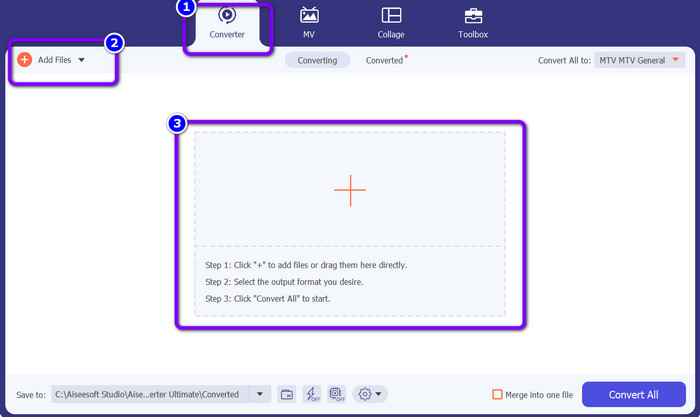
Pas 2: Ves al panell Converter. Després, fes clic al botó Add Files o al símbol Plus per importar el fitxer de vídeo MTV.
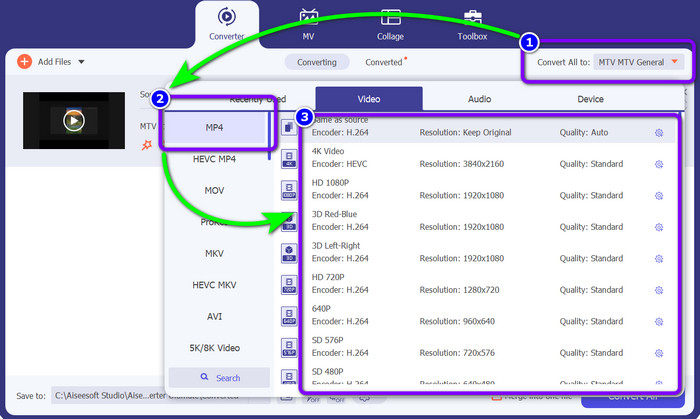
Pas 3: Ves al botó Convert All to i tria el fitxer MP4 entre les opcions de format. A continuació, selecciona la qualitat que prefereixis.
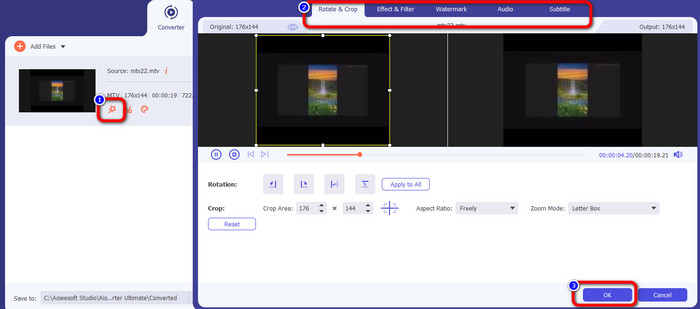
Pas 4: Si vols editar el teu vídeo, ves a la icona Edit. Tot seguit apareixerà una nova interfície a la pantalla. En aquesta interfície podràs girar i retallar vídeos, i afegir marques d’aigua, filtres i molt més. Després d’editar el vídeo, fes clic al botó OK.
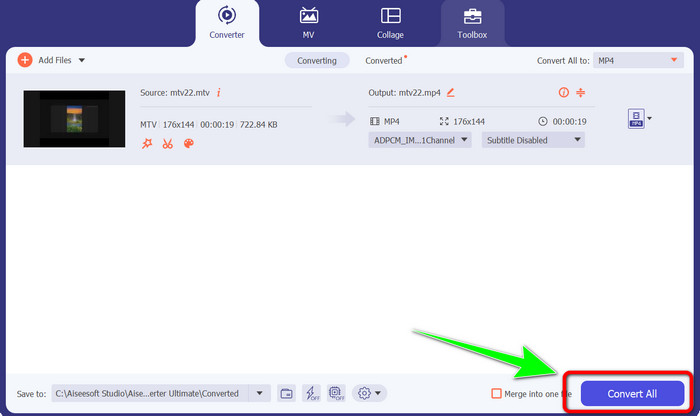
Pas 5: Finalment, fes clic al botó Convert All per convertir el fitxer MTV a format MP4. Espera uns segons que finalitzi el procés de conversió i desa el vídeo a la ubicació designada.
Part 3: el millor mètode per convertir MTV a MP4 en línia
Vols aprendre a convertir MTV a MP4 en línia? Aleshores fes servir FVC Free Video Converter Online. Gràcies a la seva interfície senzilla i fàcil d’utilitzar, pots convertir els teus vídeos amb molta facilitat. Un dels seus punts destacats és la capacitat de conversió per lots, que et permet convertir diversos fitxers alhora. D’aquesta manera no caldrà que hi dediquis temps extra. Aquest programa també et permet canviar la taxa de bits, la freqüència d’imatges i la resolució del vídeo. La resolució es pot canviar a 1920x1080. Així t’assegures de poder reproduir un vídeo d’alta qualitat. A més, també pots convertir fitxers d’àudio. És compatible amb molts tipus de fitxer, com FLAC, MP3, AAC, AC3, WMA, MKA i WAV. També pots modificar la taxa de bits i la freqüència de mostreig de l’àudio. A més, FVC Free Video Converter Online està disponible en tots els sistemes operatius i navegadors, incloent-hi Microsoft Edge, Mozilla Firefox, Safari i Google Chrome. D’aquesta manera no tindràs cap problema, especialment a l’hora de decidir des d’on utilitzar aquest convertidor en línia.
Característiques
◆ Converteix nombrosos formats de vídeo al mateix temps.
◆ Capaç de canviar la resolució, la taxa de bits i la velocitat de fotogrames del vídeo.
◆ Es poden convertir formats d'àudio com MP3, FLAC, MKA, AAC, AC3 i més.
◆ Pot canviar la taxa de bits i la freqüència de mostreig de l'àudio.
Seguiu la guia senzilla següent per convertir fàcilment MTV a MP4 mitjançant FVC Free Video Converter Online al vostre navegador.
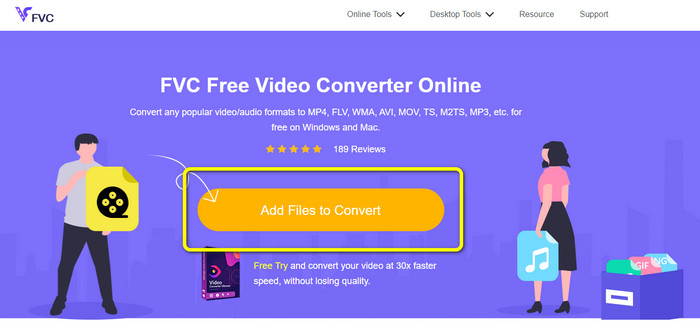
Pas 1: Ves al lloc web oficial de FVC Free Video Converter Online des de qualsevol navegador. Després, fes clic al botó Add Files to Convert per adjuntar el fitxer MTV que vols convertir.
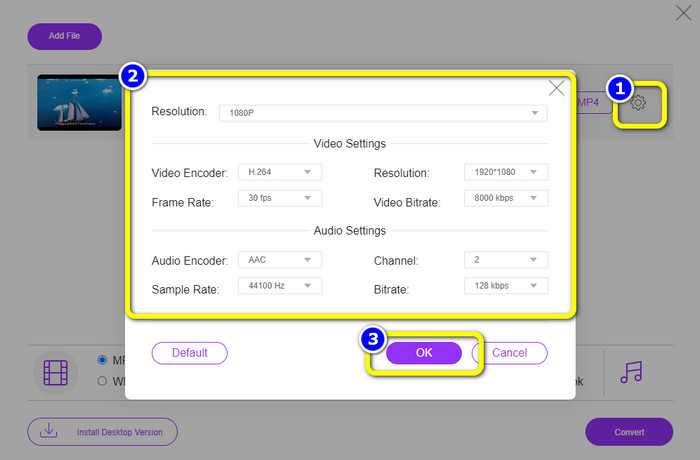
Pas 2: Fes clic a la icona Setting per editar la configuració del vídeo. Pots establir la resolució fins a 1080p. També pots canviar la taxa de mostreig, la taxa de bits i la freqüència de fotogrames de l’àudio i el vídeo. A continuació, fes clic a OK.
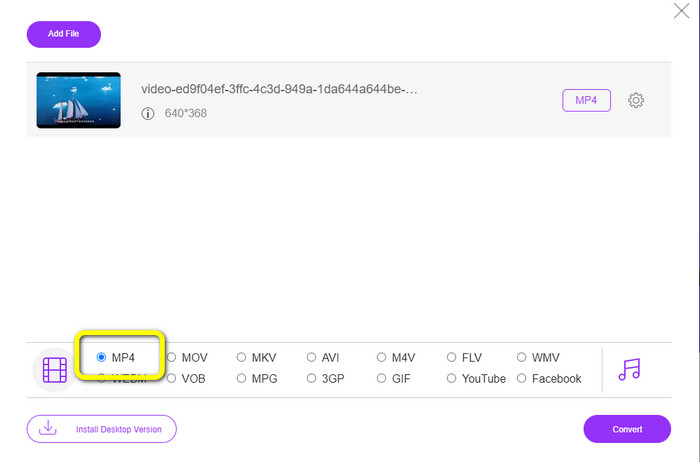
Pas 3: Després, canvia el format de sortida seleccionant el format de fitxer MP4 entre les opcions de format que hi ha a la part inferior de la interfície.
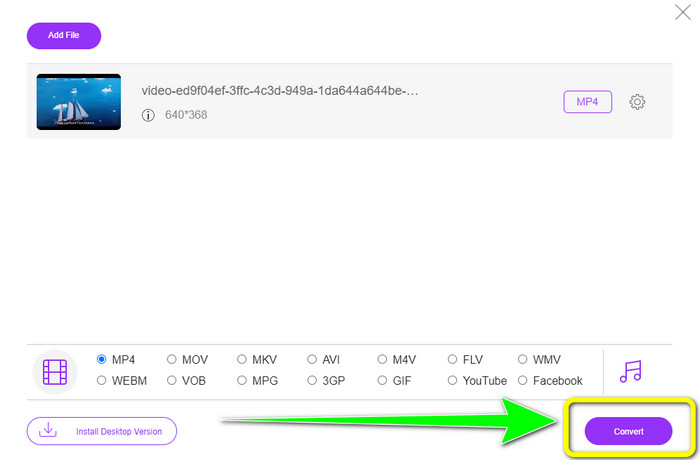
Pas 4: Fes clic al botó Convert per continuar amb el procés de conversió. Després, tria una carpeta de destinació on vulguis desar el fitxer de vídeo.
Per llegir més
2 convertidors més nous per convertir MTV a WMV sense pèrdua de qualitat
Converteix fàcilment MTV a MKV amb aquests convertidors definitius
Part 4: Preguntes freqüents sobre la conversió de MTV a MP4
1. Què és un fitxer MTV?
Un fitxer MTV és un vídeo desat en format MTV, exclusiu d'alguns reproductors de vídeo "MP4" portàtils xinesos. Té àudio MP3 i mostra una cadena d'imatges a una velocitat de fotogrames de 12 per segon mentre es reprodueix. Els fitxers MTV són comparables als fitxers AMV però amb un format diferent.
2. Com puc obrir un fitxer MTV?
Podeu obrir el fitxer MTV amb Video LAN, VLC Media Player o Online Media Technologies AVS Media Player.
3. Què és millor, MKV o MP4?
Quan es tracta de compatibilitat, MP4 és millor que els fitxers MKV. MP4 té una compatibilitat més àmplia i podeu reproduir aquest fitxer a qualsevol plataforma.
Conclusió
Convertir MTV a MP4 és fàcil un cop coneixes l’eina adequada. Aquest article ha presentat el millor mètode per convertir MTV a MP4 sense esforç utilitzant aplicacions en línia i fora de línia. A més, disposen de funcions úniques que podràs gaudir. Per tant, si vols convertir més fitxers de vídeo de manera fàcil i instantània, fes servir Video Converter Ultimate i FVC Free Video Converter Online.
-
 2 maneres efectives de com convertir MTV a MOV a Mac [2023]
 Voleu convertir els vostres fitxers MTV a MOV i utilitzar-los al vostre Mac? Per tant, fem una ullada als 2 convertidors que podeu utilitzar per convertir els vostres fitxers .mtv a un nou format .mov.
-
 Convertidors de MTV a FLV sense problemes per canviar MTV a FLV
 Esteu provant nous convertidors que converteixin MTV a FLV? Llegiu aquest article per conèixer aquests convertidors de MTV a FLV, que són els convertidors més importants entre els altres convertidors.
-
 2 procediments extraordinaris per convertir AMV a MP4 ràpidament
 Saber com convertir AMV a MP4 amb aquests convertidors de vídeo. També aprendràs les instruccions més accessibles i detallades d'AMV i MP4
