


 Video Converter Ultimate
 Gravadora de pantalla
 Reparació de vídeo
 Baixada segura
Com convertir MXF a MP4 mitjançant Free Converter
When you take the professional camcorders like Sony, Panasonic, Canon, etc., to record the videos, the videos will be exported as MXF. There are no difficulties to play the MXF files via your camcorder. However, once you want to edit the MXF files on Windows Movie Maker, iMovie, or play it on your QuickTime player or Android phone, MXF files get stuck. The solution to fix it is to convert MXF to MP4, which is the most popular video format accepted by almost editors and players.
Això és el que compartirem en aquest post, 4 maneres de convertir MXF a MP4 amb els convertidors MXF gratuïts. Sense cap habilitat i ho podeu fer fins i tot si sou principiants.

Part 1. Com convertir de franc MXF a MP4 en línia (el més fàcil)
La forma més senzilla de convertir MXF a MP4 és fer servir el convertidor de vídeo en línia gratuït. Hi ha diversos convertidors MXF en línia, que podeu transcodificar MXF a MP4 sense descarregar cap convertidor.
Free Online Video Converter is the easy video converter supports a variety of video and audio formats. It can convert MXF files into MP4, FLV, WMA, AVI, MOV, TS, M2TS, MP3, etc. for free on Windows and Mac. Moreover, you can adjust the video codec, resolution, sample rate, etc., for the output MP4 file. Besides, it supports batch conversion, so that you can convert multiple MXF files into MP4.
Pas 1. Afegiu fitxers MXF
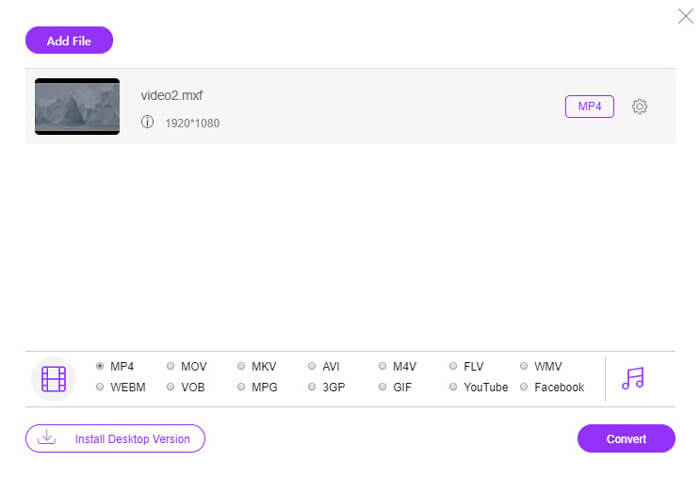
Click Add Files to Convert, then a pop-up window appears, and you need to download and install the convert launcher. After the successful installation, a window will show that you can select the MXF files that you want to convert.
Pas 2. Converteix MXF a MP4
Select the checkbox of MP4 at the bottom, and then click Convert, then it will pop up a window to select the destination to save the converted files. Then, it will start converting MXF to MP4. After the successful conversion, it will download the converted MP4 files into your computer automatically.
Si no voleu convertir fitxers MXF en línia per protegir la privadesa, moveu el següent mètode per convertir MXF a l'ordinador.
Part 2. Com convertir gratuïtament MXF a MP4 mitjançant VLC a l'ordinador
VLC, no és el reproductor multimèdia gratuït, però pot ser el convertidor de vídeo gratuït per canviar MXF a MP4 al vostre ordinador. A continuació es mostren els passos.
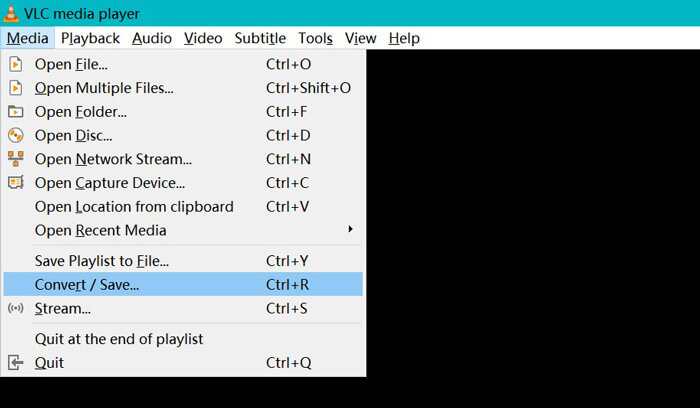
Step 1. Free download VLC on your computer and run it immediately. Click Media to select Convert / Save.
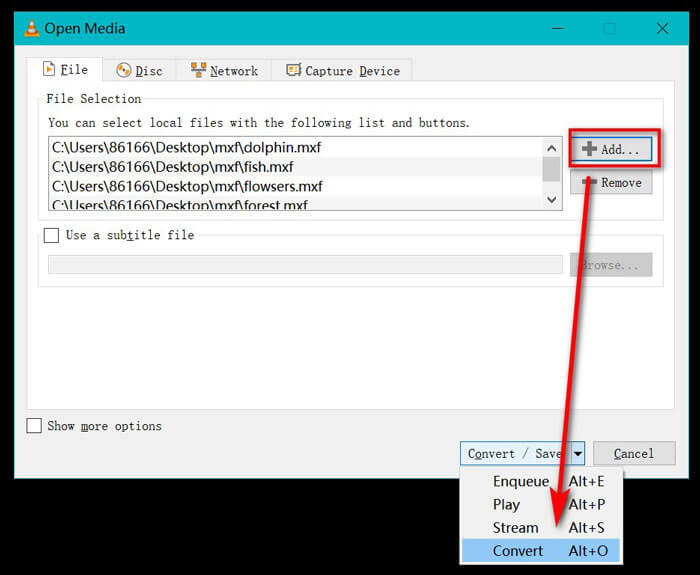
Step 2. In the Open Media window, you should click the Add button to import the MXF files into this program. After that, click Convert from the drop-down option of Convert / Save.
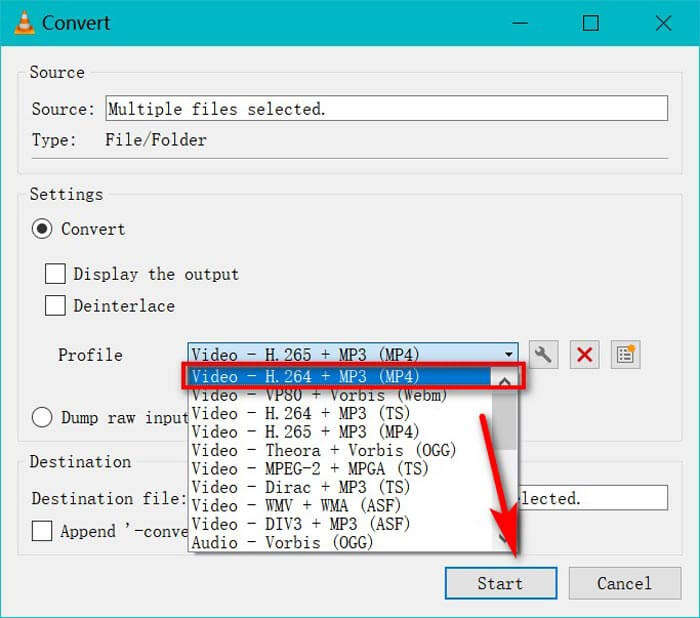
Step 3. Select MP4 as the output format from the drop-down list of Profile.
Choose the Destination file to choose the location to store the converted MP4 files.
Click Start to convert changing MXF to MP4 via VLC.
No obstant això, es necessita més temps per convertir MXF a MP4 mitjançant VLC, ja que VLC enregistrarà els fitxers MXF i els guardarà a MP4. Si necessiteu el convertidor MXF, moveu el següent mètode.
Part 3. Com alliberar MXF a MP4 amb HandBrake
HandBrake és el programari de conversió de vídeo de codi obert a Windows, Mac i Linux. Pot processar fitxers multimèdia i DVD / Blu-ray més comuns en MP4 i MKV en codecs H.265, H.264, VP9 / 8, AAC, MP3, FLAC, AC3, etc.
Ara, obtenim el convertidor de vídeo MXF gratuït per convertir MXF a MP4.
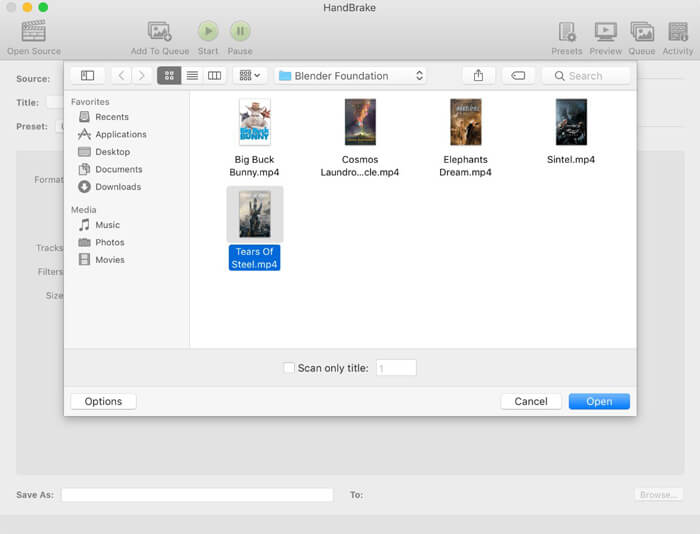
Step 1. Free download and run HandBrake. By default, HandBrake will present the Open Source dialog on running. Then you can select the MXF files you want to convert.
Step 2. Select MP4 File from Format, and you are optionally to preset the video resolution, and add the filter effects, etc., into the output file. Do not forget to set the destination to save the converted MP4 file by clicking Browse.
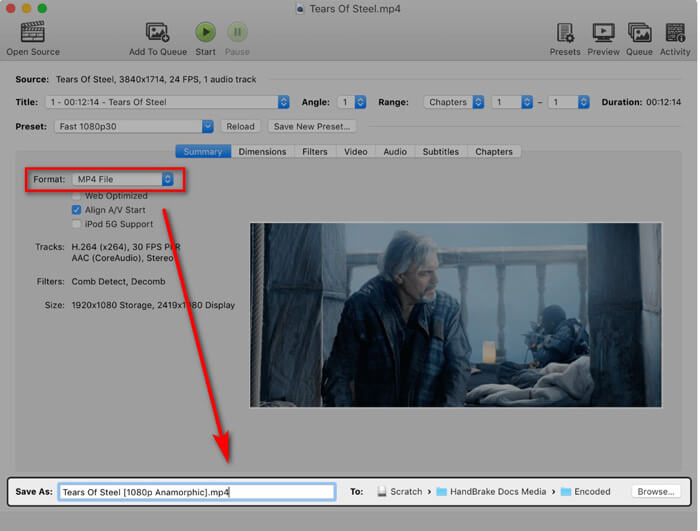
Finalment, feu clic al botó Inicia a la part superior per començar a codificar fitxers MXF en pel·lícules MP4.
Podeu trobar el progrés mentre s'està convertint i us avisarà quan hagi acabat.
Això és tot el que hi ha.
Part 4. Preguntes més freqüents sobre la conversió de MXF a MP4
Quin és el format de fitxer MXF?
MXF és el format de fitxer estàndard per a vídeo i àudio. És creada per càmeres de vídeo com Sony (OP1a), Panasonic (OP-Atom, OP1b) i altres dispositius de gravació de vídeo. Un dels exemples típics de l’ús del fitxer MXF és publicar anuncis a les estacions de televisió i arxivar sense tap de programes de televisió emesos.
MXF VS MP4, quin és millor?
Tant MXF com MP4 són el format contenidor, però MP4 pot contenir subtítols i imatges, a part de vídeo i àudio. Quant a la compatibilitat, MP4 és més popular que MXF. Com a format redundant i detallat, MXF és més fàcil de reparar que MOV o MP4. En termes de llicència, el fitxer MP4 està gravat per patents, mentre que el fitxer MXF està obert estàndard i lliure de patents. És difícil decidir quin és millor i el millor que desitgeu segons les vostres necessitats.
Puc utilitzar FFmpeg per convertir MXF a MP4?
Si, tu pots. FFmpeg pot convertir MXF a MP4. Només cal afegir els codis. Tot i això, el mètode no és una bona opció per als principiants. El mètode de conversió de MXF a MP4 mitjançant FFmpeg és per als professionals.
Conclusió
Si canvieu el fitxer MXF a vídeo MP4, podeu visualitzar o editar els fitxers MXF en quin dispositiu teniu. Hi ha una gran varietat de convertidors de vídeo MXF que podeu utilitzar per fer la conversió i aquí reunim els 3 convertidors gratuïts de MXF a MP4.
Quin mètode és el vostre preferit?
Deixa els teus comentaris a continuació.
-
 Com convertir els vostres fitxers de vídeo MP4 a imatges GIF animades sense pèrdua de qualitat
 Esteu buscant la millor manera de convertir el vostre vídeo MP4 en GIF animats? Aquí teniu una guia detallada per fer-ho a Photoshop, Windows Movie Maker, convertidor de vídeo en línia i molt més.
-
 Com convertir els vostres fitxers de vídeo FLV a MP4 sense pagar un cèntim
 Aquesta guia comparteix quatre mètodes gratuïts per convertir els fitxers de vídeo FLV a format MP4 a Windows 10/8/7 / XP i Mac OS X, de manera que pugueu gaudir dels vídeos en qualsevol dispositiu.
-
 Com convertir M2TS a MOV a Windows / Mac (en línia / fora de línia)
 Necessiteu convertir M2TS a MOV per reproduir fitxers de vídeo en diversos reproductors i plataformes? Aquest article us ajudarà a trobar el millor mètode en línia / fora de línia per convertir M2TS a MOV a Windows / Mac.
