


 Video Converter Ultimate
 Gravadora de pantalla
 Reparació de vídeo
 Baixada segura
3 maneres gratuïtes de convertir fitxers VOB a MP4 a Windows / Mac / en línia
El VOB es coneix com a format de fitxer DVD Video Object. Per tant, els discs DVD guarden els fluxos de vídeo, àudio i subtítols per defecte en format VOB. Pel que fa a MP4, és un format de contenidor popular per emmagatzemar dades de vídeo, àudio i subtítols. La comparació més gran entre VOB VS MP4 és la compatibilitat. Gairebé tots els dispositius i reproductors portàtils poden reproduir vídeos MP4. Aquesta és la raó més important per convertir VOB a format MP4.
A més, els fitxers VOB sempre tenen una mida gran. Per estalviar espai d’emmagatzematge i solucionar el problema d’incompatibilitat, convertir una VOB a MP4 és una bona opció. Podeu emmagatzemar el mateix contingut de vídeo amb una qualitat bastant bona i una mida de fitxer molt més petita. Com a resultat, podeu reproduir vídeos VOB al telèfon o a l'ordinador directament després de convertir-los al format MP4.

Part 1: Com convertir VOB a MP4 en línia en lots
Hi ha algun convertidor en línia de VOB a MP4 que admeti la conversió per lots? És clar que sí. Es tracta de FVC Free Online Video Converter, que permet als usuaris convertir per lots fitxers VOB a MP4 gratuïtament en línia. No hi ha cap límit màxim de temps. No cal que us preocupeu per la mida massa gran dels fitxers. Així doncs, si esteu buscant un convertidor de VOB a MP4 en línia sense límits, FVC Free Online Video Converter pot ser la vostra primera opció.
- • Converteix per lots fitxers VOB a MP4 mantenint la qualitat original.
- • Sense límit de mida de fitxer. Podeu convertir fitxers VOB grans a MP4 de forma gratuïta.
- • Ajusteu la resolució de vídeo, la freqüència de mostreig, la freqüència de fotogrames i molt més abans d’exportar VOB al format MP4.
- • Sense filigrana. Els vostres vídeos MP4 convertits no estaran completament filigranats.
Pas 1: Feu clic a Add Files to Convert i instal·leu el llançador. A la finestra emergent, navegueu i afegiu el vostre fitxer VOB.
Pas 2: A la part inferior del convertidor de vídeo en línia, establiu MP4 com a format de sortida de vídeo.
Pas 3: Feu clic a la icona de gear del costat per ajustar la configuració del vídeo de sortida.
Pas 4: Feu clic a Convert per convertir VOB a MP4 en línia de manera gratuïta.
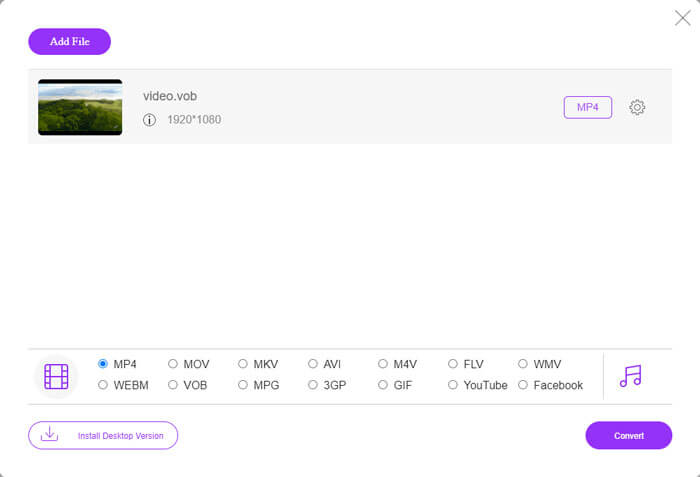
Aquest convertidor gratuït en línia a MP4 també pot canviar altres formats, com M2TS, MTS, MOV, MKV, WMV, TS, etc., a MP4.
També té una versió d'escriptori per provar:
Descàrrega gratuïtaPer a Windows 7 o posteriorDescàrrega segura
Descàrrega gratuïtaPer a macOS 10.7 o posteriorDescàrrega segura
Part 2: Com convertir VOB a MP4 a Windows (amb VLC)
VLC pot ser la vostra aplicació gratuïta de conversió VOB a MP4 per a usuaris de Windows, Mac, iOS i Android. Podeu convertir el fitxer VOB a MP4 al vostre telèfon o ordinador amb facilitat. Aquí us mostrarà com convertir VOB a MP4 a Windows 10 mitjançant VLC Media Player.
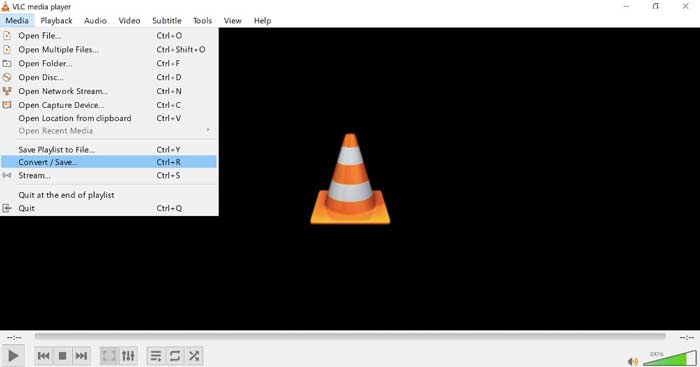
Pas 1: Executeu VLC. Trieu Convert/Save de la llista Media a la part superior.
Pas 2: Feu clic a Add a la finestra Open Media. Navegueu i importeu un vídeo VOB a VLC.
Pas 3: Trieu Convert des de Convert/Save a l’angle inferior dret.
Pas 4: A la secció Profile, establiu MP4 com a format de sortida de vídeo.
Pas 5: Feu clic a Start per començar a canviar fitxers VOB a MP4 amb VLC.
Part 3: Com convertir VOB a MP4 al Mac (amb HandBrake)
HandBrake és un convertidor de vídeo de codi obert que pot convertir VOB a MP4 de forma gratuïta a Windows, Mac i Linux. És compatible per convertir diversos fitxers VOB a MP4 alhora. Tot i que la velocitat de conversió de vídeo no és ràpida.
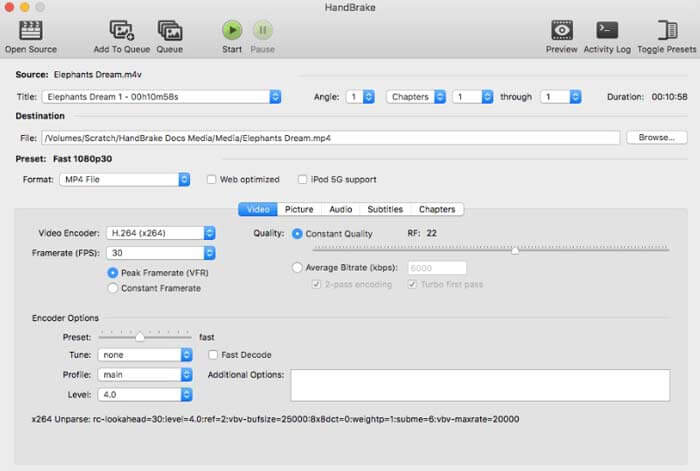
Pas 1: Executeu HandBrake. Feu clic a Open Source per afegir el fitxer VOB de DVD.
Pas 2: Feu clic a Browse per establir una nova carpeta de destinació.
Pas 3: A la secció Preset, seleccioneu MP4 de la llista Format.
Pas 4: Gestioneu les altres opcions de sortida de vídeo.
Pas 5: Feu clic a Start per convertir VOB a MP4 al Mac amb HandBrake.
-
Part 4: Preguntes més freqüents sobre la conversió de VOB a MP4
Com convertir VOB a MP4 mitjançant FFmpeg?
FFmpeg és un bon convertidor de VOB per a usuaris de Windows i Mac. Tanmateix, FFmpeg no és fàcil d’utilitzar i implementar per als principiants. Si esteu familiaritzats amb les línies d’ordres, podeu escriure ffmpeg -i input -acodec libfaac -vcodec mpeg4 -b 1200k -mbd 2 -flags+mv4+aic -trellis 2 -cmp 2 -subcmp 2 -metadata title=filename output.mp4 a la finestra de FFmpeg. A continuació, premeu la tecla Enter per convertir VOB a MP4 amb FFmpeg.
Es pot convertir VOB a MP4 mitjançant el reproductor de Windows Media?
El Windows Media Player només pot ser el vostre reproductor VOB. Podeu reproduir un fitxer VOB al reproductor de Windows Media. Per cert, la primera vegada que reproduïu fitxers VOB al Windows, haureu de descarregar còdecs.
Com es reprodueixen fitxers VOB a iPhone i Android?
Els telèfons mòbils no admeten nativament VOB. Cal instal·lar un reproductor VOB, com ara VLC Media Player. O podeu canviar VOB a altres formats per comprimir la mida del fitxer amb eficàcia. Per exemple, podeu crear fitxers VOB des de MP4 per obtenir la reproducció d’iPhone i Android.
Quin és el millor convertidor de VOB a MP4? Diferents persones tenen respostes diferents. Algunes persones volen convertir VOB a MP4 per lots sense pèrdua de qualitat, mentre que d’altres se centren més en la interfície intuïtiva, funcions avançades i molt més. Sigui el que sigui, si no voleu instal·lar res més, però necessiteu convertir fitxers VOB grans a MP4, el convertidor de vídeo en línia gratuït FVC és la vostra bona opció. Podeu convertir per lots fitxers VOB a MP4 en línia sense límit ni filigrana.
Més lectura-
 Com convertir M2TS a MP4 sense reduir la qualitat
 Voleu convertir el vídeo de càmera de vídeo HD a MP4 comú? Aquí teniu 5 maneres senzilles i gratuïtes de canviar el fitxer M2TS a MP4 a Windows i Mac.
-
 Com convertir MOV a MP4 sense perdre qualitat
 Voleu convertir fitxers MOV (Apple QuickTime Movie) a MP4? Aquesta publicació comparteix 4 mètodes gratuïts per convertir els fitxers de vídeo MOV a format MP4 a Windows 10/8/7 / XP i Mac OS X.
-
 Com editar i convertir fitxers M2TS de forma gratuïta
 Com puc editar fitxers M2TS de forma gratuïta? Hi ha alguna manera de convertir fitxers M2TS? En aquesta guia, us mostrarem el millor editor M2TS gratuït per ajudar-vos a editar i convertir fitxers M2TS amb facilitat.
-
