


 Video Converter Ultimate
 Gravadora de pantalla
 Reparació de vídeo
 Baixada segura
Es poden reproduir fitxers MKV a PS3? Aquí teniu la millor manera de reproduir fitxers MKV a PS3
La Play Station 3 no és només una consola de videojocs, també es pot utilitzar com a reproductor multimèdia per veure arxius de vídeo a la Sony PS3 des d'una unitat USB. Si has recopilat moltes pel·lícules en format MKV i les vols reproduir a la PS3, pots llegir aquest article per aprendre a reproduir arxius MKV a la PS3.

Part 1. Com convertir i reproduir fitxers MKV a PS3
Com que la PS3 no és compatible amb el format MKV, has de convertir els MKV a formats compatibles amb la PS3 si vols reproduir MKV a la PS3 amb llibertat. Per convertir vídeos MKV a arxius de vídeo admesos per la PS3, es recomana especialment Video Converter Ultimate. És un convertidor de vídeo professional dissenyat perquè els usuaris puguin convertir entre diversos formats de vídeo i àudio, com ara MKV a MP4, MOV a MP4, WMV a PS3, etc. Proporciona perfils de vídeo optimitzats per a la PS3. Pots convertir qualsevol format de vídeo a formats compatibles amb la PS3 en només uns quants clics.
A part d’això, el programa també té funcions d’edició de vídeo que us permeten retallar la mida del marc, afegir filigrana, aplicar efectes de vídeo, carregar subtítols, combinar diversos vídeos en un sol fitxer, retallar parts no desitjades del vídeo i molt més. Només heu de descarregar i instal·lar el programari a l'ordinador i provar-ho.
Descàrrega gratuïtaPer a Windows 7 o posteriorDescàrrega segura
Descàrrega gratuïtaPer a macOS 10.7 o posteriorDescàrrega segura
Pas 1. Afegiu fitxers MKV
Instal·leu i inicieu el convertidor MKV a PS3 i feu clic al botó Afegeix fitxers per carregar fitxers .mkv des del vostre ordinador. Per estalviar temps, podeu afegir diversos fitxers MKV alhora i convertir-los simultàniament.

Pas 2. Trieu PS3 com a format de sortida
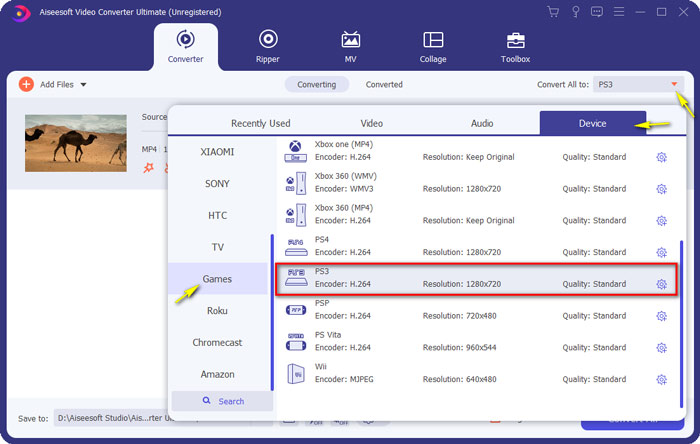
Després de carregar els teus arxius MKV, obre el menú Convert All to, tria la categoria Device i baixa fins que trobis el format de sortida PS3 a la pestanya Game.
Pas 3. Inicieu la conversió de MKV a PS3
A continuació, ves al camp Save to i especifica la carpeta de destinació on es desarà el fitxer convertit. Finalment, fes clic al botó Convert All per començar a convertir els teus arxius MKV al format per a PS3.

Pas 4. Reprodueix fitxers MKV convertits a PS3
Quan acabi la conversió, pots posar els vídeos convertits dins d'una carpeta anomenada VIDEO i després copiar-los a una unitat USB. Tot seguit, connecta la unitat USB a la PS3, ves a VIDEO i localitza el teu dispositiu. Prem el botó Triangle per veure tot el contingut. Després, tria el fitxer de vídeo que vols reproduir i prem X per començar a gaudir-lo. Ara pots veure els teus arxius MKV preferits a la PS3 en qualsevol moment i lloc.
Part 2. Reprodueix vídeos MKV amb PS3 Alternative
Si busques una manera gratuïta i directa de veure arxius MKV a l'ordinador, utilitza FVC Free Video Player. Com que és una solució basada en el web, pots reproduir els teus arxius MKV de manera fluida sense descarregar cap programa a l'ordinador.
Funcions principals de FVC Free Video Player
1. Suport de reproducció de vídeos 4K, HD i SD de tots els formats.
2. També reprodueix fitxers d'àudio, com MP3, AAC, etc. amb una qualitat sense pèrdues.
3. Ús totalment gratuït, sense registre ni descàrrega.
4. Interfície neta i intuïtiva.
5. Servei basat en web, accessible a qualsevol navegador.

Part 3. Preguntes més freqüents sobre la reproducció de fitxers MKV a PS3
Quins fitxers de vídeo pot reproduir PS3?
Els tipus de fitxers compatibles de PS3 següents són MPEG, MP4, AVI, AVCHD, DivX, etc.
Puc reproduir MKV a PS3 sense convertir?
MKV té molts estàndards i només es pot suportar H.264 / MPEG-4 AVC a la PS3. Si els vostres fitxers MKV presenten altres formes, els haureu de convertir a formats compatibles amb PS3 per facilitar la reproducció.
Com es reprodueixen fitxers MKV a PlayStation 3 des de USB?
Com que la PS3 no pot descodificar directament fitxers MKV, hauríeu de convertir MKV al fitxer de vídeo compatible amb PS3. Després d'obtenir el fitxer convertit, connecteu la unitat flash USB a un dels dos ports USB situats a la part frontal de la PlayStation 3. Engegueu la PS3, aneu a Vídeo i seleccioneu la unitat USB. A continuació, premeu el botó triangle i trieu Mostra-ho tot. Ara podeu seleccionar el vídeo que vulgueu reproduir o veure. Finalment, premeu el botó X.
Conclusió
En definitiva, espero que tots els usuaris de PS3 puguin esbrinar com reproduir vídeos MKV a la PS3 amb èxit després de llegir aquest article. A banda de la PS3, també pots reproduir els teus arxius MKV al Windows Media Player, amb FVC Free Video Player o amb altres reproductors multimèdia MKV.
-
 El reproductor VLC no reproduirà MKV, com solucionar-ho
 El reproductor VLC admet fitxers MKV? Per què VLC no reproduirà MKV? Aquesta publicació comparteix 4 consells útils perquè el reproductor VLC no reprodueixi fitxers MKV.
-
 Com reproduir fitxers MKV a l'iPad 2021
 Com es reprodueixen fitxers MKV a l'iPad 2? Puc convertir MKV a MP4 per reproduir-lo a l'iPad Pro / Air / 2? Aquesta publicació comparteix 2 maneres fàcils de reproduir MKV a l'iPad.
-
 MKV a MOV - Com convertir MKV a MOV
 Com puc convertir MKV a MOV a Mac? Pot iMovie llegir MKV? Què significa el format MOV? Aquesta publicació explica dues maneres senzilles d'ajudar-vos a convertir MKV a MOV amb convertidors de vídeo gratuïts en línia i professionals.
