


 Video Converter Ultimate
 Gravadora de pantalla
 Reparació de vídeo
Descobriu maneres de reproduir fitxers MKV a PS4
No només la Xbox One S admet la reproducció de pel·lícules. Ara la PS4 també intenta seguir aquesta tendència. Amb l’ús d’un cable USB i mitjançant DLNA, la PS4 pot reproduir MKV, MP4, AVI i molts altres formats. Això vol dir que l’MKV forma part dels fitxers que pots reproduir. Per veure la llista completa dels formats admesos, visita el lloc web oficial de la PS4. A més, no seguiries llegint aquest article si no estiguessis interessat a reproduir un fitxer MKV a la PS4. Continua llegint, a mesura que avancis descobriràs maneres de reproduir MKV a la PS4.

Part 1. Es poden reproduir tots els fitxers MKV a PS4?
Puc reproduir fitxers MKV a PS4? Segur que pots. El format de fitxer MKV és compatible amb PS4. Però no tots els fitxers MKV es poden reproduir correctament. És possible que experimenteu un fracàs en jugar-lo. Això es deu al fet que heu de complir l'estàndard establert per PS4. Majoritàriament, s'admeten H.264/MPEG-4 AVC. S'apliquen les mateixes regles si voleu reproduir fitxers MKV des d'una unitat USB. Mentrestant, per a àudio MP3, AAC LC, AC-3 són compatibles. La majoria d'aquests formats són formats Dolby Digital. Si creieu que heu complert l'estàndard, podeu seguir els passos sobre com reproduir MKV a PS4 directament.
Pas 1. Descarrega i instal·la DivX Media Server i obre el reproductor. Després habilita la compartició al teu ordinador.
Pas 2. Puja o importa el fitxer MKV al servidor.
Pas 3. Abans de passar al següent pas, assegura’t que tant l’ordinador com la PS4 estan connectats a la mateixa xarxa Wi-Fi. A continuació, descarrega i instal·la el reproductor multimèdia DivX a la teva PS4. Després, obre l’aplicació de reproductor multimèdia de la PS4 i tria DivX Media Server de la llista de dispositius que apareixeran.
Pas 4. Finalment, busca Vídeo, marca el vídeo que vols reproduir i comença a emetre’l en streaming.
Part 2. Guia pas a pas sobre com reproduir MKV a PS4 des d'USB
Mentrestant, si utilitzeu un emmagatzematge USB, assegureu-vos que tingui format FAT o exFAT, o bé no es detectarà. Si creieu que esteu preparat i la unitat flaix és compatible, consulteu la guia pas a pas a continuació.
Pas 1. Encén la PS4 i insereix el dispositiu USB. Ves al Menú principal. Ara selecciona Vídeo i busca el nom de la teva unitat USB.
Pas 2. Quan vegis la llista de noms de fitxer, fes clic a Mostra-ho tot per veure la llista completa de fitxers que has desat al teu USB. Copia el fitxer i transfereix-lo a la PS4.
Pas 3. Finalment, assegura’t que encara tens prou espai d’emmagatzematge per completar la transferència.
Part 3. Manera alternativa de jugar a MKV a PS4 mitjançant Plex Server
A més de DivX, també hi ha un altre reproductor que pots utilitzar per reproduir MKV a la PS4. Es tracta d’un servidor multimèdia en streaming anomenat Plex. Aquest servidor multimèdia et permet reproduir vídeos d’alta qualitat, música, sèries de TV i podcasts des del teu ordinador. Encara que algunes persones tenen problemes per reproduir alguns fitxers MKV, el pots seguir utilitzant com a alternativa. Mentrestant, si realment vols fer servir Plex i reproduir un fitxer incompatible, hauries de considerar convertir el vídeo. Hi ha conversors capaços de transformar els teus fitxers MKV en un format compatible amb Plex. Ajustant el còdec de vídeo, la taxa de fotogrames, el bitrate i altres paràmetres, és possible. Hi ha alguna eina capaç de fer això? Sí, n’hi ha, pots provar Video Converter Ultimate. Sí, aquesta eina és capaç de fer-ho. Prova d’utilitzar-la per resoldre aquest problema.
Pas 1. Descarrega i instal·la Video Converter Ultimate al teu PC.
Descàrrega gratuïtaPer a Windows 7 o posteriorDescàrrega segura
Descàrrega gratuïtaPer a macOS 10.7 o posteriorDescàrrega segura
Pas 2. Afegeix els fitxers que vols convertir fent clic a Afegeix fitxers o simplement arrossega i deixa anar el fitxer a la interfície.
Pas 3. Després, tria el format compatible amb Plex fent clic al desplegable Converteix-ho tot a.
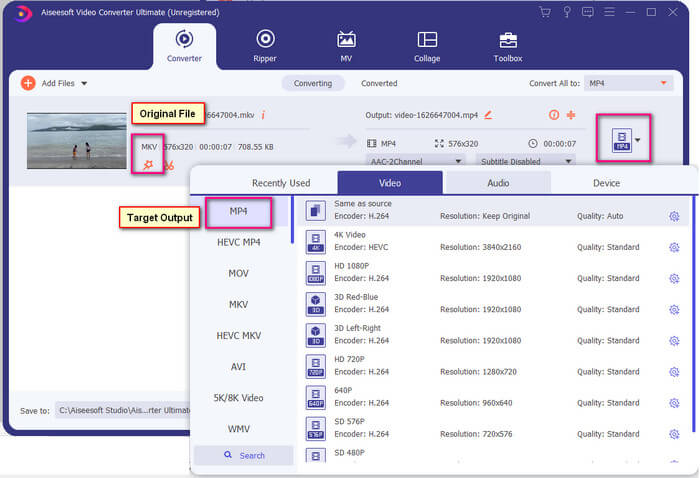
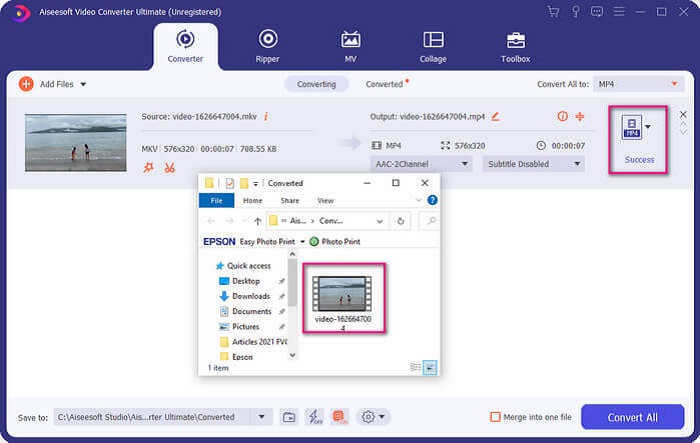
Pas 4. Un cop hagis establert el format, fes clic al botó Converteix-ho tot per iniciar el procés de conversió. Quan la conversió hagi finalitzat, se t’obrirà la carpeta on s’ha desat el fitxer.
Hi ha més coses amb el convertidor de vídeo Ultimate. Podeu consultar la llista d'avantatges i desavantatges a continuació per conèixer altres bones funcions que ofereix.
● Aquesta eina converteix només tres segons.
● Té tecnologia d'acceleració que pot millorar el fitxer convertit.
● Admet qualitat HD.
● Té funcions d'edició com afegir filtres i efectes bàsics.
● Podeu ajustar els subtítols i la pista d'àudio.
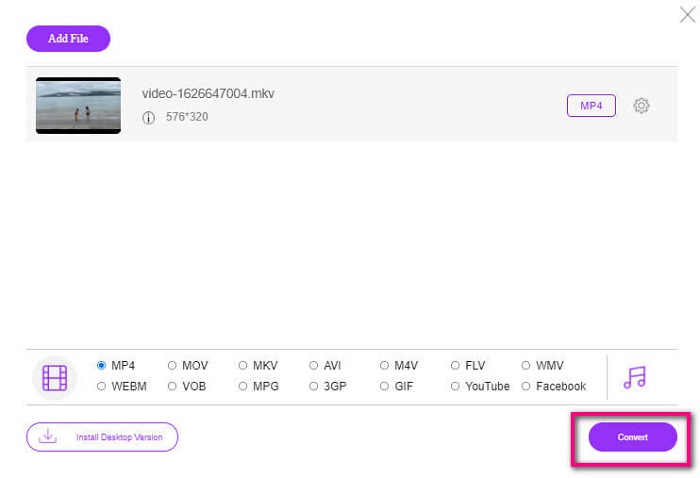
En el cas que estiguis buscant un conversor gratuït, també pots tenir en compte FVC Free Online Video Converter. Potser no sigui tan bo com Ultimate Video Converter, però encara pot estar a l’altura. Sens dubte, pot convertir el fitxer i fer-lo compatible amb Plex o DivX. Tot el que has de fer és…
Pas 1. Obre l’eina visitant la pàgina oficial indicada a la descripció.
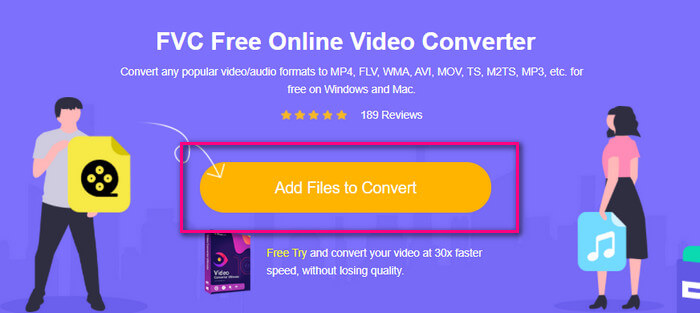
Pas 2. Puja el vídeo fent clic a Afegeix fitxers per convertir.
Pas 3. Canvia el format ressaltant el cercle que hi ha a sota.
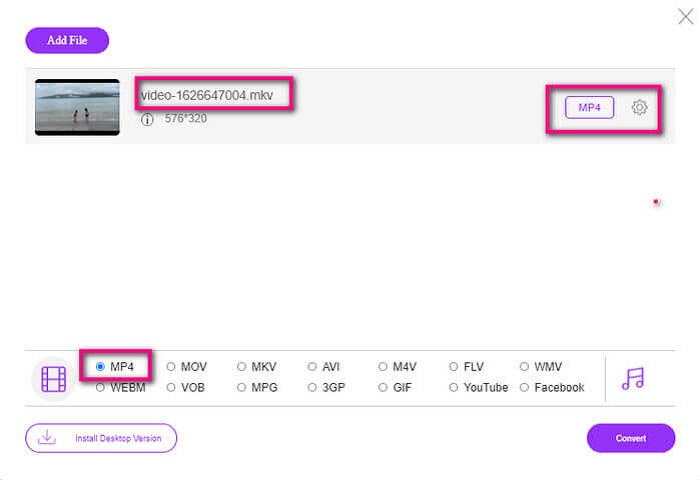
Pas 4. Finalment, fes clic al botó Converteix i selecciona la ubicació on vols desar el fitxer. Després fes clic a D’acord. Pots fer clic a la icona de la Carpeta per veure el fitxer convertit.
Lectura addicional
Reproduir MKV al Windows Media Player
Part 4. Més informació sobre com reproduir fitxers MKV a PS4
Quant costa una PS4?
El preu de venda al mercat és de 399,99 USD als Estats Units i al Canadà és de 399,99 CAD. Els preus poden variar en funció del preu de venda al vostre país.
Hi ha la possibilitat de jugar CC o Close Caption MKV a PS4?
Sí que n’hi ha. Es troba als Paràmetres d’accessibilitat. El camí és: ves als Paràmetres de la teva PS4, Accessibilitat i després selecciona Mostra subtítols ocults. Des d’allà fes clic a Opcions per activar els subtítols ocults.
Si PS4 admet MKV, per què els meus fitxers no es reprodueixen?
Com s'ha esmentat anteriorment, heu d'assegurar-vos que el fitxer MKV compleix l'estàndard del reproductor que esteu utilitzant. Només heu de comprovar el requisit de PS4 o un altre servidor de transmissió multimèdia. La majoria dels servidors multimèdia també tenen classificació per reproduir fitxers MKV.
Quins són els formats compatibles amb PS4?
Hi ha diversos formats de fitxer que admet PS4. Però notareu que la majoria dels formats estan descomprimits i contenen un fitxer gran. Encara que també admet els no comprimits com Mp4. Mentrestant, aquí teniu la llista de formats dels quals estem parlant: MKV, AVI, MPEG-2 PS, MPEG-2 TS, AVCHD i XAVC i MP4.
Conclusió
Per concloure, hi ha moltes maneres de reproduir directament o indirectament fitxers MKV a PS4. Els que es van enumerar són els mitjans més utilitzats. DivX Stream Server i Plex són només algunes alternatives que podeu utilitzar. És molt recomanable convertir el fitxer per evitar molèsties i massa processos.
-
 [Resolt] El reproductor VLC no reproduirà MKV, com solucionar-ho
 El reproductor VLC admet fitxers MKV? Per què VLC no reproduirà MKV? Aquesta publicació comparteix 4 consells útils perquè el reproductor VLC no reprodueixi fitxers MKV.
-
 Com reproduir fitxers MKV a l'iPad 2025
 Com es reprodueixen fitxers MKV a l'iPad 2? Puc convertir MKV a MP4 per reproduir-lo a l'iPad Pro / Air / 2? Aquesta publicació comparteix 2 maneres fàcils de reproduir MKV a l'iPad.
-
 Com descarregar el còdec MKV al Windows Media Player per a una reproducció fluida
 No es pot reproduir vídeo MKV al Windows Media Player? Podeu descarregar de manera gratuïta el còdec MKV per al Windows Media Player. En cas contrari, convertiu el MKV per fer-lo reproduir al Windows Media Player.
