


 Video Converter Ultimate
 Gravadora de pantalla
 Reparació de vídeo
4 de la millor gravadora AIFF que admet la qualitat d'àudio sense pèrdues
La majoria de persones pensen que els dispositius iPhone freguen la perfecció quant a seguretat del telèfon, qualitat de vídeo i d’àudio i rendiment constant. I podem dir que això és cert. El mateix passa amb la qualitat de la pantalla. Sempre que és possible, Apple desenvolupa funcions compatibles amb els dispositius iOS. Igualment passa amb els formats, còdecs i configuració de vídeo. Com quan van desenvolupar el format AIFF, pensat per oferir un format d’àudio d’alta qualitat i sense compressió. Quan diem sense compressió, és més probable obtenir una bona qualitat perquè no hi ha limitacions. Dit això, pot ser que vegis la necessitat d’utilitzar una gravadora de so AIFF gratuïta per produir aquest tipus de format. Generar aquest tipus de fitxer no és cap problema. Hi ha aplicacions i eines d’accés gratuït que pots utilitzar al web. En aquest sentit, aquest article és ideal per a tu. Consulta la nostra llista dels millors gravadors AIFF a continuació per saber-ne més.

Part 1. 2 principals gravadors AIFF en línia
Gravador d'àudio gratuït FVC
Amb l’ús de FVC Free Audio Recorder, ara pots aconseguir una qualitat d’àudio impecable semblant a l’AIFF. Encara que aquesta eina no pot generar el mateix format de fitxer, la qualitat que produeix és igual de bona. Aquesta eina és accessible des del navegador i es pot utilitzar a qualsevol hora del dia sempre que tinguis connexió a Internet, tant a casa com allà on siguis. Així, si estàs en moviment i necessites gravar per al teu vlog, és una bona opció. Fins i tot quan ets a l’exterior, pots gravar sense preocupar-te pel soroll de fons de l’entorn. A més, podràs escoltar una gravació fluida al teu dispositiu iPhone. Dit això, comença ara mateix, prova l’eina i segueix la guia que trobaràs a continuació.
Què t’aporta?
● És un lloc web d'accés gratuït.
● Podeu gravar fitxers de música fins i tot des de YouTube per crear llistes de reproducció a la vostra galeria de música.
● Grava àudio sense límit de temps i sense límit de durada.
● Accés en qualsevol moment i des de qualsevol lloc.
Pas 1. Accedeix i activa l’eina visitant FVC Free Audio Recorder i fes clic al botó Start Recording.
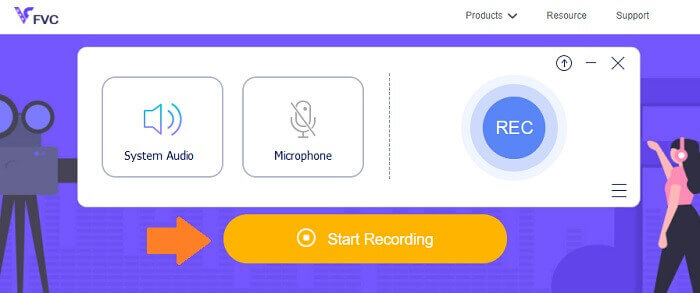
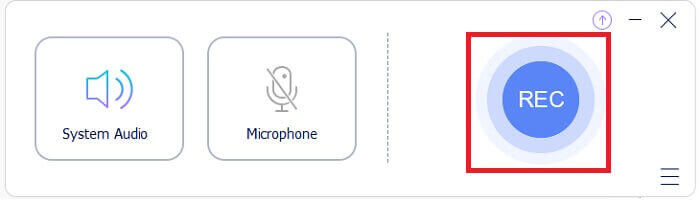
Pas 2. A continuació, activa l’àudio en cas que no ho estigui. Per defecte, hauria d’estar activat. Ara, per començar a gravar, fes clic al botó REC.
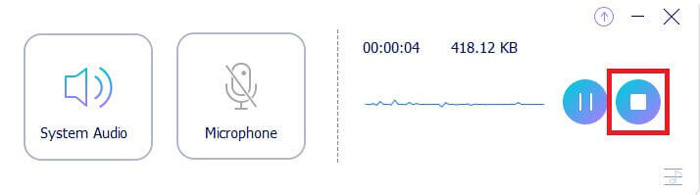
Pas 3. Quan hagis acabat, fes clic al botó blau en forma de quadrat i el fitxer es desarà automàticament a l’ordinador.
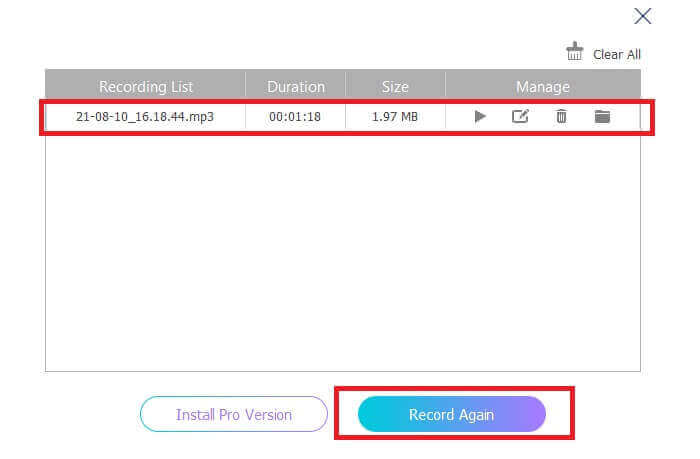
Pas 4. Per previsualitzar el fitxer, fes clic a la llista situada sota la barra flotant.
Screencapture.com
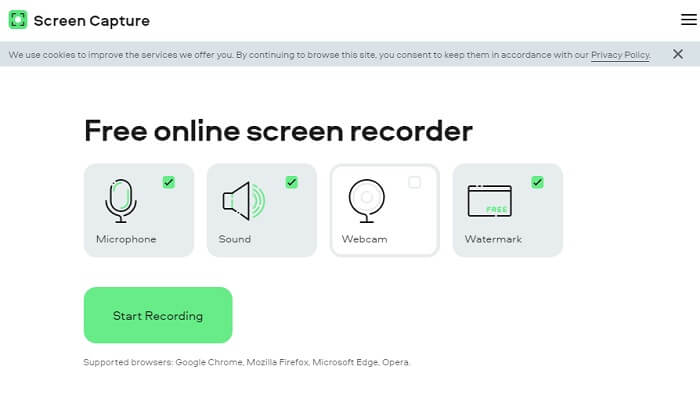
Una altra eina que pots tenir en compte per gravar àudio en línia és Screencapture.com. De manera similar, és un lloc d’accés gratuït que et permet gravar directament àudio i pantalla sense registrar cap compte. En fer clic al botó d’inici de gravació, l’eina gravarà automàticament la pantalla i el so del sistema de l’ordinador. Tan bon punt entris a la pàgina principal, hi haurà quatre pestanyes que hauràs de marcar segons el que necessitis. Com que volem gravar només àudio, desmarca-ho tot i deixa només l’àudio activat. Després, fes clic al botó Start Recording i descàrrega el fitxer quan acabis.
Què t’aporta?
● Accés gratuït.
● Lloc accessible i fiable.
● Assegurat.
● Pot gravar, àudio, vídeo i tots dos alhora.
Part 2.Top 2 programari de gravació AIFF per a Windows i Mac
Gravador de pantalla FVC
Quan parlem d'eines principals, FVC Screen Recorder és el vostre programari de referència per a la gravació de pantalla i l'enregistrament d'àudio. Està desenvolupat especialment per cobrir aquest tipus de necessitats. En només tres senzills passos podreu produir una qualitat d'àudio similar a AIFF i al format en si. Amb FVC Screen Recorder, podeu gravar sense limitacions i tenir la llibertat d'ajustar la taxa de bits per aconseguir la màxima qualitat que desitgeu. Més d'això és que no hi ha límit en quantes vegades l'utilitzeu al dia. Ús il·limitat sempre que estiguis registrat.
Què t’aporta?
● Bona atenció al client.
● Amb un bon suport tècnic que pot resoldre els vostres problemes.
● Continua l'actualització de l'eina.
● Amb la funció de bloqueig de la finestra que us permet gravar una finestra específica sense molestar el que esteu fent.
Pas 1. Desa i instal·la l’aplicació fent servir els botons que tens a continuació.
Descàrrega gratuïtaPer a Windows 7 o posteriorDescàrrega segura
Descàrrega gratuïtaPer a macOS 10.7 o posteriorDescàrrega segura
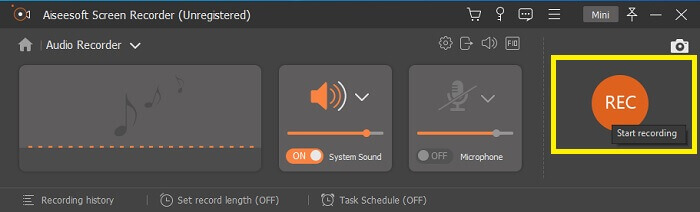
Pas 2. Inicia l’aplicació i activa el so del sistema. Ara fes clic al botó REC per començar a gravar.
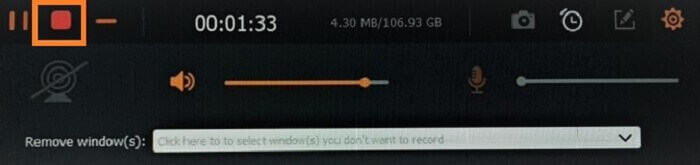
Pas 3. Quan hagis acabat la gravació, fes clic al botó d’aturar per finalitzar-la. La icona és el botó vermell en forma de quadrat.
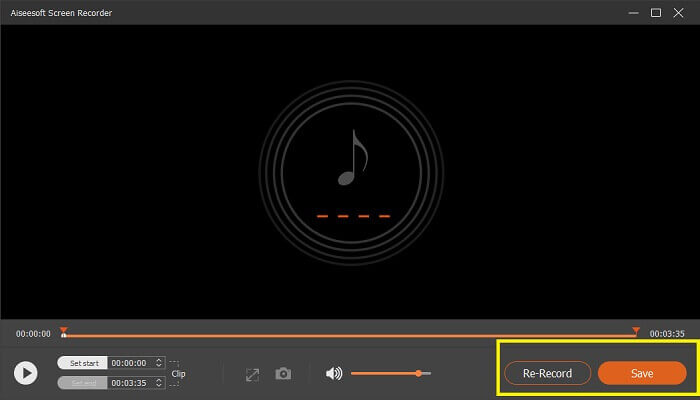
Pas 4. A continuació, l’eina et donarà l’opció de desar o tornar a gravar.
Audàcia
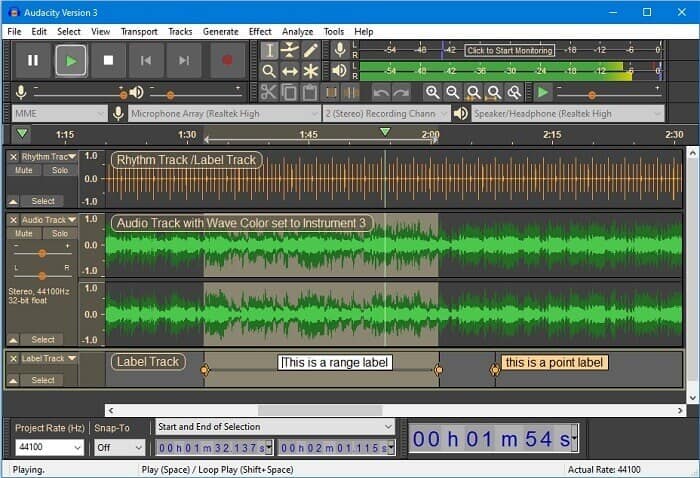
Finalment tenim Audacity. Es considera un dels gravadors d'àudio més demandats des de fa força temps. Això es deu a la flexibilitat de l'eina. La majoria dels professionals utilitzen aquesta gravació a causa de la seva fiabilitat per gravar àudio fins i tot amb connexions de tercers com sons de mescladors, ordinadors, cintes de casset i molt més.
Què t’aporta?
● És un programari de codi obert.
● És gravadora i editora.
● Compatible amb la majoria de sistemes operatius.
Part 3. Quadre de comparació
| Característiques | Gravador d'àudio gratuït FVC | Gravador de pantalla FVC | Screen Capture.com | Audàcia |
| Plataforma | Basat en web | Aplicació d'escriptori | Basat en web | Aplicació d'escriptori |
| Preu | Gratuït | Pagat | Gratuït | Pagat |
| Admet alta qualitat d'àudio |  | | | |
| Velocitat de bits ajustable | | |  | |
| Recomanat | | | | |
| Ús il·limitat | | | | |
| Sense límit de durada | | Sí a la subscripció | | Sí a la subscripció |
Part 4. Preguntes freqüents sobre AIFF Recorder
Quina diferència hi ha entre AIFF i WAV?
Com s'ha esmentat, AIFF és utilitzat principalment pels usuaris d'Apple. Tanmateix, això no vol dir que sigui una limitació. Com que aquest format de fitxer també és compatible amb altres reproductors multimèdia. Mentrestant, WAV està desenvolupat específicament per a ordinadors. Està limitat només a ordinadors d'escriptori. Quan es parla de tecnicitat i tipus de codificació, tots dos tenen mides de fitxer relativament grans. Per tant, són exactament el contrari de MP3 i MP4.
AIFF, és sense pèrdues?
La resposta és que no té pèrdues però no està comprimit. Aquest format de fitxer no està comprimit. No perd qualitat i només com està desenvolupat per oferir bons resultats d'àudio en lloc de comprometre la qualitat.
Pot Windows Media Player reproduir fitxers AIFF?
Per respondre a la teva pregunta, sí! També podeu reproduir-lo amb el reproductor VLC i altres reproductors de música.
AIF i AIFF, hi ha diferència?
Sigui el que s'utilitzi, no importa, i són iguals. Tant si afegiu un sufix com un afix.
Conclusió
Per concloure, AIFF és un bon format per a ordinadors Mac, ja que està fet específicament per a Mac. Tot i que aquest fitxer és bo, no podem negar que consumeix molta memòria al vostre ordinador. Les aplicacions revisades anteriorment poden ser compatibles i no, però algunes tenen bones alternatives per a aquest tipus de fitxer. Mentrestant, si realment voleu tenir aquest tipus de fitxers, també podeu considerar l'ús d'un convertidor gratuït.
FVC també disposa d’aquest Conversor d’àudio en línia gratuït. Només cal afegir els fitxers i esperar que acabi el procés de conversió i, llest, ja tens l’àudio convertit. Pots obtenir-ne més informació si visites la pàgina oficial. Per donar-te’n un petit tast, aquí tens alguns dels formats compatibles: MP3, WMA, AAC, WAV, AC3, AIFF i FLAC.
-
 Millor gravador 3GP per capturar un 3GP en un nou format a Windows i Mac
 El format de fitxer 3GP emmagatzema la 3a generació multimèdia i està desenvolupat pel Third Generation Partnership Project. Per obtenir informació més detallada, procediu a continuació.
-
 7 de les millors gravadores AAC per a Windows i Mac [2021]
 Descobriu què és AAC i els gravadors AAC més valorats que podeu utilitzar de forma gratuïta i descarregable tant en equips Mac com Windows.
-
 Guia local: quins són els millors enregistradors M4A per a Windows i Mac
 M4A són fitxers de contenidors codificats per ACA i ALAC per a la compressió amb pèrdues. A la llista següent es mostren les eines del gravador M4A que podeu utilitzar. Llegiu detingudament el següent.
