


 Video Converter Ultimate
 Gravadora de pantalla
 Reparació de vídeo
 Baixada segura
Revisió de l'enregistrador de pantalla AirShou: coses que heu de saber
Com que moltes coses es fan en línia, com ara reunions i classes virtuals, de vegades hem de gravar-les amb els nostres telèfons Android o iOS. Ara bé, la necessitat d’una eina per gravar la pantalla no s’acaba aquí. Si vols enregistrar qualsevol activitat que aparegui a la pantalla del teu telèfon, probablement en necessites una. Si estàs pensant a instal·lar AirShou per fer aquesta tasca, aquí t’ho expliquem! En aquesta ressenya detallada n’analitzarem les funcions principals, destacarem el que ens agrada i indicarem els punts a millorar. A més, presentarem una alternativa si AirShou no compleix les teves expectatives. Continua llegint per saber-ne més!

Part 1. Què és AirShou Screen Recorder?
AirShou és una aplicació de gravació de pantalla per a Android i iOS. És coneguda per la seva capacitat de gravar vídeos de pantalla d'alta qualitat sense necessitat d'accés root o jailbreak. L'aplicació ofereix una interfície senzilla que permet als usuaris començar a gravar amb només uns quants tocs, cosa que la fa popular entre jugadors, creadors de contingut i educadors. A més, aquesta aplicació de gravació de pantalla pot capturar l'activitat de la pantalla amb àudio clar i admet diverses resolucions i taxes de bits, proporcionant als usuaris flexibilitat en la qualitat del vídeo.
Compatibilitat:
AirShou és compatible amb iOS 9 i versions anteriors. Les versions actualitzades d'iOS ja no són compatibles. Per a Android, els dispositius amb la versió 5.0 i posterior són compatibles.
Veredicte:
Potser AirShou va ser un gravador de pantalla sòlid en el seu moment, però avui dia ja no és una opció pràctica. Amb la compatibilitat limitada a iOS 9 i versions anteriors obsolets, i la necessitat de descarregar-lo de fonts no oficials, simplement no val la pena la molèstia ni els riscos potencials. Si utilitzeu un dispositiu modern, és millor triar un gravador de pantalla actual que ofereixi compatibilitat total, funcions addicionals i compatibilitat activa.
Part 2. Una visió més profunda de l'AirShou Screen Recorder
Mentrestant, si fas servir un dispositiu que encara sigui compatible amb AirShou, aquest et pot continuar servint com un gravador de pantalla fiable per a un ús ocasional. De fet, ofereix funcions útils per a necessitats bàsiques d’enregistrament de pantalla, amb opcions fàcils de trobar i configurar. A continuació, analitzarem amb més detall les seves funcions clau, així com els seus avantatges i inconvenients.
Principals característiques:
• Grava la pantalla en HD.
• Resolució, taxa de bits i taxa de fotogrames ajustables.
• Admet l'enregistrament d'àudio intern i extern
• Controls fàcils d'iniciar i pausar l'enregistrament amb un toc.
• Lleuger, amb baix ús de la CPU.
Pros
- Interfície fàcil per a principiants.
- Sense marca d'aigua als vídeos de sortida.
- Produeix enregistraments de pantalla d'alta qualitat.
Contres
- Incompatible amb versions modernes d'iOS, com ara iOS 10 i superiors.
- Ja no està disponible a l'App Store ni a Google Play.
- La instal·lació requereix fonts de tercers.
Part 3. Com instal·lar AirShou a iOS/Android?
AirShou Screen Recorder ja no està disponible a l'App Store ni a Google Play. Per descarregar-los, heu d'anar al seu lloc web oficial. Per obtenir els passos detallats sobre com instal·lar l'eina, seguiu els passos següents:
Mètode 1: Baixeu AirShou Screen Recorder per a iPhone
Pas 1. Al teu iPhone, obre Safari i cerca AirShou Screen Recorder.
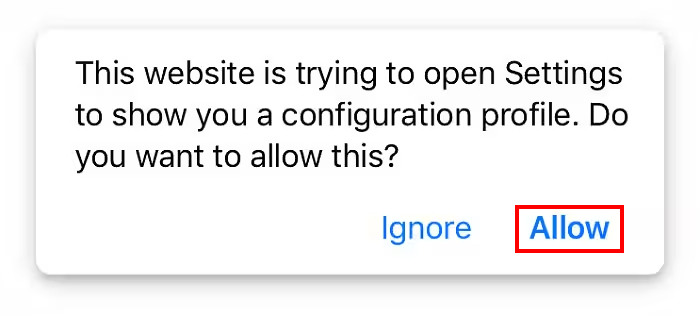
Pas 2. A continuació, permet que el teu iOS instal·li l’aplicació tocant el botó Allow.
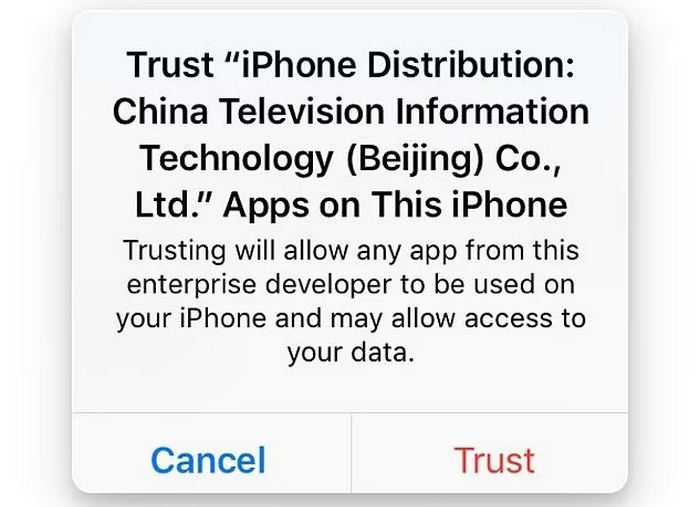
Pas 3. Després d’això, apareixerà un altre missatge; toca el botó Trust.
Pas 4. Finalment, obre l’aplicació al teu iPhone.
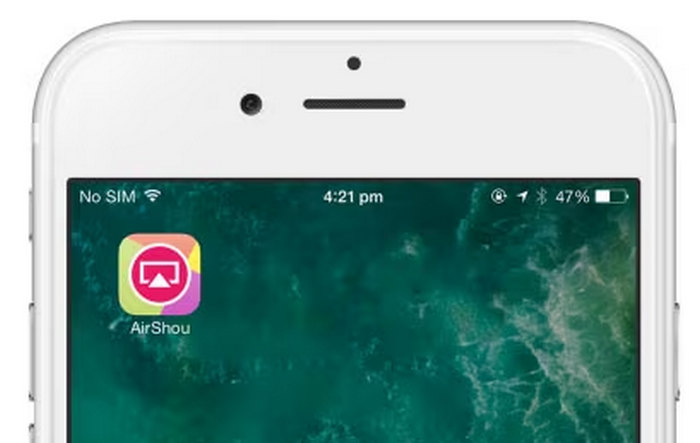
Tanmateix, tingueu en compte que és possible que l'aplicació no sempre funcioni correctament en tots els dispositius, especialment en les versions més noves d'iOS. Assegureu-vos de comprovar si funciona correctament després de la instal·lació. A més, aneu amb compte quan baixeu des de fonts de tercers i eviteu concedir permisos innecessaris per mantenir el vostre dispositiu segur.
Mètode 2: Baixeu AirShou Screen Recorder per a Android
Com que AirShou ja no està disponible a la Google Play Store, els usuaris d'Android hauran d'instal·lar-lo manualment a través del seu fitxer APK.
Pas 1. Utilitza el navegador del teu dispositiu Android per cercar i baixar el fitxer APK d’AirShou.
Pas 2. Ves a Settings i busca Security. Activa Unknown Sources per permetre la instal·lació d’aplicacions de fonts diferents de la Play Store. Aquest pas és necessari per instal·lar el fitxer APK.
Pas 3. Un cop s’hagi descarregat, obre la carpeta de Descàrregues o la ubicació on s’hagi desat el fitxer. Busca l’APK d’AirShou, toca’l i segueix les indicacions per instal·lar-lo.
Pas 4. Després de la instal·lació, veuràs la icona d’AirShou a la pantalla d’inici. Toca-la per obrir l’aplicació i començar a gravar la pantalla.
Nota: Atès que AirShou no està disponible a les botigues oficials d’aplicacions, baixa l’APK d’una font fiable per evitar riscos de seguretat. Analitza sempre els fitxers per detectar programari maliciós i vés amb compte amb els permisos que concedeixes a les aplicacions.
Fes clic aquí per llegir més informació sobre la ressenya de Camtasia Recorder si t’interessa.
Part 4. Millor alternativa a AirShou Screen Recorder
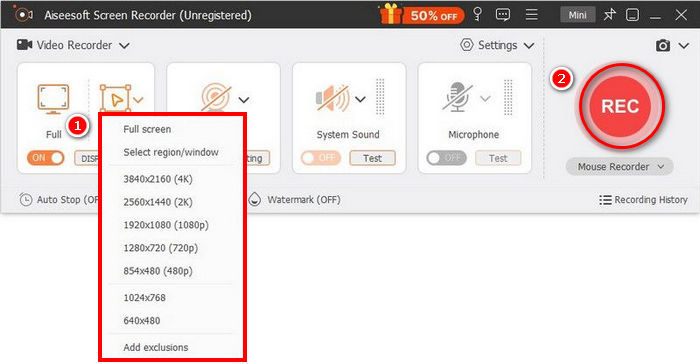
Si et fa recança utilitzar AirShou Screen Recorder per la seva compatibilitat antiquada i el procés indirecte d’instal·lació, una alternativa millor és el FVC Screen Recorder. Aquesta eina de gravació de pantalla destaca per la seva interfície senzilla i intuïtiva, que permet als usuaris gravar fàcilment el que passa a la pantalla.
Descàrrega gratuïtaPer a Windows 7 o posteriorDescàrrega segura
Descàrrega gratuïtaPer a MacOS 10.7 o posteriorDescàrrega segura
Pros
- Permet gravar a pantalla completa, a una finestra seleccionada o a una àrea personalitzada.
- Grava videotrucades, reunions, partides i classes en línia
- Permet afegir text, línies, ressaltats i formes durant la gravació.
- Pot gravar tant l'àudio del sistema com la veu del micròfon.
- Admet diversos formats de sortida de vídeo i àudio.
- Gravació de vídeos de pantalla en HD.
Contres
- La versió gratuïta pot semblar limitada.
Part 5. Preguntes freqüents sobre AirShou Screen Recorder
Encara està disponible AirShou a l'App Store o a Google Play?
No, AirShou Screen Recorder ja no està disponible a les botigues d'aplicacions oficials com l'App Store i Google Play. Per instal·lar-lo, els usuaris l'han de descarregar de fonts de tercers, cosa que pot suposar riscos de seguretat.
Puc utilitzar AirShou en versions més noves d'iOS o Android?
AirShou Screen Recorder només és compatible amb iOS 9 i versions anteriors. És possible que no funcioni correctament o en absolut amb versions més noves d'iOS. A Android, és compatible amb la versió 5.0 i posterior, però la instal·lació s'ha de fer mitjançant fitxers APK.
Encara funciona AirShou avui dia?
Sí, però amb limitacions. L'AirShou Screen Recorder encara pot funcionar en dispositius més antics, especialment els que executen iOS 9 o anterior i Android 5.0 i posterior. Tanmateix, ja no està disponible a les botigues d'aplicacions oficials i és possible que no funcioni correctament en sistemes operatius més nous. Haureu d'instal·lar-lo manualment a través de fonts de tercers, cosa que pot suposar riscos de seguretat i estabilitat.
És aplicable AirShou per a ús d'escriptori?
No, AirShou Screen Recorder no està dissenyat per a ús d'escriptori. Va ser desenvolupat específicament per a dispositius mòbils, especialment telèfons Android i dispositius iOS amb versions anteriors. No hi ha cap versió oficial d'AirShou per a Windows o macOS.
Conclusió
AirShou Screen Recorder és massa antiquat per a l’actualitat. Tot i això, en els dispositius compatibles pot funcionar bé i ser una eina fiable per enregistrar la pantalla. Tingues només en compte els possibles riscos de seguretat, ja que requereix instal·lar-se des de fonts de tercers. Si busques una opció de gravació de pantalla més segura i amb ple suport, pots provar altres alternatives com FVC Screen Recorder, que és compatible amb una gamma més ampla de dispositius, inclosos tant Windows com macOS.
-
 Revisió de la gravadora de pantalla ShareX i com gravar la pantalla amb ShareX
 Per a què s’utilitza la gravadora de pantalla ShareX? Com puc gravar la meva pantalla a ShareX? Aquesta publicació fa una revisió de ShareX i mostra com gravar la pantalla amb ShareX.
-
 4 millors gravadors gratuïts de llançament web per capturar vídeo en pantalla
 Esteu cercant la millor manera de gravar activitats a la pantalla a l’escriptori sense pagar ni un cèntim? Aquests són els 4 enregistradors gratuïts de llançament web més utilitzats.
-
 3 millors gravadors de trucades de Facebook per a ordinadors, iOS i Android
 Quan voleu gravar trucades de Facebook per estalviar coses valuoses, hi ha moltes gravadores de trucades de Facebook per triar. Aquí podeu aprendre les 3 millors eines per gravar videotrucades de Facebook per a PC, iOS i Android.
