


 Video Converter Ultimate
 Gravadora de pantalla
 Reparació de vídeo
 Baixada segura
3 millors gravadors de trucades de Facebook: com gravar videotrucades de Facebook
Com gravar les videotrucades de Facebook per conservar els moments preciosos entre tu i els teus amics i familiars? Des que Facebook incorpora la funció de videotrucada, cada vegada més usuaris prefereixen contactar amb els altres mitjançant trucades de Facebook en lloc de trucades telefòniques. Però, com que és una funció de comunicació adicional dins d’una plataforma de xarxes socials, no disposa de la funció d’enregistrament com les trucades de telèfon. A més, l’aplicació independent derivada —Facebook Messenger— tampoc no té un gravador integrat. En aquest cas, pots conèixer 3 gravadores de trucades de Facebook fàcils d’utilitzar per a ordinadors, dispositius iOS i mòbils Android, amb instruccions detallades en aquest article.

Primera part: el millor registrador de trucades de Facebook en línia per a Windows / Mac
Sense baixar cap programari de tercers, pots fer servir el FVC Free Screen Recorder per gravar videotrucades de Facebook en línia de manera gratuïta. És un gravador de trucades de Facebook fàcil d’utilitzar, amb una interfície senzilla i múltiples funcions necessàries.
- 1. Enregistreu trucades i vídeos de Facebook de manera gratuïta en línia amb senzills passos.
- 2. Enregistrament sense pèrdues d'àudios i vídeos per mantenir vídeos d'alta qualitat.
- 3. Sense filigrana per protegir la vostra propietat.
- 4. Els enregistraments es desaran automàticament a la biblioteca multimèdia i podeu optar per suprimir, descarregar i compartir lliurement a SNS.
Pas 1: Ves al lloc web de FVC Free Screen Recorder amb qualsevol navegador. Fes clic al botó Start Recording per instal·lar el llançador en pocs segons, i després torna a clicar el botó Start Recording per iniciar el gravador.

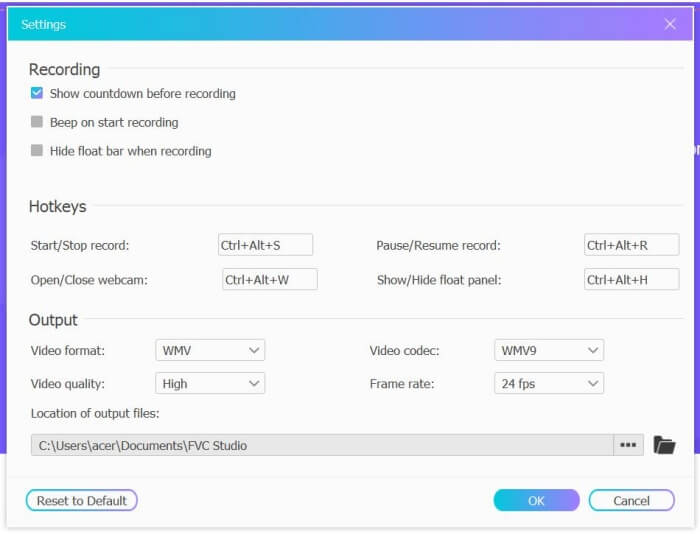
Pas 2: Fes clic al menú Recording Area per triar pantalla completa o seleccionar una regió lliurement. A continuació, activa el so del Microphone i del Speaker. Per ajustar els paràmetres de vídeo, pots fer clic a la icona de Setting. I pots triar el format MP4, qualitat High i 24 fps per mantenir una alta qualitat en les gravacions. Després, fes clic al botó REC per començar a gravar les trucades de Facebook.
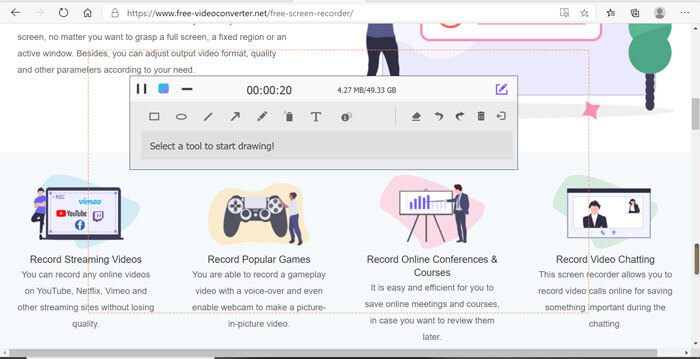
Pas 3: Apareixerà una caixa d’eines amb múltiples eines d’edició. Pots afegir formes, textos i línies segons les teves necessitats. Després fes clic a la icona Stop per desar la gravació al núvol. Pots fer clic amb el botó dret del ratolí per descarregar-la a l’ordinador.
L’ús d’aquesta gravadora de videotrucades en línia gratuïta a Facebook és la millor manera per als usuaris d’ordinadors de gravar videotrucades de Facebook en línia. Ajustant la configuració de la gravació per endavant, pot desar les trucades de Facebook en format MP4 amb una mida petita i alta qualitat. Si esteu acostumat a fer trucades de Facebook al mòbil, continueu llegint aquest article.
Part 2: Com gravar una trucada de Facebook per a iOS mitjançant la gravadora predeterminada
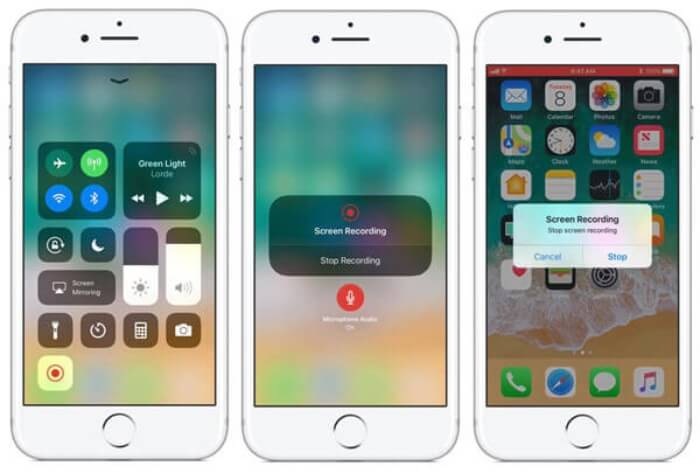
La versió actualitzada d’iOS 11 o superior té un nou gravador predeterminat al vostre iPhone i iPad, que és la millor opció per capturar videotrucades de Facebook sense descarregar cap aplicació. Aquí podeu aprendre a afegir el gravador de trucades de Facebook a les dreceres del centre de control i la manera d’utilitzar-lo.
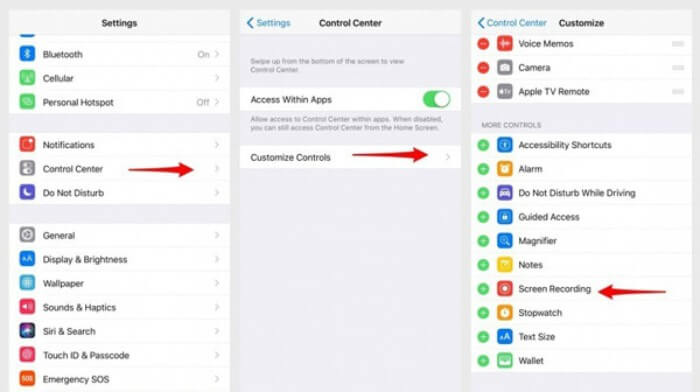
Pas 1: Toca l’app Settings al teu iPhone/iPad i desplaça’t cap avall per triar l’opció Control Center. Després toca la pestanya Customize Controls i busca la funció Screen Recording. Toca la icona Plus per afegir aquesta funció al centre de control.
Pas 2: Llisca cap avall des de la part superior de la pantalla del telèfon per obrir el centre de control i veuràs l’app de gravació a la part inferior. Toca la icona Screen Recording per començar la gravació, i pots triar capturar el vídeo o només gravar la pista d’àudio. Si vols acabar, toca la Status Bar vermella de la part superior i selecciona l’opció Stop a la finestra emergent.
Part 3: una gravadora de Facebook Messenger fàcil per a Android
Alguns telèfons Android no tenen gravadores integrades i hi ha massa gravadores de videotrucades de Facebook per triar entre Android. Per tant, podeu aprendre un dels millors gravadors per a mòbils Android amb els passos detallats de la part següent.
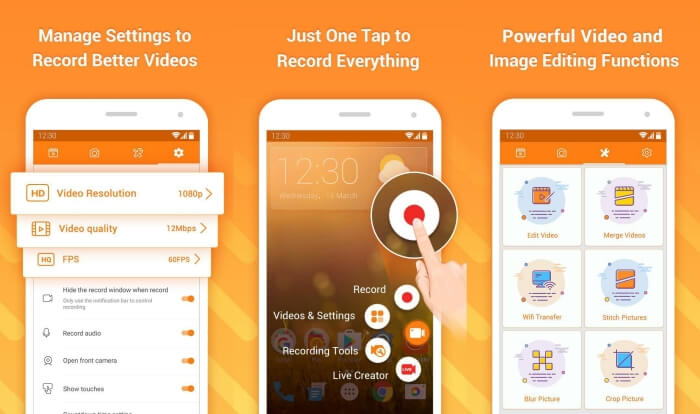
El DU Recorder és un gravador de trucades de Facebook per a Android fàcil d’utilitzar i és famós per la seva gravació fluida. Sense necessitat de fer root, tothom el pot utilitzar per gravar trucades de Facebook Messenger amb un sol toc.
Pas 1: Obre el gravador i veuràs quatre menús: gravacions, captures de pantalla, eines d’edició i configuració. Primer, toca el menú Settings per ajustar els paràmetres de vídeo. Per mantenir una alta qualitat, pots triar resolució 1080p i una velocitat de 30 fps.
Pas 2: No tanquis el gravador i simplement obre Facebook Messenger. Aleshores veuràs la icona del gravador. Toca la icona i tria la icona Recording per començar a capturar la pantalla i el so. I la pots tocar una altra vegada per aturar la gravació. Després pots tocar la icona Editing per retallar la gravació i afegir-hi música.
Et pot interessar també:
Part 4: Preguntes més freqüents de Facebook Call Recorder
1. Teniu Facebook una gravadora predeterminada per gravar videotrucades a l'ordinador?
No, no. Per tant, heu de confiar en altres enregistradors de trucades professionals de Facebook. Si no voleu descarregar cap altre programari que ocupi l’espai d’emmagatzematge de l’ordinador, FVC Free Screen Recorder és la vostra millor opció.
2. Com iniciar un xat amb un amic a l'aplicació Facebook Messager?
En primer lloc, obriu Facebook Messenger al vostre mòbil i, a continuació, trieu la casella de xat de l’amic que vulgueu fer una trucada a Facebook. I ara podeu veure la icona de vídeo per fer-hi clic per iniciar una videotrucada.
3. Quin format he de triar per desar els enregistraments quan faig servir gravadors de Facebook Messenger?
Tant si utilitzeu una gravadora de trucades de Facebook en un ordinador com en un mòbil, el millor format per desar les videotrucades de Facebook és MP4. Pot estalviar més espai d’emmagatzematge i és compatible amb tots els dispositius.
Conclusió
L’article anterior ha presentat 3 gravadores de videotrucades de Facebook. Per a iPhone, iPad i alguns mòbils Android, pots utilitzar fàcilment el gravador integrat del telèfon. En cas contrari, pots triar qualsevol gravador, incloent-hi DU Recorder a Google Play. Pel que fa al PC, FVC Free Screen Recorder és la millor opció per capturar trucades de Facebook. Si tens altres problemes quan facis servir gravadores de trucades de Facebook, deixa el teu comentari a continuació.
-
 Revisió de Snagit 2021: avantatges, inconvenients i la millor alternativa
 Quina és la millor alternativa a Snagit? Hi ha una eina de captura de pantalla com Snagit? Aquesta publicació revisarà Snagit i compartirà la millor alternativa a Snagit per capturar pantalla.
-
 6 millors gravadors WAV que no us heu de perdre a l'escriptori i en línia
 El millor programari de gravació WAV que compartim en aquest article té diverses funcions útils que us ajudaran a capturar professionals de l'àudio i la veu.
-
 Els 4 millors enregistradors de so AIFF gratuïts que produeixen àudio d'alta qualitat
 Aquest article parla sobre AIFF i algunes de les eines més populars que podeu utilitzar per produir un format AIFF d'alta qualitat.
