


 Video Converter Ultimate
 Gravadora de pantalla
 Reparació de vídeo
 Baixada segura
M4A vs. MP3 Revisió i comparació en profunditat de dos formats d'àudio
A causa de la proliferació de la música digital, la selecció d'un format d'àudio adequat és ara més crucial que mai. Tot i que M4A i MP3 s'utilitzen àmpliament, hi ha distincions importants entre els dos. Tot i que l'MP3 és l'estàndard de facto per als fitxers de música, M4A s'utilitza sovint per obtenir una qualitat d'àudio superior.
En la comparació M4A vs. MP3, examinarem els punts més subtils entre els formats de fitxer M4A i MP3 perquè puguis prendre una decisió informada. També presentarem una anàlisi exhaustiva de les diferències i similituds entre tots dos tipus de fitxer pel que fa a qualitat de so, compatibilitat, mida del fitxer i molt més. Si t’agrada la música o et dediques professionalment a ella, val la pena llegir per descobrir quin format és l’ideal per a tu.

Part 1. M4A vs. MP3
Aquí teniu una taula senzilla que compara aquests formats en diferents aspectes importants per a una decisió informada. Consulteu la taula següent.
| M4A | MP3 | |
| Qualitat del so | Alt | Bé |
| Mida de l'arxiu | Gran | Petit |
| Compatibilitat | Limitat | Àmpliament compatible |
| Metadades | Compatible | Limitat |
| Protecció DRM | Sí | No |
| Usos populars | Música, audiollibres, podcasts | Música, podcasts, tons de trucada |
Part 2. Introducció a M4A i MP3
Ja n'hi ha prou amb la batalla MP3 contra M4A. Fem una pausa una estona i aprendrem més sobre aquests formats mitjançant una breu introducció de cadascun d'ells.
Introducció al M4A
El format d'àudio digital propietari d'Apple és MPEG-4 Audio (o M4A per abreujar). És un excel·lent format d'àudio per a música, audiollibres i podcasts perquè pot acomodar moltes taxes de bits i de mostreig. Els fitxers M4A es poden obrir a iTunes, QuickTime i altres reproductors multimèdia, cosa que els fa ideals per a dispositius Apple.
Introducció al MP3
MP3, que significa 'MPEG-1 Audio Layer 3', és un format d'àudio digital que s'ha convertit en l'estàndard per a l'àudio comprimit a causa de la seva adopció generalitzada i la seva baixa compressió de velocitat de bits. Els fitxers MP3 són ideals per a música, podcasts i tons de trucada a causa de la seva mida compacta en comparació amb altres formats d'àudio. Es poden reproduir en molts dispositius diferents i descarregar-los de manera ràpida i senzilla d'Internet. Els fitxers MP3, d'altra banda, solen tenir una qualitat d'àudio més baixa que els formats alternatius com M4A.
Part 3. M4A és millor que MP3?
M4A i MP3 tenen diferents punts forts i febles. M4A és conegut per la seva qualitat de so superior i és preferit pels entusiastes i professionals de la música. L'MP3, d'altra banda, té una mida de fitxer més petita i és àmpliament compatible amb diversos dispositius i reproductors multimèdia.
Escollir entre M4A i MP3 depèn del que és més important per a vostè: una qualitat de so alta o una mida i compatibilitat de fitxers més petites.
Part 4. La diferència entre MP3 i M4A
Els formats populars de música digital MP3 i M4A tenen característiques diferents. A continuació es mostra una explicació detallada de les distincions entre MP3 i M4A:
Qualitat de so: M4A és conegut per la seva qualitat de so superior en comparació amb MP3. M4A utilitza un algoritme de compressió millor i admet un rang més ampli de tax(es) de bits i de freqüències de mostreig. M4A també admet la compressió sense pèrdues, que conserva la qualitat d’àudio original, mentre que MP3 utilitza compressió amb pèrdua, que redueix la mida del fitxer però també en redueix la qualitat de so.
Mida del fitxer: Els fitxers MP3 són més petits en mida que els fitxers M4A. Això és perquè MP3 utilitza un algoritme de compressió més eficient que redueix la mida del fitxer sense afectar significativament la qualitat de so. M4A, en canvi, utilitza un algoritme de compressió menys eficient que dona com a resultat fitxers de mida més gran però amb una qualitat de so millor.
Compatibilitat: MP3 és àmpliament reconegut com l’estàndard de la indústria per a l’àudio digital i és compatible amb una gran varietat de dispositius i reproductors multimèdia, inclosos telèfons intel·ligents, tauletes i ordinadors. M4A, en canvi, és menys compatible de manera generalitzada i s’utilitza principalment en dispositius i programari d’Apple, com ara iTunes i QuickTime.
Metadades: M4A admet un ventall més ampli de metadades en comparació amb MP3. Això vol dir que els fitxers M4A poden emmagatzemar més informació sobre l’àudio, com ara la caràtula de l’àlbum, la lletra de les cançons i la informació de les pistes.
Protecció DRM: M4A admet la protecció de Gestió de Drets Digitals (DRM), que permet als titulars dels drets d’autor controlar l’ús i la distribució dels seus fitxers d’àudio. MP3, en canvi, no admet protecció DRM.
Part 5. Com convertir M4A a MP3 o MP3 a M4A
Més que comparar i revisar aquests dos formats d'àudio, també és important aprendre a convertir de M4A a MP3 o viceversa. Aquests són alguns dels programes que podeu utilitzar:
Tant si estàs en línia com fora de línia, Video Converter Ultimate és una gran eina que pots utilitzar per convertir entre M4A i MP3. Aquesta utilitat inclou moltes funcions de les quals et pots beneficiar. L’eina ofereix la possibilitat de convertir múltiples fitxers per lots, és a dir, pots transformar una col·lecció de fitxers de música. El que és interessant és que et dona accés als paràmetres de sortida dels teus fitxers d’àudio. Descobreix com funciona aquesta eina consultant els passos següents.
Pas 1. Inicia la descàrrega fent clic en un dels botons de Baixada gratuïta i després segueix les instruccions que apareixen a la pantalla. El pas següent és obrir l’aplicació i familiaritzar-te amb la seva interfície senzilla.
Baixada gratuïtaPer a Windows 7 o posteriorBaixada segura
Descarrega gratisPer a MacOS 10.7 o posteriorBaixada segura
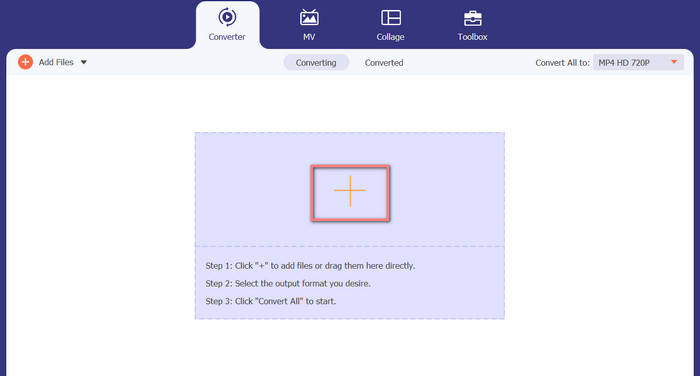
Pas 2. Fes clic al botó afegir a la pantalla principal i després cerca el fitxer d’àudio que vols convertir. Poc després de la pujada, es mostrarà a la interfície una previsualització del fitxer carregat. Pots convertir diversos M4A alhora a MP3 pujant-ne una carpeta.
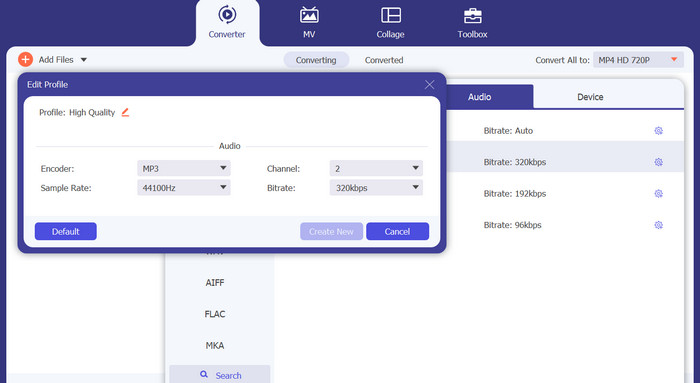
Pas 3. Per canviar el format de sortida de l’eina, ves a la pestanya Àudio del menú Perfil (que es troba a la part superior dreta de l’eina). Pots convertir un fitxer M4A en un fitxer MP3 i a l’inrevés.
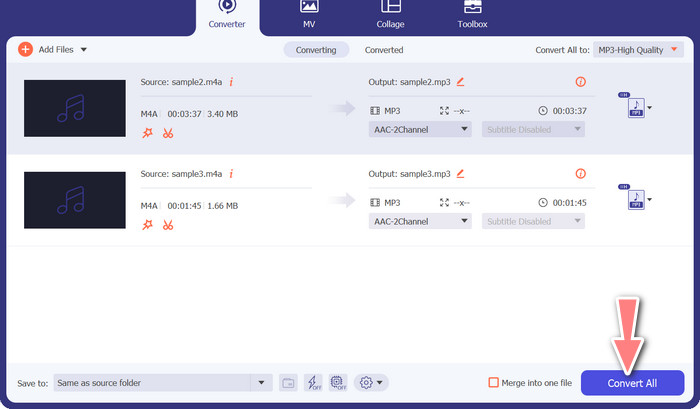
Pas 4. Selecciona la ubicació desitjada a la part inferior de la pantalla. Per començar la conversió, selecciona Converteix-ho tot.
Convertidor de vídeo gratuït en línia (en línia)
No tens espai per instal·lar un altre programa? La bona notícia és que, utilitzant un convertidor basat en web, pots evitar descarregar cap programari. L’eina en línia Free Video Converter Online permet la conversió directament al navegador. També és compatible amb una gran varietat de tipus de fitxer d’àudio i vídeo. A més, aquesta eina web permet conversions per lots. A més, l’usuari pot modificar la configuració del fitxer d’àudio final. Aprèn a convertir MP3 a M4A en línia.
Pas 1. Primer, obre el navegador web que prefereixis i ves al lloc web de Free Video Converter Online.
Pas 2. Fes clic a l’opció Afegir fitxers per convertir, després cerca el fitxer M4A que vols convertir i selecciona’l.
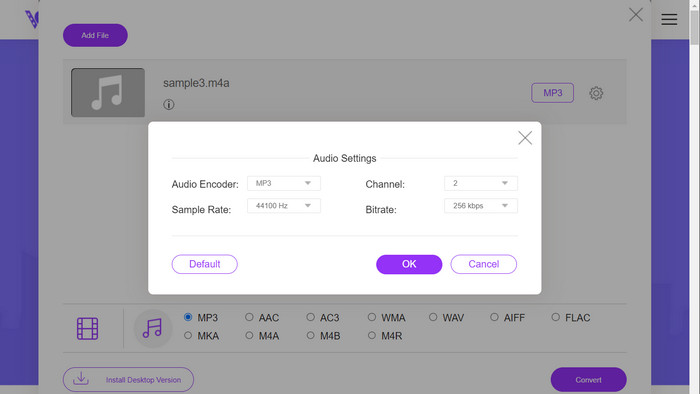
Pas 3. Selecciona MP3 com a tipus de fitxer de sortida al menú de format Àudio. També és possible ajustar el bitrate, o qualitat de sortida, del fitxer MP3.
Pas 4. Per iniciar el procés de conversió, fes clic al botó Convertir. Aquest és el procediment per canviar M4A a MP3 al web.
Lectures relacionades:
Guia sobre com convertir M4A a WAV [PC i Mac]
Millors eines que pots utilitzar per convertir per lots fitxers MP3 a M4R
Part 6. Preguntes freqüents sobre M4A i MP3
Què és MP3 vs. M4A en termes de metadades?
M4A admet una gamma més àmplia de metadades que MP3, el que significa que els fitxers M4A poden emmagatzemar més informació sobre l'àudio.
Puc editar fitxers MP3 o M4A?
Podeu editar fitxers MP3 i M4A mitjançant diversos programaris d'edició d'àudio.
Quin és millor per als podcasts, MP3 o M4A?
MP3 és millor per als podcasts a causa de la seva mida de fitxer més petita i una compatibilitat més àmplia.
Conclusió
Entendre la comparació MP3 vs. M4A et pot ajudar a triar el millor format d’àudio digital. Tant si estàs reproduint música en streaming com si l’estàs produint, seleccionar el format adequat és crucial per garantir la millor qualitat de so i compatibilitat possibles.
-
 MP3 VS MP4: Quina diferència hi ha entre MP3 i MP4
 MP3 o MP4, què és millor? Quina diferència hi ha entre MP3 i MP4? Aquest article compararà MP3 amb MP4 des de tots els aspectes que podeu imaginar.
-
 M4A Player: els 5 millors reproductors M4A per a Android i ordinador
 Com es reprodueixen fitxers M4A al telèfon Android? Quin jugador pot jugar a M4A? Aquesta publicació comparteix 5 millors reproductors M4A gratuïts per a Android, Mac i PC.
-
 4 millors mètodes per arreglar i editar metadades MP3 a Windows i Mac
 Vols conèixer els secrets de l'edició de metadades MP3 amb facilitat? Aquest bloc t'ensenyarà diferents tècniques amb les diferents eines a les que accedeixes fàcilment.
